Valid Palindrome Problem in DSA: Two Pointers Explained Simply
-
Last Updated: July 23, 2026
-
By: javahandson
-
Series

Learn Java in a easy way

Learn Valid Palindrome problem in DSA with a clean two pointer solution. Includes beginner friendly code, a full dry run, and O(1) space explained step by step.
The Valid Palindrome problem in DSA is the question that finally makes the two pointer idea click for most beginners. It sounds easy at first glance. Yet the tricky part hides in the details, and those details are exactly what interviewers poke at.
Here is the task in plain words. You get a string. Spaces, commas, colons and every other symbol get ignored. Capital letters and small letters count as the same thing. After that cleanup, you answer one question: does the text read the same forward and backward?
Take the classic example, “A man, a plan, a canal: Panama”. Strip the punctuation and lowercase everything, and you get amanaplanacanalpanama. Read that backward and you land on the same letters. So the answer is true.
In this guide we start with the obvious reverse-the-string approach. Then we move to the two pointer version that interviewers want. We dry run the code by hand, so you can watch each pointer move step by step.
Let us pin down the rules first. Most bugs in this problem come from a rule someone skipped, not from bad logic.
That last rule surprises people. After you strip symbols from a string like “.,”, nothing is left. An empty text reads the same in both directions, so it passes.
Notice that digits count too. The string “1a2” is not a palindrome, but “1a1” is. Many beginners filter letters only and quietly break this case.
| Interview Insight Before you write a single line, say out loud how you plan to treat punctuation, case and digits. Interviewers often score that clarification higher than the code itself, because it shows you read the constraints instead of guessing them. |
Two small ideas carry this whole problem. Both come back in many string questions later, so it pays to learn them properly.
Every language gives you two small checks that do the heavy lifting here. The first asks whether a character is a letter or a digit. The second converts a character to lowercase.
Together these two checks let you skip junk and compare fairly. You never have to write your own alphabet list, and you never have to worry about where the capital letters sit in the character table.
Think about why lowercasing matters. Computers store each character as a number, and a capital P carries a different number from a small p. Comparing them directly would report a mismatch even though a reader sees the same letter. Flattening case first removes that trap.
Picture two fingers on the string. One finger starts at the far left. The other starts at the far right. Both walk toward the middle, one step at a time.
At every stop, you compare the two characters under your fingers. Matching characters mean you keep going. A mismatch means the string fails right there, so you stop early.
When the fingers meet or cross, you have checked every pair. Nothing is left to compare, so the string passes.
The first idea most people reach for is direct. Build a clean version of the string, reverse it, then check whether both versions match.
clean = empty text
for each character c in s:
    if c is a letter or a digit:
        add lowercase c to clean

reversed = reverse of clean
return clean equals reversedpublic class ValidPalindromeReverse {
public static boolean isPalindrome(String s) {
StringBuilder clean = new StringBuilder();
for (char c : s.toCharArray()) {
if (Character.isLetterOrDigit(c)) {
clean.append(Character.toLowerCase(c));
}
}
String forward = clean.toString();
String backward = clean.reverse().toString();
return forward.equals(backward);
}
public static void main(String[] args) {
String s = "A man, a plan, a canal: Panama";
System.out.println(isPalindrome(s)); // true
}
}Let us walk the logic slowly. The method does its work in three clear stages, and each stage has one job.
Stage one is collection. We create an empty text buffer that will hold only the characters we care about. A plain string would work too, but adding to a string repeatedly rebuilds it every single time. A buffer grows in place instead, which keeps the cost low.
Stage two is filtering. The loop visits every character in the original text exactly once. For each one, we ask a single question: is this a letter or a digit? Spaces, commas and colons all answer no, so they never reach the buffer. Anything that answers yes gets lowercased and appended.
Stage three is comparison. We take the collected text, produce its reverse, then check whether the two versions hold the same characters in the same order.
Here is the subtle part that trips people up. Reversing a buffer usually flips it in place rather than handing back a fresh copy. So the original buffer is now the reversed one. If you read your forward text out of that same buffer afterwards, you read the reversed version twice and the comparison always succeeds.
The fix is ordering. Save the forward text into its own variable before you reverse anything. Once you store the forward copy safely, flipping the buffer cannot damage it. That single line of discipline is the difference between a correct solution and one that returns true for every input you throw at it.
Notice what the comparison at the end actually does. It checks the characters, not the memory location. Two separate pieces of text holding the same letters count as equal, which is exactly what we want here.
The loop touches each character once, so cleaning takes O(n) time. Reversing and comparing also cost O(n). Added together, the time stays O(n).
Space is the weak spot. We build a second copy of the text, so memory grows to O(n). For most inputs that is fine. Interviewers still push you to remove it.
Now for the version interviewers really want. The trick is simple: never build a copy at all. Instead, compare the string against itself from both ends.
One pointer starts at index zero. Another starts at the last index. Both skip anything that is not a letter or a digit. Whenever both land on real characters, you compare them.
left = 0
right = last index of s

while left < right:
    skip left forward while s[left] is not a letter or digit
    skip right backward while s[right] is not a letter or digit

    if lowercase s[left] != lowercase s[right]:
        return false

    move left one step right
    move right one step left

return truepublic class ValidPalindromeTwoPointers {
public static boolean isPalindrome(String s) {
int left = 0;
int right = s.length() - 1;
while (left < right) {
while (left < right && !Character.isLetterOrDigit(s.charAt(left))) {
left++;
}
while (left < right && !Character.isLetterOrDigit(s.charAt(right))) {
right--;
}
char a = Character.toLowerCase(s.charAt(left));
char b = Character.toLowerCase(s.charAt(right));
if (a != b) {
return false;
}
left++;
right--;
}
return true;
}
public static void main(String[] args) {
String s = "A man, a plan, a canal: Panama";
System.out.println(isPalindrome(s)); // true
}
}This version does more thinking, so let us break it apart piece by piece.
Setup comes first. One pointer named left starts at position zero, the very first character. Another pointer named right starts at the last position, which is the length minus one. That minus one matters. Counting starts at zero, so the final character always sits one place below the length.
The outer loop runs while left sits strictly before right. Reading that condition carefully tells you when the work is finished. Once the pointers meet or cross, they have already covered every pair, so nothing remains to do.
Inside the loop, two skip loops run before any comparison happens. The first pushes left forward as long as it points at something that is not a letter or a digit. The second pulls right backward under the same rule. After both finish, each pointer rests on a real character without fail.
Look closely at those two skip loops, because they repeat the left before right check inside their own conditions. That repetition is not clumsy copy-paste. It is the guard that stops a pointer from running off the end of the text.
Picture a string built only from punctuation. The left pointer keeps skipping forward, finds no letter anywhere, and without the guard it would march straight past the final position. Reading a character there crashes the program. With the guard, left simply stops the moment it reaches right, the outer loop ends, and the method reports true.
Comparison comes next. We lowercase both characters before checking them, so a capital letter at one end still matches a small letter at the other. Only after that flattening do we test whether the two characters differ.
A mismatch ends everything immediately. One bad pair is enough to prove the text is not a palindrome, so there is no reason to inspect the remaining characters. Returning early like this is what keeps the method fast on inputs that fail near the outside edges.
When the characters match, both pointers step one place toward the middle. Left moves up, right moves down, and the untested region shrinks from both sides at once.
Finally, reaching the end of the loop means no pair ever failed. Every comparison succeeded, so the method returns true.
| Interview Insight A very common follow-up asks why the outer loop uses a strict less-than instead of less-than-or-equal. When both pointers sit on the same position, they point at one single character. Comparing a character with itself always succeeds, so that extra round wastes a step and proves nothing new. |
Each pointer moves in one direction only, and together they cover the string once. So the time stays O(n).
The real win is memory. We never build a second string, so space drops to O(1). Only two integers and two characters live outside the input.
Tracing the code by hand makes it stick. We do it twice here, with two different inputs. The first is deliberately clean, so you can watch the pointers move without any distraction. The second is messy, so you can watch the skip loops and the safety guard do their work.
Both traces list every loop condition in the order the code checks it. In these tables, “junk” is shorthand for any character that is not a letter or a digit.
We begin with s = “racecar”. This input carries no punctuation and no capital letters. So the skip loops never move anything, and the trace shows the pure two pointer rhythm on its own.
| Position | 0 | 1 | 2 | 3 | 4 | 5 | 6 |
|---|---|---|---|---|---|---|---|
| Character | r | a | c | e | c | a | r |
We start with left = 0 and right = 6, which is the length minus one. Here is every check in order.
| # | Condition being checked | Values right now | Outcome | Effect on pointers |
|---|---|---|---|---|
| 1 | outer: left < right | left=0, right=6 | 0 < 6 is true | Enter the loop body |
| 2 | skip left: is s[0] junk? | s[0]=’r’ | A letter, so no | left stays at 0 |
| 3 | skip right: is s[6] junk? | s[6]=’r’ | A letter, so no | right stays at 6 |
| 4 | compare lowercased chars | ‘r’ and ‘r’ | Equal | Match, so move both |
| 5 | outer: left < right | left=1, right=5 | 1 < 5 is true | Enter the loop body |
| 6 | skip left: is s[1] junk? | s[1]=’a’ | A letter, so no | left stays at 1 |
| 7 | skip right: is s[5] junk? | s[5]=’a’ | A letter, so no | right stays at 5 |
| 8 | compare lowercased chars | ‘a’ and ‘a’ | Equal | Match, so move both |
| 9 | outer: left < right | left=2, right=4 | 2 < 4 is true | Enter the loop body |
| 10 | skip left: is s[2] junk? | s[2]=’c’ | A letter, so no | left stays at 2 |
| 11 | skip right: is s[4] junk? | s[4]=’c’ | A letter, so no | right stays at 4 |
| 12 | compare lowercased chars | ‘c’ and ‘c’ | Equal | Match, so move both |
| 13 | outer: left < right | left=3, right=3 | 3 < 3 is false | Exit the loop, return true |
Two things stand out in this clean run. Notice that both skip loops appear in every round, yet neither one ever moves a pointer. Their conditions fail immediately, because every character here is a letter.
Now look at the last row. Both pointers land on position 3, the middle letter e. That single character has no partner to face, so comparing it would prove nothing. The strict less-than test ends the loop right there, and the method returns true.
Now we run the messy case, s = “Ab,a!”. This one is short on purpose, yet it triggers every branch we skipped a moment ago. It holds a capital letter, a comma in the middle and an exclamation mark at the end.
| Position | 0 | 1 | 2 | 3 | 4 |
|---|---|---|---|---|---|
| Character | A | b | , | a | ! |
Remember that we never build a cleaned copy, so these positions point into the raw text. We start with left = 0 and right = 4.
| # | Condition being checked | Values right now | Outcome | Effect on pointers |
|---|---|---|---|---|
| 1 | outer: left < right | left=0, right=4 | 0 < 4 is true | Enter the loop body |
| 2 | skip left: is s[0] junk? | s[0]=’A’ | A letter, so no | left stays at 0 |
| 3 | skip right: is s[4] junk? | s[4]=’!’ | Punctuation, so yes | right moves 4 to 3 |
| 4 | skip right again: is s[3] junk? | s[3]=’a’ | A letter, so no | right stays at 3 |
| 5 | compare lowercased chars | ‘A’ and ‘a’ | Both become ‘a’ | Match, so move both |
| 6 | outer: left < right | left=1, right=2 | 1 < 2 is true | Enter the loop body |
| 7 | skip left: is s[1] junk? | s[1]=’b’ | A letter, so no | left stays at 1 |
| 8 | skip right: is s[2] junk? | s[2]=’,’ | Punctuation, so yes | right moves 2 to 1 |
| 9 | skip right again: left < right first | left=1, right=1 | 1 < 1 is false | Guard stops the skip loop |
| 10 | compare lowercased chars | ‘b’ and ‘b’ | Equal | Match, so move both |
| 11 | outer: left < right | left=2, right=0 | 2 < 0 is false | Exit the loop, return true |
Three rows in that second table deserve a longer look, because they show behaviour the first example could never reveal.
Row 3 is a skip loop finally doing its job. The exclamation mark is not a letter or a digit, so right steps down from 4 to 3. Only after that does any comparison happen. Skipping always finishes before comparing.
Row 5 shows why lowercasing matters. The left pointer sits on a capital A while the right pointer sits on a small a. Compared directly they would differ, and the method would wrongly return false. Flattening both to lowercase first makes them match.
Row 9 is the most important row across both tables. The right skip loop wants to keep moving, because it already stepped onto position 1. Before moving again it checks left < right, and that check now fails since both pointers sit at 1. So the skip loop stops instead of walking past the left pointer.
Remove that guard and the pointer would keep sliding down past position 0 and off the front of the text. The next read would crash. This tiny row is exactly the bug that catches most beginners.
| Interview Insight If an interviewer asks you to dry run your own code, trace the loop conditions out loud, not only the comparisons. Saying “now the guard fails, so the inner loop exits” proves you understand control flow. Most candidates only recite the character matches and miss the conditions entirely. |
Row 11 ends the walk. Both pointers have now crossed, so left sits above right. That makes the outer condition fail with no comparison left undone, and the method reports true. Sure enough, the cleaned text aba reads the same in both directions.
Put the two tables side by side and the lesson becomes clear. The clean input shows the loop skeleton: check the bounds, compare a pair, step inward, repeat. The messy input shows the guards that keep that skeleton safe on real world text.
Notice also how the two runs end differently. In “racecar” the pointers meet on a shared middle character, so left equals right. In “Ab,a!” they cross past each other, so left ends up above right. A strict less-than test handles both endings without any special case.
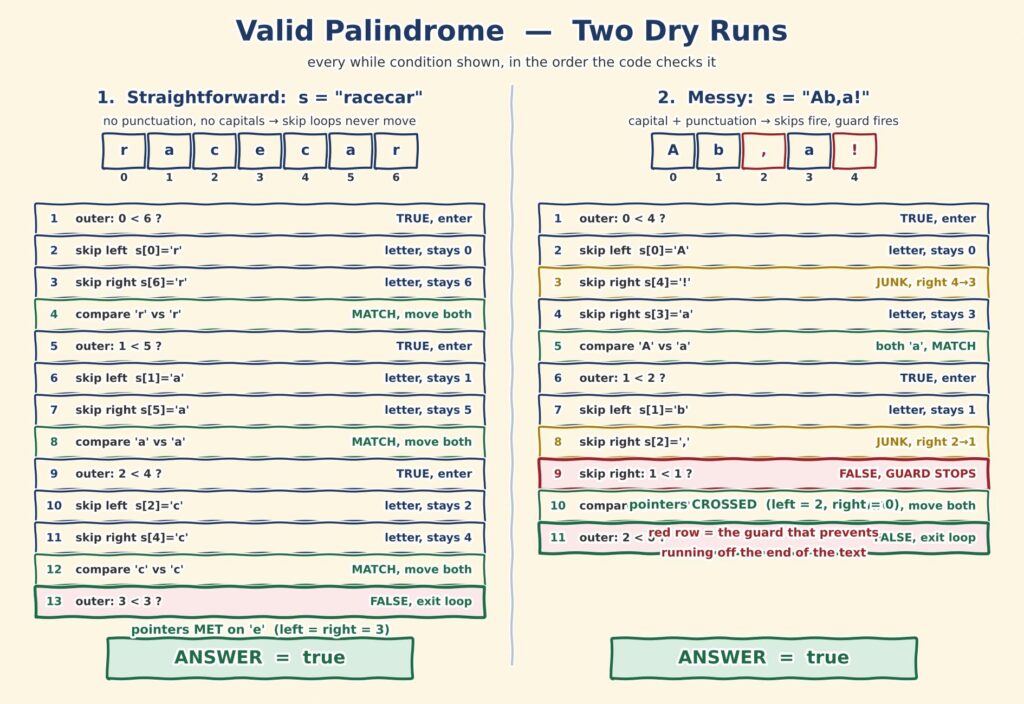
The sketch puts both traces in picture form. Your clean example sits on the left and the messy one on the right, so you can compare them at a glance. Notice how the guard that halts the skip loop is called out, since that is the step most people miss. Many readers find this view easier than the tables, so use whichever one clicks for you.
Both approaches return the correct answer. They simply pay different prices in memory.
| Approach | Time | Space | Note |
|---|---|---|---|
| Clean and reverse | O(n) | O(n) | Easy to read, builds a second copy |
| Two pointers | O(n) | O(1) | Same speed, no extra memory needed |
In an interview, mention the reverse approach first. It proves you understand the cleanup rules. Then switch to two pointers and explain that you dropped the extra copy.
That jump from O(n) space to O(1) space is the whole point of this problem. Say it out loud, because interviewers listen for exactly that sentence.
| Interview Insight Some interviewers ask you to handle text beyond plain English. Mention that the standard letter-or-digit check already handles accented and non-Latin letters. Symbols outside the basic range, however, occupy two storage units rather than one. Handling those needs code point access instead of single character access. Naming that limit shows real depth. |
A handful of small traps catch beginners here. Keep these in mind before you submit.
A: You get a string and must check whether it reads the same forward and backward. You ignore spaces and punctuation, and you treat capital and small letters as equal. Only letters and digits matter for the comparison.
A: Both run in O(n) time, but reversing builds a second copy of the text, which costs O(n) extra memory. The two pointer walk compares the string against itself from both ends, so it needs only O(1) space.
A: Yes. An empty string reads the same in both directions, so it returns true. The same applies to a string made only of punctuation, because nothing is left after the cleanup step.
A: Without that guard, a string containing only punctuation pushes the pointer past the end of the text. That causes a StringIndexOutOfBoundsException. The extra check keeps both pointers inside the string at all times.
A: Yes. Character.isLetterOrDigit keeps both letters and numbers. So “1a1” is a valid palindrome while “1a2” is not. Filtering letters only is a common beginner mistake that breaks these cases.
The Valid Palindrome problem in DSA looks like a beginner string question, and it is. The two pointer walk hiding inside it, however, is a real interview skill.
You will reuse this same pattern again and again. Reverse String uses it. Container With Most Water uses it. Three Sum uses it after a sort.
So take the pattern, not just the answer. Clean the input carefully, walk from both ends, and stop the moment a pair fails. Once that loop feels natural, a whole family of string and array problems opens up for you.
You now have the two pointer walk in your toolkit, so let us keep the momentum going. Here is where you came from and where you head next in this series.
javahandson.com | DSA Series | Arrays & Strings