Prompt Templates in Spring AI: Using .st Files with Parameters
-
Last Updated: September 27, 2026
-
By: javahandson
-
Series

Learn prompt templates in Spring AI 2.0.1 with .st files: load templates as a Resource, pass parameters, use system templates and fix JSON delimiters.
VERSION NOTE
Tested with Spring AI 2.0.1 on Spring Boot 4.1.1 and Java 21. Most older tutorials online still show Spring AI 1.x code, so check the version before you copy anything.
Prompt templates in Spring AI help you stop writing long prompts inside Java strings. Instead, you keep the prompt in a separate .st file and fill in the changing values at runtime. In this guide, you will learn how templates work and how to load .st files. You will also learn how to pass parameters to them.
In my previous articles, we built a simple chat app with ChatClient. We also connected OpenAI and Ollama in the same project. However, all our prompts were plain strings typed right inside the controller. That works for a demo. But in a real project, it quickly becomes messy.
Here is what we will cover in this article:
.st files and passing parameters to themPromptTemplate class directlyWe will build one small example throughout the article. It is a Java interview question generator. The user picks a topic, a level and a count. After that, our app sends a clean, templated prompt to the LLM.
A prompt template is a piece of text with placeholders inside it. Each placeholder is a name wrapped in curly braces, like {topic}. At runtime, Spring AI replaces every placeholder with a real value and then sends the final text to the model.
Think of it like a form letter. The letter body stays the same for everyone. Only the name, date and amount change for each person.
Let us first look at what most of us write on day one.
String prompt = "Generate " + count + " " + level
        + " level Java interview questions on " + topic
        + ". Give a short answer for each question.";

return chatClient.prompt(prompt).call().content();
This code works fine. Still, it has a few real problems:
+ signs.Now look at the same prompt as a template.
Generate {count} {level} level Java interview questions on {topic}.
Give a short answer for each question.
The text is clean and readable. The placeholders clearly show which parts change. Moreover, you can move this text into its own file and never touch Java code to change the wording.
The Spring AI course material I followed lists four simple reasons. I agree with all of them after using templates in my own projects.
.st file holds the words.{customerName} get filled at runtime.On top of that, I would add two practical benefits from real work:
In short, a prompt is also a kind of source code. So it deserves its own file, its own history and its own review.
Before writing code, it helps to know which classes do the actual work. Spring AI keeps this part quite simple.
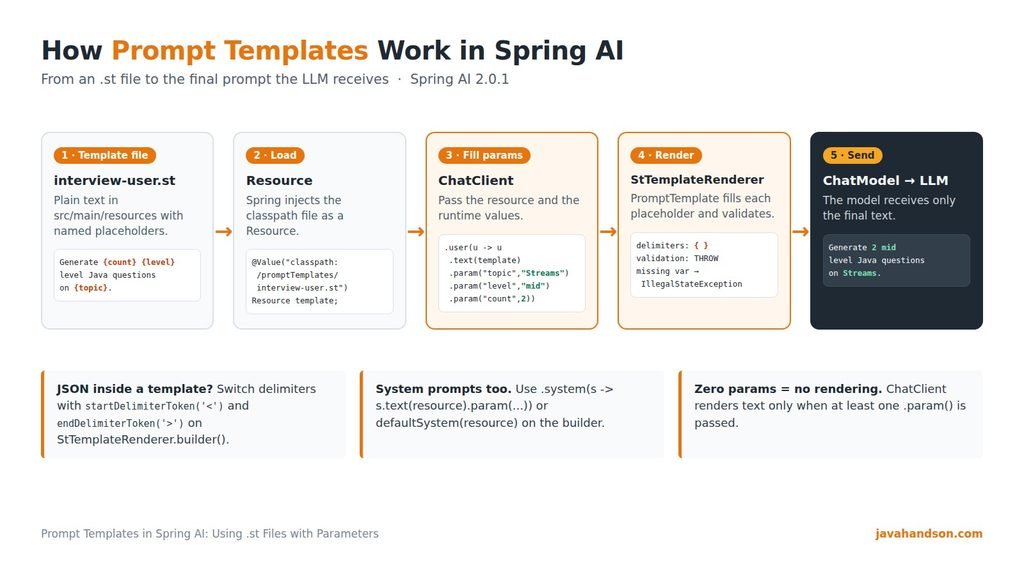
4.1 The PromptTemplate Class
PromptTemplate is the main class for templating in Spring AI. It holds your template text. It also knows how to turn that text into a final string, a Message or a full Prompt.
Even when you use the ChatClient fluent API, Spring AI uses PromptTemplate internally. So you use it every time, whether you see it or not.
PromptTemplate does not replace the placeholders by itself. Instead, it hands that job to a TemplateRenderer.
public interface TemplateRenderer extends BiFunction<String, Map<String, Object>, String> {

    @Override
    String apply(String template, Map<String, Object> variables);
}
The default implementation is StTemplateRenderer. It is based on StringTemplate, an open-source template engine created by Terence Parr. That is also where the .st file extension comes from. It simply stands for StringTemplate.
By default, StTemplateRenderer uses these settings:
{}THROW (we will see this in section 11)Sometimes your text has no placeholders at all. In that case, Spring AI gives you NoOpTemplateRenderer. It returns the text as it is, without any processing. This is handy when your prompt already contains many curly braces and you do not need any variables.
An .st file is a plain text file that holds your prompt template. Nothing special is inside it. You write normal sentences and add placeholders wherever a value should change.
The usual place is inside src/main/resources. This way, the file ends up on the classpath and Spring can load it easily. The course material I followed uses this path:
src/main/resources/promptTemplates/userPromptTemplate.st
For our example, we will use a similar structure with clear names:
src/main/resources/
└── promptTemplates/
    ├── interview-user.st
    ├── interview-system.st
    ├── review-system.st
└── reviewer-system.stA few small habits make templates easier to manage later:
promptTemplates or prompts.-system.st or -user.st.Spring AI does not force the .st extension. You can load a .txt file too, because Spring only sees it as a Resource. Even so, .st is the common convention, and your teammates will recognise it quickly.
A template is only as good as the words inside it. So, before we write code, here are a few habits I follow for every template:
if and else decisions in Java, not in the template.StringTemplate does support conditions and built-in functions. However, I keep templates plain on purpose. Plain text is easier to review, and anyone on the team can edit it without learning a new syntax.
Let us set up a small Spring Boot project. If you followed my first Spring AI article, you already have most of this.
Spring AI 2.0.x supports Spring Boot 4.0.x and 4.1.x. We will import the Spring AI BOM and add the OpenAI starter.
<parent>
    <groupId>org.springframework.boot</groupId>
    <artifactId>spring-boot-starter-parent</artifactId>
    <version>4.1.1</version>
</parent>

<dependencyManagement>
    <dependencies>
        <dependency>
            <groupId>org.springframework.ai</groupId>
            <artifactId>spring-ai-bom</artifactId>
            <version>2.0.1</version>
            <type>pom</type>
            <scope>import</scope>
        </dependency>
    </dependencies>
</dependencyManagement>

<dependencies>
    <dependency>
        <groupId>org.springframework.boot</groupId>
        <artifactId>spring-boot-starter-webmvc</artifactId>
    </dependency>
    <dependency>
        <groupId>org.springframework.ai</groupId>
        <artifactId>spring-ai-starter-model-openai</artifactId>
    </dependency>
</dependencies>
Notice the spring-boot-starter-webmvc artifact. In Spring Boot 4, this is the name of the web starter for Spring MVC apps. You do not need any extra dependency for templates. The StringTemplate support comes along with the Spring AI starter.
Next, add your OpenAI key. Always read it from an environment variable and never commit it to Git.
spring.application.name=prompt-templates-demo
spring.ai.openai.api-key=${OPENAI_API_KEY}
spring.ai.openai.chat.model=gpt-5-mini
Any chat model works here. For example, you can switch to Ollama and run everything locally. I covered that setup in my article on multiple chat models.
This is the main part of the article. We will create a user template, load it as a resource, and fill its parameters at runtime.
Create the file src/main/resources/promptTemplates/interview-user.st with this content:
Generate {count} {level} level Java interview questions on the topic "{topic}".

For each question:
- Write the question in one line.
- Give a short answer in 3 to 4 simple sentences.
- Add one common mistake candidates make.

Number the questions and do not add any extra introduction.
There are three placeholders here: {count}, {level} and {topic}. Everything else is fixed text.
Spring can inject any classpath file as a Resource. So we use the @Value annotation with the classpath: prefix.
@Value("classpath:/promptTemplates/interview-user.st")
private Resource interviewUserTemplate;
At this point, Spring has not read the file text yet. It only holds a handle to the file. The actual reading happens when Spring AI builds the prompt.
Now we pass the resource to .user() and add the values with .param(). Here is the full controller:
package com.javahandson.prompttemplates;

import org.springframework.ai.chat.client.ChatClient;
import org.springframework.beans.factory.annotation.Value;
import org.springframework.core.io.Resource;
import org.springframework.web.bind.annotation.GetMapping;
import org.springframework.web.bind.annotation.RequestMapping;
import org.springframework.web.bind.annotation.RequestParam;
import org.springframework.web.bind.annotation.RestController;

@RestController
@RequestMapping("/api")
public class InterviewController {

    private final ChatClient chatClient;

    @Value("classpath:/promptTemplates/interview-user.st")
    private Resource interviewUserTemplate;

    public InterviewController(ChatClient.Builder chatClientBuilder) {
        this.chatClient = chatClientBuilder.build();
    }

    @GetMapping("/interview-questions")
    public String interviewQuestions(
            @RequestParam String topic,
            @RequestParam(defaultValue = "beginner") String level,
            @RequestParam(defaultValue = "3") int count) {

        return chatClient.prompt()
                .user(userSpec -> userSpec
                        .text(interviewUserTemplate)
                        .param("topic", topic)
                        .param("level", level)
                        .param("count", count))
                .call()
                .content();
    }
}
Let us understand the key lines:
.user(userSpec -> ...) call gives you a PromptUserSpec to build the user message..text(interviewUserTemplate) sets the template body from the .st file..param("topic", topic) call fills one placeholder, here {topic}..call().content() sends the request and returns the reply as a String.Also notice that count is an int. The param() method accepts any Object, so you do not need to convert numbers to strings first.
If you have many values, you can pass them all at once with params():
.user(userSpec -> userSpec
        .text(interviewUserTemplate)
        .params(Map.of(
                "topic", topic,
                "level", level,
"count", count)))Start the app and call the endpoint with curl:
curl "http://localhost:8080/api/interview-questions?topic=Java%20Streams&level=intermediate&count=2"
Spring AI first renders the template. So the model receives this final text:
Generate 2 intermediate level Java interview questions on the topic "Java Streams".

For each question:
- Write the question in one line.
- Give a short answer in 3 to 4 simple sentences.
- Add one common mistake candidates make.

Number the questions and do not add any extra introduction.
The reply will look something like this. Your exact output will differ, because LLM answers change from run to run.
1. What is the difference between map() and flatMap() in Java Streams?
   map() transforms each element into exactly one new element...
   Common mistake: Using map() when each element returns a list...

2. Why are Java Streams called lazy?
   Intermediate operations do not run until a terminal operation...
   Common mistake: Expecting peek() to print without a terminal operation...
Tip: If your template has non-English text, pass the charset too, like .text(resource, StandardCharsets.UTF_8). This avoids strange characters on servers with a different default encoding.
User messages carry the question. System messages, on the other hand, set the behaviour and tone of the assistant. Templates work for both roles in exactly the same way.
Create src/main/resources/promptTemplates/interview-system.st:
You are a senior Java interviewer at a {companyType} company.
You ask practical questions that test real project experience.
Keep your language simple and friendly.
If the topic is not related to Java or its ecosystem, politely say
that you only handle Java interview topics.The system spec works just like the user spec. You call .text() with the resource and add values with .param().
@Value("classpath:/promptTemplates/interview-system.st")
private Resource interviewSystemTemplate;

@GetMapping("/interview-questions/v2")
public String interviewQuestionsV2(
        @RequestParam String topic,
        @RequestParam(defaultValue = "beginner") String level,
        @RequestParam(defaultValue = "3") int count,
        @RequestParam(defaultValue = "product") String companyType) {

    return chatClient.prompt()
            .system(systemSpec -> systemSpec
                    .text(interviewSystemTemplate)
                    .param("companyType", companyType))
            .user(userSpec -> userSpec
                    .text(interviewUserTemplate)
                    .param("topic", topic)
                    .param("level", level)
                    .param("count", count))
            .call()
            .content();
}
Now one request has two templates. The system template decides the persona, and the user template carries the actual task. Each template gets its own parameters, so there is no clash between them.
Most apps use the same system prompt for every request. In that case, you can set it once on the builder with defaultSystem(Resource). Then, at request time, you only pass the parameter.
@Configuration
public class ChatClientConfig {

    @Value("classpath:/promptTemplates/interview-system.st")
    private Resource interviewSystemTemplate;

    @Bean
    public ChatClient interviewChatClient(ChatClient.Builder builder) {
        return builder
                .defaultSystem(interviewSystemTemplate)
                .build();
    }
}
And in the controller, you just fill in the system parameter:
return interviewChatClient.prompt()
        .system(systemSpec -> systemSpec.param("companyType", companyType))
        .user(userSpec -> userSpec
                .text(interviewUserTemplate)
                .param("topic", topic)
                .param("level", level)
                .param("count", count))
        .call()
        .content();
Spring AI also offers defaultUser(Resource) if you need a default user template. Any value you pass at request time overrides the default, so you stay in control.
The fluent API covers most needs. However, sometimes you want the rendered text on its own. For example, you may want to log it, test it, or send it through ChatModel directly. That is where the PromptTemplate class helps.
Here is the simplest way to create a Prompt object from a template:
PromptTemplate promptTemplate = new PromptTemplate(
        "Explain {concept} to a {level} Java developer in 5 lines.");

Prompt prompt = promptTemplate.create(Map.of(
        "concept", "virtual threads",
        "level", "beginner"));

String answer = chatModel.call(prompt)
        .getResult()
        .getOutput()
        .getText();
Here, create(Map) returns a full Prompt that you can pass to ChatModel. It also works with ChatClient, because chatClient.prompt(prompt) accepts a Prompt too.
For file-based templates, the builder is the cleanest option. It accepts a Resource, a map of variables and an optional renderer.
PromptTemplate promptTemplate = PromptTemplate.builder()
        .resource(interviewUserTemplate)
        .variables(Map.of(
                "topic", "Spring Boot Actuator",
                "level", "advanced",
                "count", 3))
        .build();

String finalText = promptTemplate.render();
The render() method returns the final text as a String. I use this a lot while debugging. You can log the exact prompt before it goes to the model and quickly spot mistakes.
PromptTemplate gives you three kinds of output, depending on what you need next.
| Method | Returns | When to use it |
|---|---|---|
render() / render(Map) | String | Logging, testing or sending plain text |
createMessage(Map) | Message | Building a list of messages yourself |
create(Map) / create(Map, ChatOptions) | Prompt | Calling ChatModel directly with optional options |
For system messages, Spring AI has a small subclass called SystemPromptTemplate. Its createMessage() method returns a SystemMessage instead of a user message.
SystemPromptTemplate systemTemplate = new SystemPromptTemplate(interviewSystemTemplate);
Message systemMessage = systemTemplate.createMessage(Map.of("companyType", "fintech"));

Message userMessage = new UserMessage("Ask me one question on Java records.");

Prompt prompt = new Prompt(List.of(systemMessage, userMessage));
String reply = chatClient.prompt(prompt).call().content();Both approaches use the same engine, so the choice is mostly about style.
| Situation | Better choice |
|---|---|
| Normal REST endpoint with ChatClient | Fluent .user() / .system() with .param() |
| You need the rendered text for logs or tests | PromptTemplate.render() |
You call ChatModel directly | PromptTemplate.create() |
| You build a custom message list | createMessage() or SystemPromptTemplate |
My simple rule is this. Start with the fluent API. Move to the PromptTemplate class only when you need the rendered text or the Prompt object in your own hands.
Here is a problem that surprises almost everyone once. You want the model to reply in JSON, so you add a sample JSON inside the template. Suddenly, rendering fails.
By default, { and } mark placeholders. So the renderer treats every curly brace in your JSON as the start of a variable. As a result, it either throws an error or produces broken text.
Return the answer in this format:
{ "question": "...", "answer": "..." }
The renderer cannot tell which braces are JSON and which are placeholders.
The fix is to change the delimiters. StTemplateRenderer has a builder where you can set your own start and end tokens.
Create a new template, review-system.st, which uses angle brackets for placeholders:
You review Java code for a <teamName> team.
Follow these team rules:
<guidelines>

Reply only in this JSON format:
{ "verdict": "APPROVE or CHANGES_NEEDED", "comments": ["..."] }
Now tell ChatClient to use angle-bracket delimiters for this call:
// reviewSystemTemplate is loaded with @Value, just like before
String review = chatClient.prompt()
        .system(systemSpec -> systemSpec
                .text(reviewSystemTemplate)
                .param("teamName", "payments")
                .param("guidelines", guidelines))
        .user(code)
        .templateRenderer(StTemplateRenderer.builder()
                .startDelimiterToken('<')
                .endDelimiterToken('>')
                .build())
        .call()
        .content();
Now <teamName> and <guidelines> are placeholders, and the JSON braces stay as normal text.
{{ and }} are not supported, because the builder methods take a char.defaultTemplateRenderer(...) on ChatClient.Builder.PromptTemplate.builder().renderer(...) too..user() and .system(). Advisors like QuestionAnswerAdvisor have their own template settings.Sooner or later, someone adds a new placeholder to a template but forgets to pass the value. So how does Spring AI react?
By default, the renderer validates the template before rendering. If any placeholder has no value, it throws an IllegalStateException. The message looks like this:
Not all variables were replaced in the template. Missing variable names are: [level].
Honestly, this is a good default. A missing value usually means a bug. Failing fast is better than sending a half-filled prompt to a paid model.
You can change this behaviour with the ValidationMode enum. It has three values:
| Mode | What happens on a missing variable |
|---|---|
THROW | Throws an exception. This is the default. |
WARN | Logs a warning and renders the template with the gap. Not recommended for production. |
NONE | Skips validation completely. |
Here is how to set it:
ChatClient chatClient = builder
        .defaultTemplateRenderer(StTemplateRenderer.builder()
                .validationMode(ValidationMode.WARN)
                .build())
        .build();
I suggest you keep THROW in production. Use WARN only while you are shaping a new template locally.
This one is easy to miss. ChatClient renders the user or system text only when you pass at least one parameter for it. I confirmed this in the Spring AI 2.0.1 source code of DefaultChatClientUtils.
So what happens if you call .user(u -> u.text(template)) and forget every .param() call? Spring AI skips rendering completely. No exception is thrown. Instead, the model receives the raw text with {topic} and {level} still inside it.
The same thing happens with a default system template. If a request never calls .system(sp -> sp.param(...)), the placeholders go to the model as they are. Therefore, always pass the parameters, and add a render test like the one in section 13.
Templates are also the easiest way to do prompt stuffing. The course material describes prompt stuffing as giving the LLM an open book before it answers. You add reference text to the prompt, and the model uses it to answer. This works even for things the model never saw during training.
For example, say your company has its own Java coding rules. The model does not know them. So you stuff those rules into the system template through a placeholder.
You are a code reviewer for our team.
Use only the rules given below to review the code.
If a rule is not listed, do not invent one.

Team rules:
{guidelines}
@Value("classpath:/promptTemplates/reviewer-system.st")
private Resource reviewerTemplate;
@Value("classpath:/docs/java-coding-rules.txt")
private Resource codingRules;
public String review(String code) throws IOException {
String guidelines = codingRules.getContentAsString(StandardCharsets.UTF_8);
return chatClient.prompt()
.system(systemSpec -> systemSpec
.text(reviewerTemplate)
.param("guidelines", guidelines))
.user(code)
.call()
.content();
}This works well for small documents. However, stuffing a very large document into every request wastes tokens and can go past the model’s context window. For large data, the better approach is RAG, where only the most relevant chunks are added to the prompt. We will cover RAG in a later article in this series.
After building a few Spring AI apps, I have made most of these mistakes myself. Here is what to watch out for.
{topic} but the code passes "topics". The default THROW mode will catch this, so read the error message carefully.classpath:/promptTemplates/... gives a missing-file error only at request time. So test every endpoint once after adding a template.< and > as shown in section 10..user(String) call..param() calls, the template is not rendered at all, as we saw in section 11.3.src/main/resources.{customerName} instead of {n}.PromptTemplate.render() while you develop.ValidationMode.THROW in production.A render test is quick to write, and it needs no API key:
@Test
void interviewTemplateRendersAllPlaceholders() {
    Resource resource =
            new ClassPathResource("promptTemplates/interview-user.st");

    String text = PromptTemplate.builder()
            .resource(resource)
            .variables(Map.of(
                    "topic", "Java Records",
                    "level", "beginner",
                    "count", 2))
            .build()
            .render();

    assertThat(text).contains("Generate 2 beginner level");
    assertThat(text).doesNotContain("{");
}
This test catches broken placeholders before your users do. It also runs in milliseconds, because no model is called.
A: A prompt template is text with named placeholders like {topic}. At runtime, Spring AI replaces each placeholder with a real value using PromptTemplate and the default StTemplateRenderer, then sends the final text to the model.
A: An .st file is a plain text StringTemplate file that holds a prompt. You keep it in src/main/resources, load it with @Value(“classpath:…”) as a Resource, and fill its placeholders with .param() in ChatClient.
A: Use chatClient.prompt().user(u -> u.text(resource).param(“topic”, topic)). The same pattern works for system messages with .system(s -> s.text(resource).param(…)). You can also pass a Map with .params().
A: The default delimiters are { and }, so JSON braces break rendering. Configure StTemplateRenderer.builder().startDelimiterToken(‘<‘).endDelimiterToken(‘>’).build() and pass it with .templateRenderer() or defaultTemplateRenderer().
A: By default, ValidationMode.THROW raises an IllegalStateException that lists the missing variables. However, if you pass no parameters at all, ChatClient skips rendering and the raw placeholders reach the model.
A: Both render templates the same way. PromptTemplate.createMessage() returns a user message, while SystemPromptTemplate.createMessage() returns a SystemMessage for setting the assistant’s behaviour.
Prompt templates in Spring AI turn messy string building into clean, reusable files. You keep the prompt in an .st file, load it as a Resource, and fill its placeholders with .param(). The same idea works for user messages, system messages and default prompts on the builder.
Let us quickly recap the key points:
PromptTemplate handles templating, and StTemplateRenderer does the actual rendering..st files live in src/main/resources and load through @Value("classpath:...")..user(u -> u.text(resource).param(...)) and .system(s -> s.text(resource).param(...)) in ChatClient.PromptTemplate class when you need the rendered text or a Prompt object.< and > when your template contains JSON.IllegalStateException by default, and that is a good thing.Once you start using .st files, you will rarely go back to string concatenation. Your prompts become easier to read, easier to test and easier to improve with your team.