Spring AI ChatClient Response Types & Streaming
-
Last Updated: September 29, 2026
-
By: javahandson
-
Series

Confused by content() vs chatResponse()? This Spring AI ChatClient response guide shows when to use each, how to read token usage and how to stream.
When you start with Spring AI, every Spring AI ChatClient response looks the same. You call content(), you get a String, and you move on. That is fine for a first demo. However, a real app soon needs more than plain text.
You will want to know how many tokens a request used. You may need the documents that your RAG advisor picked. And your users will not enjoy staring at a spinner for ten seconds while the model thinks.
In What Is Spring AI Framework, we set up ChatClient and ChatModel with OpenAI. After that, Multiple Chat Models in Spring AI showed how to work with multiple chat models in one app. In this guide, we will look closely at the other end of the chain: the response.
By the end of this guide, you will know:
Also, I have checked all the code here against Spring AI 2.0.1, the current stable release. So, let us get started.
Before we look at each response type, let us quickly recap the flow. That way, the rest of the article becomes much easier to follow.
Every ChatClient request follows the same shape:
String answer = chatClient.prompt()      // 1. start building a prompt
        .user("What is Spring AI?")      // 2. add messages and options
        .call()                          // 3. choose sync or streaming
        .content();                      // 4. pick the response type
First, steps 1 and 2 build the request. Then step 3 picks the mode: call() for a blocking reply, or stream() for a live stream. Finally, step 4 decides the shape of the result you get back.
Behind the scenes, ChatClient hands the request to a ChatModel, such as OpenAiChatModel. The course material explains this with a nice analogy. ChatModel is the engine that does the heavy lifting. ChatClient is the steering wheel and dashboard that you actually touch.
This one surprises many developers. The name call() sounds like it sends the request. In fact, it does not.
As per the Spring AI 2.0.1 reference, call() only tells Spring AI to use a synchronous call. The real model invocation happens later. It starts when you run a terminal method, such as content(), chatResponse() or responseEntity().
Because of this, the following code does nothing on its own:
ChatClient.CallResponseSpec spec = chatClient.prompt()
        .user("Tell me a joke")
        .call();          // no HTTP request yet

String joke = spec.content();   // the model is called here
Keep this in mind, because it explains a costly bug that we will see in section 7.3.
| 💡 Interview Insight A favourite interview question is: “When does ChatClient actually send the request to the LLM?” The short answer is: not at call(). The call() and stream() methods only choose the mode. The model runs lazily, when a terminal method like content() or chatResponse() executes. |
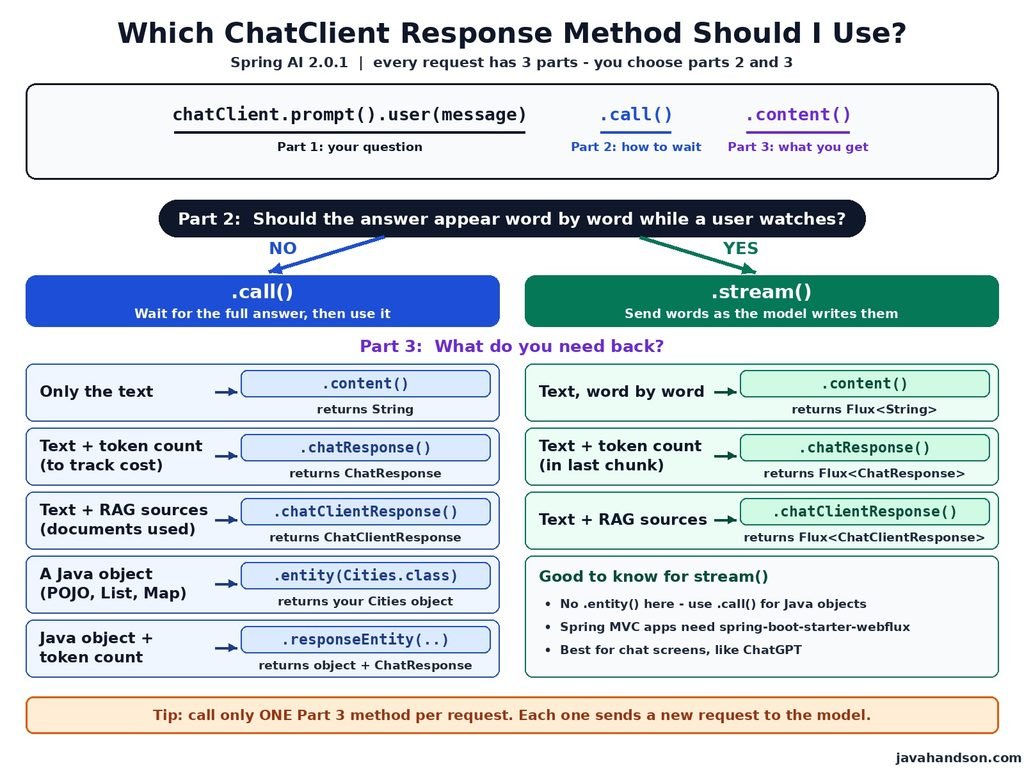
Here is the full menu. After call(), Spring AI 2.0.1 gives you these options:
| Method | Returns | Use it when |
|---|---|---|
content() | String | You only need the reply text |
chatResponse() | ChatResponse | You need token usage, model name or finish reason |
chatClientResponse() | ChatClientResponse | You need advisor data, such as RAG documents |
entity(...) | Your POJO, List or Map | You want structured output |
responseEntity(...) | ResponseEntity<ChatResponse, T> | You want a POJO and metadata together |
After stream(), you get the reactive versions:
| Method | Returns |
|---|---|
content() | Flux<String> |
chatResponse() | Flux<ChatResponse> |
chatClientResponse() | Flux<ChatClientResponse> |
Notice that entity() is missing from the streaming list. We will handle that case in section 8.6.
Next, let us walk through each option with a working example. I will use one simple controller throughout:
@RestController
@RequestMapping("/api")
public class ResponseTypesController {

    private final ChatClient chatClient;

    public ResponseTypesController(ChatClient.Builder builder) {
        this.chatClient = builder.build();
    }

    // endpoints go here
}
As for setup, it is the same as in What Is Spring AI Framework. You need the spring-ai-starter-model-openai starter and your API key:
spring.ai.openai.api-key=${OPENAI_API_KEY}
spring.ai.openai.chat.model=gpt-4o-miniLet us begin with the method you already know.
The content() method returns only the text of the reply. In other words, it is the same method you used in your first “Hello World” app.
@GetMapping("/chat")
public String chat(@RequestParam("message") String message) {
    return chatClient.prompt()
            .user(message)
            .call()
            .content();
}
Use content() when:
For many internal tools and quick features, this is all you need. So there is no point in making the code heavier than required.
Spring AI 2.0 uses JSpecify null annotations across its API. As a result, ChatClient marks content() as @Nullable. For example, the model may return no text when it stops early.
Therefore, do not pass the value straight into code that assumes a String. A small check keeps you safe:
String answer = chatClient.prompt()
        .user(message)
        .call()
        .content();

return answer != null ? answer : "Sorry, I could not generate an answer.";
Similarly, the same rule applies to chatResponse() and entity(). Both can return null in 2.0.1, so handle that case once in a helper.
Sooner or later, someone from finance will ask how much your AI feature costs. That is when chatResponse() becomes your best friend.
A ChatResponse is the complete answer from the model, not just the text. For example, it holds:
Each Generation, in turn, contains:
Most of the time, the list has only one Generation. However, it has more when you ask the provider for several choices. Meanwhile, the getResult() helper returns the first one, while getResults() returns the whole list.
The metadata carries a Usage object. It tells you how many tokens the request used:
Why does this matter? Simply because hosted models charge you per token. A token is roughly three-fourths of a word, so 100 tokens are about 75 words. So if you do not measure tokens, you cannot control your bill.
Spring AI 2.0 also added two new methods on Usage: getCacheReadInputTokens() and getCacheWriteInputTokens(). They report prompt cache hits for providers that support caching. On the other hand, they simply return null when the provider has no caching.
Apart from tokens, ChatResponseMetadata gives you:
In addition, the finish reason sits on each Generation. It tells you why the model stopped. With OpenAI, you will usually see values like STOP or LENGTH. The exact text depends on the provider.
A LENGTH finish reason is a warning sign. In short, the model hit your max token limit and the answer is incomplete. In that case, you may want to retry with a higher limit or ask for a shorter answer.
Now let us put all of this together. First, a small record for the reply:
public record ChatReply(
        String answer,
        String model,
        Integer promptTokens,
        Integer completionTokens,
        Integer totalTokens,
        String finishReason) {
}
After that, add the endpoint:
@GetMapping("/chat-response")
public ChatReply chatWithMetadata(
        @RequestParam("message") String message) {

    ChatResponse response = chatClient.prompt()
            .user(message)
            .call()
            .chatResponse();

    if (response == null || response.getResult() == null) {
        throw new IllegalStateException("Empty response from model");
    }

    Generation generation = response.getResult();
    ChatResponseMetadata metadata = response.getMetadata();
    Usage usage = metadata.getUsage();

    return new ChatReply(
            generation.getOutput().getText(),
            metadata.getModel(),
            usage.getPromptTokens(),
            usage.getCompletionTokens(),
            usage.getTotalTokens(),
            generation.getMetadata().getFinishReason());
}
Call it with curl:
curl "http://localhost:8080/api/chat-response?message=What+is+Spring+AI"
You will get JSON back with the answer, the model name and three token counts. Your numbers will differ, but the shape looks like this:
{
  "answer": "Spring AI is a framework that ...",
  "model": "gpt-4o-mini-2024-07-18",
  "promptTokens": 12,
  "completionTokens": 96,
  "totalTokens": 108,
  "finishReason": "STOP"
}
Notice that the model name has a date suffix. That is because OpenAI reports the exact snapshot it used, which is useful when a model update changes behaviour.
Returning tokens in the API response is good for learning. In production, however, you usually want them in logs or metrics.
The course builds a custom TokenUsageAuditAdvisor for this job. It reads the usage after every call and logs it, so your controllers stay clean. On top of that, Spring AI publishes a gen_ai_client_token_usage_total metric through Micrometer. You can scrape it with Prometheus and chart it in Grafana.
Also, keep one detail in mind when your ChatClient uses tools. In Spring AI 2.0.1, the usage you read after a tool-calling loop is cumulative. It adds up tokens from every model round in that loop.
| 💡 Interview Insight Interviewers often ask: “How do you track LLM cost in a Spring AI app?” Mention three layers. First, read Usage from chatResponse() for per-request numbers. Second, move that logic into an advisor so it audits every call. Third, use the built-in Micrometer metrics for dashboards and alerts. |
This method is the least known of the group. Still, it becomes very handy once you start using advisors.
In Spring AI 2.0.1, ChatClientResponse is a simple Java record with two parts:
Think of the context as a shared notebook. Each advisor in the chain can write to it. Then, after the call, you can read what they wrote.
In the RAG section of the course, we used RetrievalAugmentationAdvisor. It searches the vector store and adds matching chunks to the prompt. The answer looks great. But one question remains: which documents did the model actually use?
Users trust an answer more when they can see its sources. Likewise, auditors ask the same question in banking and healthcare apps. Luckily, the RAG advisor stores the retrieved documents in the context under a fixed key: RetrievalAugmentationAdvisor.DOCUMENT_CONTEXT.
Assume you have a ragChatClient bean with the RetrievalAugmentationAdvisor registered, as shown in the course. Here is how you return the answer along with its sources:
public record RagReply(String answer, List<String> sources) {
}

@GetMapping("/rag-chat")
public RagReply ragChat(@RequestParam("message") String message) {
    ChatClientResponse clientResponse = ragChatClient.prompt()
            .user(message)
            .call()
            .chatClientResponse();

    ChatResponse response = clientResponse.chatResponse();
    String answer = (response != null && response.getResult() != null)
            ? response.getResult().getOutput().getText()
            : "";

    Object docs = clientResponse.context()
            .get(RetrievalAugmentationAdvisor.DOCUMENT_CONTEXT);

    @SuppressWarnings("unchecked")
    List<Document> documents = docs != null
            ? (List<Document>) docs
            : List.of();

    List<String> sources = documents.stream()
            .map(Document::getText)
            .toList();

    return new RagReply(answer, sources);
}
Now your frontend can show a “Sources” section under each answer. In my experience, this one small feature removes a lot of doubt from business users.
The advisor also copies the same documents into the ChatResponse metadata under that key. So you can read them from either place. Personally, I prefer the context, because it keeps the intent clear.
We covered structured output in detail in the course section on output converters. So here is a quick recap, followed by a tip that many people miss.
LLMs return text. Your Java code, however, prefers objects. That is why the entity() method exists. It adds format instructions to the prompt and converts the reply into your type.
record CountryCities(String country, List<String> cities) {
}

CountryCities result = chatClient.prompt()
        .user("List 5 famous cities in India")
        .call()
        .entity(CountryCities.class);
For generic types, pass a ParameterizedTypeReference:
List<CountryCities> list = chatClient.prompt()
        .user("List 3 cities each for India and Japan")
        .call()
        .entity(new ParameterizedTypeReference<List<CountryCities>>() {});
Why the extra wrapper? Because Java’s type erasure removes generic details like List<CountryCities> at runtime. ParameterizedTypeReference keeps that information, so Spring can build the right objects.
Spring AI 2.0 also adds an optional second argument, EntityParamSpec. With validateSchema(), Spring AI checks the JSON against your type and retries with error feedback if it fails. With useProviderStructuredOutput(), the schema goes to the provider as an API-level rule instead of prompt text.
Here is a common need. Say you want a typed object, and you also want token usage for the same call. The responseEntity() method gives you both in one shot:
// Spring AI's ResponseEntity, not the Spring MVC one
import org.springframework.ai.chat.client.ResponseEntity;

ResponseEntity<ChatResponse, CountryCities> result = chatClient.prompt()
        .user("List 5 famous cities in India")
        .call()
        .responseEntity(CountryCities.class);

CountryCities cities = result.getEntity();
Usage usage = result.getResponse().getMetadata().getUsage();
Look at the import line first. Spring AI has its own ResponseEntity record in org.springframework.ai.chat.client. It has nothing to do with Spring MVC’s org.springframework.http.ResponseEntity.
So if your controller already imports the Spring MVC one, the compiler will pick the wrong class. I have lost a good half hour to this exact mix-up. To avoid it, use the full name for one of them, or move the AI call into a service class.
Remember the lazy behaviour from section 2.2? Now it matters. Look at this innocent code:
ChatClient.CallResponseSpec spec = chatClient.prompt()
        .user("List 5 famous cities in India")
        .call();

CountryCities cities = spec.entity(CountryCities.class);   // model call #1
ChatResponse response = spec.chatResponse();               // model call #2
Each terminal method triggers the model call on its own. As a result, this code hits the LLM twice. You pay twice, and the two answers may not even match. Developers raised this exact point in Spring AI GitHub issue #3895.
Fortunately, the fix is simple. Use responseEntity() when you need the object and the metadata together. For text plus metadata, call chatResponse() once and read the text from it.
| 💡 Interview Insight A tricky interview question is: “Can you call entity() and chatResponse() on the same CallResponseSpec?” You can, but each terminal method runs the model again. That doubles cost and latency. The right answer is responseEntity(), which returns both the ChatResponse and the converted entity from a single call. |
Now for the part that users actually notice. Let us make the answer appear word by word, just like ChatGPT.
First, recall how an LLM works from the course. It predicts one token at a time. The wrapper feeds each new token back into the model and repeats the loop until a stop token appears.
So a long answer is not ready in one go. Instead, the model builds it piece by piece over several seconds. With call(), your user waits until the very last token. With stream(), you forward each piece as soon as it arrives.
The total time stays about the same. However, the first words show up in well under a second. For a chat screen, that difference feels huge.
Here is the step most tutorials skip. The Spring AI reference is clear on this point: streaming works only through the reactive stack. So an imperative Spring MVC app must include spring-boot-starter-webflux too.
<dependency>
    <groupId>org.springframework.boot</groupId>
    <artifactId>spring-boot-starter-webmvc</artifactId>
</dependency>
<dependency>
    <groupId>org.springframework.boot</groupId>
    <artifactId>spring-boot-starter-webflux</artifactId>
</dependency>
Do not worry about your app turning reactive. When both starters are present, Spring Boot still runs your app on Spring MVC. WebFlux only brings Reactor and the reactive HTTP client that streaming needs.
Once the dependency is in place, streaming is almost a one-word change. Replace call() with stream():
@GetMapping(value = "/stream",
        produces = MediaType.TEXT_EVENT_STREAM_VALUE)
public Flux<String> stream(@RequestParam("message") String message) {
    return chatClient.prompt()
            .user(message)
            .stream()
            .content();
}
Luckily, Spring MVC knows how to handle a Flux return type. With the text/event-stream content type, it writes each chunk to the client as it arrives.
Next, test it with curl. The -N flag turns off buffering, so you can watch the answer grow:
curl -N "http://localhost:8080/api/stream?message=Explain+Spring+AI"
Each line of output starts with data: and holds a small piece of the answer. This is the Server-Sent Events format.
In a real UI, the browser reads this stream with EventSource. But there is a small trap here.
The SSE format trims one leading space from each data line. Meanwhile, many tokens start with a space, like ” Spring” or ” AI”. So when you join the chunks, words stick together as “SpringAI”. A clean fix is to wrap each token in a tiny JSON object:
public record Token(String text) {
}

@GetMapping(value = "/stream-sse",
        produces = MediaType.TEXT_EVENT_STREAM_VALUE)
public Flux<ServerSentEvent<Token>> streamSse(
        @RequestParam("message") String message) {

    Flux<ServerSentEvent<Token>> tokens = chatClient.prompt()
            .user(message)
            .stream()
            .content()
            .map(text -> ServerSentEvent.builder(new Token(text))
                    .event("token")
                    .build());

    ServerSentEvent<Token> done = ServerSentEvent
            .builder(new Token(""))
            .event("done")
            .build();

    return tokens.concatWith(Flux.just(done));
}
We also send a final done event. Otherwise, the browser cannot tell a finished answer from a dropped connection. It would simply try to reconnect.
On the browser side, a few lines of JavaScript are enough:
const output = document.getElementById("answer");
const source = new EventSource("/api/stream-sse?message=What+is+RAG");

source.addEventListener("token", (event) => {
    output.textContent += JSON.parse(event.data).text;
});

source.addEventListener("done", () => source.close());
Now the answer types itself out on the screen. It is a small change in code, and yet users notice it immediately.
Sometimes you want the live text and the token count. For that, use chatResponse() after stream(). It returns a Flux<ChatResponse>, where each element is one chunk.
There is one catch with OpenAI, though. By default, it does not send token usage in streaming mode. You have to switch it on:
spring.ai.openai.chat.stream-usage=true
With this property, OpenAI sends one extra chunk at the end. That chunk has usage details and no text. Here is how to handle both kinds of chunks:
private static final Logger log =
        LoggerFactory.getLogger(ResponseTypesController.class);

@GetMapping(value = "/stream-usage",
        produces = MediaType.TEXT_EVENT_STREAM_VALUE)
public Flux<String> streamWithUsage(@RequestParam("message") String message) {
    return chatClient.prompt()
            .user(message)
            .stream()
            .chatResponse()
            .doOnNext(chunk -> {
                Usage usage = chunk.getMetadata().getUsage();
                if (usage.getTotalTokens() > 0) {
                    log.info("Stream used {} tokens", usage.getTotalTokens());
                }
            })
            .mapNotNull(chunk -> {
                Generation gen = chunk.getResult();
                return gen != null ? gen.getOutput().getText() : null;
            });
}
Here, the doOnNext() step logs usage without touching the stream. Then mapNotNull() pulls the text and quietly drops the final usage-only chunk.
If you are using RAG with streaming, pick chatClientResponse() instead. It returns a Flux<ChatClientResponse>, so you get the advisor context along with each chunk.
As we saw earlier, there is no entity() method after stream(). Instead, the reference suggests a workaround. Collect the full text first, then convert it with a BeanOutputConverter:
BeanOutputConverter<CountryCities> converter =
        new BeanOutputConverter<>(CountryCities.class);

Mono<CountryCities> result = chatClient.prompt()
        .user(u -> u.text("List 5 famous cities in {country}. {format}")
                .param("country", "India")
                .param("format", converter.getFormat()))
        .stream()
        .content()
        .collect(Collectors.joining())
        .map(converter::convert);
Honestly, I rarely use this pattern. A half-built JSON object is useless to a user, so streaming brings no real benefit here. If you need structured output, call().entity() is simpler and safer.
A Flux does nothing until someone subscribes. So a test that just prints the Flux will show nothing useful. In tests, it is fine to block and collect the full text:
@Test
void streamReturnsAnswer() {
    String answer = chatClient.prompt()
            .user("Say hello in one line")
            .stream()
            .content()
            .collect(Collectors.joining())
            .block(Duration.ofSeconds(30));

    assertThat(answer).isNotBlank();
}
Always pass a timeout to block(). Otherwise, a stuck stream can hang your whole build. Keep block() inside tests only, and never inside a request-handling thread.
| 💡 Interview Insight Expect this question in interviews: “What do you need to stream LLM responses in a Spring MVC app?” Answer with three points. Add spring-boot-starter-webflux, because Spring AI streaming runs on Reactor. Return Flux from the controller with the text/event-stream type. Finally, for OpenAI token usage, enable the stream-usage option. |
Both modes have a clear place. To help you decide, here is a quick comparison for you:
| Point | call() | stream() |
|---|---|---|
| Return type | String, ChatResponse or a POJO | Flux of String, ChatResponse or ChatClientResponse |
| First words visible | After the full answer is ready | Almost immediately |
| Structured output | Yes, through entity() | Only by collecting the full text |
| Token usage | Always in the metadata | In the last chunk, if the provider sends it |
| Code complexity | Very simple | Needs Reactor and SSE handling |
| Best for | Back-end jobs, APIs, POJOs | Chat screens and long answers |
My simple rule is this. If a human is reading the answer live, use stream(). If code is reading the answer, use call().
Let me share a few lessons that will save you debugging time.
Finally, remember one limit from the Spring AI docs. Tool calling is imperative, so it blocks even inside a stream. If your ChatClient uses tools, expect small pauses in the stream while a tool runs.
| 💡 Interview Insight A good closing question in interviews is: “Which ChatClient response type would you use for a customer support chatbot?” A strong answer combines them. Use stream().chatClientResponse() for the live chat screen, so you get text and RAG sources together. Log token usage from the final chunk. Then use call().entity() for back-end steps, like ticket classification. |
A: content() returns only the reply text as a String. chatResponse() returns the full ChatResponse object, which also carries token usage, the model name, the response ID and the finish reason for each generation.
A: No. call() and stream() only choose synchronous or streaming mode. The model is invoked lazily, when a terminal method such as content(), chatResponse() or responseEntity() runs.
A: Call chatResponse() and read response.getMetadata().getUsage(). The Usage object gives getPromptTokens(), getCompletionTokens() and getTotalTokens(). For OpenAI streaming, also set spring.ai.openai.chat.stream-usage=true.
A: Use chatClientResponse() when you need data that advisors shared during the call. A common example is reading the documents retrieved by RetrievalAugmentationAdvisor, stored under the DOCUMENT_CONTEXT key, to show sources with a RAG answer.
A: Use responseEntity(YourClass.class). It returns Spring AI’s ResponseEntity holding both the ChatResponse and the converted entity. Calling entity() and chatResponse() separately on the same spec triggers two model calls.
A: Spring AI streaming runs on the reactive stack, so a Spring MVC app must also include spring-boot-starter-webflux. Your app still runs on Spring MVC. Return a Flux from the controller with the text/event-stream content type.
A Spring AI ChatClient response is much more than a String. So once you know the options, you can pick exactly what each feature needs.
Here is a quick recap:
In short, start simple with content(). Then add metadata, sources and streaming as your app grows. This way, your code stays easy to read, and your users get a fast, trustworthy experience.