JFR In-Process Data Redaction in Java 27 (JEP 536): A Beginner’s Guide
-
Last Updated: October 18, 2026
-
By: javahandson
-
Series

JFR In-Process Data Redaction (JEP 536) masks secrets inside the JVM in Java 27. Learn how it works, how to configure redact-key and redact-argument.
Java Flight Recorder (JFR) is a powerful, low-overhead tool for diagnosing JVM problems. Yet it carries a quiet risk. The recordings it produces can hold secrets. JFR In-Process Data Redaction, delivered as JEP 536 in Java 27, solves this problem at the source. It hides sensitive values before they ever reach the recording file.
In older Java versions, a flight recording could capture your database password or API token in plain text. The value just sat there inside the file. Anyone who opened it could read the secret. So teams had to scrub recordings by hand, which is slow and easy to forget.
This guide explains the feature from the ground up. We will keep the language simple and the examples practical. By the end, you will know:
Let us begin with a short refresher on JFR itself.
Before the new feature makes sense, you need a clear picture of JFR. So let me keep this part short and friendly.
JFR is built right into the JVM. It records events while your application runs. These events cover garbage collection, thread activity, method timing, and much more. The overhead stays tiny, so you can even run it in production.
Here is the key point for our topic. At startup, JFR also captures the details of how your app was launched. That means three things in particular:
These details are genuinely useful. They help you reproduce a bug with the exact same setup. Sadly, they are also where secrets love to hide.
Why does the JVM bother capturing all this? The reason is reproducibility. When a bug shows up only with a certain flag or variable, that startup snapshot is gold. You can recreate the exact conditions later. Unfortunately, that same strength is what makes a leak so easy.
Think about how a typical service starts. You often pass secrets through the environment or the command line. A simple example looks like this:
export STRIPE_API_KEY=sk_live_abc123

java -Ddb.password=S3cr3t! \
     -jar payments-service.jar
Both the system property and the environment variable now belong to the JVM startup. As a result, JFR records them. Before Java 27, it stored the raw value with no masking.
Now picture sharing that recording file. Maybe you attach it to a support ticket. Perhaps you drop it on a shared drive for a teammate. The secret travels along with it. I have seen this exact slip in banking projects, where a shared recording quietly carried a live credential.
Before Java 27, the JVM gave no automatic help here. You had two options, and honestly neither was great.
The first option was pure discipline. You tried never to pass secrets on the command line. Instead, your app read them from a vault or a file at runtime. That is good practice, yet mistakes still creep in. One rushed deployment, and a secret slips onto the command line again.
The second option was cleanup after the fact. Java shipped a tool called jfr scrub for this. You run it on a finished recording to filter out certain events or fields. It works, but it has real limits:
JEP 536 takes a smarter route. The redaction happens inside the JVM, while the recording is being written. The raw secret never lands on disk at all.
Compare the two models for a moment:
Prevention is almost always safer. There is no original file to leak. There is no cleanup step to forget. The secret simply never reaches the recording.
| 💡 Interview Insight Interviewers often ask for the difference between jfr scrub and JEP 536. Here is the clean answer: jfr scrub cleans an existing recording after the fact, while JEP 536 redacts inside the JVM before anything is written to disk. One is a cure, the other is prevention. |
Now let us look at the feature itself. The idea is simple, even though the name sounds heavy.
“In-process” simply means “inside the running JVM”. As JFR prepares to write your startup data, it checks each value against a set of patterns. If a value looks like a secret, the JVM replaces it. Only the safe version then reaches the file.
So the flow is short and clear:
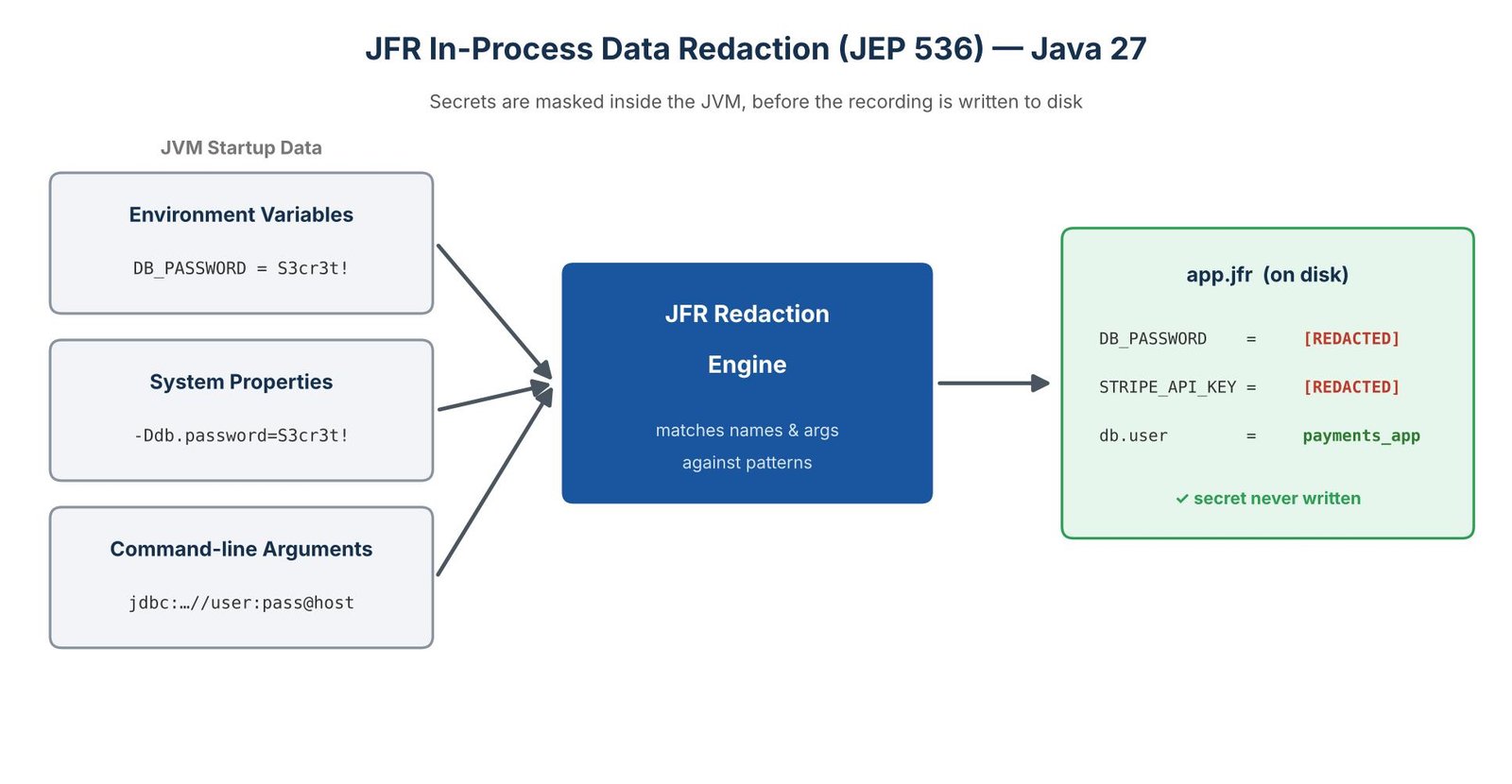
JEP 536 focuses on the three startup sources we just saw. In JFR terms, these map to specific events:
For environment variables and system properties, redaction matches on the name. For command-line arguments, it can also match on the argument text. We will try both a little later.
The replacement is deliberately boring. A matched value gets swapped for the text [REDACTED]. The name stays visible, but the value is gone.
So inside the recording, you might see something like this:
DB_PASSWORD    = [REDACTED]
STRIPE_API_KEY = [REDACTED]
db.user        = payments_app      # not a secret, kept as-is
This strikes a nice balance. You still know which variables existed, which helps during debugging. Yet the actual secret is never present.
Here comes the best part for most teams. Redaction is enabled by default in Java 27. You do not add a flag to switch it on. The moment your app runs on Java 27, the built-in patterns already protect you.
Put another way, upgrading to Java 27 gives you this safety for free. You only touch the configuration when you want to add your own patterns or, in rare cases, turn it off.
| 💡 Interview Insight A common question is whether you must enable JEP 536 manually. The answer is no. Redaction is on by default in Java 27 with a built-in pattern list. You configure it only to extend the patterns or to disable it on purpose. |
Most teams never need to configure anything. Still, it helps to know the knobs. All settings live under one JVM flag: -XX:FlightRecorderOptions.
There are two sub-options, and their names tell you what they do:
So redact-key protects named values. Meanwhile, redact-argument protects loose arguments on the command line. Together they cover all three sources.
You will almost always use redact-key. Most secrets live in named values anyway. The redact-argument option is for the odd case where a secret rides along as a bare argument. A JDBC URL is the classic example, and we will cover it later.
The patterns are simple glob patterns, not full regular expressions. A few rules cover everything:
For example, the pattern *secret* matches CLIENT_SECRET, my_secret_key, and Secret123. It is a wide net, and that is intentional.
This part trips up beginners, so please read it twice. When you set your own patterns, you usually replace the built-in list rather than adding to it.
To keep the defaults and add your own, start the value with a plus sign:
# ADD "confidential" on top of the built-in defaults
java -XX:FlightRecorderOptions:redact-key=+*confidential* \
     -jar app.jar

# REPLACE all defaults with a single pattern (risky!)
java -XX:FlightRecorderOptions:redact-key=*confidential* \
     -jar app.jar
Notice the difference between the two lines. The first keeps every built-in pattern and adds one more. The second throws away all the built-in protection and keeps only your single pattern. That second form is a classic way to leak secrets by accident.
Long pattern lists on the command line get messy fast. So JEP 536 lets you point to a file with the @ symbol. The file holds one pattern per line.
# keys.txt
*password*
*token*
*merchant*secret*

# use the file:
java -XX:FlightRecorderOptions:redact-key=@keys.txt -jar app.jar
This option is handy for teams. You keep one shared file of patterns and reuse it across services. One place to update, and everywhere stays protected.
Sometimes you want recordings with no redaction at all. For instance, on a local machine that only has fake test data. The special value none disables it:
java -XX:FlightRecorderOptions:redact-key=none,redact-argument=none \
     -jar app.jar
Use this with care. Turn it off only where you are sure there are no real secrets. On anything close to production, always leave redaction on.
| 💡 Interview Insight An interviewer may ask how to add a custom pattern without losing the defaults. The one-word answer is the + prefix. Without it, your patterns replace the whole built-in list. Pointing out that trap shows real, hands-on understanding. |
The default list targets the words that secrets usually contain. The exact set can grow across releases, but it covers the common cases well. Representative patterns include:
So common names like DB_PASSWORD, API_TOKEN, and CLIENT_SECRET get caught right away. You enjoy sensible coverage without writing a single pattern.
You may notice the patterns are quite broad. That is a design choice, not an oversight. The team behind JEP 536 chose to redact a little too much rather than too little.
Think about the trade-off for a second. If redaction misses a real secret, that secret leaks. If it hides one harmless value by mistake, you lose a small piece of debug data. The second cost is tiny next to the first. Therefore, when in doubt, the JVM hides the value.
You might wonder which patterns are active right now. There is a simple way to check. Ask the JVM to print its FlightRecorderOptions help. The output lists the current redaction settings, so you never have to guess what is protected.
java -XX:FlightRecorderOptions:help
Run this on your target Java 27 build. The exact default list can shift a little between minor releases. A quick check keeps you honest about what is covered.
Reading is fine, but watching it work really sticks. So let us run a tiny test. You only need Java 27 installed.
Launch any small app with a fake secret and a recording turned on:
java -DDB_PASSWORD=SuperSecret123 \
     -XX:StartFlightRecording=duration=10s,filename=demo.jfr \
     -jar hello.jar
Here we pass a system property named DB_PASSWORD. Its name contains “password”, so a default pattern should match it.
After the app finishes, read the recording with the jfr command. We look at the system property event:
jfr print --events jdk.InitialSystemProperty demo.jfr
In the output, find the DB_PASSWORD entry. On Java 27, its value shows as [REDACTED], not SuperSecret123. The secret never made it into the file.
Now suppose your company uses a key named MERCHANT_SIGNING. That name has no “secret” or “password” in it. As a result, the defaults miss it. Add your own pattern, but keep the defaults with +:
java -DMERCHANT_SIGNING=abc-123 \
     -XX:FlightRecorderOptions:redact-key=+*merchant* \
     -XX:StartFlightRecording=duration=10s,filename=demo2.jfr \
     -jar hello.jar
Run the jfr print command again. This time MERCHANT_SIGNING also shows [REDACTED]. You have extended the protection to your own naming style.
You may worry about speed. Does all this matching slow things down? In practice, no. The checks run once at startup, over a short list of values. The cost is tiny, and you will not notice it. So there is no real reason to switch redaction off for performance.
Let me share a few ways I would actually use this in a real service.
A classic leak is a JDBC URL with the password baked in. For example:
jdbc:postgresql://user:S3cr3t@db-host:5432/payments
The whole URL often arrives as a command-line argument. So redact-argument is the right tool here. You match the argument text, not a key name:
java -XX:FlightRecorderOptions:redact-argument=+jdbc:*//*:*@* \
     -jar app.jar
The pattern targets the shape of a JDBC URL that carries credentials. When it matches, the whole argument is hidden. Your recording no longer carries a live database password.
In a company with many services, repeating patterns everywhere gets painful. So I would keep a single file in a shared config repo:
# company-redaction-keys.txt
*password*
*token*
*secret*
*merchant*
*signing*
Every service then points to the same file. When security adds a new sensitive word, you update one place. All services pick it up on their next restart.
When you upgrade a fleet to Java 27, redaction turns on by itself. That is good news. Even so, I would run two quick checks:
These checks take only minutes. They give you real confidence that the feature helps, instead of hiding the wrong things.
Containers lean heavily on environment variables. A Kubernetes pod often injects secrets as env vars at startup. So a flight recording from a pod is a prime candidate for a leak.
The good news is that JEP 536 works the same way inside a container. The JVM does not care where the env var came from. A variable named PAYMENT_API_TOKEN still matches the default *token* pattern. So your pod recordings stay clean too.
Here is one practical tip for Kubernetes teams. Map your secret names to the default patterns on purpose. Name a secret CARD_VAULT_TOKEN, not CARD_VAULT_X. The first name matches out of the box, while the second needs a custom pattern.
This section matters most for avoiding a false sense of safety. Redaction is strong, yet it has clear limits. Please do not assume it protects everything.
JEP 536 does not touch these areas:
Let me stress the custom-events point, because it bites people. Say you build an event to track payment calls. You add fields for the amount and a card token. JFR will store whatever you put there. The redaction engine does not look inside your custom fields. So you must mask that token in your own code, before you commit the event.
It also does not fix old recordings. The feature works going forward only. A recording made on Java 26 stays exactly as it was.
So treat JEP 536 as one strong layer, not the whole wall. Keep your other good habits in place too. Read secrets from a vault. Avoid putting them on the command line whenever you can.
| 💡 Interview Insight A sharp follow-up question is what JEP 536 does not protect. Good points to raise: heap dumps, custom JFR event fields, and existing recordings. Saying “it is one layer, not a complete solution” signals mature, security-aware thinking. |
A: Yes. JEP 536 is on by default in Java 27 with a built-in list of patterns. You only touch the configuration to add your own patterns or to turn it off on purpose.
A: jfr scrub cleans a recording after it is already on disk, so the secret existed at some point. JEP 536 redacts inside the JVM before anything is written. One is a cure, the other is prevention.
A: Start your pattern with a plus sign, for example redact-key=+*merchant*. Without the +, your patterns replace the entire built-in list, which can silently drop protection.
A: No. It only covers environment variables, system properties, and command-line arguments in JFR’s startup events. Heap dumps and your own custom event fields must be sanitized separately.
A: No. The feature works going forward only. A .jfr file created on Java 26 stays exactly as it was; redaction applies only to new recordings on Java 27.
JFR In-Process Data Redaction is a small feature with a big payoff. For years, flight recordings could quietly carry passwords and tokens. JEP 536 finally closes that gap right at the source.
Here is the quick recap:
My advice is simple. Upgrade to Java 27, confirm one recording, and enjoy the free safety. Then layer your own patterns for the names that are special to your domain. For payments and banking work especially, that small effort pays off quickly.