ChatOptions in Spring AI: Temperature, Max Tokens & topP Explained
-
Last Updated: September 28, 2026
-
By: javahandson
-
Series

Learn ChatOptions in Spring AI 2.0.1 with simple examples. Understand temperature, max tokens, topP and topK, and set them per request or globally.
Have you ever asked your AI app the same question twice and got two very different answers? Or maybe an answer stopped in the middle of a sentence? Both problems come from the same place. That place is ChatOptions in Spring AI.
In the previous articles, we built a ChatClient and then connected more than one chat model. Both apps worked. However, we never told the model how to behave. We just sent a prompt and accepted whatever came back.
In this guide, we will fix that. You will learn how to tune the model with a few simple settings. By the end, you will know:
All code in this guide targets Spring AI 2.0.1, the current stable release. I will also point out where the 1.x style differs, because many old tutorials still use it.
Let us get started.
ChatOptions is a set of settings that you send along with your prompt. The prompt says what you want. ChatOptions says how the model should produce it.
I like to think of ChatOptions as a tuning panel. Think of a music system with knobs for volume, bass and treble. The song stays the same, but the sound changes.
Similarly, the prompt stays the same, but the answer changes with ChatOptions. You can make the model more focused or more creative. You can also make it short or long. In addition, you can stop it at a certain word.
In Spring AI, ChatOptions is an interface in the org.springframework.ai.chat.prompt package. It holds the options that most providers share. Here is the list:
| Option | What it controls |
|---|---|
| model | Which model to call, for example gpt-4o-mini |
| temperature | Creativity. Low is focused, high is random |
| maxTokens | The maximum length of the reply, in tokens |
| topP | Nucleus sampling. How much of the probability pool to use |
| topK | How many top word choices the model considers |
| frequencyPenalty | Reduces repeated words. Higher means less repetition |
| presencePenalty | Pushes the model towards new topics |
| stopSequences | Stops the reply when a given text appears |
Each option is nullable. If you do not set a value, Spring AI uses the default from your configuration or from the model itself.
The word “portable” matters here. The same ChatOptions code works with OpenAI, Ollama, Anthropic and others. So you can switch providers without rewriting your tuning code.
Of course, every provider also has its own special features. For that, Spring AI gives you concrete classes that implement ChatOptions:
So you have two choices. Use the portable ChatOptions for common settings. Switch to a provider class only when you need a special feature.
| 💡 Interview Insight A common question is: “What is the difference between ChatOptions and OpenAiChatOptions?” ChatOptions is a generic interface with the options that most providers share. OpenAiChatOptions is a concrete class that implements it and adds OpenAI-only settings. Portable code uses ChatOptions. Provider features need the concrete class. |
Before we touch any option, we need one small idea. Without it, temperature and topP will feel like magic.
An LLM has one main job. It guesses the next token based on the text so far. It works like a very smart autocomplete.
A token is a small piece of text. It can be a full word, part of a word, or a single character. For GPT-style models, one token is roughly three-quarters of a word. So 100 tokens is about 75 words.
The model does not pick just one word. Instead, it gives a probability to every token in its vocabulary. Then it picks one token from that list. After that, it adds the token to the text and repeats the process. The loop ends when the model outputs a special stop token or hits a limit.
Say the prompt is “The cat sat on the”. The model might score the next token like this:
Now the options step in. Temperature reshapes these percentages. topP and topK cut the list short. Max tokens decides how many times this loop can run. That is the whole story in one line.
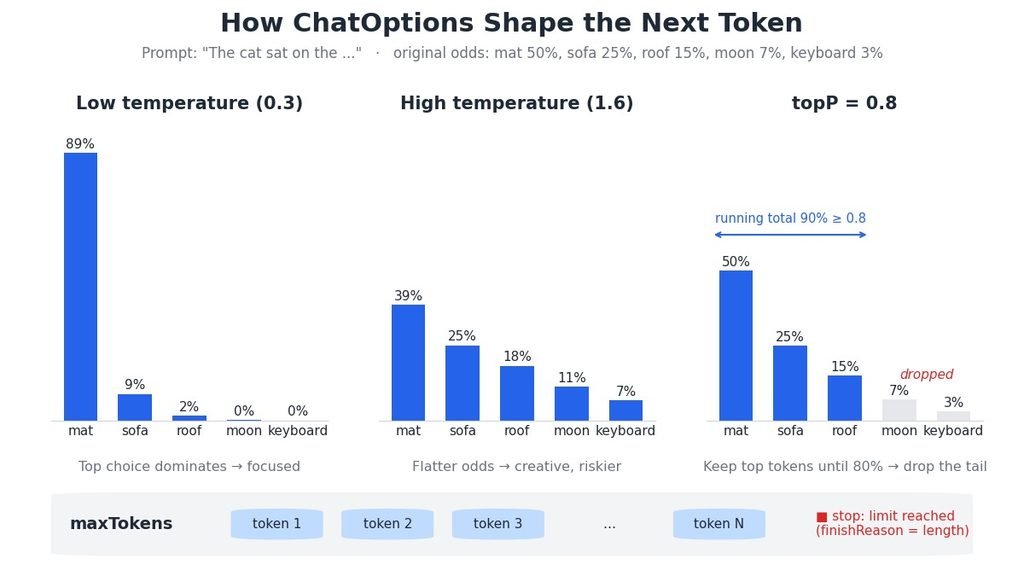
Temperature is the option you will touch most often. It controls how adventurous the model is when it picks the next token.
At a low temperature, the top choice becomes even stronger. In our example, “mat” might jump from 50% to about 90%. As a result, the model almost always says “mat”.
At a high temperature, the percentages get flatter. Now “mat” might drop to about 40% while “roof” and “moon” rise. The model takes more risks. Sometimes this gives a fresh idea. At other times, it gives nonsense.
For OpenAI, the value usually sits between 0 and 2. In practice, most apps stay between 0 and 1.
Here is a simple guide that I follow in my own projects:
| Temperature | Behaviour | Good for |
|---|---|---|
| 0.0 to 0.3 | Focused and consistent | Code, data extraction, classification, SQL |
| 0.4 to 0.7 | Balanced | Chatbots, support replies, explanations |
| 0.8 to 1.0 | Creative and varied | Stories, taglines, brainstorming |
A low temperature does not make the model correct. It only makes it consistent. If the model is wrong at 0.1, it will be wrong the same way every time.
Here is the simplest way to set temperature for one request:
String answer = chatClient.prompt()
        .user("Write a Java method to reverse a string")
        .options(ChatOptions.builder()
                .temperature(0.1))
        .call()
        .content();
Notice something important. We did not call build() on the options. In Spring AI 2.0, the options() method takes the builder itself. Spring AI then merges it with the defaults. We will look at merging in detail in section 8.
This one catches many people. OpenAI’s reasoning models work differently. The Spring AI 2.0.1 docs say that gpt-5, gpt-5-mini and gpt-5-nano do not support temperature. If you send it, the call fails with an error.
This matters because gpt-5-mini is the default OpenAI model in Spring AI 2.0. So if you plan to tune temperature, pick a model that supports it. For example, gpt-4o-mini and gpt-5-chat both accept it.
| 💡 Interview Insight Interviewers often ask: “Does temperature 0 make an LLM fully deterministic?” Not always. It makes the model pick the top token almost every time. However, small differences on the provider side can still change the output. For repeatable results, OpenAI also offers a seed option in OpenAiChatOptions. Even that is best effort, not a guarantee. |
The second big option is maxTokens. It sets a ceiling on how long the reply can be.
Max tokens limits the output only. It does not limit your prompt. However, the prompt and the reply together must fit inside the model’s context window.
Here is a quick way to pick a value. Take the number of words you expect and add about one third. For a 150-word summary, 200 to 250 tokens is a safe limit.
Why set it at all? There are three good reasons:
The model simply stops. It does not wrap up nicely. So you may get half a sentence, or half a JSON object.
You can detect this. The response metadata carries a finish reason. If the limit cut the reply, the finish reason says so. Here is how to read it:
ChatResponse response = chatClient.prompt()
        .user("Explain the Java memory model")
        .options(ChatOptions.builder().maxTokens(100))
        .call()
        .chatResponse();

String finishReason = response.getResult()
        .getMetadata()
        .getFinishReason();

if ("length".equalsIgnoreCase(finishReason)) {
    log.warn("Reply was cut by the maxTokens limit");
}
I learnt this the hard way. In one of my projects, we used entity() to map replies into a Java record. Now and then, parsing failed with a strange JSON error. The real cause was a small maxTokens value that cut the JSON in the middle.
OpenAI has two token limit settings, and they do not mix. The Spring AI 2.0.1 docs explain it like this:
| Setting | Use it for | Example models |
|---|---|---|
| maxTokens | Non-reasoning models | gpt-4o, gpt-4o-mini |
| maxCompletionTokens | Reasoning models | o1, o3, o4-mini series |
The two are mutually exclusive. If you send both, OpenAI returns an error. To protect you, the OpenAiChatOptions builder follows a “last set wins” rule. So if you set maxTokens and then maxCompletionTokens, the builder clears maxTokens and logs a warning.
There is one more detail. For reasoning models, maxCompletionTokens also covers the hidden reasoning tokens. So give these models a larger budget than you would give a normal model.
var options = OpenAiChatOptions.builder()
        .model("o4-mini")
        .maxCompletionTokens(2000);

String answer = chatClient.prompt()
        .user("Plan a migration from Java 8 to Java 21")
        .options(options)
        .call()
.content();Each provider has its own name and default for this limit:
That Anthropic change is worth a note. If you upgraded from 1.x and relied on the 500 default, your replies may now be longer and cost more. Set the value explicitly if cost matters.
| 💡 Interview Insight A good follow-up question is: “Why did my structured output fail to parse?” One common cause is a maxTokens value that is too small. The model stops mid-JSON, so the converter cannot read it. Check the finish reason, then raise the limit or ask for a shorter output. |
topP sounds scary, but the idea is simple. It decides how many of the top candidates stay in the running.
The model sorts tokens from most likely to least likely. Then it adds their probabilities from the top until the total reaches topP. Only these tokens stay. The model drops the rest.
Let us use our cat example with topP set to 0.8:
So the model now picks only from mat, sofa and roof. A silly word like “keyboard” can never appear. That is why topP is also called nucleus sampling. It keeps only the nucleus of good choices.
A lower topP, like 0.3, keeps very few tokens. A higher topP, like 0.95, keeps almost all of them.
Both options control randomness, but in different ways. Temperature reshapes the probabilities. topP cuts the list after that.
OpenAI’s guidance, repeated in the Spring AI docs, is clear. Change temperature or topP, but not both in the same request. When you change both, the combined effect is hard to predict.
My rule is simple. I tune temperature first. I touch topP only if I have a specific reason.
topK is simpler than topP. It keeps a fixed number of top tokens. With topK set to 3, the model always picks from the top three, whatever their percentages.
Not every provider supports topK. Ollama does, and its default is 40, with topP at 0.9. However, the official OpenAI API does not accept top_k at all. If you talk to an OpenAI-compatible server like vLLM, you can still pass it through the extraBody option.
String answer = chatClient.prompt()
        .user("Suggest three names for a Java blog")
        .options(ChatOptions.builder()
                .topK(40)
                .topP(0.8))
        .call()
.content();The remaining options are less famous, but they are handy in real apps.
Both penalties fight repetition. For OpenAI, each accepts a value between -2.0 and 2.0.
Small positive values, like 0.3 to 0.6, usually help with long answers. Large values can make the text odd, so go slowly.
Stop sequences tell the model where to stop. When the model generates one of these strings, it ends the reply right there. OpenAI allows up to four stop sequences.
This is great for structured outputs. For example, you can stop at “END” or at a blank line.
String answer = chatClient.prompt()
        .user("List three Spring AI features, then write END")
        .options(ChatOptions.builder()
                .stopSequences(List.of("END")))
        .call()
.content();Yes, even the model name is an option. You can override it for a single request. This is useful for routing a hard question to a stronger model without creating a new ChatClient.
Now let us see where you can set these options. There are three levels, and each one overrides the level before it.
The easiest way is through Spring Boot properties. These become the default options of the ChatModel bean.
# OpenAI defaults
spring.ai.openai.api-key=${OPENAI_API_KEY}
spring.ai.openai.chat.model=gpt-4o-mini
spring.ai.openai.chat.temperature=0.7
spring.ai.openai.chat.max-tokens=500

# Ollama defaults
spring.ai.ollama.chat.model=llama3.2
spring.ai.ollama.chat.temperature=0.7
spring.ai.ollama.chat.num-predict=500
Spring AI 1.x users, please note one change. In 1.x, these keys had an extra options segment, like spring.ai.openai.chat.options.temperature. Spring AI 2.0 flattened them. The old keys still work as deprecated aliases for now, but move to the new names soon.
Next, you can set defaults for one ChatClient with defaultOptions(). This is useful when different clients need different behaviour.
@Configuration
public class ChatClientConfig {

    @Bean
    public ChatClient codeChatClient(ChatClient.Builder builder) {
        return builder
                .defaultSystem("You are a senior Java developer.")
                .defaultOptions(OpenAiChatOptions.builder()
                        .model("gpt-4o-mini")
                        .temperature(0.1)
                        .maxTokens(800))
                .build();
    }
}
Again, notice there is no build() on the options. In Spring AI 2.0.1, defaultOptions() accepts a ChatOptions.Builder. Older course slides and 1.x tutorials often show defaultOptions(ChatOptions.builder()…build()). That style no longer compiles with ChatClient in 2.0.
Here we inject the auto-configured ChatClient.Builder, which is fine for a single model. If you have several models, build each client as shown in our multiple chat models guide.
Finally, you can override options for one single call with options(). This is the most specific level, so it wins.
@GetMapping("/story")
public String story(@RequestParam String topic) {
    return codeChatClient.prompt()
            .system("You are a friendly storyteller.")
            .user("Write a short story about " + topic)
            .options(OpenAiChatOptions.builder()
                    .temperature(0.9)
                    .maxTokens(400))
            .call()
            .content();
}
The client default says temperature 0.1. This request says 0.9. So this call uses 0.9, while the model name still comes from the client default.
This is the part most tutorials skip. With ChatClient, Spring AI merges your options builder with the defaults. Only the fields that you set explicitly override the defaults. Everything else stays as it was.
So the order of priority looks like this:
This makes life easy. You can set sensible defaults once and change only one or two values per request.
Sometimes you call ChatModel directly instead of ChatClient. In that case, the rules change. You must pass a fully built options object inside the Prompt:
ChatResponse response = openAiChatModel.call(
        new Prompt("Summarise this ticket in two lines",
                OpenAiChatOptions.builder()
                        .model("gpt-4o-mini")
                        .temperature(0.2)
                        .maxTokens(120)
                        .build()));
Here we do call build(). More importantly, ChatModel does not merge anything. The Spring AI 2.0 upgrade notes say that if the Prompt carries options, they are used as they are. Your application.properties values are not mixed in. So set every value that matters to you.
| 💡 Interview Insight A tricky interview question is: “Why does .options() take a builder in Spring AI 2.0?” Because ChatClient merges request options with the defaults before the advisors run. A builder lets Spring AI apply only the fields you set. Direct ChatModel calls are different. They take a built ChatOptions object and do no merging. |
Now you know both styles. So which one should you use?
Use ChatOptions.builder() when you only need common settings like temperature, maxTokens or topP. Your code then stays provider-neutral. For example, a service can run on OpenAI in production and on Ollama during local development.
Switch to OpenAiChatOptions, OllamaChatOptions or AnthropicChatOptions when you need a special feature. Common examples are:
One warning here. A provider class only works with its own model. If you pass OpenAiChatOptions to an Ollama client, those OpenAI-only settings mean nothing to Ollama.
In Spring AI 2.0, all options classes became strictly immutable. The old copy() method is gone. Instead, you use mutate() to start a new builder from existing options.
OpenAiChatOptions base = OpenAiChatOptions.builder()
        .model("gpt-4o-mini")
        .temperature(0.3)
        .maxTokens(500)
        .build();

String creative = chatClient.prompt()
        .user("Give me a catchy title for a Java blog post")
        .options(base.mutate().temperature(0.9))
        .call()
        .content();
This is safe in a multi-threaded app. The base options never change, so no request can disturb another one.
Let us put everything together. We will build one controller with three endpoints. Each endpoint uses different options on the same client.
@RestController
@RequestMapping("/api/tune")
public class TunedChatController {

    private static final Logger log =
            LoggerFactory.getLogger(TunedChatController.class);

    private final ChatClient chatClient;

    public TunedChatController(ChatClient.Builder builder) {
        this.chatClient = builder
                .defaultOptions(ChatOptions.builder()
                        .model("gpt-4o-mini")
                        .temperature(0.5)
                        .maxTokens(500))
                .build();
    }

    // Focused and repeatable: good for code
    @GetMapping("/code")
    public String code(@RequestParam String message) {
        return chatClient.prompt()
                .user(message)
                .options(ChatOptions.builder().temperature(0.1))
                .call()
                .content();
    }

    // Creative: good for stories and taglines
    @GetMapping("/creative")
    public String creative(@RequestParam String message) {
        return chatClient.prompt()
                .user(message)
                .options(ChatOptions.builder()
                        .temperature(0.9)
                        .frequencyPenalty(0.4))
                .call()
                .content();
    }

    // Short summary with token usage logging
    @GetMapping("/summary")
    public String summary(@RequestParam String message) {
        ChatResponse response = chatClient.prompt()
                .user("Summarise in under 60 words: " + message)
                .options(ChatOptions.builder()
                        .temperature(0.2)
                        .maxTokens(100))
                .call()
                .chatResponse();

        Usage usage = response.getMetadata().getUsage();
        log.info("Prompt tokens: {}, reply tokens: {}",
                usage.getPromptTokens(), usage.getCompletionTokens());

        return response.getResult().getOutput().getText();
    }
}The constructor sets the defaults once. Every endpoint then changes only what it needs:
That last point is very useful. Token counts drive your bill. So logging them from day one tells you exactly what each endpoint costs.
Run the app and try these calls:
curl "http://localhost:8080/api/tune/code?message=Write+a+Java+method+to+check+a+palindrome"
curl "http://localhost:8080/api/tune/creative?message=Write+a+tagline+for+a+coffee+shop"
curl "http://localhost:8080/api/tune/summary?message=Spring+AI+brings+Spring+style+to+LLM+apps"
Call /code three times. The answers should look almost the same. Then call /creative three times. This time, you should see clear differences. That difference is temperature at work.
Here is a quick reference that you can keep handy. Treat these as starting points, not rules.
| Use case | Temperature | topP | maxTokens |
|---|---|---|---|
| Code generation | 0.0 to 0.2 | default | 800 to 1500 |
| Data extraction to JSON | 0.0 to 0.1 | default | enough for the full JSON |
| Classification or yes/no | 0.0 | default | 5 to 20 |
| Customer support chat | 0.3 to 0.5 | default | 300 to 500 |
| Summaries | 0.2 to 0.4 | default | 100 to 300 |
| Blog ideas and taglines | 0.8 to 1.0 | default | 200 to 400 |
| Story writing | 0.8 to 1.0 | 0.9 to 0.95 | 800 plus |
Always test with your own prompts. A value that works on one model may feel different on another.
Let me share what I have learnt while tuning these options in real projects.
| 💡 Interview Insight If an interviewer asks how you would tune an LLM for a banking chatbot, keep it practical. Use a low temperature, around 0.2, for factual and consistent replies. Set a clear maxTokens to control cost and length. Add stop sequences for structured parts. Finally, monitor token usage and evaluate replies before going live. |
A: ChatOptions is a portable interface that holds the settings sent with a prompt, such as model, temperature, maxTokens, topP, topK, penalties and stop sequences. Provider classes like OpenAiChatOptions implement it and add provider-only settings.
A: Use 0.0 to 0.3 for code, data extraction and classification. Use 0.4 to 0.7 for chatbots and explanations. Use 0.8 to 1.0 for creative writing. Always test with your own prompts.
A: ChatClient merges request options with the default options before the advisors run. A builder lets Spring AI override only the fields you set. So you pass the builder without calling build().
A: For OpenAI, maxTokens is for non-reasoning models like gpt-4o-mini. maxCompletionTokens is for reasoning models like o3 and o4-mini and also covers reasoning tokens. They are mutually exclusive, and the builder keeps the last one you set.
A: No. OpenAI recommends changing one of them, not both. Their combined effect is hard to predict. Tune temperature first and touch topP only for a specific reason.
A: Reasoning models such as gpt-5, gpt-5-mini and gpt-5-nano do not support temperature, and gpt-5-mini is the default OpenAI model in Spring AI 2.0. Use a model that accepts it, such as gpt-4o-mini or gpt-5-chat.
ChatOptions in Spring AI gives you real control over how a model answers. You do not need deep maths to use it well. You only need to know what each knob does.
Here is a quick recap:
Start with the defaults from the cheat sheet. Then adjust one value at a time and watch the results. In a few days, you will know exactly how your model behaves.