Java String Interview Questions (2026): Immutability, StringBuilder, and the String Pool Explained
-
Last Updated: November 6, 2026
-
By: javahandson
-
Series

Java String interview questions: why String is immutable, String vs StringBuilder vs StringBuffer, the string pool. 20 Q&A, beginner to advanced.
Java String interview questions show up in almost every interview, from fresher rounds to senior architect panels. The reason is simple. Strings sit everywhere in real code, so interviewers use them to test how well you understand memory, object design, and the JVM underneath. In this guide, I have collected 20 of the most common String questions and answered each one the way I would answer it across the table in a real interview.
I have spent close to ten years building banking and payments systems in Java. In that world, you deal with huge volumes of text every day, such as account numbers, transaction references, and SFTP file payloads. String behaviour is not a textbook topic there. It directly affects how much memory your service burns and how fast it runs. So these answers come from first principles, with runnable code and the follow-up questions interviewers actually throw at you.
Each answer below starts with a plain explanation, then a short code snippet where it helps. I have grouped them into beginner, intermediate, and advanced so you can prepare in layers. Treat the beginner set as your warm-up, and spend extra time on the advanced ones, because that is where senior interviews are won or lost. Let us begin. For the wider picture across every Core Java topic, see the Core Java interview questions for freshers guide.
These first six questions test the basics. Almost every interview opens here, so your answers must be crisp and confident. Do not rush them. A clear, well-structured basic answer sets the tone for the whole round.
Answer – A String in Java is immutable, which means once you create it, its value can never change. When you think you are modifying a String, Java actually creates a brand new String object and leaves the old one untouched. This single design choice drives a lot of how Strings behave, so it is worth understanding deeply.
Why did the language designers do this? There are four solid reasons, and I usually walk through all of them.
Here is a quick snippet that shows the point clearly.
String ref = "Mumbai";
ref.concat(" Central");   // creates a new String, does not change "Mumbai"
System.out.println(ref);  // prints: Mumbai

ref = ref.concat(" Central"); // reassign the reference to the new object
System.out.println(ref);  // prints: Mumbai Central
The first concat call looks like it should change the value. It does not. The original "Mumbai" object stays as it is, and a new object is thrown away because nothing captures it. Only when we reassign ref do we see the new value. This trips up almost every beginner at least once.
Interview insight: The common follow-up is, “If String is immutable, how is the pool safe to share?” Your answer is that immutability guarantees no reference can corrupt the shared object, so sharing is always safe.
Answer – The String pool is a special area inside the Java heap where the JVM stores unique String literals. When you write a String literal in your code, the JVM first checks the pool. If an equal String already exists there, it hands you the existing reference instead of creating a new object. This saves memory, because the same text is stored only once.
String interning is the process behind this. Every String literal is interned automatically. For Strings you build at runtime, you can intern them manually by calling the intern() method, which returns the pooled reference.
Let me show the behaviour.
String a = "Chennai";          // goes into the pool
String b = "Chennai";          // reuses the same pooled object
System.out.println(a == b);    // true, same reference

String c = new String("Chennai"); // forced new object on the heap
System.out.println(a == c);        // false, different object
System.out.println(a == c.intern()); // true, intern() returns the pooled one
Notice that a and b point to the exact same object, so == returns true. But c is built with new, which always creates a fresh object outside the pool. After we call c.intern(), we get the pooled reference back, and the comparison becomes true again. The diagram near the top of this guide shows this same idea visually.
Interview insight: Interviewers love asking how many objects new String("Chennai") creates. The answer is up to two, one in the pool for the literal "Chennai" and one on the heap for the new object, assuming the literal was not already pooled.
Answer – All three hold text, but they differ in two things, mutability and thread safety. String is immutable. StringBuilder and StringBuffer are both mutable, so you can change their contents without creating new objects. The difference between the last two is that StringBuffer is synchronised and thread-safe, while StringBuilder is not synchronised and therefore faster.
Here is how I summarise it in an interview.
A quick example of why this matters in a loop.
// Bad: creates a new String on every iteration
String ids = "";
for (int i = 0; i < 1000; i++) {
    ids = ids + i;   // each + builds a fresh String
}

// Good: one mutable buffer, no wasted objects
StringBuilder sb = new StringBuilder();
for (int i = 0; i < 1000; i++) {
    sb.append(i);
}
String result = sb.toString();
The first loop quietly creates a thousand throwaway String objects. The second loop reuses one StringBuilder and appends to it. In a batch job that stitches together thousands of transaction records, this difference is the gap between a smooth run and a slow one.
Interview insight: The modern follow-up is, “Does the compiler already optimise + for me?” It does for simple cases, but not reliably inside loops. So prefer StringBuilder explicitly when you concatenate in a loop.
Answer – To compare the contents of two Strings, always use the .equals() method. The == operator does not compare content. It compares references, which means it checks whether two variables point to the same object in memory. That difference is the source of one of the most common bugs for beginners.
The trap appears because literal Strings share pooled objects, so == sometimes returns true by accident. Then a developer assumes == works, and it quietly breaks the moment a String comes from user input, a file, or a database.
String x = "Delhi";
String y = "Delhi";
System.out.println(x == y);        // true, both pooled, but misleading

String z = new String("Delhi");
System.out.println(x == z);        // false, different objects
System.out.println(x.equals(z));   // true, same content
See how x == y returns true but x == z returns false, even though all three hold "Delhi"? The .equals() call is the only one that reliably checks the actual text. If you want to ignore case, use .equalsIgnoreCase() instead.
Interview insight: A good habit I mention is to put the known literal first, like "ACTIVE".equals(status). This avoids a NullPointerException if status happens to be null.
Answer – The String.format() method builds a String from a template and a set of values. You write a pattern with placeholders, then pass the values to fill those placeholders. It returns a new formatted String. I reach for it whenever I need clean, readable output with numbers, padding, or alignment.
Concatenation with + is fine for one or two simple pieces. But once you mix numbers, decimals, and fixed-width fields, format is far cleaner to read and maintain.
String name = "Kolkata Branch";
double amount = 2500.5;

// Concatenation gets messy fast
String msg1 = "Branch " + name + " settled " + amount + " INR";

// format() reads like a template
String msg2 = String.format("Branch %s settled %.2f INR", name, amount);
// Branch Kolkata Branch settled 2500.50 INR
The %s placeholder takes the String, and %.2f formats the amount to two decimal places. In financial output, that two-decimal control is not optional, so format is the natural choice. For high-volume logging, though, remember that format is slower than plain concatenation, because it parses the pattern each time.
Interview insight: A sharp follow-up is about printf versus format. They use the same formatting rules, but printf prints straight to the console while format returns a String you can reuse.
Answer – These three check whether a String has useful content, but they are not the same. The isEmpty() method returns true only when the length is exactly zero. The isBlank() method, added in Java 11, returns true when the String is empty or contains only whitespace. Checking length() == 0 is the old manual way of doing what isEmpty() does.
The gap that catches people is a String of spaces. It is not empty, but it is blank. In real systems, input often arrives padded with spaces, so this difference matters.
String a = "";          // empty
String b = "   ";       // only spaces
String c = " hi ";      // has real content

System.out.println(a.isEmpty());  // true
System.out.println(b.isEmpty());  // false, it has 3 spaces
System.out.println(b.isBlank());  // true, Java 11+
System.out.println(c.isBlank());  // false
Notice that b is not empty but is blank. When you validate a form field or a value from a file, isBlank() is usually what you actually want, because a user who types only spaces has effectively entered nothing. Before Java 11, people wrote s.trim().isEmpty() to get the same result.
Interview insight: A good follow-up is the difference between trim() and strip(). Both remove leading and trailing whitespace, but strip(), added in Java 11, is Unicode-aware and handles a wider set of whitespace characters correctly.
Now the questions dig into memory, class design, and version-specific behaviour. These separate candidates who memorised definitions from those who actually understand Strings. Take your time and reach for the “why” behind each answer.
Answer – The literal "x" is placed in the string pool and reused by every matching literal. The expression new String("x") always creates a fresh object on the regular heap, outside the pool, even if the same text already exists in the pool. So the two differ in where the object lives and whether it is shared.
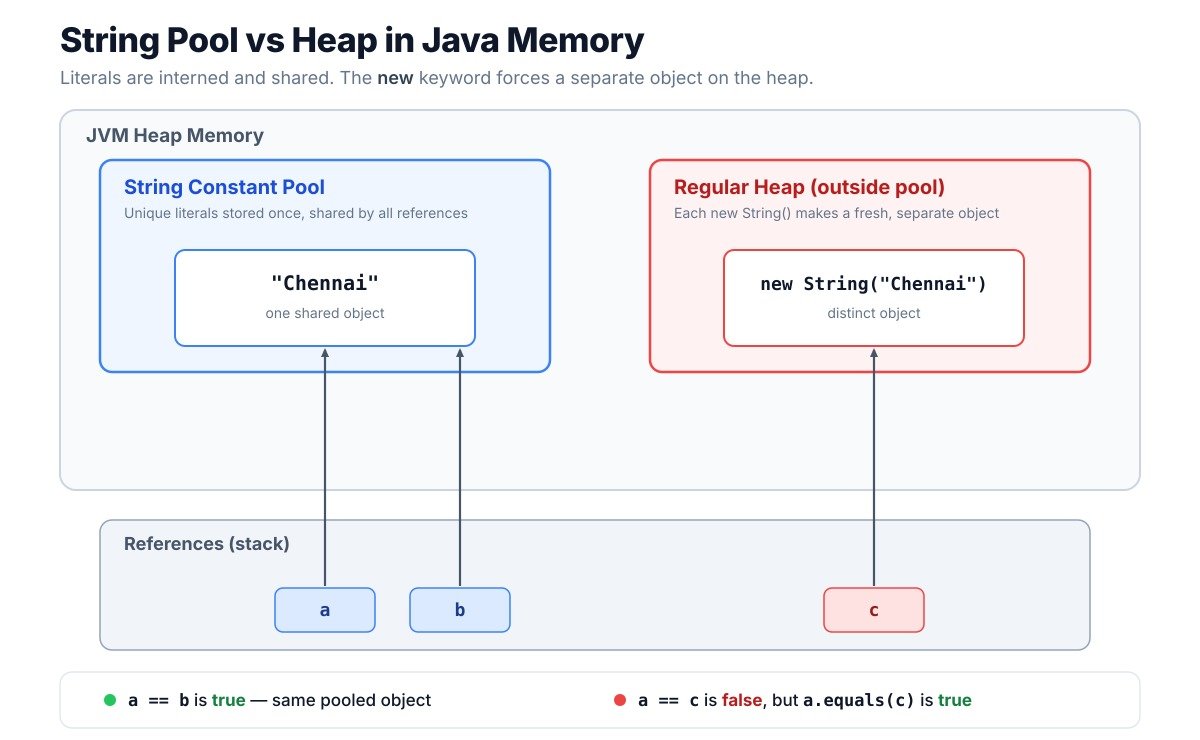
This is why new String() is almost always a mistake in normal code. You pay for an extra object and gain nothing.
String literal = "Pune";             // pooled, shared
String created = new String("Pune"); // new heap object, not shared

System.out.println(literal == created);           // false
System.out.println(literal == created.intern());  // true
When the JVM reads new String("Pune"), it first ensures the literal "Pune" is in the pool, then copies it into a new heap object. That is why people say this line can create two objects. The intern() call lets you fetch the pooled version back if you really need reference equality.
Interview insight: Interviewers ask when new String() is ever justified. One honest answer is almost never, though historically it was used to force a copy so a substring would not pin a large backing array. That reason disappeared after Java 7, which brings us to the next question.
Answer – The substring() method returns a portion of a String. The important part for interviews is how it stored that portion in memory, because the behaviour changed in Java 7. Before Java 7, a substring shared the same character array as the original String and just kept an offset and a length. From Java 7 onward, substring copies the needed characters into a brand new array.
That old sharing design caused a subtle memory problem. If you pulled a tiny substring out of a very large String, the small substring kept the entire large array alive in memory, because it still pointed to it.
// Conceptual view of the old pre-Java 7 problem
String huge = loadOneMegabyteOfText();   // 1 MB backing array
String tiny = huge.substring(0, 5);      // only 5 chars needed

// Pre Java 7: 'tiny' still referenced the full 1 MB array
// Java 7+:   'tiny' owns a small 5-char array, big one can be freed
The fix shipped in Java 7 Update 6. Now every substring owns its own small array, so the large original can be garbage collected once you drop its reference. The trade-off is that each substring call now copies characters, which costs a little time and memory up front. For almost all code, that trade-off is well worth it.
Interview insight: This is a classic senior-level trap. If someone claims substring leaks memory, you can confidently say that was true before Java 7, but modern substring copies the array and does not pin the parent anymore.
Answer – StringBuilder is preferred in loops because it is mutable and not synchronised, so appending is cheap and fast. Using plain String concatenation inside a loop creates a fresh String on every pass, which wastes memory and slows the JVM down. StringBuffer does the same mutable job as StringBuilder but adds synchronisation, so it is only relevant when multiple threads share and modify the same buffer.
In day-to-day code, that shared-buffer situation is rare. Most of the time, a buffer is built inside one method by one thread, so StringBuilder is the right default.
// Single thread building a report line: use StringBuilder
StringBuilder report = new StringBuilder();
report.append("Txn:").append(txnId)
      .append(" Amt:").append(amount);

// Shared across threads and mutated by each: StringBuffer is safer
StringBuffer sharedLog = new StringBuffer();
The chained append calls show another nice feature. Each append returns the same builder, so you can link calls together and keep the code readable. For the vast majority of concatenation work, StringBuilder wins on speed with no downside. One extra tip is to size the builder up front with new StringBuilder(256) when you roughly know the final length, which avoids internal array resizing.
Interview insight: A good answer also mentions that synchronisation in StringBuffer is not free. Even single-threaded use pays the lock cost, so never pick StringBuffer unless genuine thread sharing exists.
Answer – The hashCode() of a String is computed from its characters using a fixed formula. Each character contributes to the result, so two Strings with the same text always produce the same hash code. And yes, String caches its hash code. After the first computation, the value is stored in a private field and simply returned on later calls.
Caching is safe precisely because Strings are immutable. The characters never change, so the hash can never go stale.
String ref = "NEFT";
int h1 = ref.hashCode();  // computed and cached internally
int h2 = ref.hashCode();  // returned from the cached field, not recomputed
// h1 == h2 always
The formula Java uses is s[0]*31^(n-1) + s[1]*31^(n-2) + ... + s[n-1]. The number 31 is chosen because it is an odd prime, and multiplying by 31 is fast for the JVM to optimise, since 31 * x becomes (x << 5) - x. You do not need to memorise the formula, but knowing its shape and why 31 is used makes a strong impression.
Interview insight: One edge case worth mentioning is that an empty String has a hash code of 0, and so does any String whose characters happen to produce 0. So the cached value 0 can trigger a recompute, though in practice this is a tiny detail.
Answer – Text blocks are multi-line String literals written between triple quotes. They became a standard feature in Java 15. The problem they solve is ugly multi-line text. Before text blocks, writing JSON, SQL, or HTML inside Java meant escaping every quote and joining lines with \n and +, which was painful to read and easy to get wrong.
With text blocks, you write the text almost exactly as it looks, and Java preserves the line breaks for you.
// Old way: escapes and plus signs everywhere
String json1 = "{\n" +
    "  \"bank\": \"HDFC\",\n" +
    "  \"ifsc\": \"HDFC0001234\"\n" +
    "}";

// Text block: clean and readable
String json2 = """
    {
      "bank": "HDFC",
      "ifsc": "HDFC0001234"
    }
    """;
The second version is far easier to read and maintain. Notice there are no escaped quotes and no manual newlines. Java also strips the common leading whitespace based on where you place the closing triple quote, so the indentation stays tidy. For anyone who writes a lot of embedded SQL or JSON, text blocks are a genuine quality-of-life win.
Interview insight: A common question is whether a text block creates a different type. It does not. A text block is still a plain String, just with nicer syntax, so everything you know about String still applies.
Answer – The String class is declared final, which means you cannot extend it with a subclass. This is a deliberate design choice that works hand in hand with immutability. If you could subclass String, someone could write a malicious subclass that overrides methods and breaks the immutability guarantee. Making the class final slams that door shut.
So immutability and finality are two separate protections that reinforce each other. Immutability stops the value from changing. Finality stops anyone from creating a mutable or misbehaving version of String through inheritance.
// This is illegal and will not compile
// class EvilString extends String {  // error: cannot inherit from final String
//     ...
// }
There is a performance angle too. Because String is final, the JVM knows a String reference always behaves exactly like the real String class. That certainty lets the compiler and runtime apply optimisations they could not safely apply if String could be subclassed. The security benefit, though, is the main reason, especially since Strings carry things like class names, file paths, and network addresses.
Interview insight: A sharp interviewer may ask whether final and immutable mean the same thing. They do not. Final applies to the class and blocks inheritance, while immutable describes the object’s state, which never changes after construction.
Answer – Since Java 7, you can use a String in a switch statement. Under the hood, the compiler does not magically compare Strings directly. It uses the String’s hashCode() first, then confirms with equals(). So a String switch is really a two-step process, a fast hash lookup followed by a safe content check.
Why both steps? A hash code narrows down the candidate case quickly, but two different Strings can share a hash code. The equals() call then confirms the exact match, so the switch never picks the wrong branch.
String mode = "UPI";
switch (mode) {
    case "NEFT": handleNeft(); break;
    case "UPI":  handleUpi();  break;  // matched via hashCode, confirmed via equals
    default:     reject();
}
The compiler turns this into a hidden switch on mode.hashCode(), and inside each matching bucket it calls equals() to be sure. That is why a String switch is efficient and still correct. It also means the String you switch on must not be null, or you get a NullPointerException, so always guard against null before the switch.
Interview insight: The neat takeaway is that a String switch is not slow string matching. It is a hashCode-based jump plus an equals confirmation, which is why it needs a non-null value.
These final questions reach into JVM internals, security, and tricky edge cases. Senior and architect interviews often live here, so take your time with them. These are also the answers where your real-world experience shines through, so add a line from your own projects wherever you can.
Answer – Up to Java 8, a String stored its characters in a char[], where every character took two bytes. Compact Strings, introduced in Java 9, changed that internal storage to a byte[] plus a small flag that records the encoding. The flag, called the coder, says whether the bytes use Latin-1 with one byte per character, or UTF-16 with two bytes per character.
The point is memory savings. Most real-world text, such as names, codes, and IDs, fits entirely within Latin-1. For that text, the new layout uses half the bytes it used before.
// Conceptual: how the JVM picks the encoding
String code = "HDFC0001234"; // all Latin-1, stored 1 byte per char
String euro = "Price: 100€";  // euro sign forces UTF-16, 2 bytes per char
When every character fits in Latin-1, the String uses the compact one-byte layout. The moment one character falls outside Latin-1, like the euro sign, the whole String switches to the two-byte UTF-16 layout. This happens automatically, so you write no special code. In a service that caches millions of product names, getting close to half that memory back is a real benefit.
Interview insight: The feature is on by default, and you can disable it with the JVM flag -XX:-CompactStrings. But turning it off rarely helps unless your text is almost all non-Latin-1.
Answer – The intern() method pushes a String into the pool and returns the pooled reference. If an equal String is already pooled, you get that existing one. If not, your String is added, and its reference is returned. This lets you force reference equality for Strings built at runtime, which can save memory when you have many duplicate values.
Since Java 7, the string pool lives in the regular heap, not in the old PermGen space. That matters for garbage collection, because pooled Strings that are no longer referenced can now be collected like normal objects.
String a = new String("UPI").intern(); // returns the pooled "UPI"
String b = "UPI";                        // the pooled "UPI"
System.out.println(a == b);              // true
Interning sounds like a free optimisation, but it needs care. Interning a huge number of unique Strings fills the pool and can hurt performance, because the pool is a hash table that the JVM must manage. So intern deliberately, usually for a bounded set of repeated values, not for every String you create.
Interview insight: The follow-up I often hear is where the pool lives. The correct modern answer is the heap since Java 7, which moved it out of PermGen and made pooled Strings eligible for normal garbage collection.
Answer – The behaviour of the + operator changed under the hood in Java 9. Before Java 9, the compiler translated + concatenation into a chain of StringBuilder append calls. From Java 9 onward, thanks to JEP 280, the compiler emits an invokedynamic instruction that hands the work to a runtime helper called StringConcatFactory. The source code looks identical, but the generated bytecode is different.
Why the change? The new approach lets the JVM choose the most efficient concatenation strategy at runtime, and improve it in future releases, without recompiling your code.
String branch = "Hyderabad";
int count = 42;
String line = branch + " processed " + count; // one source line

// Pre Java 9 bytecode: new StringBuilder().append(...).append(...).toString()
// Java 9+ bytecode:    invokedynamic -> StringConcatFactory picks the strategy
So the same line you write today is faster on newer JVMs, with no change on your side. This is a good example of how the platform keeps improving under a stable API. For simple concatenation, you can trust + on modern Java. For loops, as covered earlier, still prefer an explicit StringBuilder.
Interview insight: The neat takeaway for interviews is that + is not naive anymore. On Java 9 and later, it is backed by invokedynamic, so it adapts to whatever the JVM decides is best.
Answer – For passwords and secret keys, a char[] is safer than a String. The reason comes straight from immutability. A String cannot be changed or cleared, so once a password sits in a String, it stays in memory until garbage collection decides to reclaim it. A char[], on the other hand, can be overwritten the moment you are done with it.
In a payments or banking system, that window matters. If the JVM crashes and dumps its heap, or an attacker reads memory, a lingering password String is a real exposure. Wiping the array shrinks that risk.
char[] password = readPassword();
try {
    authenticate(password);
} finally {
    java.util.Arrays.fill(password, '\0'); // wipe it right after use
}
There is a second reason too. A String might get interned or logged by accident, and then the secret sits in the pool or in a log file. A char[] does not go into the string pool and does not print anything useful by default. This is exactly why the standard Console.readPassword() method returns a char[] and not a String.
Interview insight: This question tests security awareness. The strong answer names both points, that you can wipe a char[] after use, and that a String may linger in memory, in the pool, or in logs.
Answer – String deduplication is a JVM feature that saves memory by sharing the backing arrays of duplicate Strings. Many applications hold thousands of copies of the same text, such as repeated status values or country codes. With deduplication turned on, the G1 collector spots Strings that hold the same characters and points them at one shared character array, even though they are separate String objects.
The key detail is that it deduplicates the internal array, not the String objects themselves. The objects stay separate, but they stop each holding their own copy of identical data.
// Enable it with a JVM flag when running on G1
// java -XX:+UseStringDeduplication -XX:+UseG1GC MyApp

List<String> statuses = new ArrayList<>();
for (int i = 0; i < 1_000_000; i++) {
    statuses.add(new String("SETTLED")); // many copies of the same text
}
// G1 can collapse their backing arrays into one shared array
This is different from interning. Interning is something you call in code, and it shares whole String objects in the pool. Deduplication is automatic, runs in the background during garbage collection, and shares only the character arrays. For a long-running service with lots of repeated text, it can quietly reclaim a surprising amount of heap.
Interview insight: A good answer separates deduplication from interning clearly. Interning is manual and pools whole objects, while deduplication is automatic G1 work that merges the backing arrays.
Answer – A naive reverse that swaps characters one by one breaks on certain Unicode characters. The reason is that some characters, like many emoji, are stored as two char values called a surrogate pair. If you reverse at the char level, you split that pair and corrupt the character. The correct approach reverses while keeping surrogate pairs together.
The easiest reliable way is StringBuilder.reverse(), because it is surrogate-aware and keeps the pairs intact.
String text = "Pay😀Now";

// StringBuilder.reverse() handles surrogate pairs correctly
String ok = new StringBuilder(text).reverse().toString();

// A manual char-by-char swap would split the emoji and corrupt it
Here the emoji is a single logical character made of two char values. StringBuilder.reverse() knows this and moves the pair as a unit, so the emoji survives the reversal. If you ever need to count real characters rather than char values, use text.codePointCount(0, text.length()), which counts code points, not raw chars.
Interview insight: This question tests whether you know that a Java char is not always a full character. The key phrase to drop is code point, and the key tool is StringBuilder.reverse for correct surrogate handling.
Answer – The String.split() method takes a regular expression, and compiling that regex has a cost. For a one-off split, the cost is tiny and nobody cares. But when you split millions of large Strings in a tight loop, that repeated regex work adds up and becomes a real bottleneck. The key insight is that split() recompiles the pattern on every single call.
In high-throughput code, such as parsing a large SFTP file of transaction records, this repeated compilation is wasteful. The fix is to compile the pattern once and reuse it.
// Slow in a hot loop: recompiles the regex every call
for (String row : millionRows) {
    String[] parts = row.split(",");
}

// Fast: compile once, reuse the Pattern
Pattern comma = Pattern.compile(",");
for (String row : millionRows) {
    String[] parts = comma.split(row);
}
By hoisting Pattern.compile(",") out of the loop, you compile the regex a single time and reuse it for every row. In a parsing job I worked on, this one change noticeably cut processing time. For a plain single-character delimiter, another option is to avoid regex entirely and scan with indexOf, which is even faster.
Interview insight: The senior-level point here is that split() hides a regex compile. Mention that you would reuse a compiled Pattern in hot paths, and the interviewer sees that you think about performance, not just correctness.
Work through these alongside the String questions above, and you will walk into your next interview ready for whatever the panel asks about text handling in Java.