Keywords and Identifiers in Java: A Simple Beginner’s Guide
-
Last Updated: July 18, 2026
-
By: javahandson
-
Series

Learn keywords and identifiers in Java the easy way. See the full keyword list, naming rules, camelCase vs PascalCase conventions, and common beginner mistakes.
When you write your first Java program, you name a lot of things. You name variables, methods, and classes. Some words you pick yourself. Others are already taken by the language.
Keywords and identifiers in Java sit right at the center of this. A keyword is a word Java has reserved for itself. An identifier is a name you create for your own stuff.
Mix these two up, and the compiler complains fast. So it helps to know which words belong to Java and which ones you get to choose.
In this guide, we start with keywords. Then we move on to identifiers and the rules for naming them. Along the way, you’ll see plenty of tiny examples.
Here’s what we’ll walk through:
You don’t need any deep Java background. If you’ve written even one small program, you’re ready to follow along.
One quick note before we start. This topic feels tiny, but it shapes everything you write later. Clean names and correct keyword use save you hours of confusing errors down the road.
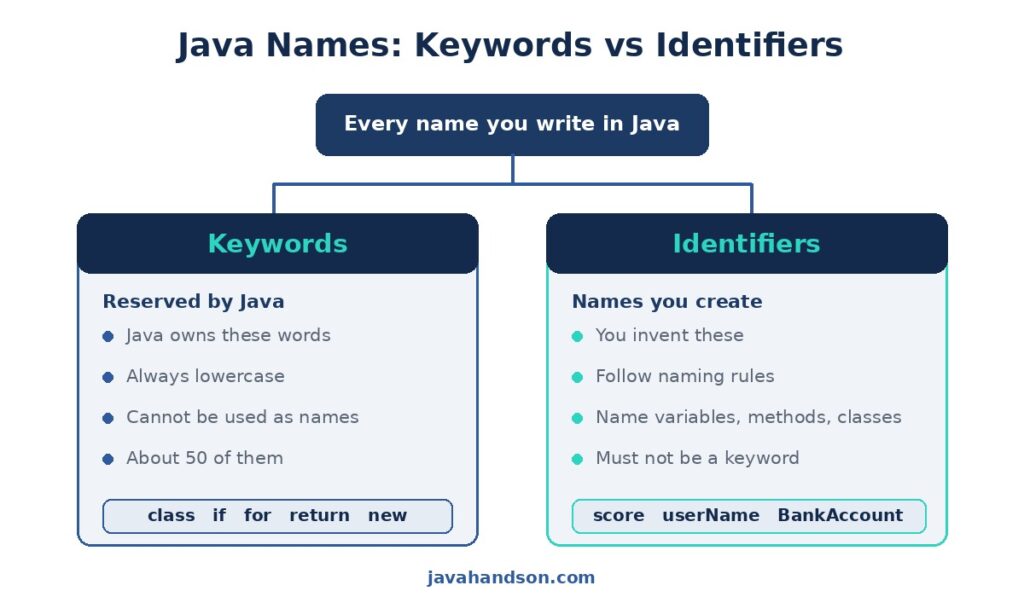
A keyword is a word that Java already owns. The language uses it for a special job, so you can’t grab it for your own names.
Think of words like class, if, and return. Each one tells the compiler to do something specific. You simply can’t rename them or reuse them.
Every keyword is reserved. Java holds onto it for good. You can’t use it as a variable, method, or class name.
Try to name a variable class, and the compiler stops you cold. It reads class as a signal to start a class definition, not as a name.
int class = 5;   // ERROR: 'class' is a keyword
int number = 5;  // OK: 'number' is a normal name
The first line fails right away. The second line works fine, because number is a name you’re free to pick.
Why does Java lock these words down? Each keyword triggers a fixed action in the compiler. If you could rename them, the compiler would get confused. It couldn’t tell your name apart from its own command. So it keeps them separate.
Here’s a handy detail. Every Java keyword is written in lowercase. There’s no keyword with a capital letter in it.
So if, else, and while are keywords. But If, Else, and While are not. Java treats them as ordinary names you could actually use.
This is why Java is case-sensitive. The word public is a keyword. The word Public is just a plain identifier, and Java sees them as two different things.
Some words feel like keywords but aren’t, strictly speaking. Java calls them literals. The values true, false, and null fall into this group.
You can’t use these three as names either. Still, they aren’t real keywords. They stand for fixed values instead of language commands.
For everyday coding, you can treat them like reserved words. Just remember you can’t name a variable true or null.
Java has around 50 keywords. That sounds like a lot to memorize. Good news: you won’t cram them all at once.
Most of these you’ll pick up naturally as you code. Below, we group them by their job so they’re easier to make sense of.
These describe the primitive types that hold basic values. You’ll type them constantly, so they’ll stick fast.
You already met most of these on day one. int and boolean show up in almost every program.
There’s also the void keyword, which sits near this group. It isn’t a data type, but it goes where a type would. You write it when a method returns nothing at all.
These steer the path your program takes. They decide what runs, what repeats, and what gets skipped.
Loops and conditions lean on these words heavily. You’ll use if and for more than almost anything else.
These build the object-oriented side of Java. They shape your classes and how they relate to each other.
Don’t stress about all of these now. You’ll grow into them as you learn about objects and inheritance.
These set who can see your code and how it works. They act like labels stuck onto your fields and methods.
The first three come up early. The advanced ones wait until you touch threads or serialization.
These deal with things going wrong. When your code hits a problem, these words help you catch it and recover.
You’ll meet these once you start reading files or parsing input. For now, just know they group together around errors.
Two small words help you organize code across files. They come up in almost every real project.
You’ve probably typed import already without thinking about it. That line at the top of a file uses this exact keyword.
Here’s the whole set in one place. Bookmark it, but please don’t try to memorize it in one sitting.
| Group | Keywords |
|---|---|
| Data types | byte, short, int, long, float, double, char, boolean |
| Control flow | if, else, switch, case, default, for, while, do, break, continue, return |
| Classes/objects | class, interface, enum, extends, implements, new, this, super, abstract, final, instanceof |
| Access/modifiers | public, private, protected, static, final, synchronized, volatile, transient, native, strictfp |
| Exceptions | try, catch, finally, throw, throws |
| Package/import | package, import |
| Others | void, assert, const*, goto* |
Notice the stars on const and goto. Java reserves both words but never actually uses them. They’re kept off-limits so nobody names a variable with them.
These two are called reserved but unused. Java holds them back yet gives them no job. You still can’t use either as a name.
Why keep them? The designers wanted room to add features later without breaking old code. So far, they never have.
An identifier is a name you invent. You use it to label a variable, a method, a class, or a package. It’s how you refer to things in your code.
Take the line int score = 10;. Here, score is an identifier. You made it up, and now it points to the value 10.
Every custom name in your program is an identifier. Variable names, method names, class names — all of them count.
int age = 25;              // 'age' is an identifier
String firstName = "Sam";   // 'firstName' is an identifier
void printReport() { }      // 'printReport' is an identifier
See how each name describes what it holds or does? Good identifiers read almost like plain English.
A clear name saves you time later. Read x = x * 2 and you’ll wonder what x means. Read price = price * 2 and it clicks instantly.
So pick names that explain themselves. Future you, reading this code in six months, will be grateful.
Identifiers appear all over your programs. Once you start looking, you’ll see them everywhere.
Every one of these is a name you or another coder created. None of them are keywords. That’s the line that splits the two groups.
Java has firm rules about identifier names. Break one, and your code won’t compile. Let’s go through them one by one.
An identifier can contain letters, digits, the dollar sign, and the underscore. That’s the full set of legal characters.
Most of the time you’ll stick to letters. The dollar sign is usually left for tools that generate code, so skip it in your own work.
Here’s a big one. A name can’t start with a digit. It has to begin with a letter, an underscore, or a dollar sign.
int total5 = 100;   // OK: digit is not first
int _count = 5;     // OK: underscore first
int 5total = 100;   // ERROR: can't start with a digit
The last line fails because it opens with 5. Move the digit anywhere else, and the name becomes valid.
You can’t put a space inside an identifier. Java would read a space as the end of one name and the start of something else.
So first name with a space is invalid. To join words, glue them together and capitalize, like firstName. We’ll cover that style soon.
We said this before, but it’s worth repeating. You can’t use any keyword as an identifier. Words like class, new, and return are off-limits.
The compiler already gave those words a meaning. Trying to reuse one just confuses it, and you get an error.
Java cares about upper and lower case. The names age, Age, and AGE are three separate identifiers, not one.
int age = 20;
int Age = 30;
System.out.println(age);  // prints 20
System.out.println(Age);  // prints 30
Both variables live side by side without a clash. Handy, sure, but it also causes bugs when you mistype a name. Watch your capitals.
Let’s put the rules together. Here are some names side by side, valid next to invalid.
| Identifier | Valid? | Reason |
|---|---|---|
| userName | Yes | Letters only, clean and clear |
| _temp | Yes | Underscore start is allowed |
| count1 | Yes | Digit is not first |
| total$ | Yes | Dollar sign is legal |
| 1stPlace | No | Starts with a digit |
| first name | No | Contains a space |
| class | No | It’s a reserved keyword |
| my-var | No | Hyphen is not allowed |
Run down that list a couple of times. Once the pattern sticks, you’ll spot bad names at a glance.
Rules tell you what Java allows. Conventions tell you what good developers actually do. They aren’t enforced by the compiler, yet everyone follows them.
Why bother? Because shared conventions make code easy to read across teams. Your names look like everyone else’s, so nobody has to guess.
For variables and methods, use camelCase. Start with a lowercase letter. Then capitalize the first letter of each new word.
int itemCount = 0;
String userEmail = "sam@mail.com";
void calculateTotal() { }
The name reads like a little hump-backed word. Each capital marks where a new word begins, which keeps things readable.
For class names, use PascalCase. It’s like camelCase, but the very first letter is capital too.
class BankAccount { }
class StudentRecord { }
class OrderProcessor { }
This little difference helps a lot. A capital first letter tells you it’s a class. A lowercase one tells you it’s a variable or method.
For constants, use all capitals with underscores between words. A constant is a value that never changes, marked with static final.
static final int MAX_USERS = 100;
static final double PI = 3.14159;
static final String APP_NAME = "MyApp";
The shouting capitals send a clear signal. When you see MAX_USERS, you know right away it’s a fixed value you shouldn’t reassign.
Short names save typing but cost you clarity. A name like n tells you nothing. A name like numberOfStudents tells the whole story.
A slightly longer name is a small price. The clarity you gain pays off every time someone reads the code, including you.
For a true-or-false variable, name it like a question. Words like isReady, hasAccess, or canEdit make the intent obvious.
boolean isActive = true;
boolean hasPermission = false;
boolean canDelete = true;
Read one aloud, and it sounds like a yes-or-no question. That tiny habit makes your if-conditions much easier to follow.
Here’s the whole naming style in one small table. Keep it nearby until it becomes second nature.
| What you’re naming | Style | Example |
|---|---|---|
| Variable | camelCase | totalPrice |
| Method | camelCase | getUserName() |
| Class | PascalCase | CustomerOrder |
| Interface | PascalCase | Runnable |
| Constant | UPPER_CASE | MAX_SIZE |
| Package | lowercase | com.myapp.utils |
Follow these, and your code fits right in with the wider Java world. That’s the whole point of a convention.
Let’s tie it all together in one small program. We’ll build a tiny class that tracks a bank account.
Here’s the code. Read it once, then we’ll pull apart the naming choices below.
class BankAccount {
    static final double MIN_BALANCE = 100.0;  // constant
    private double balance;                    // variable

    void deposit(double amount) {              // method
        balance = balance + amount;
    }

    double getBalance() {
        return balance;
    }
}Look at the names, and you’ll see every convention at work:
Every name here follows a keyword rule and a convention. None of them clash with reserved words, and each one reads clearly.
A stranger could read this class and follow it fast. The names carry meaning, and the styles hint at each thing’s role.
That’s the payoff of good keyword sense and clean identifiers. Your code explains itself, with far fewer comments needed.
Want to lock this in? Try renaming a few things and watch what breaks.
Playing with small breaks like these teaches the rules fast. The compiler becomes your quick, honest tutor.
A handful of slip-ups trip up almost every beginner. Let’s name them so you can steer clear.
This is the classic one. You reach for a natural word like class or new, and the compiler rejects it. Pick a different name instead, like className or newItem.
Names like 2ndPlace or 100days fail every time. Flip them around to placeTwo or days100, and they compile cleanly.
You write userName in one spot and username in another. Java sees two different names, and your value seems to vanish. Keep your capitals consistent.
A name like user name or user-name won’t work. Only letters, digits, underscore, and dollar sign are allowed. Join words with camelCase instead.
Names like a, tmp, or x1 compile fine but confuse everyone later. They don’t break the build, yet they break readability. Spell out what the value really is.
Sometimes you’ll name a class in camelCase or a constant in lowercase. The code still runs, so it feels harmless. Over a big project, though, the mess adds up.
Stick to one style per kind of name. PascalCase for classes, camelCase for variables, UPPER_CASE for constants. That steady habit keeps a whole codebase readable.
A: A keyword is a word Java reserves for itself, like class or return, and you can’t use it as a name. An identifier is a name you create for your own variables, methods, and classes, like score or userName.
A: Java has around 50 keywords. Two of them, const and goto, are reserved but never actually used by the language.
A: No. An identifier must start with a letter, an underscore, or a dollar sign. A digit can appear anywhere except as the first character, so total5 is fine but 5total fails.
A: Not technically. They are literals, not keywords. Even so, you can’t use them as identifiers, so you can treat them like reserved words in everyday coding.
A: Yes. Java treats age, Age, and AGE as three separate names. Keeping your capitalization consistent avoids bugs where a value seems to disappear.
A: Use camelCase for variables and methods, PascalCase for class names, and UPPER_CASE with underscores for constants. Packages are written in lowercase. These aren’t enforced by the compiler, but every Java developer follows them.
A: Yes, both are legal. The underscore is common in constant names, while the dollar sign is usually left for tool-generated code, so it’s best to avoid it in code you write by hand.
A: Because class and new are keywords with a fixed job in the compiler. Reusing one confuses the compiler, since it can’t tell your name apart from its own command, so it throws an error.
Let’s recap the main ideas. A keyword is a reserved word that Java owns, so you can never use it as a name.
An identifier is a name you create for your variables, methods, and classes. It must start with a letter, underscore, or dollar sign, and it can’t contain spaces.
On top of the rules, conventions guide good naming. Use camelCase for variables and methods, PascalCase for classes, and UPPER_CASE for constants.
One more thing worth holding onto. Java is case-sensitive, so age and Age are two different names. Keep your capitals steady, and you’ll dodge a whole class of silly bugs.
Get these habits early, and the rest of Java feels smoother. Clean names and correct keyword use are the quiet foundation of readable code.