Spring AI Advisors: What They Are & Built-in Advisors Explained
-
Last Updated: October 2, 2026
-
By: javahandson
-
Series

Learn Spring AI Advisors: how the advisor chain and order work, every built-in advisor with code, and how to write your own custom advisor.
Spring AI Advisors are one of the most useful features in the whole framework. Yet many beginners skip them. They just call the model, read the answer and move on. That works for a demo. However, a real app soon needs logging, chat memory, safety checks and document search around every call.
In the earlier articles of this series, we built a ChatClient, connected multiple chat models and read responses in different ways. Now we will add a smart layer around each call. That layer is the advisor chain.
By the end of this guide, you will know:
All code here is checked against Spring AI 2.0.1, the latest stable release at the time of writing. So let us get started.
An advisor is a small component that wraps around every call to the AI model. Spring AI Advisors are simply a set of such components. It can look at the request before it goes to the model. It can also look at the response when it comes back.
In simple words, advisors are interceptors for your prompt flow. If you have used Servlet filters or Spring AOP, you already know the idea. Spring AI just applies the same pattern to LLM calls.
With advisors, you can:
Think about a passport check at an airport. Your bag goes through several counters before boarding. One counter checks your ticket. Another scans your bag. A third stamps your passport.
Each counter does one job. Also, none of them cares about the other counters. Advisors work in the same way. Each one does one small job on the request, then hands it to the next advisor.
On the way back, the response passes the same counters in reverse. So an advisor can also check or change what the model said.
Here is the basic flow:
User -> ChatClient -> [Advisors] -> LLM -> Response -> [Advisors] -> User
The ChatClient builds a request from your prompt. Next, that request passes through the advisor chain. The last link in the chain calls the model. After that, the response travels back through the same advisors.
You can, of course. But the code soon gets messy. Imagine twenty endpoints that each need logging, memory and safety checks. You would copy the same lines everywhere.
Advisors solve this. You write the logic once and attach it to the ChatClient. As a result, every call gets the same behaviour, and your controllers stay clean.
| 💡 Interview Insight A common question is how advisors differ from Spring AOP. Both wrap a call with before and after logic. However, advisors understand AI concepts. They work with prompts, messages, chat memory and token usage. They also run in a clear order that you control with getOrder(). So advisors are AOP built for LLM calls. |
Let us now open the box and see what happens inside.
Spring AI uses two main objects in the chain:
Both objects also carry a small map called the advise context. Think of it as a shared notebook. One advisor can write a value into it, and a later advisor can read that value.
For example, the RAG advisors store the retrieved documents in this context. Your code can read them later from the response.
Here is a detail most tutorials skip. You never call the model yourself inside the chain. Instead, Spring AI adds one final advisor for you automatically.
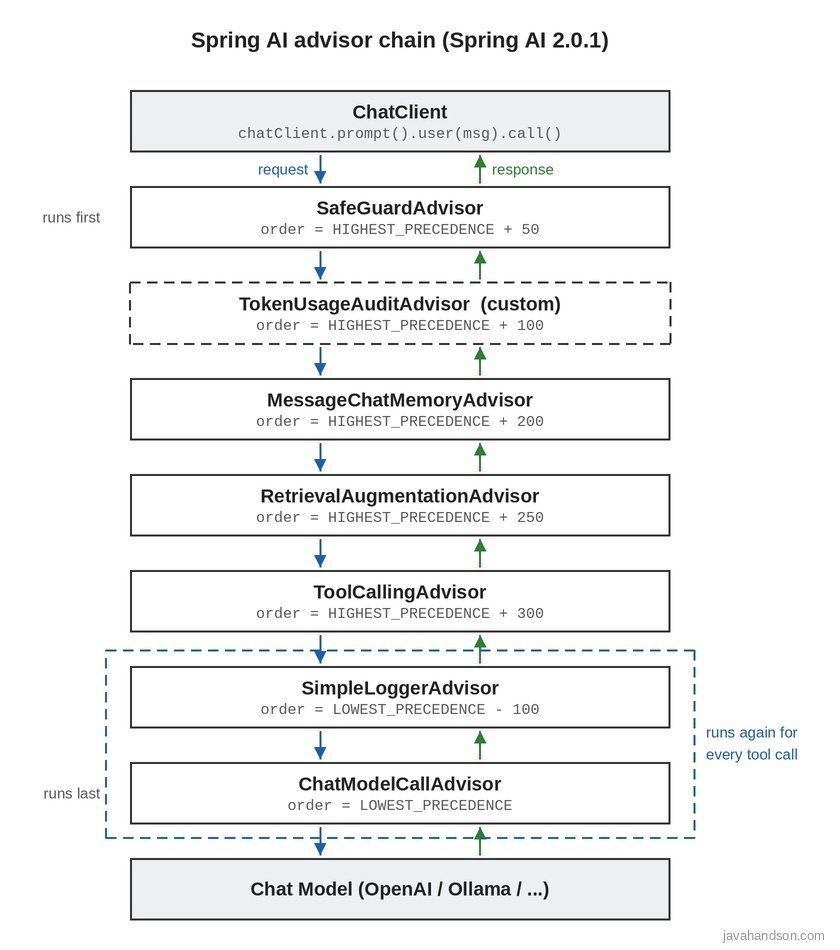
In Spring AI 2.0.1, this is ChatModelCallAdvisor for normal calls. For streaming, it is ChatModelStreamAdvisor. Its order is Ordered.LOWEST_PRECEDENCE, so it always runs last.
That means every advisor you add sits between your code and this final advisor.
Here is the full flow, step by step:
Step three is powerful. For example, a safety advisor can stop a bad prompt before it costs you a single token.
Order is the part that confuses most developers. So let us go slowly here.
Every advisor has a getOrder() method. Spring AI sorts the chain by this number. The rule is simple: the lower value runs first on the request.
Spring’s Ordered interface gives two handy constants:
Ordered.HIGHEST_PRECEDENCE is the smallest int value. An advisor near it runs first.Ordered.LOWEST_PRECEDENCE is the largest int value. An advisor near it runs last.Now comes the twist. The chain works like a stack. The advisor that sees the request first will see the response last.
Let me show this with three advisors:
Request  ->  A (order 10)  ->  B (order 20)  ->  C (order 30)  ->  LLM
Response <-  A             <-  B             <-  C             <-  LLM
So advisor A is the outer layer. It touches the request first and the final answer last. In contrast, advisor C sits closest to the model.
What if two advisors have the same order? Then the docs say their order is not guaranteed. So always give important advisors different values.
I checked the default order of each advisor in the 2.0.1 source code. Here they are:
| Advisor | Default order | Where it sits |
|---|---|---|
| SafeGuardAdvisor | 0 | Middle |
| SimpleLoggerAdvisor | 0 | Middle |
| QuestionAnswerAdvisor | 0 | Middle |
| RetrievalAugmentationAdvisor | 0 | Middle |
| MessageChatMemoryAdvisor | HIGHEST_PRECEDENCE + 200 | Near the start |
| ToolCallingAdvisor | HIGHEST_PRECEDENCE + 300 | Near the start |
| StructuredOutputValidationAdvisor | LOWEST_PRECEDENCE – 2000 | Near the end |
| ChatModelCallAdvisor | LOWEST_PRECEDENCE | Always last |
Notice something here. Four common advisors share the value 0. That is fine for a demo. But in a real app, you should set clear values yourself. We will do exactly that in section 9.
There is one more layer to understand. In Spring AI 2.0, the ToolCallingAdvisor runs the tool calling loop. It calls the rest of the chain again for every tool round.
Therefore, any advisor with an order higher than HIGHEST_PRECEDENCE + 300 runs once per tool round. An advisor with a lower order runs only once per user request. Keep this in mind when you place logging, auditing or RAG advisors.
| 💡 Interview Insight Interviewers like to ask: “If an advisor has the highest precedence, when does it see the response?” The answer is: last. The chain behaves like a stack. The first advisor to touch the request is the last one to touch the response. If you need to be first on both sides, use two separate advisors and share data through the advise context. |
You can attach advisors in two places. Let us look at both.
The Spring AI docs recommend registering advisors when you build the client. Then every request gets them automatically.
@Bean
ChatClient chatClient(ChatClient.Builder builder) {
    return builder
            .defaultAdvisors(new SimpleLoggerAdvisor())
            .build();
}
The defaultAdvisors() method accepts one or more advisors, or a List. This is the right place for cross-cutting concerns like logging and memory.
Sometimes only one endpoint needs an advisor. In that case, add it on the request itself:
String answer = chatClient.prompt()
        .advisors(new SimpleLoggerAdvisor())
        .user(message)
        .call()
        .content();
Per-request advisors join the default ones. Spring AI then sorts the whole chain by order.
Advisors often need some data for each call. The memory advisor, for instance, needs to know which conversation this is. You pass such values with param():
String answer = chatClient.prompt()
        .advisors(a -> a.param(ChatMemory.CONVERSATION_ID, username))
        .user(message)
        .call()
        .content();
These parameters land in the advise context. Each advisor then reads the keys it cares about.
As your app grows, one ChatClient bean can collect too many dependencies. Spring AI offers ChatClientBuilderCustomizer for this. Each customizer owns one concern.
@Bean
ChatClientBuilderCustomizer loggingCustomizer() {
    return builder -> builder.defaultAdvisors(new SimpleLoggerAdvisor());
}

@Bean
@ConditionalOnProperty(name = "audit.token-usage.enabled", havingValue = "true")
ChatClientBuilderCustomizer auditCustomizer() {
    return builder -> builder.defaultAdvisors(new TokenUsageAuditAdvisor());
}
Spring AI applies every customizer to the auto-configured builder. In addition, the conditional bean lets you switch auditing on or off per environment. No code change is needed for that.
Now let us walk through the built-in Spring AI Advisors that ship with version 2.0.1. For each one, I will show what it does and a short code sample.
This is the first advisor most people use. It logs the full request and the full response. As a result, you can see exactly what went to the model.
chatClient.prompt()
        .advisors(new SimpleLoggerAdvisor())
        .user("Tell me a joke")
        .call()
        .content();
You will not see any output yet, though. The advisor logs at DEBUG level. So add this line to application.properties:
logging.level.org.springframework.ai.chat.client.advisor=DEBUG
You can also control what gets logged. The builder accepts two functions and an order:
SimpleLoggerAdvisor logger = SimpleLoggerAdvisor.builder()
        .requestToString(req -> "USER: " + req.prompt().getUserMessage().getText())
        .responseToString(res -> "AI: " + res.getResult().getOutput().getText())
        .order(Ordered.LOWEST_PRECEDENCE - 100)
        .build();
Why the high order? Because then the logger sees the final prompt after memory and RAG have changed it. That is usually what you want while debugging.
A word of caution here. Full prompts may contain personal data. In banking and payments work, raw customer text is normally kept out of production logs. So keep this advisor for local and test environments, or mask the data first.
This advisor blocks a request if the prompt contains a sensitive word. When it finds one, it does not call the model at all. Instead, it returns a polite failure message.
SafeGuardAdvisor safeGuard = SafeGuardAdvisor.builder()
        .sensitiveWords(List.of("password", "salary of"))
        .failureResponse("Sorry, I can't help with that request.")
        .order(Ordered.HIGHEST_PRECEDENCE + 50)
        .build();
A few facts I confirmed in the 2.0.1 source:
That third point matters a lot. The prompt also holds your system message and the chat history. So if a sensitive word appears there, every request gets blocked. We will see how this causes a nasty bug in section 10.
Treat SafeGuardAdvisor as a first, cheap filter. For real protection, combine it with a moderation model or your own custom advisor.
LLMs are stateless. Each call is a fresh start. This advisor gives your app a memory.
Before the call, it loads past messages for the conversation and adds them to the prompt. After the call, it saves the new user message and the AI reply.
@Bean
ChatClient chatClient(ChatClient.Builder builder, ChatMemory chatMemory) {
    return builder
            .defaultAdvisors(MessageChatMemoryAdvisor.builder(chatMemory).build())
            .build();
}
Then pass the conversation ID on every call:
@GetMapping("/chat-memory")
public String chatMemory(@RequestHeader("username") String username,
                         @RequestParam("message") String message) {
    return chatClient.prompt()
            .user(message)
            .advisors(a -> a.param(ChatMemory.CONVERSATION_ID, username))
            .call()
            .content();
}
Spring Boot auto-configures a ChatMemory bean for you. By default, it is a MessageWindowChatMemory that keeps the last 20 messages in memory. You can switch to JDBC, Cassandra, Neo4j, MongoDB or Redis storage when you need persistence.
Long chats create a problem. Sending the whole history on every call wastes tokens and may hit the context window limit.
This advisor stores memory in a vector database instead. On each call, it fetches only the past messages that are relevant to the current question. Then it adds them to the system text.
VectorStoreChatMemoryAdvisor memory =
        VectorStoreChatMemoryAdvisor.builder(vectorStore).build();
It lives in the spring-ai-vector-store-advisor module. It is a good fit for long or knowledge-heavy conversations.
This advisor gives you a simple RAG setup in one line. It searches your vector store with the user’s question. Then it adds the matching text to the prompt as context.
QuestionAnswerAdvisor qaAdvisor = QuestionAnswerAdvisor.builder(vectorStore)
        .searchRequest(SearchRequest.builder()
                .topK(3)
                .similarityThreshold(0.5)
                .build())
        .build();
Its built-in prompt tells the model to answer only from the given context. If the answer is not there, the model should say so. This reduces made-up answers.
You can also filter documents per request. Pass a filter expression through the QuestionAnswerAdvisor.FILTER_EXPRESSION parameter. For example, you could search only the documents of one department.
The docs call this the Naive RAG pattern. It is simple, and for many apps it is enough.
When naive RAG is not good enough, this is the next step. It follows the modular RAG design from the spring-ai-rag module.
Out of the box, it needs only a document retriever:
@Bean
RetrievalAugmentationAdvisor retrievalAugmentationAdvisor(VectorStore vectorStore) {
    return RetrievalAugmentationAdvisor.builder()
            .documentRetriever(VectorStoreDocumentRetriever.builder()
                    .vectorStore(vectorStore)
                    .topK(3)
                    .similarityThreshold(0.5)
                    .build())
            .build();
}
But you can also plug in more steps:
Before this advisor existed, we wrote the vector search, joined the text and stuffed it into a system prompt by hand. Now the controller shrinks to a plain chatClient.prompt().user(message).call().content() call. The advisor does the rest.
This one is new in Spring AI 2.0. It runs the whole tool calling loop inside the advisor chain.
When the model asks for a tool, this advisor runs the tool and sends the result back. It repeats until the model gives a final answer. Because it lives in the chain, other advisors can watch each round.
The best part is that you rarely touch it. ChatClient registers it automatically at order HIGHEST_PRECEDENCE + 300:
String answer = chatClient.prompt("What time is it in Tokyo?")
        .tools(timeTools)   // ToolCallingAdvisor is added for you
        .call()
        .content();
You can switch auto-registration off globally with spring.ai.chat.client.tool-calling.enabled=false. For a single call, use AdvisorParams.toolCallingAdvisorAutoRegister(false) instead.
When you ask for a Java object, the model returns JSON. Sometimes that JSON is broken or misses a field. This advisor validates the JSON against a schema built from your class.
If validation fails, it adds the error to the prompt and asks the model again. By default, it retries up to three times.
StructuredOutputValidationAdvisor validator =
        StructuredOutputValidationAdvisor.builder()
                .outputType(CountryCities.class)
                .maxRepeatAttempts(2)
                .build();
There is an easier route too. The entity() method accepts a spec with validateSchema(), which turns on the same behaviour. Also note that this advisor does not support streaming.
The docs list a ReReadingAdvisor under reasoning advisors. It is based on a research paper about the RE2 technique. The idea is simple: repeat the question so the model reads it twice.
{Input_Query}
Read the question again: {Input_Query}
The reference docs show its full source code as an example. However, I did not find it in the core advisor package of Spring AI 2.0.1. So treat it as a recipe and copy the code into your project. We will write a similar advisor ourselves in section 8.
A few more advisors live in separate modules. The most useful one is SemanticCacheAdvisor from the Redis semantic cache module.
It checks a vector-based cache before calling the model. If a similar question was asked before, it returns the cached answer. Otherwise, it calls the model and stores the new answer. This can cut your LLM bill a lot for FAQ-style apps. I will cover it in detail in a separate article.
| Advisor | Main job | Module |
|---|---|---|
| SimpleLoggerAdvisor | Logs request and response | spring-ai-client-chat |
| SafeGuardAdvisor | Blocks prompts with sensitive words | spring-ai-client-chat |
| MessageChatMemoryAdvisor | Adds chat history as messages | spring-ai-client-chat |
| VectorStoreChatMemoryAdvisor | Adds relevant past messages | spring-ai-vector-store-advisor |
| QuestionAnswerAdvisor | Simple RAG from a vector store | spring-ai-vector-store-advisor |
| RetrievalAugmentationAdvisor | Modular, advanced RAG | spring-ai-rag |
| ToolCallingAdvisor | Runs the tool calling loop | spring-ai-client-chat |
| StructuredOutputValidationAdvisor | Validates JSON and retries | spring-ai-client-chat |
Many tutorials on Spring AI Advisors still show 1.x code. So here are the advisor changes you must know when moving to 2.0.
PromptChatMemoryAdvisor has been removed. It used to put chat history into the system prompt as plain text. Now you should use MessageChatMemoryAdvisor instead. The builder looks the same, so the change is usually one word.
In 1.x, memory advisors fell back to a default conversation ID. That default is gone in 2.0. The .conversationId() builder method is also removed.
Now every call through a memory advisor must pass ChatMemory.CONVERSATION_ID with param(). If you forget it, you get an IllegalArgumentException at runtime.
The default memory order changed from HIGHEST_PRECEDENCE + 1000 to HIGHEST_PRECEDENCE + 200. Why? So that memory sits outside the ToolCallingAdvisor.
As a result, memory now stores only the final user question and the final answer. It no longer saves the tool call messages in between. This is safer, because most memory stores do not support those message types.
spring-ai-advisors-vector-store is now spring-ai-vector-store-advisor.ToolCallAdvisor is now ToolCallingAdvisor.If you are coming from a 1.0 milestone, the names changed even earlier. CallAroundAdvisor became CallAdvisor. StreamAroundAdvisor became StreamAdvisor. Also, AdvisedRequest and AdvisedResponse became ChatClientRequest and ChatClientResponse.
| 💡 Interview Insight A good follow-up question is “Why did Spring AI 2.0 move the tool loop into an advisor?” Because now other advisors can observe and shape every tool round. Logging, auditing and memory can all take part in the loop. Earlier, each ChatModel ran its own hidden loop, so advisors could not see the rounds. |
Built-in Spring AI Advisors cover common needs. But sooner or later, you will want your own. The good news is that it takes very little code.
All advisor interfaces live in the org.springframework.ai.chat.client.advisor.api package:
adviseCall().adviseStream().before() and after().For most custom advisors, BaseAdvisor is the easiest choice. Use CallAdvisor directly when you need full control around the call.
Tokens cost money. So let us log the token count and time taken for every request. We will call it TokenUsageAuditAdvisor.
public class TokenUsageAuditAdvisor implements CallAdvisor {

    private static final Logger log =
            LoggerFactory.getLogger(TokenUsageAuditAdvisor.class);

    @Override
    public ChatClientResponse adviseCall(ChatClientRequest request,
                                         CallAdvisorChain chain) {
        long start = System.currentTimeMillis();

        ChatClientResponse response = chain.nextCall(request);

        long timeTaken = System.currentTimeMillis() - start;
        ChatResponse chatResponse = response.chatResponse();
        if (chatResponse != null) {
            Usage usage = chatResponse.getMetadata().getUsage();
            log.info("Prompt: {}, completion: {}, total: {} tokens, time: {} ms",
                    usage.getPromptTokens(),
                    usage.getCompletionTokens(),
                    usage.getTotalTokens(),
                    timeTaken);
        }
        return response;
    }

    @Override
    public String getName() {
        return "TokenUsageAuditAdvisor";
    }

    @Override
    public int getOrder() {
        return Ordered.HIGHEST_PRECEDENCE + 100;
    }
}
Let me explain the key parts:
chain.nextCall(request) passes control to the next advisor. Everything before it is “before” logic, and everything after it is “after” logic.chatResponse() can be null, so we check it first.There is a bonus in 2.0.1 here. The ToolCallingAdvisor now adds up token usage across all tool rounds. Therefore, this one log line shows the true total for the request.
LLMs do not know today’s date. Let us add it to the system message on every call.
public class CurrentDateAdvisor implements BaseAdvisor {

    @Override
    public ChatClientRequest before(ChatClientRequest request, AdvisorChain chain) {
        String note = "Today's date is " + LocalDate.now() + ".";
        Prompt prompt = request.prompt().augmentSystemMessage(system ->
                system.mutate()
                        .text(system.getText() + System.lineSeparator() + note)
                        .build());
        return request.mutate().prompt(prompt).build();
    }

    @Override
    public ChatClientResponse after(ChatClientResponse response, AdvisorChain chain) {
        return response;
    }

    @Override
    public int getOrder() {
        return 0;
    }
}
Notice that we never call the chain ourselves. BaseAdvisor does that between before() and after(). Also, the request is immutable. So we always build a new one with mutate().
If the prompt has no system message, augmentSystemMessage() creates one for us. That keeps the code short.
Sometimes one advisor needs to pass a value to another. Use the advise context for that. The pattern is the same one the QuestionAnswerAdvisor uses internally:
Map<String, Object> context = new HashMap<>(request.context());
context.put("tenant_id", tenantId);

return request.mutate()
        .context(context)
        .build();
A later advisor can then read request.context().get("tenant_id"). The value also reaches the response context.
If your app uses .stream(), your advisor must implement StreamAdvisor too. Otherwise, it will not run for streaming calls.
BaseAdvisor already handles both modes. In streaming mode, it calls after() only on the final chunk that carries a finish reason. Keep that in mind if your after logic reads the full answer.
Let us put everything together. We will build an HR assistant that remembers users, reads the HR policy PDF, blocks sensitive questions, audits tokens and logs prompts.
<dependency>
    <groupId>org.springframework.ai</groupId>
    <artifactId>spring-ai-starter-model-openai</artifactId>
</dependency>

<dependency>
    <groupId>org.springframework.ai</groupId>
    <artifactId>spring-ai-rag</artifactId>
</dependency>

<dependency>
    <groupId>org.springframework.ai</groupId>
    <artifactId>spring-ai-starter-vector-store-qdrant</artifactId>
</dependency>
I am assuming the Spring AI BOM is already in your pom.xml, as in the earlier articles. Also, the HR policy PDF is already loaded into Qdrant.
Before writing code, decide where each advisor sits. Here is the plan:
| Advisor | Order | Why here |
|---|---|---|
| SafeGuardAdvisor | HIGHEST + 50 | Block bad input before anything else |
| TokenUsageAuditAdvisor | HIGHEST + 100 | Count tokens once per request |
| MessageChatMemoryAdvisor | HIGHEST + 200 | Default; add chat history |
| RetrievalAugmentationAdvisor | HIGHEST + 250 | Search documents once, outside the tool loop |
| ToolCallingAdvisor | HIGHEST + 300 | Added automatically |
| SimpleLoggerAdvisor | LOWEST – 100 | Log the final prompt for each model call |
This plan solves two problems. First, the safety check runs before memory, so a blocked prompt never enters the history. Second, RAG runs outside the tool loop, so the vector search does not repeat for every tool round.
@Configuration
public class HrChatClientConfig {

    @Bean
    ChatClient hrChatClient(ChatClient.Builder builder,
                            ChatMemory chatMemory,
                            VectorStore vectorStore) {

        var safeGuard = SafeGuardAdvisor.builder()
                .sensitiveWords(List.of("salary of", "home address"))
                .failureResponse("Sorry, I can't share personal employee data.")
                .order(Ordered.HIGHEST_PRECEDENCE + 50)
                .build();

        var memory = MessageChatMemoryAdvisor.builder(chatMemory).build();

        var rag = RetrievalAugmentationAdvisor.builder()
                .documentRetriever(VectorStoreDocumentRetriever.builder()
                        .vectorStore(vectorStore)
                        .topK(3)
                        .similarityThreshold(0.5)
                        .build())
                .order(Ordered.HIGHEST_PRECEDENCE + 250)
                .build();

        var logger = SimpleLoggerAdvisor.builder()
                .order(Ordered.LOWEST_PRECEDENCE - 100)
                .build();

        return builder
                .defaultSystem("You are an internal HR assistant. Be polite.")
                .defaultAdvisors(safeGuard, new TokenUsageAuditAdvisor(),
                        memory, rag, logger)
                .build();
    }
}
The order in which we list advisors here does not matter much. Spring AI sorts them by getOrder() anyway. Still, I list them in run order, so the next developer can read the flow easily.
@RestController
@RequestMapping("/api/hr")
public class HrChatController {

    private final ChatClient chatClient;

    public HrChatController(@Qualifier("hrChatClient") ChatClient chatClient) {
        this.chatClient = chatClient;
    }

    @GetMapping("/chat")
    public String chat(@RequestHeader("username") String username,
                       @RequestParam("message") String message) {
        return chatClient.prompt()
                .user(message)
                .advisors(a -> a.param(ChatMemory.CONVERSATION_ID, username))
                .call()
                .content();
    }
}
Look at how small this controller is. All the heavy work lives in the advisors.
curl -H "username: ravi" "http://localhost:8080/api/hr/chat?message=How+many+paid+leaves+do+I+get"
curl -H "username: ravi" "http://localhost:8080/api/hr/chat?message=Can+I+carry+them+forward"
curl -H "username: ravi" "http://localhost:8080/api/hr/chat?message=What+is+the+salary+of+Anil"
The first call answers from the HR policy. The second call works because memory knows what “them” means. Finally, the third call is blocked by SafeGuardAdvisor before it reaches the model.
defaultAdvisors(). Use per-request advisors only for optional behaviour.Mistake 1: A blocked prompt that blocks the whole chat. This one is very easy to miss. By default, memory runs at HIGHEST + 200 and SafeGuardAdvisor runs at 0. So memory saves the bad question first. Then SafeGuard blocks it. On the next call, that saved question is part of the prompt again. Since SafeGuard checks all messages, it blocks every later request in that conversation. The fix is simple: give SafeGuardAdvisor a lower order than memory.
Mistake 2: Forgetting the conversation ID. In Spring AI 2.0, memory advisors throw an IllegalArgumentException without it. Pass ChatMemory.CONVERSATION_ID on every call.
Mistake 3: Copying old 1.x code. Code with PromptChatMemoryAdvisor, ToolCallAdvisor or .conversationId() will not compile on 2.0.
Mistake 4: Using the old dependency name. Older course material and blogs use spring-ai-advisors-vector-store. In 2.0, the artifact is spring-ai-vector-store-advisor.
Mistake 5: Logging sensitive data. SimpleLoggerAdvisor prints full prompts. Turn it off or mask data in production.
Mistake 6: Putting heavy work inside the tool loop. Any advisor after HIGHEST + 300 runs for every tool round. So keep searches and audits outside the loop.
Mistake 7: Trusting SafeGuardAdvisor as full security. It is a simple word check. A user can bypass it with a synonym or extra spaces. Add proper moderation for anything serious.
| 💡 Interview Insight If an interviewer asks how you would debug a wrong AI answer, mention advisors. First, add SimpleLoggerAdvisor with a high order to see the exact final prompt. Then check the retrieved documents in the response metadata or context. Finally, check token usage to spot truncated context. This shows you understand the full request pipeline, not just the model. |
Spring AI Advisors are the hidden engine of the framework. Memory, RAG, tool calling, logging and safety checks all run as advisors. Once you understand the chain, the whole framework starts to make sense.
Here is a quick recap:
getOrder(). Lower runs first on the request and last on the response.Start with SimpleLoggerAdvisor and a memory advisor. Then add RAG and your own audit advisor as your app grows. Most importantly, always set the order on purpose.
A: Spring AI Advisors are components that wrap every ChatClient call to the model. They can read or change the request before it reaches the LLM and the response after it comes back. Logging, chat memory, RAG, tool calling and safety checks all run as advisors.
A: Each advisor returns a value from getOrder(). Lower values run first on the request and last on the response, because the chain works like a stack. If two advisors share the same value, their order is not guaranteed, so set clear values in production.
A: The main ones are SimpleLoggerAdvisor, SafeGuardAdvisor, MessageChatMemoryAdvisor, VectorStoreChatMemoryAdvisor, QuestionAnswerAdvisor, RetrievalAugmentationAdvisor, ToolCallingAdvisor and StructuredOutputValidationAdvisor. SemanticCacheAdvisor is available from the Redis semantic cache module.
A: Yes. PromptChatMemoryAdvisor was removed in Spring AI 2.0. Use MessageChatMemoryAdvisor instead, which has the same builder style. Also pass ChatMemory.CONVERSATION_ID on every call, because memory advisors now throw an IllegalArgumentException without it.
A: Implement CallAdvisor for normal calls, StreamAdvisor for streaming, or BaseAdvisor to handle both. With BaseAdvisor you only write before() and after() and return an order from getOrder(). Then register it with defaultAdvisors() or advisors() on the ChatClient.
A: SimpleLoggerAdvisor logs at DEBUG level. Add logging.level.org.springframework.ai.chat.client.advisor=DEBUG to application.properties. Give it a high order, such as Ordered.LOWEST_PRECEDENCE – 100, so it logs the final prompt after memory and RAG have changed it.