Spring AI Structured Output: Convert LLM Responses to Java POJOs
-
Last Updated: September 30, 2026
-
By: javahandson
-
Series

Stop parsing LLM text by hand. Learn Spring AI structured output with entity(), records, Lists and Maps, plus 2.0 retries that fix bad JSON automatically.
LLMs love to talk. Your Java code, on the other hand, loves types. Spring AI structured output is the bridge between these two worlds. It turns a chatty LLM reply into a clean Java record that the rest of your code can use.
In the earlier articles of this series, we built our first ChatClient and then connected multiple chat models. In all those examples, we ended the call with content(). That gave us a plain String. It works well for a chatbot screen. However, it is not enough when your code must read a field, save a value or take a decision.
In this guide, we will fix that. We will use Spring AI 2.0.1, the latest stable release at the time of writing.
By the end of this guide, you will know:
Let us get started.
Let me start with the basic problem. Once you see it clearly, the rest of the article will make more sense.
An LLM is a text-in, text-out system. You send a prompt, and it sends back a string. Even when you ask for JSON, the model only tries its best. Nothing forces it to follow your format.
Here is a small example. Suppose you ask, “Give me three big cities in India.” You may get a numbered list. The next time, you may get a friendly paragraph. Sometimes you even get a line like “Sure! Here are the cities:” before the actual answer.
For a human reader, all three replies are fine. For your code, each one needs different parsing logic.
In real applications, we usually need structured data such as:
Structured data is easy to parse, validate and store. It also fits nicely into the code you already have. For instance, you can save a record with Spring Data JPA. You can also return it straight from a REST controller.
Let me share a case from my own work. I have spent many years on banking and payments integrations. In one project, the support team received hundreds of emails about failed payments every day. Someone had to read each email, pick a category and set a priority.
An LLM can do this reading job very well. But a reply like “This looks like an urgent refund issue” is useless for a ticketing system. The system needs fields like category, priority and a short summary. In other words, it needs a typed object.
That is exactly the job of structured output. We will build this ticket example later in the article.
Before writing code, let us understand what happens behind the scenes. The idea is simple, and it will help you debug problems later.
First, Spring AI looks at your Java type. Then it generates a JSON Schema from that type. The schema follows the JSON Schema draft 2020-12 standard.
Next, it adds format instructions to your prompt. These instructions tell the model to reply only with JSON that matches the schema. So the model gets your question plus a clear description of the expected shape.
After the model replies, Spring AI takes the raw text. It cleans the text a little and then parses it with Jackson. In Spring AI 2.0, this step uses a Jackson 3 JsonMapper.
Finally, you receive a ready Java object. You never touch the raw JSON yourself.
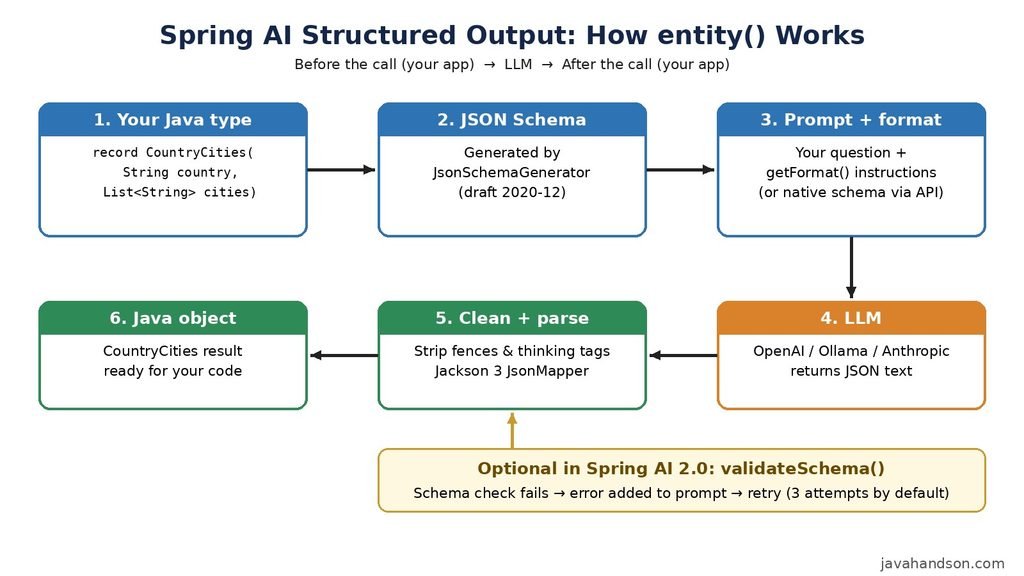
The whole feature rests on one interface called StructuredOutputConverter. Here is how it looks in Spring AI 2.0.1:
public interface StructuredOutputConverter<T>
        extends Converter<String, T>, FormatProvider {

    default String getJsonSchema() {
        return NO_JSON_SCHEMA;
    }
}

public interface FormatProvider {
    String getFormat();
}
It combines two small jobs:
The getJsonSchema() method is new in Spring AI 2.0. It exposes the schema so that the new reliability features can use it. We will cover those features in section 11.
Spring AI ships with ready converters, so you rarely write your own:
Most of the time, you will not create these objects yourself. When you pass a class or a type reference to entity(), ChatClient uses BeanOutputConverter behind the scenes.
Let us set up a small Spring Boot project. I will use OpenAI here. But the same code works with Ollama, Anthropic, Gemini and other providers.
Spring AI 2.x is built on Spring Boot 4 and Spring Framework 7. Java 17 is the minimum version. So create a Spring Boot 4 project first. Then add the Spring AI BOM and the starters:
<dependencyManagement>
    <dependencies>
        <dependency>
            <groupId>org.springframework.ai</groupId>
            <artifactId>spring-ai-bom</artifactId>
            <version>2.0.1</version>
            <type>pom</type>
            <scope>import</scope>
        </dependency>
    </dependencies>
</dependencyManagement>

<dependencies>
    <dependency>
        <groupId>org.springframework.boot</groupId>
        <artifactId>spring-boot-starter-webmvc</artifactId>
    </dependency>
    <dependency>
        <groupId>org.springframework.ai</groupId>
        <artifactId>spring-ai-starter-model-openai</artifactId>
    </dependency>
</dependencies>
The BOM keeps all Spring AI modules on the same version. As a result, you do not need a version number for each starter.
Now add these properties to application.properties:
spring.ai.openai.api-key=${OPENAI_API_KEY}
spring.ai.openai.chat.model=gpt-4o-mini
Keep the API key in an environment variable. Never commit it to Git.
Spring Boot gives us an auto-configured ChatClient.Builder. We will use it to create one ChatClient bean in a configuration class. Then every controller and service can simply inject it.
@Configuration
public class ChatClientConfig {

    @Bean
    public ChatClient chatClient(ChatClient.Builder builder) {
        return builder
                .defaultOptions(OpenAiChatOptions.builder()
                        .temperature(0.2))
                .build();
    }
}
Notice the low temperature here. Structured output is an extraction job, not a creative one. So a low value keeps the answers focused and the JSON shape stable. Also note that in Spring AI 2.0, defaultOptions() takes the options builder itself. We do not call build() on it.
Now the controller just injects the ChatClient bean:
@RestController
@RequestMapping("/api")
public class StructuredOutputController {

    private final ChatClient chatClient;

    public StructuredOutputController(ChatClient.Builder builder) {
        this.chatClient = builder.build();
    }

    // endpoints from the next sections go here
}
All the endpoints in the next sections go inside this controller.
This is the most common use case. You define a Java type, and Spring AI fills it for you.
Records are a perfect fit here. They are short, immutable and easy to read. Let us create one:
public record CountryCities(String country, List<String> cities) {
}Now add an endpoint. The only change from a normal chat call is the last method. We call entity() instead of content():
@GetMapping("/country-cities")
public CountryCities countryCities(@RequestParam String country) {
    return chatClient.prompt()
            .user(u -> u.text("Give me 5 popular cities in {country}.")
                        .param("country", country))
            .call()
            .entity(CountryCities.class);
}
That is all. Spring AI builds the schema, sends the instructions and parses the reply. Notice that we also used a prompt template with a {country} placeholder. It keeps user input separate from the prompt text.
Run the app and call the endpoint:
curl "http://localhost:8080/api/country-cities?country=India"
You will get a response similar to this one:
{
  "country": "India",
  "cities": ["Mumbai", "Delhi", "Bengaluru", "Hyderabad", "Chennai"]
}
Since the controller returns a record, Spring MVC turns it back into JSON for the browser. Inside your service, though, it is a proper Java object. You can call countryCities.cities() and loop over it like any other list.
| 💡 Interview Insight A classic interview question is: “How does Spring AI make an LLM return a Java object?” Explain the two phases. Before the call, a converter adds format instructions with a JSON Schema built from your class. After the call, it parses the text with Jackson. Also mention that the model is only asked to follow the schema. Nothing forces it by default. |
Often you need many objects, not one. For example, you may want cities for three countries in a single call.
Your first idea may be to write List<CountryCities>.class. Sadly, Java does not allow that.
The reason is type erasure. Java removes generic type details at runtime. So List<CountryCities> becomes just List. Spring then has no idea what should go inside the list.
ParameterizedTypeReference solves this problem. Its anonymous subclass keeps the full generic type. As a result, Spring can read the element type and build each item correctly.
@GetMapping("/countries-cities")
public List<CountryCities> countriesCities(@RequestParam String countries) {
    return chatClient.prompt()
            .user(u -> u.text("Give me 3 popular cities for each country: {countries}")
                        .param("countries", countries))
            .call()
            .entity(new ParameterizedTypeReference<List<CountryCities>>() {});
}
Do not forget the {} at the end. It creates the anonymous subclass that carries the type information. Without it, the code will not compile.
Sometimes you do not want to create a class at all. A quick lookup or a dynamic shape fits better in a Map.
Here is a map from country name to a list of cities:
@GetMapping("/country-map")
public Map<String, List<String>> countryMap(@RequestParam String countries) {
    return chatClient.prompt()
            .user("Give me 3 cities for each country: " + countries
                    + ". Use the country name as the key.")
            .call()
            .entity(new ParameterizedTypeReference<Map<String, List<String>>>() {});
}
Again, ParameterizedTypeReference keeps the generic types for us.
If you do not know the shape in advance, use Map<String, Object>. With ChatClient, a type reference does the job:
Map<String, Object> result = chatClient.prompt()
        .user("Give me an array of numbers from 1 to 9 under the key 'numbers'")
        .call()
        .entity(new ParameterizedTypeReference<Map<String, Object>>() {});
On the low-level ChatModel API, MapOutputConverter serves the same purpose. It asks the model for RFC 8259 compliant JSON and returns a Map<String, Object>.
Be careful with free-form maps, though. Every value comes back as Object, so you need casts later. For anything important, prefer a record.
For a plain list of strings, you do not need JSON at all. ListOutputConverter asks the model for comma-separated values. Then it splits the reply with Spring’s ConversionService.
@GetMapping("/flavours")
public List<String> flavours() {
    return chatClient.prompt()
            .user("List five popular ice cream flavours")
            .call()
            .entity(new ListOutputConverter(new DefaultConversionService()));
}
Here we pass a converter object instead of a class. Yes, entity() accepts that too. In fact, this is how you plug in custom converters, which we will see in section 13.
The model only sees your JSON Schema. So a better schema gives you better answers. Jackson annotations are the easiest way to improve it.
Let us build the support ticket example from section 2.3. First, we need two enums and a record:
public enum Category { REFUND, FAILED_PAYMENT, CARD_BLOCKED, KYC, OTHER }

public enum Priority { LOW, MEDIUM, HIGH }

public record TicketAnalysis(
        @JsonPropertyDescription("Main issue category of the email")
        Category category,

        @JsonPropertyDescription("HIGH if money is stuck or deducted twice")
        Priority priority,

        @JsonPropertyDescription("One-line summary, maximum 20 words")
        String summary,

        @JsonPropertyDescription("Transaction reference if present in the email")
        @JsonProperty(required = false)
        String transactionRef) {
}
A few things are happening here:
Now the endpoint:
@PostMapping("/tickets/analyse")
public TicketAnalysis analyse(@RequestBody String email) {
    return chatClient.prompt()
            .system("You are a support analyst for a payments company.")
            .user(email)
            .call()
            .entity(TicketAnalysis.class);
}
With this, a messy customer email becomes a clean object. Your ticketing system can store it straight away.
Here is a small tip. Use @JsonPropertyDescription for field descriptions, even if your project already uses Swagger. There is a reported GitHub issue where @Schema descriptions did not reach the entity() schema. The Jackson annotation works reliably.
By default, the schema follows the declaration order of your fields. If you want a different order, use @JsonPropertyOrder:
@JsonPropertyOrder({"category", "priority", "summary", "transactionRef"})
public record TicketAnalysis(
        Category category,
        Priority priority,
        String summary,
        String transactionRef) {
}
Why does order matter? Models write text from left to right. So asking for the category before the summary nudges the model to decide the category first. It is a small trick, but it helps with some models.
In Spring AI 2.0, BeanOutputConverter uses the same JsonSchemaGenerator that tool calling uses. This brings a few useful defaults:
This alignment is new in 2.0. If you upgrade from 1.x, test your prompts again. The schema text may differ slightly from before.
The entity() method is enough for most apps. Sometimes, however, you work with the low-level ChatModel API. In that case, you use the converter yourself.
Let us print what Spring AI actually sends to the model:
BeanOutputConverter<CountryCities> converter =
        new BeanOutputConverter<>(CountryCities.class);

System.out.println(converter.getFormat());
The output starts like this, followed by the full JSON Schema:
Your response should be in JSON format.
Do not include any explanations, only provide a RFC8259 compliant JSON response following this format without deviation.
Do not include markdown code blocks in your response.
Remove the ```json markdown from the output.
Here is the JSON Schema instance your output must adhere to:
I strongly suggest you print this once for your own classes. It is the fastest way to understand why a model returns a certain shape.
Now let us use the converter with ChatModel and a PromptTemplate:
BeanOutputConverter<CountryCities> converter =
        new BeanOutputConverter<>(CountryCities.class);

String template = """
        Give me 5 popular cities in {country}.
        {format}
        """;

Prompt prompt = PromptTemplate.builder()
        .template(template)
        .variables(Map.of("country", "Japan", "format", converter.getFormat()))
        .build()
        .create();

Generation generation = chatModel.call(prompt).getResult();

CountryCities result = converter.convert(generation.getOutput().getText());
The {format} placeholder receives the instructions. After the call, convert() does the parsing. This is exactly what entity() does for you in one line.
Here is the honest truth. By default, the model is only asked to follow your schema. Most of the time, it does. Sometimes, however, it misses a required field, returns a wrong type or adds a friendly sentence. Then the parser throws an exception.
Spring AI 2.0 adds two switches for this. Both go into an optional second argument of entity().
The first switch validates the reply and retries on failure:
TicketAnalysis ticket = chatClient.prompt()
        .user(email)
        .call()
        .entity(TicketAnalysis.class, spec -> spec.validateSchema());
Here is the flow:
By default, it tries up to 3 times. Since the model sees the real error, the retry is not blind. It knows what to fix.
Behind the scenes, this uses StructuredOutputValidationAdvisor. You can register your own instance to change the attempts:
var validationAdvisor = StructuredOutputValidationAdvisor.builder()
        .outputType(TicketAnalysis.class)
        .maxRepeatAttempts(5)
        .build();

ChatClient chatClient = builder
        .defaultAdvisors(validationAdvisor)
        .build();
Keep one thing in mind. Every retry is another paid LLM call. The advisor adds up the token usage of all attempts, so your metrics show the real cost.
The second switch moves the schema from the prompt to the provider API:
TicketAnalysis ticket = chatClient.prompt()
        .user(email)
        .call()
        .entity(TicketAnalysis.class, spec -> spec.useProviderStructuredOutput());
Now the provider itself enforces the schema. The prompt also becomes shorter, because the format text is no longer needed.
According to the Spring AI 2.0 docs, OpenAI, Anthropic, Google GenAI, Mistral AI and Ollama support this feature. Spring AI checks whether the model options implement the StructuredOutputChatOptions interface. If they do not, it quietly falls back to the prompt-based approach.
The switch stays off by default for compatibility. Older models may reject the request. So test it with your exact model version before you turn it on.
To enable it for every call on a client, use the advisor parameter:
@Bean
ChatClient chatClient(ChatClient.Builder builder) {
    return builder
            .defaultAdvisors(AdvisorParams.ENABLE_NATIVE_STRUCTURED_OUTPUT)
            .build();
}Each switch solves a different problem. The native option prevents most bad replies. Meanwhile, the validation option catches the rest. So for critical flows, use both together:
TicketAnalysis ticket = chatClient.prompt()
        .user(email)
        .call()
        .entity(TicketAnalysis.class, spec -> spec
                .useProviderStructuredOutput()
.validateSchema());Here is a trap I want you to avoid. OpenAI’s native structured output does not accept a top-level JSON array. So a List<CountryCities> with useProviderStructuredOutput() fails with an API error.
The fix is easy. Wrap the list in a record:
public record CountryCitiesList(List<CountryCities> items) {
}

CountryCitiesList result = chatClient.prompt()
        .user("Give me 3 cities each for India, Japan and France")
        .call()
        .entity(CountryCitiesList.class, spec -> spec.useProviderStructuredOutput());
The default prompt-based flow has no such limit. Top-level lists work fine there.
Even with both switches, a call can still fail. The model may repeat the same mistake. The provider may also time out. So always plan for the last failure.
public TicketAnalysis analyseSafely(String email) {
    try {
        return chatClient.prompt()
                .user(email)
                .call()
                .entity(TicketAnalysis.class, spec -> spec.validateSchema());
    } catch (Exception ex) {
        log.warn("Structured output failed, moving to manual queue: {}", ex.getMessage());
        return new TicketAnalysis(Category.OTHER, Priority.MEDIUM,
                "Needs manual review", null);
    }
}
In payments systems, we never let one bad parse block the whole flow. A safe default plus a manual review queue is a common pattern. It keeps the pipeline moving, and a human checks the odd cases later.
| 💡 Interview Insight Interviewers now ask about reliability: “What if the LLM returns invalid JSON?” Give a layered answer. Use useProviderStructuredOutput() to constrain the model at the API level. Add validateSchema() so Spring AI retries with the error message. Finally, catch the exception and return a safe fallback, because no retry count guarantees success. |
The entity() method returns only your object. But sometimes you also need metadata, like token usage for cost tracking. For that, use responseEntity():
ResponseEntity<ChatResponse, CountryCities> result = chatClient.prompt()
        .user("Give me 5 popular cities in India")
        .call()
        .responseEntity(CountryCities.class);

CountryCities cities = result.entity();
long totalTokens = result.response().getMetadata().getUsage().getTotalTokens();
Watch the import here. This ResponseEntity comes from org.springframework.ai.chat.client, not from Spring Web. In a controller, both names clash easily. So I usually keep this code inside a service class.
Small local models are not always neat with their replies. Let us see what Spring AI handles for us and where we need to step in.
The good news first. BeanOutputConverter already cleans common noise before parsing. It removes:
It also ignores unknown JSON fields instead of failing. So one extra field will not break your record.
However, the default cleaner cannot remove a full sentence before the JSON. A reply like “Here are the cities: { … }” still fails. Some small local models do this often.
In that case, write a lenient converter. It finds the JSON part and passes it to BeanOutputConverter:
public class LenientJsonOutputConverter<T> implements StructuredOutputConverter<T> {

    private static final Pattern JSON_BLOCK =
            Pattern.compile("(\\{[\\s\\S]*\\}|\\[[\\s\\S]*\\])");

    private final BeanOutputConverter<T> delegate;

    public LenientJsonOutputConverter(Class<T> type) {
        this.delegate = new BeanOutputConverter<>(type);
    }

    @Override
    public String getFormat() {
        return delegate.getFormat();
    }

    @Override
    public String getJsonSchema() {
        return delegate.getJsonSchema();
    }

    @Override
    public T convert(String source) {
        Matcher matcher = JSON_BLOCK.matcher(source);
        String json = matcher.find() ? matcher.group(1) : source;
        return delegate.convert(json);
    }
}
Then pass it to entity():
CountryCities result = chatClient.prompt()
        .user("Give me 5 popular cities in Italy")
        .call()
        .entity(new LenientJsonOutputConverter<>(CountryCities.class));
Notice that getJsonSchema() delegates too. Because of that, validateSchema() and useProviderStructuredOutput() still work with this converter.
You can use the same idea for non-JSON formats like YAML or CSV. Write your own getFormat() and convert(). Then leave getJsonSchema() at its default.
This question comes up a lot. Can we use entity() with stream()?
The answer is no. Typed parsing needs the complete response. So entity() works only after call(). The stream() method gives you text chunks, not typed objects. The same rule applies when validateSchema() is active.
If you need both, stream the text to the UI for a live feel. Then make a separate call() with entity() for the data your code needs. In most business flows, though, a normal call() is simpler and good enough.
Let me share a few lessons that will save you debugging time.
| 💡 Interview Insight A good senior-level question is: “Tool calling or structured output, which one would you use?” Both use JSON Schema. However, the goal differs. Structured output shapes the final answer into your type. Tool calling lets the model ask your code to run a method. The Spring AI docs also note that tool calling does not use output converters. Tools are structured by design. |
A: It is a feature that converts an LLM’s text reply into a typed Java object. Spring AI generates a JSON Schema from your class, adds format instructions to the prompt, and parses the reply with Jackson. You use it by calling entity() instead of content() on ChatClient.
A: Pass a ParameterizedTypeReference to entity(), for example new ParameterizedTypeReference<List<CountryCities>>() {}. Java erases generic types at runtime, so List<CountryCities>.class is not allowed. The type reference keeps the element type for Spring.
A: BeanOutputConverter maps JSON to a class, record or generic type. MapOutputConverter returns a Map<String, Object> for free-form JSON. ListOutputConverter asks for comma-separated values and returns a List<String>. ChatClient uses BeanOutputConverter automatically when you pass a class to entity().
A: It validates the LLM reply against the JSON Schema of your target type. If validation fails, Spring AI adds the exact error to the prompt and calls the model again, up to 3 attempts by default. It is powered by StructuredOutputValidationAdvisor.
A: No. Typed parsing needs the complete response, so entity() works only after call(). The stream() method returns text chunks, not typed objects. If you need both, stream text to the UI and make a separate call() for the structured data.
A: OpenAI’s native structured output does not accept a top-level JSON array as the response schema. Wrap the list inside a record, such as record CountryCitiesList(List<CountryCities> items), or use the default prompt-based entity() call.
Spring AI structured output turns an LLM from a chatty assistant into a reliable data source. You define a record, call entity(), and get a typed Java object back.
Here is a quick recap:
Start with the plain entity() call. Then add the reliability switches as your app moves toward production. This way, your code stays simple while your data stays clean.