String in Java
-
Last Updated: January 26, 2024
-
By: javahandson
-
Series

A string in Java is a group of characters that you treat as one value. Names, addresses, email IDs, file paths, JSON payloads – almost every program you write will push text around. In this article we will learn what a string in Java really is, the three ways of creating one, the difference between a string literal and a string object, and the String class methods you will reach for every single day.
Think about the last program you wrote. Did it print a message, read a name, or build a file path? Then it used strings. Text is the format humans understand, so text sits at the boundary of nearly every application.
Java gives text its own class, and that class comes with roughly fifty ready-made methods. You do not need all fifty. You need about twenty, plus a clear picture of how Java stores text in memory. That picture is what stops the classic beginner bugs.
We will build both here. First the mental model, then the toolbox.
A string represents a group of characters treated as a single value. A name like Suraj, an address, a product code – each one is a string.
Picture a strip of movie tickets. Every ticket is a character. The strip holds them in order, and you hand over the whole strip, not one ticket at a time. A string works the same way. Java keeps the characters in order and hands you the whole thing as one value.
You declare one like this.
String str = "JavaHandsOn";
System.out.println(str); // Output: JavaHandsOn
Here str is the variable and String is its type.
If you come from C or C++, this part matters. There, a string is an array of characters ending with a null character. Java took a different route.
In Java, String is a class that lives in the java.lang package. Every class doubles as a data type, so String is a data type too – just not a primitive one like int or char.
Why does that matter? Because an object can carry behaviour. A C string cannot tell you its own length. A Java string can, because length() ships with the class.
char[] letters = {'J', 'a', 'v', 'a'};   // an array of characters
String word = "Java";                     // an object of the String class

System.out.println(word.length());        // Output: 4
System.out.println(letters.length);       // Output: 4 (a field, not a method)
Notice the small difference. Arrays expose a length field. Strings expose a length() method.
Open the source of java.lang.String and you will find a private array holding the characters. Up to Java 8 that array was a char[], where every character ate two bytes.
Java 9 changed it. The field became a byte[] plus a small marker called the coder. Most real-world text uses only Latin-1 characters, so Java now packs those into one byte each. The feature is called compact strings, and it cut the memory footprint of typical applications noticeably.
You never touch that array directly. The class keeps it private and never hands out a reference to it. That privacy is what makes the next point possible.
The class declaration reads public final class String. Nobody can extend it. No subclass can slip in and break the guarantees the JDK relies on.
String also implements three interfaces worth knowing.
CharSequence – the shared contract that StringBuilder and StringBuffer also honour.Comparable<String> – which is why Collections.sort() can sort a list of strings without any extra help.Serializable – so you can write a string to a stream.There are three classic ways to create a string in Java. Each one puts the characters somewhere slightly different, and that difference shows up later when you compare strings.
A string literal is a group of characters wrapped in double quotes. Assign it straight to a variable.
String str = "JavaHandsOn"; // string literal
You can split that into two statements if you prefer.
String str;              // declare the variable
str = "JavaHandsOn";     // assign the value
With this approach the JVM keeps the text in a special area called the string constant pool. We will unpack that pool in section 4.
This is the form you should reach for by default. It is shorter, and it lets the JVM reuse memory for you.
Since String is a class, you can build one with new and pass the text to the constructor.
String str = new String("JavaHandsOn");Now the JVM does two things. It puts the literal "JavaHandsOn" in the pool, and it also creates a brand new object on the regular heap. Your variable points at the new object, not at the pooled one.
That means one statement quietly produced two objects. Keep the thought handy – it explains a surprising result in section 4.4.
You can also hand a character array to the constructor. Java copies the characters into a fresh string.
char[] arr = {'J','a','v','a','H','a','n','d','s','O','n'};
String str = new String(arr);
System.out.println(str); // Output: JavaHandsOn
The copy matters. Change the array afterwards and the string stays exactly as it was.
char[] arr = {'J','a','v','a'};
String str = new String(arr);
arr[0] = 'L';                 // the array changed
System.out.println(str); // Output: Java (the string did not)Beyond the classic three, a handful of factory methods show up constantly in real code.
String.valueOf(x) turns almost anything – an int, a double, a boolean, a char array – into a string.Integer.toString(42) does the same job for a single int.String.join(", ", list) glues a collection together with a separator."Hi %s".formatted(name) fills in a template, available since Java 15.String age = String.valueOf(30);
System.out.println(age); // Output: 30
String csv = String.join(",", "a", "b", "c");
System.out.println(csv); // Output: a,b,c
String greeting = "Hello %s!".formatted("Suraj");
System.out.println(greeting); // Output: Hello Suraj!Let us write one program that creates a string in every classic way.
package com.java.handson.strings;

public class StringDemo {
    public static void main(String[] args) {

        String str1 = "JavaHandsOn";                 // literal
        String str2 = new String("JavaHandsOn");     // new keyword
        char[] arr = {'J','a','v','a','H','a','n','d','s','O','n'};
        String str3 = new String(arr);               // from a char array

        System.out.println(str1);
        System.out.println(str2);
        System.out.println(str3);
    }
}
// Output:
// JavaHandsOn
// JavaHandsOn
// JavaHandsOn
All three print the same text. Their memory story, though, is completely different.
The string constant pool is a cache the JVM maintains for literals. Since Java 7 it sits inside the normal heap, so the garbage collector can clean it like any other region.
Here is the rule. When the JVM meets a literal, it first checks the pool. Found a match? It reuses that object. No match? It creates one and files it away for next time.
Think of a company badge printer. Ask for a badge that already exists and reception hands you the same one back. Ask for a new name and the printer makes it once, then keeps it on the shelf.
That reuse is only safe because strings never change. Section 5 explains why.
| String Literal | String Object |
|---|---|
| Characters wrapped in double quotes, assigned straight to a variable. | Built with the new operator, with the text passed to the constructor. |
| The JVM keeps it in the string constant pool. | The JVM keeps it in the ordinary heap area. |
| A second variable with the same text reuses the same object. | A second variable with the same text gets a brand new object. |
| Creates at most one object. | Creates up to two objects: the pooled literal and the heap copy. |
| == returns true for two identical literals. | == returns false even when the text matches. |
| Preferred for everyday code. | Rarely needed; useful only when you deliberately want a distinct object. |
The diagram below shows both areas at once. Follow the arrows and the table above suddenly clicks.
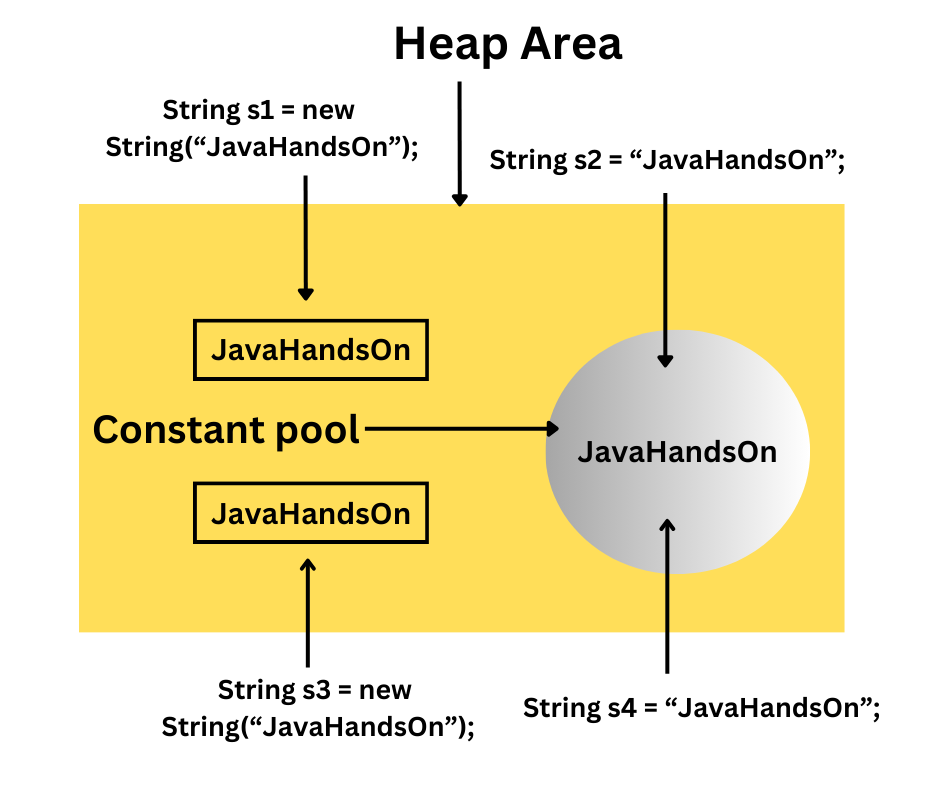
Two literals with the same text share one box in the pool. Two new String(...) calls get one box each in the heap, no matter what the text says.
Now let us prove it. The == operator compares references, so it answers one question only: are these two variables pointing at the same object?
package com.java.handson.strings;

public class StringDemo {
    public static void main(String[] args) {

        String s1 = new String("JavaHandsOn");
        String s2 = "JavaHandsOn";
        String s3 = new String("JavaHandsOn");
        String s4 = "JavaHandsOn";

        System.out.println("s1 == s2 : " + (s1 == s2));
        System.out.println("s1 == s3 : " + (s1 == s3));
        System.out.println("s2 == s3 : " + (s2 == s3));
        System.out.println("s2 == s4 : " + (s2 == s4));
        System.out.println("s1.equals(s2) : " + s1.equals(s2));
    }
}
// Output:
// s1 == s2 : false
// s1 == s3 : false
// s2 == s3 : false
// s2 == s4 : true
// s1.equals(s2) : true
Only one line printed true. Both s2 and s4 are literals with identical text, so the JVM handed them the same pooled object.
Every new String(...) call produced its own object, so those comparisons failed. The last line shows the fix: equals() compares content and returns true.
What if you already hold a heap string and want the pooled version? Call intern().
String heapCopy = new String("JavaHandsOn");
String pooled = heapCopy.intern();
String literal = "JavaHandsOn";

System.out.println(heapCopy == literal); // Output: false
System.out.println(pooled == literal);   // Output: true
The method returns the pooled object with the same content, adding it first if the pool does not have it yet.
Should you use it? Almost never. Modern JVMs handle string memory well, and reaching for intern() to make == work is a smell. Use equals() instead and move on.
Once Java creates a string, its characters never change. Not one method on the class edits the text in place. Every method that looks like it modifies something actually builds a new string and returns it.
String s = "java";
s.toUpperCase();               // the result goes nowhere
System.out.println(s);         // Output: java

s = s.toUpperCase();           // catch the returned value
System.out.println(s);         // Output: JAVA
So what happens when you write s = s.toUpperCase()? The variable starts pointing at a new object. The old "java" object never changed at all.
That is the short version. For the full story, including how the pool behaves across class loaders, read our dedicated article on String immutability in Java.
This method reports how many characters the string holds. It takes no argument and returns an int.
String s1 = "JavaHandsOn";
int length = s1.length();
System.out.println(length); // Output: 11
One precise detail: the method counts UTF-16 code units, not what a human calls a character. For ordinary text the two match. Section 12.6 shows where they part ways.
Give it a position and it returns the character sitting there. Positions start at 0, so the last valid index is length() - 1.
String s1 = "JavaHandsOn";
char ch = s1.charAt(5);
System.out.println(ch); // Output: a
Ask for an index outside that range and Java throws StringIndexOutOfBoundsException. Check the length first whenever the index comes from user input.
These two look alike and behave differently. isEmpty() asks whether the length is zero. isBlank(), added in Java 11, also treats a string of only spaces or tabs as blank.
System.out.println("".isEmpty());     // Output: true
System.out.println("   ".isEmpty());  // Output: false
System.out.println("   ".isBlank());  // Output: true
For validating a form field, isBlank() is usually what you want. A user who typed three spaces did not really type a name.
Sometimes you need the characters one by one. toCharArray() hands you a fresh array. chars(), from Java 8, gives you a stream of int values instead.
String s = "Java";
char[] arr = s.toCharArray();
System.out.println(arr[0]);                    // Output: J

long vowels = "JavaHandsOn".chars()
        .filter(c -> "aeiouAEIOU".indexOf(c) >= 0)
        .count();
System.out.println(vowels); // Output: 4The concat method joins two strings and returns the result. It takes a String and gives back a String, so you call it on one string and pass the other.
String s1 = "Java";
String s2 = "HandsOn";
String s3 = s1.concat(s2);
System.out.println(s3); // Output: JavaHandsOn
Most developers use the + operator instead, and that is fine. One difference is worth knowing: concat throws a NullPointerException on a null argument, while + quietly appends the text “null”.
String name = null;
System.out.println("Hello " + name);  // Output: Hello null
// "Hello ".concat(name); // would throw NullPointerExceptionA substring is a smaller slice of a bigger string. Pass one index and you get everything from that position to the end.
String s1 = "JavaHandsOn";
String s2 = s1.substring(4);
System.out.println(s2); // Output: HandsOn
Index 4 lands on the letter H, so the slice runs from H to the final character.
Two indexes give you a window. The first index joins the slice, the second one marks where to stop.
Remember the rule: start is inclusive, end is exclusive. The character at the end index stays out.
String s1 = "JavaHandsOn";
String s2 = s1.substring(4, 10);
System.out.println(s2);              // Output: HandsO
System.out.println(s2.length());     // Output: 6  (10 minus 4)
That last line is a nice shortcut. The length of the slice always equals end minus start.
Need to break one string into many pieces? The split method chops it into an array using a delimiter. That delimiter is a regular expression, not a plain character – a detail we will come back to in section 12.4.
String str = "Hello@How@are@you";
String[] arr = str.split("@");
System.out.println(Arrays.toString(arr));
// Output: [Hello, How, are, you]
// arr[0] = Hello, arr[1] = How, arr[2] = are, arr[3] = you
By default split drops trailing empty pieces. That surprises people, so here it is in code.
System.out.println("a,b,,,".split(",").length);      // Output: 2
System.out.println("a,b,,,".split(",", -1).length); // Output: 5The second parameter caps how many pieces come back. Whatever is left over lands in the final slot untouched.
String str = "Hello@How@are@you";
String[] arr = str.split("@", 2);
System.out.println(Arrays.toString(arr));
// Output: [Hello, How@are@you]
Set the limit higher than the number of delimiters and nothing changes. The delimiter appears three times, so you get four pieces no matter how big the limit is.
String[] arr = "Hello@How@are@you".split("@", 5);
System.out.println(arr.length); // Output: 4
A limit of 2 is genuinely useful when you parse a header line such as Content-Type: text/html; charset=utf-8 and want to keep everything after the first colon in one piece.
This static method is the mirror image of split. Hand it a separator and some values, and it stitches them together.
List<String> tags = List.of("java", "string", "tutorial");
String line = String.join(" | ", tags);
System.out.println(line); // Output: java | string | tutorial
Compare that to a manual loop with an if-check for the last comma. The one-liner wins every time.
Looking for a smaller string inside a bigger one? indexOf returns the position where the first match starts.
String s1 = "Hello welcome to JavaHandsOn";
int position = s1.indexOf("welcome");
System.out.println(position); // Output: 6
When no match exists, the method returns exactly -1. Not “some negative number” – the value is always -1, which is why the idiomatic check reads if (s.indexOf(x) != -1).
Same idea, opposite direction. This one reports where the final match starts.
String s1 = "Hello welcome to JavaHandsOn, welcome again!";
int position = s1.lastIndexOf("welcome");
System.out.println(position); // Output: 30
A classic use is pulling a file extension out of a path. Find the last dot, slice after it, done.
String file = "report.final.pdf";
String ext = file.substring(file.lastIndexOf('.') + 1);
System.out.println(ext); // Output: pdfWhen you only care whether the text appears, skip the index maths and ask directly.
String s1 = "Hello welcome to JavaHandsOn";
System.out.println(s1.contains("Java"));   // Output: true
System.out.println(s1.contains("Python")); // Output: falseThese two check the edges of a string and return a boolean.
String s1 = "Hello welcome to JavaHandsOn";
System.out.println(s1.startsWith("Hello"));   // Output: true
System.out.println(s1.endsWith("HandsOn"));   // Output: true
System.out.println(s1.startsWith("welcome", 6)); // Output: true
The two-argument form of startsWith begins the check at a given offset. Handy when you walk through a string a token at a time.
Here is a small program that exercises the whole search family.
package com.java.handson.strings;

public class StringSearchDemo {
    public static void main(String[] args) {

        String s1 = "Hello welcome to JavaHandsOn";
        System.out.println("indexOf     : " + s1.indexOf("welcome"));
        System.out.println("missing     : " + s1.indexOf("Python"));

        String s2 = "Hello welcome to JavaHandsOn, welcome again!";
        System.out.println("lastIndexOf : " + s2.lastIndexOf("welcome"));

        System.out.println("contains    : " + s1.contains("Java"));
        System.out.println("startsWith  : " + s1.startsWith("Hello"));
        System.out.println("endsWith    : " + s1.endsWith("HandsOn"));
    }
}
// Output:
// indexOf     : 6
// missing     : -1
// lastIndexOf : 30
// contains    : true
// startsWith  : true
// endsWith : trueEvery method in this section returns a new string. None of them edits the original. Catch the return value or the work disappears.
These convert the whole string to one case.
String s1 = "Java";
System.out.println(s1.toUpperCase()); // Output: JAVA
System.out.println(s1.toLowerCase()); // Output: java
Both use the default locale of the machine unless you say otherwise. On a Turkish locale, "TITLE".toLowerCase() produces a dotless letter and string comparisons start failing in production.
For anything the machine reads – codes, keys, protocol tokens – pass an explicit locale.
String code = "TITLE".toLowerCase(Locale.ROOT);
System.out.println(code); // Output: title  (on every machine)
The trim method removes spaces from the front and back of a string. Spaces in the middle survive.
String s1 = "   Learn Java   ";
System.out.println("[" + s1.trim() + "]"); // Output: [Learn Java]
Java 11 added strip(), and it is the better choice today. trim only removes characters up to the space character, while strip understands the full Unicode definition of whitespace – including the non-breaking spaces that arrive when users paste from a web page.
String pasted = " Java ";     // non-breaking spaces
System.out.println(pasted.trim().length());   // Output: 6  (nothing removed)
System.out.println(pasted.strip().length());  // Output: 4  (both removed)
The replace method swaps every occurrence of one character for another. An overload does the same for whole substrings.
String s1 = "JavaHandsOn";
System.out.println(s1.replace('a', 'x'));        // Output: JxvxHxndsOn
System.out.println(s1.replace("Hands", "Deep")); // Output: JavaDeepOn
Despite the name, replaceAll is not “replace even more”. It treats its first argument as a regular expression.
String messy = "Java   Hands    On";
System.out.println(messy.replaceAll("\\s+", " ")); // Output: Java Hands On
Rule of thumb: plain text goes to replace, patterns go to replaceAll.
Two more that save real typing. repeat(n) arrived in Java 11 and does exactly what the name says. String.format builds text from a template.
System.out.println("-".repeat(20));
// Output: --------------------

String row = String.format("%-10s|%5d", "Java", 30);
System.out.println(row);
// Output: Java      |   30
The format string reads as a small language. %-10s means a string padded to ten characters on the left, and %5d means an integer right-aligned in five characters.
The equals method compares content. Identical characters in identical order give you true.
Its real signature is boolean equals(Object obj), inherited from the Object class and overridden by String. Pass it anything that is not a String and you simply get false.
System.out.println("Java".equals("Java"));           // Output: true
System.out.println("Java".equals("java"));           // Output: false
System.out.println("Java".equalsIgnoreCase("java")); // Output: true
So equals respects case and equalsIgnoreCase does not. Reach for the second one when you compare things people typed, such as a country code or a yes/no answer.
Where equals answers yes or no, compareTo answers which one comes first. It returns an int, and only the sign carries meaning.
String s1 = "Learn";
String s2 = "Java";
System.out.println(s1.compareTo(s2)); // Output: 2
System.out.println(s2.compareTo(s1)); // Output: -2

System.out.println("Java".compareTo("java"));             // Output: -32
System.out.println("Java".compareToIgnoreCase("java"));   // Output: 0
Where do 2 and -32 come from? Java walks both strings until the characters differ, then subtracts their codes. L is 76 and J is 74, so the answer is 2. Capital J is 74 and small j is 106, so the answer is -32.
Write your checks against the sign, never against a specific number. if (a.compareTo(b) > 0) is correct. if (a.compareTo(b) == 2) is a bug waiting for a rename.
Section 4.4 already showed the mechanism. The == operator compares references, so it tells you whether two variables point at one object.
With literals it often returns true, which is exactly what makes it dangerous. Your code passes every test, then a string arrives from a database or a web request instead of a literal, and the same comparison quietly returns false.
Use equals for content. Always. For the complete guide – null safety, Objects.equals, locale-aware sorting with Collator, and strings inside a switch – read our article on String comparison in Java.
Immutability has a cost. Concatenate inside a loop and every pass creates a whole new object, copies all the old characters, then throws the previous object away.
// Slow: builds a new String on every pass
String result = "";
for (int i = 0; i < 10000; i++) {
    result = result + i;
}

// Fast: one buffer that grows
StringBuilder sb = new StringBuilder();
for (int i = 0; i < 10000; i++) {
    sb.append(i);
}
String result2 = sb.toString();
For ten items nobody notices. For ten thousand the difference is dramatic, because the work grows with the square of the item count.
A quick clarification, since this trips people up. A single expression such as "a" + b + "c" is not slow. The compiler turns it into one efficient concatenation. Only the loop version hurts, because each pass is a separate expression.
| Feature | String | StringBuffer | StringBuilder |
|---|---|---|---|
| Can the content change? | No, immutable | Yes, mutable | Yes, mutable |
| Thread safe? | Yes, because nothing changes | Yes, methods are synchronized | No |
| Speed for heavy edits | Slowest | Fast | Fastest |
| Uses the constant pool? | Yes, for literals | No | No |
| Available since | Java 1.0 | Java 1.0 | Java 5 |
| Typical use | Fixed text, map keys, method arguments | Shared buffer across threads | Building text in a loop or method |
String. That covers most of your code.StringBuilder.StringBuffer, though a better design usually gives each thread its own builder.Both mutable classes carry the same method set: append, insert, delete, reverse, replace. Learn one and you know the other. Our full guides cover them method by method: StringBuffer in Java and StringBuilder in Java.
This is the number one string bug in Java, and it hides well. Two literals share an object, so == works during development and fails once real data arrives.
String typed = new Scanner(System.in).nextLine(); // user types: yes
if (typed == "yes") { }        // never true
if (typed.equals("yes")) { }   // correct
if ("yes".equals(typed)) { } // correct and null-safeCalling trim() or toUpperCase() without assigning the result does nothing at all. The new string exists for a microsecond, then the garbage collector takes it.
String input = "  suraj  ";
input.trim();                  // wrong: result thrown away
input = input.trim();          // right
People expect substring(0, 5) to return six characters because index 5 sounds included. It returns five. The end index marks the stopping point, and that character stays behind.
String s = "JavaHandsOn";
System.out.println(s.substring(0, 4)); // Output: Java  (4 characters)
The argument to split is a regular expression. Characters such as ., |, * and + carry special meaning there, so splitting a version number on a dot returns an empty array.
System.out.println("1.2.3".split(".").length);      // Output: 0
System.out.println("1.2.3".split("\\.").length);    // Output: 3
System.out.println("a|b".split(java.util.regex.Pattern.quote("|")).length); // Output: 2Writing new String("Java") creates an extra object for no benefit and breaks pooling. Some IDEs flag it as a warning. Just write the literal.
String bad = new String("Java");  // two objects, zero benefit
String good = "Java"; // one pooled objectJava stores text as UTF-16, and a few characters need two code units. An emoji is the everyday example, so length() reports 2 for what looks like one symbol.
String emoji = "😀";            // a grinning face
System.out.println(emoji.length());       // Output: 2
System.out.println(emoji.codePointCount(0, emoji.length())); // Output: 1
When you truncate user text for a preview, use codePointCount or you will slice an emoji in half and print a broken box.
Let us build something small and real. A file arrives with one user per line, in the format name,email,city. The data is messy: stray spaces, mixed case, and the odd blank line.
Our job is to clean each row and print a tidy report. That single task uses most of the methods from this article.
package com.java.handson.strings;

import java.util.Locale;

public class UserReport {

    public static void main(String[] args) {

        String[] rows = {
            "  Suraj , SURAJ@Mail.com ,  Pune ",
            "Anita,anita@mail.com,Mumbai",
            "   ",
            "Ravi , ravi@mail.com , Delhi"
        };

        StringBuilder report = new StringBuilder();
        report.append(String.format("%-10s|%-20s|%-8s%n", "NAME", "EMAIL", "CITY"));
        report.append("-".repeat(40)).append(System.lineSeparator());

        int valid = 0;
        for (String row : rows) {

            if (row.isBlank()) {
                continue;                       // skip the empty line
            }

            String[] parts = row.split(",");
            if (parts.length != 3) {
                continue;                       // skip a broken row
            }

            String name = parts[0].strip();
            String email = parts[1].strip().toLowerCase(Locale.ROOT);
            String city = parts[2].strip();

            if (email.indexOf('@') == -1) {
                continue;                       // skip an invalid email
            }

            String domain = email.substring(email.indexOf('@') + 1);
            report.append(String.format("%-10s|%-20s|%-8s%n", name, email, city));
            valid++;

            if (domain.endsWith(".com")) {
                // a place to flag commercial domains later
            }
        }

        report.append("-".repeat(40)).append(System.lineSeparator());
        report.append("Valid rows: ").append(valid);

        System.out.println(report);
    }
}
// Output:
// NAME      |EMAIL               |CITY
// ----------------------------------------
// Suraj     |suraj@mail.com      |Pune
// Anita     |anita@mail.com      |Mumbai
// Ravi      |ravi@mail.com       |Delhi
// ----------------------------------------
// Valid rows: 3Walk through what each piece did.
isBlank() caught the whitespace-only line that isEmpty() would have missed.split(",") broke each row into three fields, and the length check guarded against malformed input.strip() cleaned the padding around every field, including any pasted non-breaking spaces.toLowerCase(Locale.ROOT) normalised the email so SURAJ@Mail.com and suraj@mail.com become one value.indexOf('@') validated the address, and substring pulled the domain out of it.String.format aligned the columns, while repeat(40) drew the separators.StringBuilder collected everything, so the loop never rebuilt a growing String.Forty lines of code, and it touches nearly every idea in this article. That is what daily string work actually looks like.
A: A String in Java is an object of the java.lang.String class that holds a sequence of characters. Unlike C, it is not a character array. The class is final and immutable, and it implements CharSequence, Comparable and Serializable.
A: There are three classic ways. Assign a literal in double quotes, call new String(“text”), or pass a char array to the constructor. Factory helpers such as String.valueOf, String.join and text blocks give you more options.
A: The JVM stores a literal in the string constant pool and reuses it for every identical literal. The new keyword forces a separate object in the heap, so two objects with the same text still fail an == check.
A: Up to two. The literal “Java” goes into the constant pool if it is not already there, and the new keyword builds a second object in the heap. If the pool already holds “Java”, the statement creates just the one heap object.
A: Inside the heap. Java 6 and earlier kept the pool in PermGen, which made it easy to exhaust. Java 7 moved it into the main heap, so the garbage collector can reclaim unused pooled strings.
A: Immutability makes pooling safe, keeps hash codes stable for HashMap keys, removes the need for locking across threads, and protects security-sensitive values such as file paths and connection URLs from changing after a check.
A: It counts UTF-16 code units, not visible characters. Ordinary text gives the number you expect. An emoji needs two code units, so length() returns 2 for one symbol. Use codePointCount when that distinction matters.
A: It returns -1, and always exactly -1 rather than an arbitrary negative number. That is why the standard check reads if (text.indexOf(part) != -1), or more simply if (text.contains(part)).
A: trim() removes characters whose code is less than or equal to the space character. strip(), added in Java 11, uses the full Unicode definition of whitespace, so it also removes non-breaking spaces that users paste from web pages.
A: split takes a regular expression, and a dot matches any character there. Every character becomes a delimiter, leaving only empty pieces that split then discards. Escape it as “\\.” or wrap it with Pattern.quote.
A: Use StringBuilder whenever you build text step by step, especially inside a loop. Concatenating with + in a loop copies every character on each pass. A single expression like “a” + b + “c” needs no builder.
A: It returns the pooled string with the same content, adding it to the pool first if needed. Calling it lets == succeed on a heap string, but production code should call equals() instead of managing the pool by hand.
Let us wrap up what we covered.
A string in Java is an object of the final String class, not a character array. That single fact explains the rest. Because it is an object, it carries methods. Because it is immutable, the JVM can pool literals and share them safely.
You create strings three classic ways. A literal lands in the string constant pool and gets reused. The new keyword forces a separate heap object, which is why == lies to you. A character array gets copied into a fresh string.
On the methods side, you now have a working toolbox: length and charAt for size and position, substring and split for slicing, indexOf and contains for searching, strip and replace and format for cleaning up. The walkthrough in section 13 showed them working together on real, messy data.
Keep three rules in your head and most string bugs never reach you. Compare content with equals, never with ==. Always catch the value a String method returns. Switch to StringBuilder the moment you start appending in a loop.
Ready for more depth? Each of the four articles below picks up exactly where this one stops.