var in Java: Local Variable Type Inference (A Beginner’s Guide)
-
Last Updated: July 20, 2026
-
By: javahandson
-
Series

Learn how var in Java works, where you can and cannot use it, and when it makes code cleaner. A beginner-friendly guide to local variable type inference.
You write Java every day, and you type the same types twice. On the left side you write the type. On the right side you write it again. It feels like busywork.
Take a simple line like a map of lists. You spell out the whole type on the left. Then you repeat almost all of it on the right. Your eyes glaze over, and the real logic gets buried under type names.
The var in Java feature was made to fix that small pain. Since Java 10, you can let the compiler guess the type for you. You write var, and Java fills in the rest.
But there is a catch. This is not the loose var from JavaScript. Your variable still has one fixed type, and it never changes. Java just saves you from typing it out.
That difference trips up a lot of beginners. They see var and assume Java went soft on types. It did not. The type is still there, still strict, still checked at compile time. You just do not have to write it by hand.
In this article, we start with what var really does. Then we look at where it helps, where it hurts, and the rules you must follow.
Here is what we will cover:
No deep Java knowledge is needed. If you can declare a variable, you are ready to go. We will keep the examples small and the language plain the whole way through.
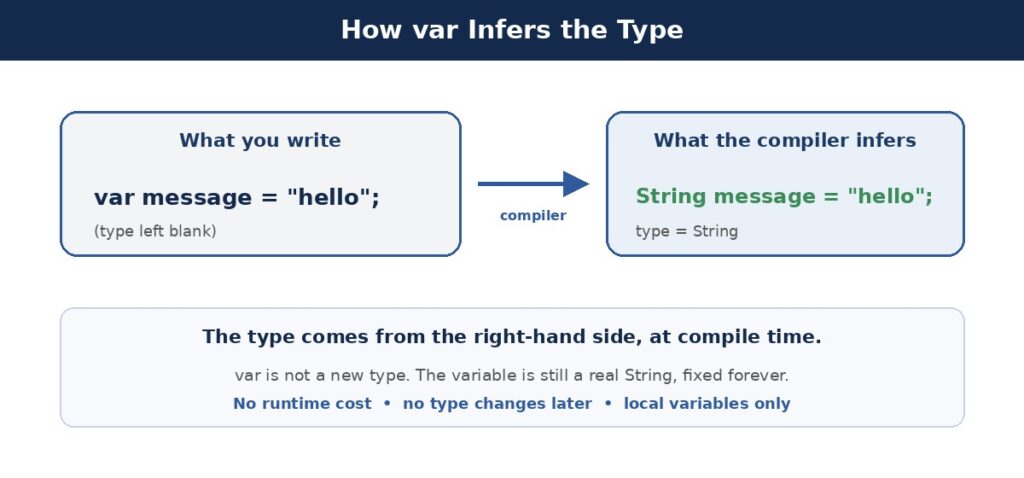
The keyword var lets you skip the explicit type in a local variable. You still declare a variable. You just let the compiler read the value and pick the type.
Think of it like filling out a form. Normally you write your job title twice, once in each box. With var, you write it once, and the second box copies it for you. Less typing, same result.
Look at a plain declaration first. The type sits on both sides.
String message = "hello";
// String appears twice
Now write the same line with var. The compiler sees the string on the right and knows the type.
var message = "hello";
// compiler infers String
Both lines do the exact same thing. The variable message is a String in both cases. Nothing about how it behaves has changed.
You can call every String method on it. You can pass it anywhere a String is expected. To the rest of your code, message is just a plain String. The var word only affects how you wrote the declaration.
Beginners often think var is some flexible, catch-all type. That is not true. There is no type called var in Java.
Instead, var is a signal to the compiler. It says: read the right side and fill in the real type. The final type stays concrete and fixed.
A quick way to prove this is to hover over the variable in your IDE. It will show the real type, like String or int, never var itself. The keyword vanishes the moment the code compiles.
Once the compiler picks a type, it stays that way forever. You cannot reassign a var variable to a different type later.
var count = 10;   // inferred as int
count = 20;       // fine, still an int
count = "text"; // compile error, not a String
So var is strict, not loose. The value can change, but the type cannot. This keeps Java type-safe, just like always.
This point is worth repeating, because it is the biggest mix-up around var. A dynamic language lets a variable become anything at runtime. Java refuses. The type is decided early and held tight.
If you know JavaScript, drop that mental model. There, var creates a variable that can hold anything at any time.
In Java, var is closer to auto in C++ or var in C#. The type gets picked once and then stays put. Only the words on the page get shorter.
So the name var is a bit unlucky. It looks like the JavaScript keyword, yet it behaves in the opposite way. Same spelling, very different rules. Keep that in the back of your mind.
Java arrived in Java 10, released back in 2018. The team behind it had a clear goal in mind.
They wanted to cut down on boilerplate. Java has a reputation for being wordy, and repeated type names were part of that.
Long generic types were the worst offender. Writing a nested map type twice on one line felt like punishment. So var gave developers a way to trim the fat while keeping full type safety.
There was also a readability angle. When a line is shorter, your eye finds the important part faster. The variable name and the value stand out, instead of getting lost behind a wall of angle brackets.
Notice the balance here. The change makes code shorter, yet it does not weaken the type system at all. That was the whole point.
Here is a fun detail. The word var is not a true keyword in Java. It is what the language calls a reserved type name.
Why does that matter? Old code that used var as a variable or method name still works. Java kept the door open for backward compatibility.
int var = 10;   // still legal, var used as a name
var count = 5;  // var used for inference
Both lines compile fine. The compiler figures out which meaning you want from the context. Clever, and safe for older projects.
This was a smart move by the language designers. A brand new keyword could have broken millions of lines of old code. By making var a special type name instead, they added the feature without hurting anyone.
The magic is not really magic. The compiler simply reads the expression on the right side of the equals sign.
Whatever type that expression produces becomes the type of your variable. Then the compiler writes that type into the bytecode as if you typed it yourself.
The value on the right is the whole story. The compiler evaluates it and takes its type.
var name = "Suraj";        // String
var age = 30;               // int
var price = 9.99;           // double
var active = true;          // boolean
var list = new ArrayList<String>(); // ArrayList<String>
Each line gets its type from what sits on the right. No guessing, no runtime tricks. It all happens while the code compiles.
Some folks worry that var slows things down. It does not. The work happens once, at compile time.
After compiling, the bytecode looks the same as if you wrote the type by hand. So var is purely a convenience for you, the reader and writer.
This is a common interview trap, so keep it clear in your head. The runtime never even sees the word var. By the time your program runs, every type is already baked in. There is nothing to slow down.
Think of it as a fill-in-the-blank step. You leave the type blank, and the compiler completes it.
Take a map with a long generic type. Writing it twice is a chore.
// Without var, the type is long and repeated
Map<String, List<Integer>> data = new HashMap<>();

// With var, you write it once on the right
var data = new HashMap<String, List<Integer>>();
The second version reads cleaner. The compiler still knows the full type, so nothing is lost.
You can even test this yourself. Try calling a method that does not exist on the variable. The compiler will complain and name the real type in the error message. That proves it knew the type all along.
One more detail is worth knowing. The compiler picks the most specific type it can, not a general one.
var list = new ArrayList<String>();
// type is ArrayList<String>, NOT List<String>
So the variable becomes ArrayList, the concrete class. It does not become the List interface. That difference can matter.
Why care? With an explicit List type, you could reassign it to a LinkedList later. With var and a concrete type, that door closes. The variable is tied to ArrayList.
Most of the time this is harmless. You rarely swap a list for a different kind mid-method. But it is good to know the rule, so a surprise error later does not throw you off.
The var in Java keyword works only for local variables. That is the short rule. But it helps to see the exact spots.
A local variable is one you declare inside a method, a loop, or a block. It lives and dies within that scope. Those are the only places where var is welcome, and we will walk through each one.
This is the main home for var. Any variable inside a method body is fair game, as long as you give it a starting value.
void demo() {
    var greeting = "Hi there";
    var total = 0;
    var nums = List.of(1, 2, 3);
}
Each variable gets its type from the value beside it. greeting is a String, total is an int, and nums is a List of integers. You wrote none of those types, yet they are all locked in.
Loops are a great fit. The loop variable often has an obvious type, so var trims the noise.
var names = List.of("Amy", "Ben", "Cara");

for (var name : names) {
    System.out.println(name);
}

for (var i = 0; i < 5; i++) {
    System.out.println(i);
}
In the enhanced for-loop, name becomes a String. In the counter loop, i becomes an int. Both are inferred from context.
Loops are where var feels most natural. The type is almost always plain to see. So the extra word would just add clutter without helping anyone read the code.
You can also use var when opening a resource. The reader still sees what you are opening on the right side.
try (var reader = new BufferedReader(new FileReader("data.txt"))) {
    var line = reader.readLine();
    System.out.println(line);
}
Here reader is a BufferedReader and line is a String. Both come straight from the expressions you wrote.
This spot is handy because resource types can be long. A buffered reader wrapped around a file reader is a mouthful. With var, the setup stays short and the intent stays clear.
Now for the limits. The var keyword is picky. It refuses to work in many places, and for good reasons.
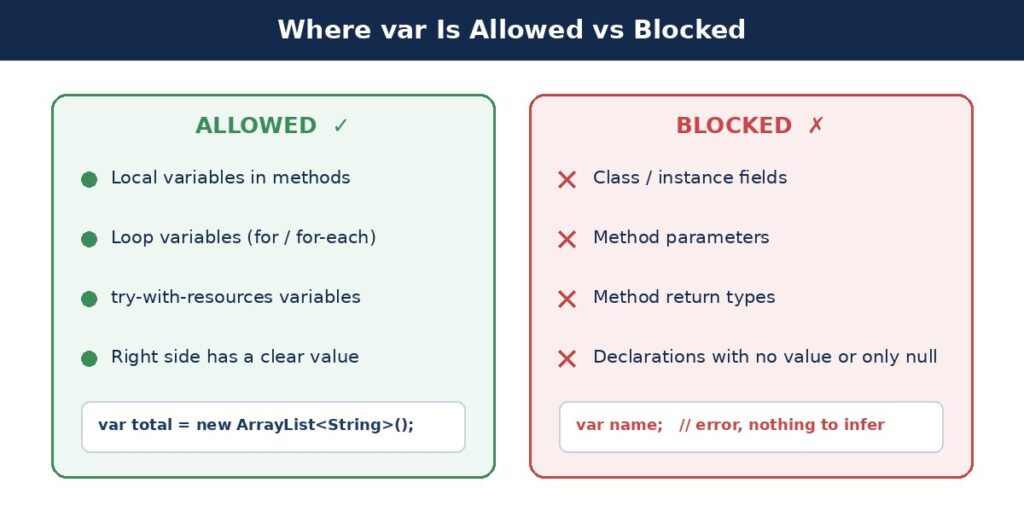
The compiler needs something to read. If you do not assign a value, it has nothing to infer from.
var x;        // error, no value to infer
var y = 5;    // fine, y is int
So every var must start with a value on the same line. A bare declaration simply will not compile.
Assigning just null does not help either. The compiler cannot guess a type from nothing.
var name = null; // error, type is unclear
A null value fits many types. Since the compiler cannot pick one, it gives up and reports an error.
Class fields cannot use var. They must have an explicit type written out.
class User {
    var name = "Guest"; // error, fields need a type
    String email;         // correct
}
This rule keeps class definitions clear. Anyone reading the class sees the real types at a glance.
Method signatures also stay explicit. You cannot write var as a parameter or as a return type.
// All of these are errors
var greet(var name) { ... }

// You must write real types
String greet(String name) { ... }
A method signature is a contract. Callers need to know the types, so var is off the table here.
Picture someone using your method without opening its body. They read only the signature. If it said var, they would learn nothing about what to pass or what comes back. That is why Java bans it here.
It helps to see all the no-go zones together:
Notice a pattern across this list. Every banned spot is a place where the type must be public or clear to others. The var word only fits inside a method, where the details stay private to that block.
The var keyword is a tool, not a rule. Used well, it cleans up your code. Used badly, it hides what matters.
There is no strict law here from Oracle. It is a style choice, and teams often set their own guidelines. So it pays to understand the trade-off yourself, rather than following a blanket rule.
Some Java types are long and clunky. Nested generics are the classic case. Here var pays off the most.
// Hard to read
Map<String, List<Customer>> byCity = new HashMap<String, List<Customer>>();

// Much cleaner
var byCity = new HashMap<String, List<Customer>>();
You still see the full type once, on the right. The line gets shorter and easier to scan.
The saving grows with the length of the type. For a plain int, var barely helps. For a deeply nested generic, it can cut a line nearly in half. Use that as a rough gauge.
Now the flip side. When the right side is not obvious, var hides useful information.
var result = service.process(); // what type is this?
A reader cannot tell the type from this line. They must jump to process() and check its return type. That extra hop slows people down.
This gets worse in code review. A reviewer often reads a change without the full project open. If the type is hidden behind a method call, they cannot judge the line at a glance. So they either guess or go digging.
Ask one question before you reach for var. Can a reader tell the type at a glance? If yes, var is a good choice.
Prefer var when the right side clearly shows the type. A constructor call or a literal is perfect. Skip var when the type is buried inside a method call.
This one rule covers most cases you will ever hit. When you are unsure, lean toward the explicit type. Clarity for the reader beats a few saved keystrokes every time.
One subtle trap deserves a mention. The inferred type may not be what you expect.
var value = 10 / 3;   // int, so value is 3, not 3.33
var big = 100_000_000_000L; // long, thanks to the L
The compiler follows the literal exactly. So keep an eye on int math and number suffixes. What you write is what you get.
Bugs like this hide well, because the code looks fine. The value 3 from integer division is a classic. With an explicit double type, you might catch it sooner. With var, the wrong type slips by quietly.
Let us see the two styles in one small block. First, the fully explicit version.
Map<String, List<Order>> ordersByUser = new HashMap<>();
List<Order> userOrders = ordersByUser.get("amy");
int orderCount = userOrders.size();
Now the same logic with var where the type is clear.
var ordersByUser = new HashMap<String, List<Order>>();
var userOrders = ordersByUser.get("amy"); // List<Order>
var orderCount = userOrders.size();          // int
The second block is shorter, and each type is still easy to trace. That is the sweet spot for var. You gain brevity without losing clarity.
Generics and var can work together, but there is a small twist. You need to help the compiler a little.
The diamond operator, that empty pair of angle brackets, relies on the left side for its type. With var, the left side is gone.
// Old way, left side gives the type
List<String> names = new ArrayList<>();

// With var, the diamond has nothing to read
var names = new ArrayList<>();  // infers ArrayList<Object>
See the problem? The list becomes ArrayList<Object>, which is rarely what you want. The empty diamond had no type to borrow.
The fix is easy. Move the generic type into the diamond on the right side.
var names = new ArrayList<String>(); // correct
Now the compiler reads String from the right and infers ArrayList<String>. The type is clear, and everyone is happy.
So the rule with generics is simple. When you use var, the right side must carry the type argument. An empty diamond and var do not mix well, so fill in the type.
Let us move past tiny snippets. Where does var earn its keep in day-to-day work? A couple of spots stand out.
In small examples, the win from var looks tiny. In real code with long generic types, it adds up fast. These next cases show the feature at its best.
Streams often produce values with chunky types. A var declaration keeps the setup line short and readable.
var names = List.of("Amy", "Ben", "Cara", "Amy");

var counts = names.stream()
    .collect(Collectors.groupingBy(n -> n, Collectors.counting()));

// counts is Map<String, Long>, inferred for you
Writing that map type by hand would be a mouthful. Here var lets the collector decide the shape, and the line stays clean.
Working out that Map of String to Long by yourself takes a moment of thought. The compiler does it instantly and never gets it wrong. So you save effort and dodge a possible mistake.
Map entries have a wordy type too. A for-loop over them reads much better with var.
var scores = Map.of("Amy", 90, "Ben", 85);

for (var entry : scores.entrySet()) {
    System.out.println(entry.getKey() + ": " + entry.getValue());
}
Without var, that loop header would spell out Map.Entry with two generic types. The short form is easier on the eyes, and the meaning stays clear.
You still get full type safety inside the loop. Call getKey and you get a String. Call getValue and you get an int. The compiler tracks all of it behind the scenes.
You might try var on a lambda variable. That fails, because a bare lambda has no single type to infer.
var greet = () -> System.out.println("Hi"); // errorA lambda needs a target type, like Runnable or a custom interface. The right side alone does not tell the compiler which one. So give it an explicit type instead.
The same lambda could be a Runnable, or an Action, or any matching interface. Java cannot pick for you. This is one clear case where the explicit type is required, not just preferred.
A tool works best with a few habits around it. These simple guidelines keep your var usage clean and readable.
None of these are hard rules from the language. They are lessons learned by teams who use var a lot. Follow them, and your code stays friendly to the next person who reads it.
When the type is hidden, the name carries more weight. So pick names that tell the reader what the value holds.
var c = getCustomers();          // vague
var customers = getCustomers();  // much clearer
A good name fills the gap left by the missing type. The reader still understands the line at a glance.
This matters more with var than with explicit types. When the type is gone, the name is your best clue. A lazy name like x or tmp leaves the reader with nothing to go on.
Pair var with expressions that show their type. A constructor call or a factory method makes a great match.
var users = new ArrayList<User>(); // type is right there
var today = LocalDate.now();        // clearly a LocalDate
In both lines, the type jumps out from the right side. A new ArrayList is clearly a list, and LocalDate.now clearly gives a date. That is exactly when var shines.
You do not need var on every line. Plain types are still fine, and often better. Mix both styles based on which reads clearer.
Think of var as one more option in your toolbox. Reach for it when it helps, and set it aside when it does not.
Some teams even ban var in shared code, to keep every type visible. Others use it freely. Follow your team’s style, and stay consistent within a file.
A few slips show up again and again. Knowing them saves you time and confusion.
Some people fall in love with var and use it on every line. That can make code harder to read, not easier.
Keep it where the type is obvious. Drop it where the type matters and is not clear. Balance beats blind habit.
It is easy to treat var like a free pass. But the type locks in on the first line. Later reassignment to another type fails.
var id = 101;      // int
id = "A101";     // error, still an int
This one trips up many beginners. They try var on a class field and hit a compile error. Remember, var is local only.
Do not assume the type without thinking. Integer division gives an int. A number with L becomes a long. Check what the right side really produces.
Here is a subtle one. When you write var with a constructor, you get the concrete class, not the interface.
var users = new ArrayList<String>();  // ArrayList, not List
users = new LinkedList<>();            // error, wrong type
If you plan to swap implementations, use the explicit interface type instead. That keeps your options open down the road.
Teams sometimes forget this cost. When a method’s return type changes, an explicit declaration shows the change in the diff. A var line hides it.
So on shared code, weigh readability for the whole team. A little extra typing can save a reviewer some digging.
It helps to see both styles side by side. Neither one is always right. Each fits a different moment.
| Point | Explicit Type | var |
|---|---|---|
| Type visible on the line | Yes, always | Only if the right side shows it |
| Works for fields | Yes | No |
| Works for local variables | Yes | Yes |
| Needs an initial value | No | Yes |
| Best for long generics | Verbose | Clean and short |
| Runtime speed | Same | Same |
So the choice is about reading, not speed. Both compile to the same thing. Pick the one that makes the line clearer.
Read the table one more time and the pattern stands out. The explicit type wins on visibility, and var wins on brevity. Everything else is a tie. So your decision always comes back to what reads better.
A: var lets the compiler infer the type of a local variable from the value on the right side. You still get a fixed, concrete type. It was added in Java 10 to cut down on repeated type names.
A: No. var is a reserved type name, not a true keyword. That means old code using var as a variable or method name still compiles fine.
A: No. The type locks at compile time. You can reassign a new value of the same type, but assigning a different type causes a compile error.
A: You cannot use var for class fields, method parameters, return types, catch parameters, declarations with no value, or a variable set to only null. It works only for local variables that have a starting value.
A: No. Type inference happens once at compile time. The bytecode looks the same as if you wrote the type by hand, so there is zero runtime cost.
A: An empty diamond gives ArrayList<Object>, which is rarely what you want, because var has no left side for the diamond to read. Put the generic type on the right, like new ArrayList<String>(), to infer the correct type.
A: The compiler picks the most specific type from the right side. So var list = new ArrayList<String>() becomes ArrayList, not List. If you need to swap implementations later, declare the interface type explicitly instead.
A: Not directly. A bare lambda has no single type to infer, so var greet = () -> … fails. Lambdas need a target type like Runnable, so give the variable an explicit type.
A: Use var when the type is clear from the right side, such as a constructor call or a literal. Avoid it when the type hides inside a method call, since the reader then has to go hunting for it.
A: JavaScript var can hold any type at any time. Java var is strict: the type is fixed once at compile time and never changes. It is closer to auto in C++ or var in C#.
Let us wrap up what we learned. The var in Java feature lets the compiler infer a local variable type from the right side. You type less, and the code often reads better.
But var stays strict. The type is fixed at compile time, and it never changes. It works only for local variables with a starting value.
Reach for var when the type is clear from the right side, like a constructor or a literal. Skip it when the type hides inside a method call, or when a reader would be left guessing.
Keep the two big traps in mind as well. The diamond needs its type on the right, and integer math can hand you a surprise type. A quick check saves you from both.
Use it with care, and var becomes a small, friendly helper. Overuse it, and it can cloud your code. Balance is the whole game.
Keep these quick points handy as you write:
Print this list or keep it in a note nearby. After a week of using var, these rules become second nature. Then you can lean on the feature without a second thought.