Wrapper Classes and Autoboxing in Java: A Beginner’s Guide
-
Last Updated: July 19, 2026
-
By: javahandson
-
Series

Wrapper classes and autoboxing in Java made simple — the 8 wrappers, boxing vs unboxing, the Integer cache == trap, null pitfalls, and interview Q&A.
You already know the basic types in Java. Things like int, double, char, and boolean. They hold plain values, they sit on the stack, and they are fast. So far, so good.
Then you try to put an int inside an ArrayList. And Java complains. Suddenly your simple number needs to become an object first.
That is where wrapper classes and autoboxing in Java come in. A wrapper class turns a primitive into a real object. Autoboxing does that conversion for you, without extra code. It feels invisible, and that is exactly what makes it worth understanding.
Most beginners learn the happy path and move on. Then a weird bug shows up. Two equal numbers compare as not equal. A method returns null and the program crashes on a line that looks fine. A loop runs far slower than it should. Every one of these traces back to boxing.
In this article, we start with the wrapper classes themselves. After that, we look at how autoboxing and unboxing really work, right down to what the compiler writes for you. We also dig into the Integer cache, the null traps, and the performance cost. By the end, the strange bugs will make sense.
Here is what we will walk through:
No deep background needed. If you know what an int and an object are, you are ready to go.
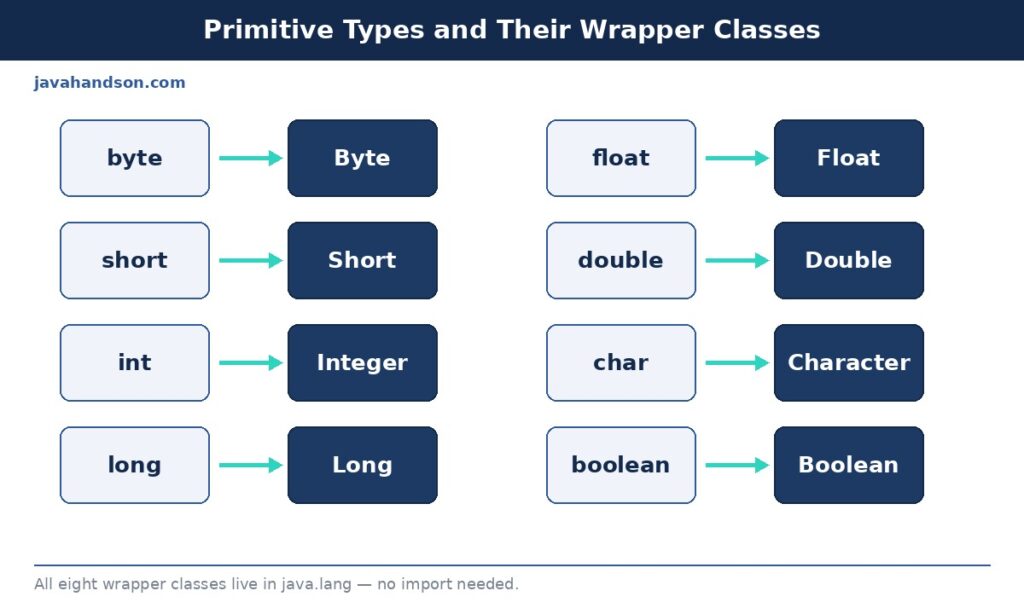
A wrapper class is an object version of a primitive type. It takes a plain value and wraps it inside an object. Hence the name.
Every primitive in Java has one matching wrapper class. An int maps to Integer. A double maps to Double. A boolean maps to Boolean. The pattern is easy to spot once you see the list.
The value itself lives inside the wrapper as a private final field. So an Integer is really just a small object holding one int, plus the usual object overhead. That overhead matters later, so keep it in mind.
A primitive holds its value directly. When you write int x = 5, the number 5 sits right there in the variable. There is no object, no reference, no heap allocation.
A wrapper works differently. When you write Integer y = 5, Java creates an object on the heap. The variable y holds a reference to that object, not the number itself. The value 5 lives inside the object.
This one difference explains almost everything odd about wrappers. Here is why it matters:
So a wrapper is not just a fancy int. It behaves like every other object in Java. That is the whole point, and also the source of every trap we will cover.
Primitives are fast and light. But they are not objects. And large parts of Java only work with objects.
Take collections, for example. An ArrayList, a HashMap, a HashSet — none of them can hold a raw int. They store objects only. So you need Integer instead of int to put a number inside them.
Generics push you the same way. You cannot write List<int>, because a generic type parameter must be a reference type. You write List<Integer> instead, and boxing bridges the gap.
Here are the main reasons wrapper classes exist:
So a wrapper class bridges two worlds. On one side sits the fast primitive. On the other side sits the object that the rest of Java expects. Boxing is the bridge between them.
Java has eight primitive types. Each one gets its own wrapper class. Here they are, side by side, with a small note on each.
| Primitive | Wrapper Class | Size (bits) | Example |
|---|---|---|---|
byte | Byte | 8 | 10 |
short | Short | 16 | 200 |
int | Integer | 32 | 42 |
long | Long | 64 | 9000000000L |
float | Float | 32 | 3.14f |
double | Double | 64 | 3.14159 |
char | Character | 16 | ‘A’ |
boolean | Boolean | JVM-defined | true |
Notice two small twists. int becomes Integer, not “Int”. And char becomes Character, not “Char”. The other six just capitalize the first letter.
Six of these wrappers extend a common parent called Number. That group is Byte, Short, Integer, Long, Float, and Double. Because they share a parent, they all offer methods like intValue() and doubleValue().
Character and Boolean do not extend Number. A character is not really a number in that sense, and a boolean is just true or false. So they sit on their own, outside the Number family.
All eight live in the java.lang package. So you do not need to import anything to use them. They are always available in every Java file you write.
You can build a wrapper object in a few ways. The cleanest one uses valueOf(). Let us look at a quick example.
Integer a = Integer.valueOf(42);   // recommended factory method
Integer b = 42;                    // autoboxing, even cleaner
Double  d = Double.valueOf(3.14);

System.out.println(a);  // 42
System.out.println(b);  // 42
System.out.println(d);  // 3.14
You might also see the old style, new Integer(42). Avoid it. That constructor is deprecated since Java 9, and it always makes a fresh object on the heap.
The reason valueOf() wins is simple. It can reuse a cached object for common values, while the constructor never can. We will unpack that cache in section 4, because it explains one of the most famous Java gotchas.
Wrapping a value by hand gets tedious. So Java added a shortcut back in version 5, released in 2004. It handles the conversion for you, both ways, and you barely notice it happening.
Autoboxing is the automatic change from a primitive to its wrapper. You write an int, and Java quietly turns it into an Integer when the context needs one.
Look at how little you have to write:
Integer count = 10;   // int 10 becomes Integer, automatically
List<Integer> nums = new ArrayList<>();
nums.add(5);          // primitive 5 is boxed into Integer
nums.add(7);          // same thing here
You never called valueOf() there. The compiler added it for you behind the scenes. That is autoboxing at work, and it keeps your code clean and readable.
Here is the key idea most tutorials skip. Autoboxing is not a runtime trick. It is pure compiler sugar. The compiler rewrites your code before it ever runs.
When you write Integer count = 10, the compiler turns it into Integer count = Integer.valueOf(10). The snippet below shows the same code twice, first as you write it, then as the compiler sees it.
// What you write:
Integer count = 10;
int back = count;

// What the compiler generates:
Integer count = Integer.valueOf(10);   // boxing
int back = count.intValue();           // unboxing
So boxing becomes a valueOf() call, and unboxing becomes an intValue() call. Knowing this removes the mystery. Any time boxing surprises you, imagine those hidden calls, and the behaviour makes sense.
Unboxing is the reverse trip. Java pulls the primitive back out of the wrapper when your code expects a plain value.
Integer boxed = 20;
int plain = boxed;    // Integer becomes int, via intValue()

int sum = boxed + 5;  // boxed is unboxed, then added
System.out.println(sum);  // 25
When you do math on an Integer, Java has to unbox it first. Arithmetic operators work on primitives, not objects. So the conversion happens on its own, quietly, on every single operation.
Boxing and unboxing kick in at several spots. You often do not even notice. Here are the common ones:
| ▶ Quick tip Autoboxing is a compiler feature, not runtime magic. The compiler inserts valueOf() for boxing and intValue() for unboxing. The bytecode looks exactly the same as if you wrote those calls by hand. When behaviour confuses you, mentally add those hidden calls back in. |
Here is where beginners get burned. Comparing wrapper objects with == does not always work the way you expect. And the reason is a small, clever cache built into the JDK.
Run this snippet and look closely at the output. It confuses almost everyone the first time they see it.
Integer a = 100;
Integer b = 100;
System.out.println(a == b);   // true

Integer c = 200;
Integer d = 200;
System.out.println(c == d);   // false !
Same code, same comparison. Yet one line prints true and the other prints false. Nothing else changed except the number. What is going on here?
Java keeps a small pool of Integer objects ready to reuse. This pool covers the values from -128 to 127. When you box a number in that range, valueOf() hands you the same cached object every time.
So both a and b point to the exact same Integer for 100. That is why a == b is true. They are literally the same object in memory, sharing one address.
For 200, the value sits outside the cache. So valueOf() creates a brand new object for each call. Now c and d point to different objects, and c == d turns false.
Why does this cache exist at all? Small integers show up constantly in real code — loop counters, array indexes, status codes, small IDs. Reusing objects for those common values saves memory and reduces garbage collection pressure. It is a quiet optimization that usually helps you.
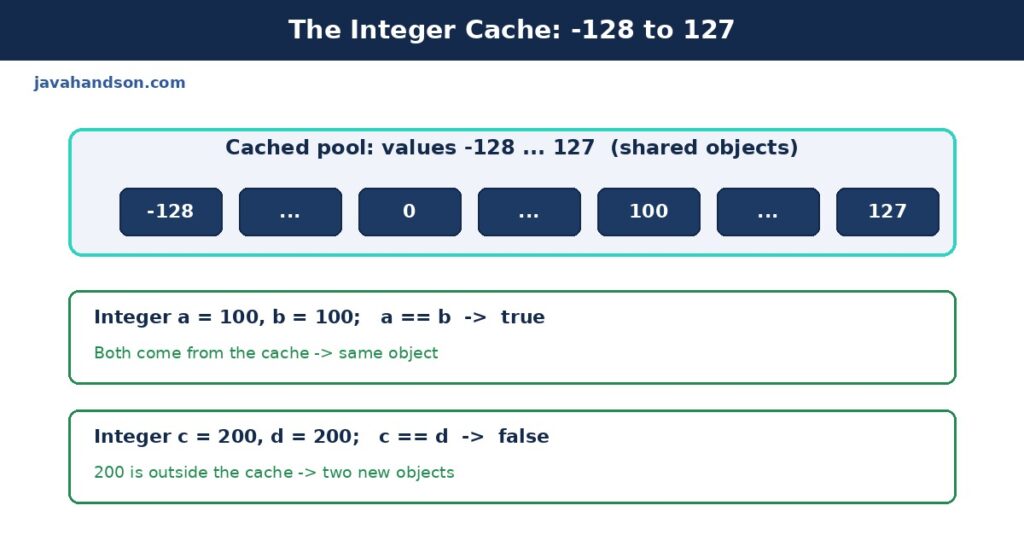
The lesson is simple. Never compare wrapper objects with ==. Use equals() instead, because it checks the value, not the memory address.
Integer c = 200;
Integer d = 200;

System.out.println(c == d);        // false, compares references
System.out.println(c.equals(d));   // true, compares values
The == operator asks “are these the same object?”. The equals() method asks “do these hold the same value?”. For wrappers, you almost always want the second question, so reach for equals() by default.
There is a mixed case worth knowing too. If you compare an Integer with a plain int using ==, Java unboxes the Integer first. So that comparison checks values, and it works fine. The trap only bites when both sides are wrapper objects.
| ▶ Interview insight The Integer cache range is -128 to 127 by default. You can raise the upper bound with the JVM flag -XX:AutoBoxCacheMax. Byte, Short, Long, and Character cache their small values too, and Boolean caches both TRUE and FALSE. Float and Double never cache, because their value space is far too large to make caching worthwhile. |
Wrappers really earn their place inside collections. But that is also where a subtle removal bug loves to hide. Let us look at how it happens.
A List has two remove methods. One takes an int index. The other takes an Object value. With a List<Integer>, both look valid, and that causes real confusion.
List<Integer> list = new ArrayList<>();
list.add(10);
list.add(20);
list.add(30);

list.remove(1);                     // removes index 1 -> the value 20
list.remove(Integer.valueOf(10));   // removes the value 10
The first call passes a plain int, so Java picks remove(int index). It deletes the element at position 1, not the value 1. The second call passes an Integer object, so Java picks remove(Object) and deletes by value instead.
This trips up even experienced developers. When you mean the value, wrap it clearly with Integer.valueOf(). That removes all doubt about which overload runs.
A HashMap finds keys using two methods: hashCode() and equals(). Wrapper classes override both correctly, so two Integers holding the same value behave as the same key.
That is why map.get(1000) works even though 1000 sits outside the cache. The lookup never uses ==. It uses hashCode() to find the bucket, then equals() to match the key. Both compare by value, so the fresh object still matches.
Map<Integer, String> map = new HashMap<>();
map.put(1000, "gold");

System.out.println(map.get(1000));   // gold, matched by equals()
So inside collections, wrappers behave sensibly. The == trap only appears when you compare references directly in your own code. The collections themselves do the right thing for you.
Wrapper classes are more than boxes. They carry a bunch of helper methods that you will reach for often. Let us tour the ones that matter most.
You often read numbers as text, from a file, a form, or a config value. The parse methods turn that text into a real primitive number.
int    n = Integer.parseInt("42");     // 42 as int
double d = Double.parseDouble("3.14"); // 3.14 as double
long   l = Long.parseLong("9000");     // 9000 as long

System.out.println(n + 1);  // 43
Watch the input, though. If the text is not a valid number, these methods throw a NumberFormatException. Always guard or wrap user input before parsing it, because you cannot trust outside data.
There is a related method, valueOf(), that does the same parsing but returns a wrapper object instead of a primitive. Use parseInt() when you want an int, and Integer.valueOf() when you want an Integer.
You can also go the other way. Turn a number into text with toString() or String.valueOf().
String s1 = Integer.toString(42);      // "42"
String s2 = String.valueOf(3.14);      // "3.14"
String s3 = Integer.toString(255, 16); // "ff", base 16

System.out.println(s1 + " " + s3);  // 42 ff
That second form of toString() takes a radix, or base. So you can print a number in hex, binary, or any base from 2 to 36. It is handy for low-level and debugging work.
Wrapper classes expose useful constants and static helpers. They tell you the limits of each type and let you compare safely.
System.out.println(Integer.MAX_VALUE);      // 2147483647
System.out.println(Integer.MIN_VALUE);      // -2147483648
System.out.println(Character.isDigit('7')); // true
System.out.println(Integer.compare(5, 9));  // -1
Integer.compare() is safer than subtracting two values yourself. Subtraction can overflow for large numbers and flip the sign. The compare method avoids that whole class of bugs.
The floating-point wrappers hide their own trap. Float and Double follow the IEEE 754 standard, so some decimals cannot be stored exactly. This is not a wrapper bug, but it shows up through them.
Double x = 0.1 + 0.2;
System.out.println(x);            // 0.30000000000000004
System.out.println(x == 0.3);     // false !
So never compare floating-point values for exact equality. Check whether the difference is smaller than a tiny threshold instead. This applies to both the primitives and their wrappers.
Autoboxing feels free. It is not. Each box creates an object, and objects cost memory and time. Most of the time you will not care. But in tight loops, the cost adds up fast and hurts.
Look at this innocent-looking loop. It hides a nasty performance bug that many developers miss.
Long total = 0L;                 // note: Long, not long
for (long i = 0; i < 1_000_000; i++) {
    total += i;                  // unbox, add, box again — every time
}
The variable total is a Long object. So every add unboxes it, does the math, and boxes the result into a new object. That is roughly a million throwaway objects created for no reason.
The garbage collector then has to clean up all those short-lived objects. So you pay twice: once to create them, and again to collect them. On a hot path, that becomes a real slowdown.
Change one letter. Use the primitive long instead of the wrapper Long. Now the loop stays in primitive land the whole time.
long total = 0L;                 // primitive now
for (long i = 0; i < 1_000_000; i++) {
    total += i;                  // pure primitive math, no boxing
}
The rule of thumb is easy. Use primitives for heavy math and hot loops. Use wrappers only when an object is truly required, like inside a collection or a generic type.
This is also why specialized streams exist. IntStream, LongStream, and DoubleStream work on primitives and skip boxing entirely. When you process large amounts of numeric data, they run noticeably faster than a Stream of wrappers.
| ▶ Interview insight Boxing inside a large loop is a classic performance smell. The fix is to keep accumulator variables as primitives and reserve wrapper types for the boundary, where collections or generics force your hand. For heavy numeric work, prefer IntStream, LongStream, or DoubleStream, since they avoid boxing altogether. |
A wrapper can be null. A primitive never can. Mix the two carelessly, and your program crashes at runtime with a confusing stack trace.
Say a method returns an Integer, and it hands you null. Then you unbox it into an int. Boom.
Integer value = getFromMap();   // suppose this returns null
int result = value;             // NullPointerException here!
Java tries to unbox null by calling intValue() on it. But null has no methods to call. So it throws a NullPointerException, and it points at a line that looks perfectly innocent. The real cause hides one step earlier.
This one catches even careful developers. A ternary expression can force unboxing that you never intended, just because of its branch types.
Integer count = null;
// If one branch is int, the whole expression becomes int,
// so 'count' gets unboxed even when it holds null:
int result = (count != null) ? count : 0;   // safe here

boolean flag = true;
Integer boxed = flag ? 1 : null;            // risky pattern
Say one branch of a ternary is a primitive and the other is a wrapper. Java then unboxes the wrapper branch to match types. If that branch holds null, you get a NullPointerException. So keep both branches the same kind, or check for null first.
The defense is simple. Check for null before you unbox. Or lean on the wrapper type when a value might genuinely be missing.
Integer value = getFromMap();
int result = (value != null) ? value : 0;   // safe default
By now the big traps should feel familiar. Let us gather them in one place, so you can spot them fast in your own code and in reviews.
This is the number one slip. The == check works by accident for small numbers, thanks to the cache. Then it fails silently for bigger ones. Reach for equals() every time, and the whole problem disappears.
A null wrapper turned into a primitive throws a NullPointerException. Guard against null before any unboxing step. This bug loves to hide inside map lookups and ternary expressions, where the unboxing is not obvious.
A wrapper accumulator inside a big loop boxes on every pass. Keep loop counters and running totals as primitives. Save wrappers for the edges of your code, where objects are actually required.
On a List<Integer>, remove(1) deletes index 1, not the value 1. When you mean the value, pass Integer.valueOf(1) so the object overload runs. This one causes real data bugs, not just crashes.
Calling new Integer(5) still compiles, but it is deprecated since Java 9. It skips the cache and wastes memory on every call. Prefer valueOf() or plain autoboxing, which reuse cached objects where possible.
Each box quietly creates an object on the heap. In small programs that is fine. In performance-sensitive code, those objects pile up, and the garbage collector pays the price along with you.
A: A wrapper class turns a primitive into an object. Each of the eight primitives has one — int maps to Integer, double to Double, and so on. You need them wherever Java expects an object, like collections and generics.
A: Autoboxing converts a primitive into its wrapper automatically, like int to Integer. Unboxing does the reverse, pulling the primitive back out. The compiler inserts these conversions for you.
A: Java caches Integer objects from -128 to 127. Values in that range share the same object, so == is true. 200 sits outside the cache, so each gets a new object and == turns false. Use equals() to compare values.
A: The default range is -128 to 127. You can raise the upper bound with the JVM flag -XX:AutoBoxCacheMax. Byte, Short, Long, and Character also cache small values, but Float and Double never cache.
A: If a wrapper is null and you assign it to a primitive, Java tries to call intValue() on null. That throws a NullPointerException. Check for null before unboxing, especially after a map.get() that may miss.
A: Use equals(). The == operator checks whether two references point to the same object, which only works by accident for cached values. equals() compares the actual value, which is what you almost always want.
A: Each box creates a new object. If your accumulator is a wrapper like Long, every iteration unboxes, adds, and boxes again — that is millions of throwaway objects. Keep counters and totals as primitives in hot loops.
A: That constructor is deprecated. It always creates a fresh object and skips the cache. Use Integer.valueOf(5) or plain autoboxing instead, which reuse cached objects when possible.
A: Collections and generics work with objects, not primitives. So an ArrayList holds Integer, not int. Autoboxing hides this by converting your int when you call add().
A: Use a wrapper when you need an object — inside collections or generics — or when a value can legitimately be null. Use primitives everywhere else, especially for math and performance-sensitive code.
Let us pull the threads together. A wrapper class turns a primitive into an object, so it fits where Java demands objects. Collections, generics, and null values all need that bridge.
Autoboxing and unboxing handle the conversion for you. Under the hood they are just valueOf() and intValue() calls that the compiler writes. Keep that mental model, and the odd behaviour stops being odd.
The sharp edges are few but real. The == cache trap, the null unboxing crash, the ternary surprise, the remove overload, and the boxing cost in loops. Each one traces back to the same fact: a wrapper is an object, and a primitive is not.
So keep it simple. Use primitives for math and speed. Reach for wrappers when an object is required. And compare them with equals(), never with ==. Get those habits right, and wrapper classes become a quiet helper instead of a hidden trap.