DateTimeFormatter in Java: Format and Parse Dates Easily
-
Last Updated: October 14, 2026
-
By: javahandson
-
Series

DateTimeFormatter in Java explained with examples. Learn the pattern letters, how to format and parse dates, ISO formatters, and why it is thread-safe.
Every real app shows dates to users and reads dates from text. That is the job of DateTimeFormatter in Java. It turns a date into a string, and a string back into a date.
In the old days, we used SimpleDateFormat for this. However, that class had a nasty flaw. It was not thread-safe, which caused random bugs. So Java 8 gave us a safer tool.
In this guide, we will keep things beginner friendly. First, we will format a date into text. Then we will parse text back into a date. After that, the pattern letters will finally make sense.
I have debugged many date-format bugs in production. Honestly, most of them came from the old class. So I was glad when this safer one arrived. Let us see how it works.
Dates may look simple, but formatting trips people up. The pattern letters are easy to mix up. However, once you learn a few rules, it clicks. Then you will format any date with ease.
By the end of this guide, you will know:
Let us begin with the most common job: formatting.
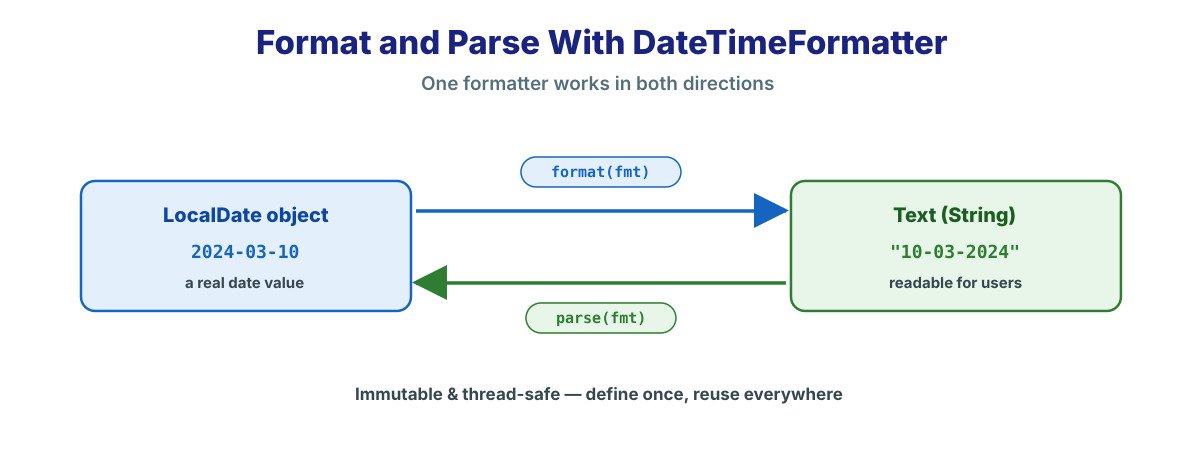
DateTimeFormatter is a class for printing and parsing dates. So it works in both directions. It formats a date into text, and it parses text into a date.
It lives in the java.time.format package and arrived with Java 8. Most importantly, it is immutable and thread-safe. Therefore you can define one and share it everywhere.
The old SimpleDateFormat was not thread-safe. So sharing one across threads caused wrong results. Many teams hit this bug under heavy load.
DateTimeFormatter fixes this completely. You can store one as a static constant. Then every thread can use it with no risk. In short, it is both safer and simpler.
// safe to share — define once, reuse everywhere
public static final DateTimeFormatter DATE_FMT =
        DateTimeFormatter.ofPattern("dd-MM-yyyy");
This small change matters more than it looks. With the old class, each thread needed its own copy. However, now one shared instance is enough. So you save memory and dodge a whole class of bugs.
The same formatter works across the date classes. So it formats a LocalDate, a LocalDateTime or a ZonedDateTime. You just match the pattern to the type’s fields.
For instance, a date-only pattern suits a LocalDate. Meanwhile, a pattern with time letters suits a LocalDateTime. So one tool covers the whole family.
There is one simple rule to respect here. The pattern must only use fields the type actually has. So a time pattern on a LocalDate will fail. In short, match the pattern to the value.
Formatting means turning a date into a readable string. So you pick a pattern, then apply it. Let us start with a simple example.
You create a formatter with ofPattern(). Then you call format() on the date. As a result, you get a string in your chosen shape.
DateTimeFormatter fmt =
        DateTimeFormatter.ofPattern("dd-MM-yyyy");

LocalDate date = LocalDate.of(2024, 3, 10);
String text = date.format(fmt);   // "10-03-2024"
So the pattern dd-MM-yyyy controls the output. Here dd is the day, MM is the month, and yyyy is the year. You can rearrange these parts any way you like.
Think of the pattern as a template. Each letter is a slot that the date fills. Meanwhile, the symbols between them, like dashes, print as-is. So you fully control the final shape.
The same idea works for a LocalDateTime too. So you just add time letters to the pattern. For instance, HH:mm adds the hour and minute.
DateTimeFormatter fmt =
        DateTimeFormatter.ofPattern("dd MMM yyyy, HH:mm");

LocalDateTime dt = LocalDateTime.of(2024, 3, 10, 14, 30);
String text = dt.format(fmt);   // "10 Mar 2024, 14:30"
Notice MMM gives the short month name, Mar. Meanwhile, HH gives the 24-hour clock. So the output reads naturally for a user.
Sometimes you want fixed words inside the output. For that, wrap the words in single quotes. So the formatter prints them as-is.
DateTimeFormatter fmt =
        DateTimeFormatter.ofPattern("EEE, dd MMM yyyy 'at' HH:mm");

LocalDateTime dt = LocalDateTime.of(2024, 3, 10, 14, 30);
System.out.println(dt.format(fmt));
// Sun, 10 Mar 2024 at 14:30
Notice the word ‘at’ in quotes here. So Java prints it literally, not as pattern letters. Without the quotes, each letter would be read as a field.
One formatter can both format and parse. So you define it once and use it in two directions. This keeps your input and output in sync.
DateTimeFormatter fmt = DateTimeFormatter.ofPattern("dd-MM-yyyy");

LocalDate date = LocalDate.of(2024, 3, 10);
String text = date.format(fmt);              // "10-03-2024"
LocalDate back = LocalDate.parse(text, fmt); // 2024-03-10
So the round trip gives you the same date. You format out, then parse back in. As a result, the two sides never drift apart.
The pattern letters are the heart of this class. However, they confuse beginners at first. So let us make them crystal clear.
You only need a handful of letters for daily work. The table below lists the ones you will use most. Keep it close while you learn.
| Letter | Means | Example |
|---|---|---|
| yyyy | year (4 digits) | 2024 |
| MM | month (2 digits) | 03 |
| MMM | month (short name) | Mar |
| MMMM | month (full name) | March |
| dd | day of month | 10 |
| HH | hour (0-23) | 14 |
| hh | hour (1-12) | 02 |
| mm | minute | 30 |
| ss | second | 45 |
| EEE | day of week (short) | Sun |
| a | AM or PM | PM |
So you build any format by mixing these letters. For instance, yyyy-MM-dd gives 2024-03-10. Likewise, hh:mm a gives 02:30 PM.
Here is the trap that bites everyone. The letter case changes the meaning. So M and m are not the same thing at all.
Let me show the classic mistake clearly. People write mm for the month by accident. However, mm means minutes, so the month comes out wrong.
LocalDateTime dt = LocalDateTime.of(2024, 3, 10, 14, 30);

// WRONG: 'mm' is minutes, not month
dt.format(DateTimeFormatter.ofPattern("dd-mm-yyyy"));  // 10-30-2024

// RIGHT: 'MM' is month
dt.format(DateTimeFormatter.ofPattern("dd-MM-yyyy")); // 10-03-2024The number of letters also changes the output. So MM pads the month to two digits. Meanwhile, MMM switches to a short name instead.
So one extra letter can change everything. A number becomes a name, for instance. Therefore always count your letters with care.
The same idea applies to the year and day. So yyyy gives a four-digit year, like 2024. Meanwhile, yy gives a two-digit year, like 24. In practice, yyyy is the safer choice for clarity.
Here is a simple habit that helps. Write the pattern, then read it out loud. If each piece matches your intended output, it is correct. Otherwise, fix the letter or its count.
| 💡 Interview Insight A common interview question is why dd-mm-yyyy gives a wrong month. The reason is case. In a pattern, capital M means month, but small m means minute. So mm prints minutes, not the month. The correct pattern uses capital MM for the month. |
Parsing is the reverse of formatting. So it turns a string back into a date. This is just as common in real apps.
You call parse() on the target class. Then you pass the text and the formatter. As a result, you get a real date object back.
DateTimeFormatter fmt =
        DateTimeFormatter.ofPattern("dd-MM-yyyy");

LocalDate date = LocalDate.parse("10-03-2024", fmt);
System.out.println(date);   // 2024-03-10
So the formatter must match the text exactly. The pattern and the string have to line up. Otherwise, Java throws a parse error, which we cover next.
There is a nice shortcut worth knowing too. For an ISO date, you can skip the formatter entirely. So LocalDate.parse(“2024-03-10”) just works. However, for any other shape, you must pass a formatter.
If the text does not match, parsing fails. So Java throws a DateTimeParseException. Therefore it is wise to handle that case.
try {
    LocalDate.parse("2024/03/10",
            DateTimeFormatter.ofPattern("dd-MM-yyyy"));
} catch (DateTimeParseException ex) {
    System.out.println("Bad date format: " + ex.getMessage());
}
So always guard user input with a try-catch. People type dates in all kinds of ways. As a result, a clear error message helps a lot.
You can parse a full date and time too. So LocalDateTime.parse() works the same way. You just need a pattern with both date and time letters.
DateTimeFormatter fmt =
        DateTimeFormatter.ofPattern("dd-MM-yyyy HH:mm");

LocalDateTime dt = LocalDateTime.parse("10-03-2024 14:30", fmt);
System.out.println(dt);   // 2024-03-10T14:30
So the same rules apply as before. The text and the pattern must match. Then Java builds the full date-time for you.
Most parse errors come from a mismatch. So the text uses one shape, but the pattern expects another. Let us look at the usual culprits.
So check the pattern against the text carefully. They must line up piece by piece. In most cases, that quick check finds the bug.
You do not always need a custom pattern. Java ships several ready-made formatters. So for standard formats, you can skip ofPattern() entirely.
The built-in ISO formatters cover common cases. So ISO_LOCAL_DATE prints 2024-03-10. Likewise, ISO_LOCAL_DATE_TIME adds the time.
LocalDate date = LocalDate.of(2024, 3, 10);

System.out.println(date.format(DateTimeFormatter.ISO_LOCAL_DATE));
// 2024-03-10

System.out.println(date.format(DateTimeFormatter.BASIC_ISO_DATE));
// 20240310
So these save you from writing a pattern. For a plain ISO date, they just work. Moreover, they are the standard choice for data exchange.
Why prefer ISO for data exchange? Because the format is the same everywhere. So two systems never argue about day-month order. In short, it removes a common source of confusion.
Java can also format dates by locale. So ofLocalizedDate() picks a style for the user’s region. This gives a natural look in each country.
DateTimeFormatter fmt =
        DateTimeFormatter.ofLocalizedDate(FormatStyle.MEDIUM);

LocalDate date = LocalDate.of(2024, 3, 10);
System.out.println(date.format(fmt)); // e.g. Mar 10, 2024Let us tie the ideas together now. Say we read a date from a form, then show it nicely. So we parse first, then format.
String input = "10-03-2024";

DateTimeFormatter inFmt = DateTimeFormatter.ofPattern("dd-MM-yyyy");
DateTimeFormatter outFmt = DateTimeFormatter.ofPattern("EEEE, dd MMMM yyyy");

LocalDate date = LocalDate.parse(input, inFmt);
String pretty = date.format(outFmt);

System.out.println(pretty);   // Sunday, 10 March 2024
So we parse the raw input with one formatter. Then we format the result with another. As a result, the user sees a friendly, readable date.
Some formats come up again and again. So here is a small cookbook you can copy. Each one shows the pattern and the output.
| You want | Pattern | Output |
|---|---|---|
| Day/Month/Year | dd/MM/yyyy | 10/03/2024 |
| ISO date | yyyy-MM-dd | 2024-03-10 |
| Readable date | dd MMM yyyy | 10 Mar 2024 |
| Full date | EEEE, dd MMMM yyyy | Sunday, 10 March 2024 |
| 12-hour time | hh:mm a | 02:30 PM |
| 24-hour time | HH:mm | 14:30 |
| Date and time | dd-MM-yyyy HH:mm | 10-03-2024 14:30 |
So you can grab a row and use it right away. Each pattern is ready to drop into ofPattern(). Moreover, you can mix and match the parts freely.
A quick note on the 12-hour time row. The hh pattern pairs with the a letter. So hh:mm a prints 02:30 PM, with the AM or PM marker. Without the a, you would lose the morning-or-evening hint.
By default, the formatter resolves dates in a smart way. However, you can make it strict if you want. So an impossible date is rejected, not guessed.
For most apps, the default behaviour is fine. Still, strict parsing helps with critical input. In that case, you set the resolver style on the formatter.
Why does this even matter? Because some inputs are ambiguous or invalid. So a date like the 31st of February makes no sense. With strict parsing, Java rejects it instead of adjusting silently.
| 💡 Interview Insight Interviewers often ask if DateTimeFormatter is thread-safe. The answer is yes. Unlike the old SimpleDateFormat, it is immutable and thread-safe. So you can define one as a static constant and share it across all threads with no risk. |
Let me share a few habits from real projects. They will save you from silly format bugs. So keep them in mind as you code.
Most format bugs are small and quiet. So they often pass a quick glance. However, these habits catch them early, before a user does.
That first mistake is by far the most common. The mm-for-month slip looks right at a glance. However, it silently prints the minutes instead.
A: DateTimeFormatter is a java.time.format class for printing and parsing dates. It formats a date into a String and parses a String back into a date. It is immutable and thread-safe, unlike the old SimpleDateFormat.
A: Call LocalDate.parse() with a formatter that matches the text. For example, LocalDate.parse(“10-03-2024”, DateTimeFormatter.ofPattern(“dd-MM-yyyy”)) gives the date 2024-03-10.
A: You used small mm in the pattern, which means minutes. The month uses capital MM. So change dd-mm-yyyy to dd-MM-yyyy to get the correct month.
A: Yes. It is immutable and thread-safe, so you can store one as a static constant and share it across all threads with no risk — unlike the old SimpleDateFormat.
Using DateTimeFormatter in Java is simple once the pattern clicks. It formats a date into text, and it parses text into a date. Best of all, it is safe to share across threads.
The trickiest part is just the pattern letters. However, a few rules clear up most of the confusion. Learn the case rule and the count rule, and you are set. After that, formatting feels natural.
Here is a quick recap of what we covered:
So pick the right pattern and reuse your formatter. Then both formatting and parsing become easy. The pillar guide below ties the whole date family together.
One last tip before you go. Keep a small file of your common patterns. Then copy from it instead of guessing each time. Over time, the letters will stick in your memory anyway.