Java OOPS Interview Questions: 20 Q&A With Simple Examples
-
Last Updated: October 27, 2026
-
By: javahandson
-
Series

Java OOPS interview questions: four pillars, overloading vs overriding, abstract class vs interface. 20 Q&A with simple runnable code examples.
Object-oriented programming sits at the heart of almost every Java interview. If you clear the OOP round with confidence, you set a strong tone for the rest of the discussion. This guide collects the most common Java OOPS interview questions and answers them in plain words. More importantly, it answers them the way you would actually speak to an interviewer.
I have grouped the questions into three levels. Beginner questions check your basics. Intermediate questions test how well you understand the design behind the language. Advanced questions push into the tricky corners that senior interviews love. Each answer starts with a short explanation and then a tiny code example, so the idea sticks. Most answers also end with a complete program you can paste into a file and run, with the expected output shown at the bottom.
One small tip before we start. Interviewers rarely want a textbook definition. Instead, they want a clear mental model and a real example. So I keep the examples close to everyday systems, like accounts, payments, and devices. Let us begin.
New to Java interviews? Start with the Core Java Interview Questions for Freshers: 45 Must-Know Q&A guide first. It covers the whole core Java round at a glance, and this article then goes deep on the OOP part of that round.
Object-oriented programming is a way to design software around objects. An object bundles data and the behaviour that works on that data. So instead of loose functions, I group related state and logic into one clean unit. This keeps large systems easy to reason about.
Java leans on OOP heavily. Classes, objects, inheritance, and interfaces shape almost every program I write. Over my years in banking and payments, this structure paid off again and again. A well-modelled Account or Transaction class keeps the rules in one place, so the code stays safe even as the system grows. That is the real value interviewers want you to show.
Four ideas carry the whole model. These are encapsulation, inheritance, polymorphism, and abstraction. Nearly every OOP question circles back to one of them. So the first question below unpacks all four, and the rest of the guide then builds on that base.
Answer – Object-oriented programming stands on four pillars. These are encapsulation, inheritance, polymorphism, and abstraction. I like to explain each one in plain words first, then show a tiny example.
Here is each pillar on its own: what it means, why it matters, and a small piece of code.
1. Encapsulation: the object guards its own data
class Account {
    private double balance;                       // hidden from the outside

    public void deposit(double amount) {
        if (amount <= 0) {
            throw new IllegalArgumentException("Invalid amount: " + amount);
        }
        balance += amount;                        // the only way to change balance
    }

    public double getBalance() { return balance; }
}
2. Inheritance: a child class reuses a parent class
class SavingsAccount extends Account {            // SavingsAccount IS-A Account
    double interest() {
        return getBalance() * 0.04;               // getBalance() comes from Account
    }
}
3. Polymorphism: one reference, many forms
interface Payment { void pay(double amount); }

class UpiPayment implements Payment {
    public void pay(double amount) { System.out.println("UPI paid " + amount); }
}

class CardPayment implements Payment {
    public void pay(double amount) { System.out.println("Card paid " + amount); }
}

Payment p = new UpiPayment();
p.pay(250);                  // UPI paid 250.0
p = new CardPayment();
p.pay(250);                  // Card paid 250.0  -> same call, different behaviour
4. Abstraction: show the “what”, hide the “how”
class Checkout {
    void complete(Payment payment, double total) {
        payment.pay(total);      // Checkout has no idea how UPI or cards work inside
    }
}
Interviewers often ask how abstraction and encapsulation differ, since both seem to “hide” something. This table draws the line:
| Aspect | Abstraction | Encapsulation |
|---|---|---|
| Main question | What should the caller see? | How do I protect the data? |
| Works at | Design level | Implementation level |
| Built with | Interfaces and abstract classes | private fields plus public methods |
| Example | Payment.pay() hides the UPI or card logic | Account keeps balance private behind deposit() |
Here is the same idea as one small program you can run. Read it slowly. Each class shows one pillar, and the comments name the pillar it stands for.
interface Payment {                          // abstraction: only the "what"
    void pay(double amount);
}

class Account {                              // encapsulation: private state
    private double balance;

    public void deposit(double amount) {
        if (amount <= 0) {
            System.out.println("Rejected deposit: " + amount);
            return;
        }
        balance += amount;
    }

    public double getBalance() { return balance; }
}

class SavingsAccount extends Account {       // inheritance: reuses Account
    double interest() { return getBalance() * 0.04; }
}

class UpiPayment implements Payment {        // polymorphism: one type, many forms
    public void pay(double amount) { System.out.println("UPI paid " + amount); }
}

class CardPayment implements Payment {
    public void pay(double amount) { System.out.println("Card paid " + amount); }
}

public class PillarsDemo {
    public static void main(String[] args) {
        SavingsAccount acc = new SavingsAccount();
        acc.deposit(1000);
        acc.deposit(-50);                     // blocked inside deposit()
        System.out.println("Balance: " + acc.getBalance());
        System.out.println("Interest: " + acc.interest());

        Payment[] payments = { new UpiPayment(), new CardPayment() };
        for (Payment p : payments) {
            p.pay(250);                       // same call, different behaviour
        }
    }
}

/* Output:
Rejected deposit: -50.0
Balance: 1000.0
Interest: 40.0
UPI paid 250.0
Card paid 250.0
*/
Map the output back to the pillars:
| Interview insight Interviewers often ask for a real example right after this. Keep a banking or payment example ready, because it feels concrete and shows you have used OOP in real code. |
Answer – A class is a blueprint, and an object is the real thing built from that blueprint. Think of a class as the design of a car. The object is the actual car standing in the showroom.
I write a class only once. From that single class, I can create many objects. Each object keeps its own copy of the instance fields. So the class defines the structure and behaviour, while the object holds the actual values at runtime.
class Car {
    String model;
    Car(String model) { this.model = model; }
}

Car swift = new Car("Swift");   // object 1
Car nexon = new Car("Nexon");   // object 2
Here Car is one class. But swift and nexon are two separate objects. They share the same structure, yet they hold different data. This is the core idea behind every Java program.
This table sums up the difference:
| Aspect | Class | Object |
|---|---|---|
| What it is | A blueprint or template | A real instance built from it |
| How many | Written once | As many as you create with new |
| When it exists | Compile time, loaded once by the JVM | Runtime, on the heap |
| What it holds | Structure and behaviour | Actual field values |
Two more points make the answer stronger:
Let us make the class-versus-object idea visible. The program below builds two cars from one Car class, changes one of them, and asks the class how many cars it has built so far.
class Car {
    static int carsBuilt = 0;        // one copy, shared by every Car
    String model;                    // each Car gets its own copy

    Car(String model) {
        this.model = model;
        carsBuilt++;
    }

    void drive() { System.out.println(model + " is driving"); }
}

public class ClassObjectDemo {
    public static void main(String[] args) {
        Car swift = new Car("Swift");
        Car nexon = new Car("Nexon");

        swift.drive();
        nexon.drive();

        nexon.model = "Nexon EV";             // changes only this object
        System.out.println(swift.model + " / " + nexon.model);
        System.out.println("Cars built: " + Car.carsBuilt);
        System.out.println(swift == nexon);   // two different objects
    }
}

/* Output:
Swift is driving
Nexon is driving
Swift / Nexon EV
Cars built: 2
false
*/
What the output tells you:
Answer – Both share a method name, yet they solve different problems. Overloading happens inside a single class. Overriding happens across a parent and a child class.
// Overloading: one class, same name, different parameters
class Printer {
    void print(String text) { System.out.println("Text: " + text); }
    void print(int number)  { System.out.println("Number: " + number); }
}

// Overriding: the child replaces the parent's version
class Base {
    void show() { System.out.println("Base"); }
}

class Child extends Base {
    @Override
    void show() { System.out.println("Child"); }
}

Printer printer = new Printer();
printer.print("hi");     // Text: hi      -> chosen at compile time
printer.print(42);       // Number: 42

Base b = new Child();
b.show();                // Child         -> chosen at runtime
Each one has its own rules. Overloading is valid only when:
class Converter {
    int parse(String s) { return Integer.parseInt(s); }
    // double parse(String s) { ... }        // will not compile: only the return type differs
    long parse(String s, int radix) { return Long.parseLong(s, radix); }   // OK: extra parameter
}
Overriding is valid only when:
| Aspect | Overloading | Overriding |
|---|---|---|
| Where | Same class | Parent and child class |
| Signature | Must differ | Must stay the same |
| Binding | Compile time | Run time |
| Polymorphism type | Static (compile-time) | Dynamic (run-time) |
One small habit saves many bugs here. Always add the @Override annotation on an overriding method. The compiler then checks that a real parent method exists with that signature. So a tiny typo, like a wrong parameter type, fails fast instead of silently creating an overload. This is a cheap safety net, and interviewers like to see it.
This runnable example puts both ideas side by side. The Calculator shows overloading, and the two notifier classes show overriding.
class Calculator {
    int add(int a, int b)          { return a + b; }
    double add(double a, double b) { return a + b; }
    int add(int a, int b, int c)   { return a + b + c; }
}

class Notifier {
    void send(String msg) { System.out.println("Notifier: " + msg); }
}

class SmsNotifier extends Notifier {
    @Override
    void send(String msg) { System.out.println("SMS: " + msg); }
}

public class OverloadOverrideDemo {
    public static void main(String[] args) {
        Calculator calc = new Calculator();
        System.out.println(calc.add(2, 3));        // picks add(int, int)
        System.out.println(calc.add(2.5, 3.5));    // picks add(double, double)
        System.out.println(calc.add(1, 2, 3));     // picks the 3-argument version

        Notifier n = new SmsNotifier();            // parent reference, child object
        n.send("OTP is 4821");                     // child version runs
    }
}

/* Output:
5
6.0
6
SMS: OTP is 4821
*/
Two different moments of decision are at work here:
| Interview insight A common trap is to call overloading “runtime”. It is not. Overloading is resolved at compile time; only overriding is resolved at runtime. Saying this clearly instantly separates you from weaker candidates. |
Answer – A constructor is a special method that runs when I create an object. It carries the same name as the class and has no return type. Its only job is to set up the initial state.
Constructor chaining means one constructor calls another. There are two ways to do it:
Two rules come up in almost every interview:
class Vehicle {
    Vehicle() { System.out.println("Vehicle created"); }
}

class Bike extends Vehicle {
    Bike() {
        super();                 // calls Vehicle() first
        System.out.println("Bike created");
    }
    Bike(String name) {
        this();                  // calls Bike()
        System.out.println(name);
    }
}
Chaining keeps the setup code in one spot. So I write the heavy logic once and let other constructors reuse it. This avoids copy-paste bugs across overloaded constructors. Interviewers like candidates who spot that reuse.
A few related points often come up next:
class User {
    String name;
    User(String name) { this.name = name; }   // our own constructor
}

User a = new User("Asha");    // fine
// User b = new User();       // will not compile: the free no-arg constructor is gone
And here is a private constructor in action:
class ApiClient {
    private static final ApiClient INSTANCE = new ApiClient();

    private ApiClient() { }                 // no outside object

    public static ApiClient getInstance() {
        return INSTANCE;                    // one shared object
    }
}
Constructor order is easier to see than to describe. Run this program and watch the numbered lines print.
class Vehicle {
    Vehicle() { System.out.println("1. Vehicle constructor"); }
}

class Bike extends Vehicle {
    String name;

    Bike() {
        this("Unnamed");                       // jump to Bike(String)
        System.out.println("3. Bike() finished");
    }

    Bike(String name) {
        super();                               // Vehicle() runs first
        this.name = name;
        System.out.println("2. Bike(String) set name to " + name);
    }
}

public class ConstructorChainDemo {
    public static void main(String[] args) {
        new Bike();
        System.out.println("---");
        Bike b = new Bike("Classic 350");
        System.out.println(b.name);
    }
}

/* Output:
1. Vehicle constructor
2. Bike(String) set name to Unnamed
3. Bike() finished
---
1. Vehicle constructor
2. Bike(String) set name to Classic 350
Classic 350
*/
Follow the first call step by step:
Keep one picture in mind: the parent is always built before the child, just like the foundation of a house goes in before the walls.
Answer – Both let me define a contract, yet they fit different needs. I reach for an abstract class when several classes share common code and a clear “is-a” bond. I reach for an interface when unrelated classes must follow the same contract.
The key differences in short:
This table makes the contrast easy to recall.
| Feature | Abstract class | Interface |
|---|---|---|
| Instance fields (state) | Yes | No (only constants) |
| Constructors | Yes | No |
| Multiple inheritance | No (single parent) | Yes (many) |
| Method bodies | Yes | Default / static only |
| Best used for | Shared code, is-a bond | Pure contract |
Here is how the two work together in a real design. I use an abstract class for shared payment logic, and an interface for an optional ability. So a class can inherit the base behaviour and also opt into extra capabilities. This mix keeps each part small and focused.
abstract class Payment {
    abstract void pay(double amount);       // each child defines this
    void log()  { System.out.println("payment logged"); }  // shared
}

interface Refundable {                      // optional capability
    void refund(double amount);
}

class CardPayment extends Payment implements Refundable {
    void pay(double amount)    { System.out.println("paid " + amount); }
    public void refund(double amount) { System.out.println("refunded " + amount); }
}
Java 8 blurred the line a little, yet the core intent stayed clear. An interface now carries default and static methods, so it can share some behaviour. But it still models a capability, like Comparable or Runnable. An abstract class, by contrast, models a partly built base type that children complete.
My rule of thumb:
Here is a complete program that uses both tools together. Shape is an abstract class with real state and shared code, while Drawable is an interface that only some shapes choose to sign.
abstract class Shape {
    private final String name;                 // state: allowed here

    Shape(String name) { this.name = name; }   // constructor: allowed here

    abstract double area();                    // each child fills this in

    void describe() {                          // shared code for all shapes
        System.out.printf("%s with area %.2f%n", name, area());
    }
}

interface Drawable {
    void draw();
}

class Circle extends Shape implements Drawable {
    private final double r;
    Circle(double r) { super("Circle"); this.r = r; }
    double area() { return Math.PI * r * r; }
    public void draw() { System.out.println("Drawing a circle"); }
}

class Square extends Shape {
    private final double side;
    Square(double side) { super("Square"); this.side = side; }
    double area() { return side * side; }
}

public class AbstractVsInterfaceDemo {
    public static void main(String[] args) {
        Shape[] shapes = { new Circle(1), new Square(3) };
        for (Shape s : shapes) {
            s.describe();
            if (s instanceof Drawable) {        // only some shapes can draw
                ((Drawable) s).draw();
            }
        }
        // Shape s = new Shape("x");            // will not compile: Shape is abstract
    }
}

/* Output:
Circle with area 3.14
Drawing a circle
Square with area 9.00
*/
Both shapes reuse describe() from the abstract parent, so that code is written only once. Only Circle signs the Drawable contract, so only the circle draws. Also notice that you cannot write new Shape(…) at all. An abstract class is a half-finished blueprint, and Java will only build its finished children.
| Interview insight The follow-up is almost always “when would you choose one over the other?” Answer with the rule: shared code and a single parent means abstract class; many unrelated types means interface. |
Answer – An instance member belongs to each object. A static member belongs to the class itself. So every object gets its own copy of an instance field, while all objects share one single copy of a static field.
Think of a classroom. Each student has their own name and their own marks. Those are instance fields. But the school name is the same for everyone in the room, so it makes no sense to store it again inside every student. That one shared value is a static field.
The same split applies to methods and blocks:
| Aspect | Static member | Instance member |
|---|---|---|
| Belongs to | The class | Each object |
| Copies in memory | One shared copy | One copy per object |
| How you call it | ClassName.member | objectRef.member |
| Can use this? | No | Yes |
The program below shows all three pieces: static fields, a static method, and a static block.
class BankAccount {
    static String bankName = "JH Bank";   // one copy for the whole class
    static int totalAccounts = 0;

    String holder;                        // one copy per object
    double balance;

    static {                              // runs once, when the class loads
        System.out.println("BankAccount class loaded");
    }

    BankAccount(String holder, double balance) {
        this.holder = holder;
        this.balance = balance;
        totalAccounts++;
    }

    void show() {                         // instance method: can use both kinds
        System.out.println(holder + " has " + balance + " at " + bankName);
    }

    static void report() {                // static method: no 'this' in here
        System.out.println("Total accounts: " + totalAccounts);
        // System.out.println(holder);    // will not compile: whose holder?
    }
}

public class StaticDemo {
    public static void main(String[] args) {
        BankAccount a = new BankAccount("Ravi", 500);
        BankAccount b = new BankAccount("Meera", 900);
        a.show();
        b.show();

        BankAccount.bankName = "JH Bank Ltd";   // change once, every object sees it
        a.show();
        BankAccount.report();
    }
}

/* Output:
BankAccount class loaded
Ravi has 500.0 at JH Bank
Meera has 900.0 at JH Bank
Ravi has 500.0 at JH Bank Ltd
Total accounts: 2
*/
Read the output from top to bottom:
The static Keyword in Java: Variables, Methods, Blocks and Nested Classes Explained guide covers static blocks, static nested classes and the memory side in more detail.
| Interview insight A simple rule to say out loud: if a value is the same for every object, like a counter or a constant, make it static. If it describes one particular object, keep it an instance field. Also remember that static methods are hidden, not overridden, which section 4.3 explains. |
Answer – final means “this cannot change after it is set”. The exact meaning depends on where you put it. Java lets you use final in three places, and each one locks something different.
One detail trips up many beginners. A final reference cannot point to a different object, but the object it points to can still change. So a final List can still gain new items. final locks the arrow, not the box at the end of the arrow. If you want the contents locked too, you need an immutable object, which section 4.5 covers.
A final field does not need a value on the same line either. A blank final field gets its value in the constructor, and the compiler makes sure every constructor sets it exactly once. This is the usual way to build fields that are fixed per object, like an order ID.
import java.util.ArrayList;
import java.util.List;

final class TaxRules {                          // final class: no subclass allowed
    static final double GST = 0.18;             // constant: set once, forever
}

class Order {
    private final String orderId;               // blank final: set in the constructor
    private final List<String> items = new ArrayList<>();

    Order(String orderId) { this.orderId = orderId; }

    final double total(double price) {          // final method: no override
        return price + price * TaxRules.GST;
    }

    void addItem(String item) { items.add(item); }  // the list itself can still change
    List<String> items() { return items; }
    String id() { return orderId; }
}

public class FinalDemo {
    public static void main(String[] args) {
        Order o = new Order("ORD-7");
        o.addItem("Keyboard");
        o.addItem("Mouse");
        System.out.println(o.id() + " " + o.items());
        System.out.println("Total: " + o.total(1000));

        // TaxRules.GST = 0.2;               // will not compile: final constant
        // class Cheap extends TaxRules { }  // will not compile: final class
    }
}

/* Output:
ORD-7 [Keyboard, Mouse]
Total: 1180.0
*/
The order ID and the GST rate never change once set. Yet the items list grew from empty to two entries, even though the items field is final. That is the “arrow, not the box” rule in action. Remove the comment markers on the last two lines in main and the compiler stops you both times.
For local variables, effectively final variables and lambdas, read final Keyword in Java: Variables, Methods, and Classes (A Beginner’s Guide).
| Interview insight Interviewers love the follow-up “is a final List immutable?” The answer is no. final stops you reassigning the reference, but list.add() still works. Use List.of() or List.copyOf() when you need a list nobody can change. |
Answer – An interface can never have a constructor. You cannot create an object of an interface on its own, so there is nothing to construct. That rule has stayed the same across every version.
State is limited too. An interface can hold only constants, which are implicitly public, static, and final. It cannot hold normal instance fields. The method story, however, did change over the years. Let me lay it out simply.
There is a neat story behind default methods. Before Java 8, adding a method to a published interface broke every class that implemented it. The team needed a way to grow interfaces safely. So default methods arrived, and that is how List and Collection gained stream() without breaking old code. This backward-compatibility goal is a great point to mention in an interview.
One last caution. Do not misuse an interface as a bag of constants. This old constant interface pattern leaks implementation details into the type. An enum or a final class with static fields fits that job far better.
An interview often links this topic to functional interfaces. An interface with exactly one abstract method is a functional interface. It can still carry default and static methods, since those do not count against the single-method rule. The @FunctionalInterface annotation then asks the compiler to guard that rule for me.
@FunctionalInterface
interface Validator {
    boolean isValid(String input);              // the one abstract method

    default Validator and(Validator other) {    // default methods do not count
        return in -> this.isValid(in) && other.isValid(in);
    }
}

Validator notEmpty  = in -> !in.isEmpty();      // lambdas implement it
Validator shortText = in -> in.length() <= 10;

System.out.println(notEmpty.and(shortText).isValid("hello"));   // true
System.out.println(notEmpty.and(shortText).isValid(""));        // false
This program puts every kind of interface member into one small Logger, so you can see which Java version made each one possible.
interface Logger {
    int LEVEL = 1;                              // public static final constant

    void log(String msg);                       // abstract

    default void logInfo(String msg) {          // Java 8
        log(prefix() + msg);
    }

    static Logger console() {                   // Java 8
        return msg -> System.out.println(msg);
    }

    private String prefix() {                   // Java 9
        return "[INFO] ";
    }
}

public class InterfaceEvolutionDemo {
    public static void main(String[] args) {
        Logger logger = Logger.console();
        logger.log("Plain message");
        logger.logInfo("Server started");
        System.out.println("Level = " + Logger.LEVEL);
        // new Logger();                        // will not compile: no constructor
    }
}

/* Output:
Plain message
[INFO] Server started
Level = 1
*/
Here is what each member shows:
Answer – The diamond problem shows up with multiple inheritance. Picture one type at the top, two types in the middle that both extend it, and one type at the bottom that inherits from both. The shape of those links looks like a diamond, hence the name.
Java never let a class extend two classes, so classes dodge the problem by design. But Java 8 brought default methods into interfaces. Now a class can implement two interfaces that both offer the same default method. That creates a genuine conflict. Which method should win?
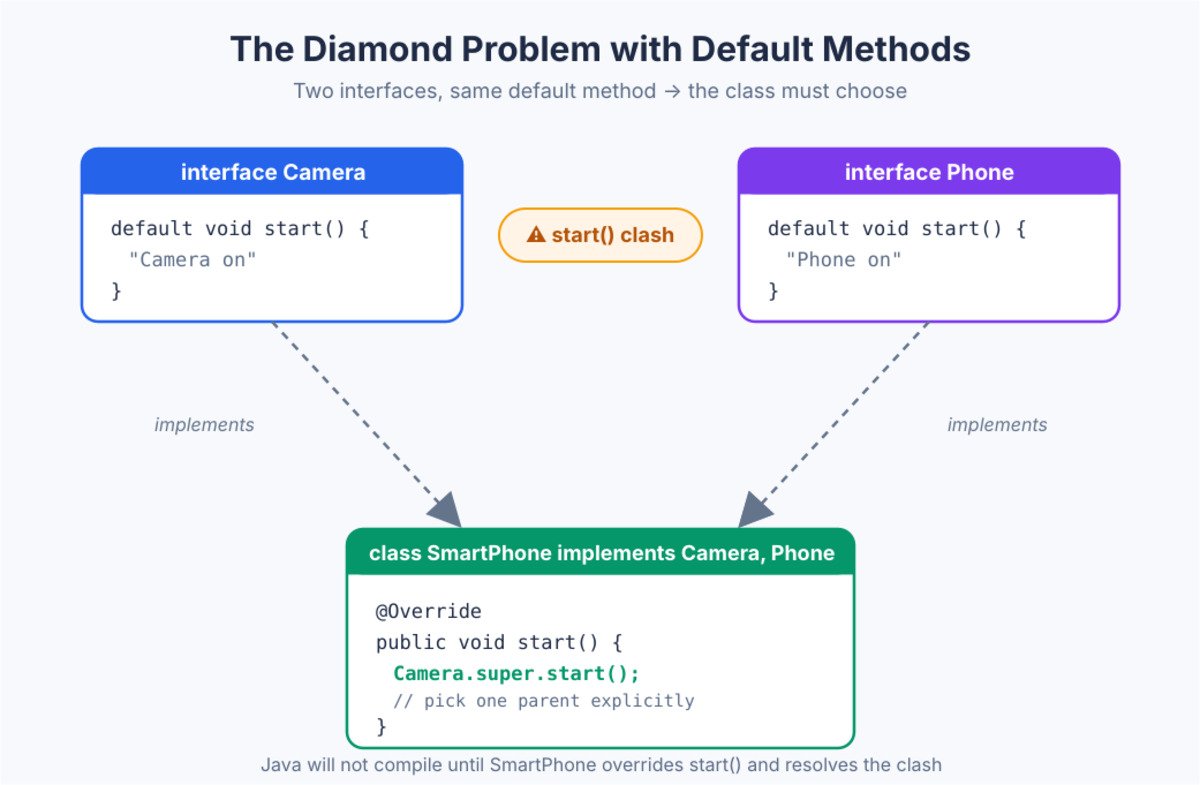
Java does not guess. Instead, it forces me to override the method and choose a winner. Inside that override, I can call a specific parent with the special syntax InterfaceName.super.method(). So the conflict turns into a clear, explicit decision.
interface Camera { default void start() { System.out.println("Camera on"); } }
interface Phone  { default void start() { System.out.println("Phone on"); } }

class SmartPhone implements Camera, Phone {
    @Override
    public void start() {
        Camera.super.start();     // pick one parent explicitly
    }
}
When a clash could be settled automatically, Java applies three tie-break rules, in this order:
The program below shows both sides of the rule. SmartPhone must settle the clash itself, while Tablet shows that a method from a real superclass wins without any extra code. For a longer walkthrough, read Default Methods in Interface: Multiple Inheritance and the Diamond Problem in Java.
interface Camera {
    default void start() { System.out.println("Camera on"); }
}

interface Phone {
    default void start() { System.out.println("Phone on"); }
}

class SmartPhone implements Camera, Phone {
    @Override
    public void start() {                       // must override, or no compile
        Camera.super.start();
        Phone.super.start();
        System.out.println("SmartPhone ready");
    }
}

class Device {
    public void start() { System.out.println("Device on"); }
}

class Tablet extends Device implements Camera { }   // class method wins

public class DiamondDemo {
    public static void main(String[] args) {
        new SmartPhone().start();
        new Tablet().start();
    }
}

/* Output:
Camera on
Phone on
SmartPhone ready
Device on
*/| Interview insight The line to say out loud is this: Java solves the diamond problem by refusing to pick for you. The code simply will not compile until you override the method and resolve the clash yourself. |
Answer – Composition means an object holds a reference to another object and reuses its behaviour. Inheritance means a class extends another class to reuse behaviour. Both reuse code, yet they bind the two types very differently.
Both reuse code, but they bind the types very differently:
| Aspect | Inheritance | Composition |
|---|---|---|
| Relationship | “is-a”: a SavingsAccount is an Account | “has-a”: a Car has an Engine |
| Coupling | Tight: the child leans on the parent’s internals | Loose: the outer class only calls the inner object’s methods |
| Change at runtime | No, fixed when you compile | Yes, swap the inner object |
| Main risk | A parent change can quietly break every child | A little extra code to forward calls |
So my rule is simple:
// Composition: Car HAS-A Engine
class Engine {
    void start() { System.out.println("Engine started"); }
}

class Car {
    private final Engine engine = new Engine();   // has-a
    void start() { engine.start(); }
}
In real payment systems, I lean on composition a lot. A PaymentProcessor holds a Validator, an Encryptor, and a Sender as separate objects. Later I can replace any one of them without touching the rest. That freedom is exactly why composition wins for code that must keep changing.
Two ideas explain why the classic advice says “favour composition over inheritance”:
Here is the payment example as a runnable program. The processor does not care how a message travels. It only knows that it has a Sender.
interface Sender {
    void send(String msg);
}

class RestSender implements Sender {
    public void send(String msg) { System.out.println("REST -> " + msg); }
}

class QueueSender implements Sender {
    public void send(String msg) { System.out.println("QUEUE -> " + msg); }
}

class PaymentProcessor {
    private final Sender sender;               // has-a Sender

    PaymentProcessor(Sender sender) { this.sender = sender; }

    void process(double amount) {
        sender.send("paid " + amount);         // delegation
    }
}

public class CompositionDemo {
    public static void main(String[] args) {
        new PaymentProcessor(new RestSender()).process(500);
        new PaymentProcessor(new QueueSender()).process(500);   // part swapped
    }
}

/* Output:
REST -> paid 500.0
QUEUE -> paid 500.0
*/
The same PaymentProcessor class sent one message over REST and one over a queue, and nothing inside it changed. We simply handed it a different part, the way you swap a phone charger without buying a new phone. With inheritance, you would need a new subclass for every kind of sender. The guide Inheritance vs Composition in Java: A Practical Guide walks through more cases like this one.
Answer – Most people know super() for the parent constructor. But super does more than that. It gives the child access to the parent’s members, even when the child hides or overrides them.
Here are the three things super can do:
class Account {
    double rate() { return 4.0; }
}

class SavingsAccount extends Account {
    @Override
    double rate() {
        return super.rate() + 2.0;   // reuse parent, then add
    }
}
Two more facts round this off:
This small keyword carries real design weight. It lets a child add to the parent instead of replacing it. A good example is a logging layer. The child logs an event, then calls super to run the real work. So the parent logic stays untouched, and the child only wraps a thin layer around it. Clean extension like this keeps a codebase easy to trust.
This program uses super in all three ways: to call a parent method, to reach a hidden parent field, and to wrap extra work around the parent’s logic.
class Account {
    String type = "Account";
    double rate() { return 4.0; }
    void close() { System.out.println("Account closed"); }
}

class SavingsAccount extends Account {
    String type = "Savings";                       // hides the parent field

    @Override
    double rate() { return super.rate() + 2.0; }   // extend, not replace

    @Override
    void close() {
        System.out.println("Audit: closing savings account");
        super.close();                             // still run the parent work
    }

    void showTypes() {
        System.out.println(type + " / " + super.type);
    }
}

public class SuperDemo {
    public static void main(String[] args) {
        SavingsAccount s = new SavingsAccount();
        System.out.println("Rate: " + s.rate());
        s.showTypes();
        s.close();
    }
}

/* Output:
Rate: 6.0
Savings / Account
Audit: closing savings account
Account closed
*/
What each method shows:
Answer – Runtime polymorphism means the actual object decides which method runs, not the reference type. Java resolves overridden calls while the program runs. We call this dynamic method dispatch.
Here is the mental model of what the JVM does for a call like animal.sound():
So the reference type only decides which methods you may call at compile time. The object decides which version actually runs.
class Animal { void sound() { System.out.println("Some sound"); } }
class Dog extends Animal { void sound() { System.out.println("Bark"); } }

Animal a = new Dog();
a.sound();   // prints "Bark" - decided by the object, not the reference
This behaviour is the quiet engine behind clean design. I can write code against a general type, like Payment, and plug in many concrete types later. The right method then runs automatically for each object. So new payment modes slot in without rewriting the caller.
Now a sharp interview twist. Fields are not polymorphic. Only methods use dynamic dispatch. A field access always follows the reference type, not the real object. Many candidates miss this, so a quick example makes the point stick.
class Animal { String name = "Animal"; }
class Dog extends Animal { String name = "Dog"; }

Animal a = new Dog();
System.out.println(a.name);      // "Animal" - field uses reference type
System.out.println(a.getClass()); // class Dog  - object is still a Dog
Run this to see dispatch in action. One loop, one method call, three different results.
class Payment {
    String label = "generic";
    void pay() { System.out.println("Generic payment"); }
}

class UpiPayment extends Payment {
    String label = "upi";
    @Override void pay() { System.out.println("UPI payment"); }
}

class CardPayment extends Payment {
    @Override void pay() { System.out.println("Card payment"); }
}

public class DispatchDemo {
    public static void main(String[] args) {
        Payment[] list = { new Payment(), new UpiPayment(), new CardPayment() };
        for (Payment p : list) {
            p.pay();                               // decided by the real object
        }

        Payment p = new UpiPayment();
        System.out.println(p.label);               // field: reference type wins
    }
}

/* Output:
Generic payment
UPI payment
Card payment
generic
*/
What the output shows:
| Interview insight Note that static, private, and final methods skip dynamic dispatch. The compiler binds them early, because none of them can be overridden. |
Answer – Upcasting means treating a child object as its parent type. Downcasting means going back the other way, from a parent reference to the child type. Upcasting is always safe and happens on its own. Downcasting needs an explicit cast, and it can fail while the program runs.
| Aspect | Upcasting | Downcasting |
|---|---|---|
| Direction | Child to parent | Parent to child |
| Syntax | Automatic: Payment p = new CardPayment(); | Explicit cast: (CardPayment) p |
| Safety | Always safe | Can throw ClassCastException at runtime |
| What you can call | Only the parent type’s methods | The child’s own methods too |
Why is one safe and the other risky? Every CardPayment is a Payment, so storing a card in a Payment variable can never be wrong. But not every Payment is a CardPayment. When you downcast, you are promising Java “trust me, this one really is a card”. If that promise is false, Java throws a ClassCastException at runtime.
The fix is to check before you cast. The instanceof operator answers “is this object really of that type?” Since Java 16, pattern matching lets you check and cast in one step, as in if (p instanceof CardPayment card). Inside that if block, card is already the right type.
class Payment {
    void pay(double amt) { System.out.println("Paying " + amt); }
}

class CardPayment extends Payment {
    void addCashback() { System.out.println("Cashback added to card"); }
}

class UpiPayment extends Payment {
    void showVpa() { System.out.println("VPA: asha@upi"); }
}

public class CastingDemo {
    public static void main(String[] args) {
        Payment p = new CardPayment();          // upcast: automatic and safe
        p.pay(300);
        // p.addCashback();                     // will not compile: Payment has no such method

        CardPayment card = (CardPayment) p;     // downcast: explicit
        card.addCashback();

        Payment other = new UpiPayment();
        try {
            CardPayment wrong = (CardPayment) other;   // compiles, fails at runtime
        } catch (ClassCastException e) {
            System.out.println("ClassCastException: a UPI payment is not a card");
        }

        Payment[] all = { new CardPayment(), new UpiPayment() };
        for (Payment x : all) {
            if (x instanceof CardPayment c) {   // Java 16+: check and cast together
                c.addCashback();
            } else if (x instanceof UpiPayment u) {
                u.showVpa();
            }
        }
    }
}

/* Output:
Paying 300.0
Cashback added to card
ClassCastException: a UPI payment is not a card
Cashback added to card
VPA: asha@upi
*/
Three things to notice:
| Interview insight If your code downcasts all over the place, treat it as a design smell. Usually the method belongs in the parent type, so polymorphism can pick the right behaviour without any casts. |
Answer – Because Java has a contract: if two objects are equal by equals(), they must return the same hashCode(). Hash-based collections like HashMap and HashSet depend on that promise. Break it, and those collections quietly start giving wrong answers.
First, the basics:
Now picture a HashSet as a wall of numbered boxes, called buckets. Here is what happens:
A correct equals() also follows a few simple rules that interviewers sometimes ask about:
import java.util.HashSet;
import java.util.Objects;
import java.util.Set;

class AccountId {
    private final String branch;
    private final int number;

    AccountId(String branch, int number) {
        this.branch = branch;
        this.number = number;
    }

    @Override
    public boolean equals(Object o) {
        if (this == o) return true;
        if (!(o instanceof AccountId)) return false;
        AccountId other = (AccountId) o;
        return number == other.number && branch.equals(other.branch);
    }

    @Override
    public int hashCode() {                   // try deleting this method and run again
        return Objects.hash(branch, number);
    }
}

public class EqualsHashCodeDemo {
    public static void main(String[] args) {
        AccountId a = new AccountId("PUNE", 101);
        AccountId b = new AccountId("PUNE", 101);

        System.out.println(a == b);           // two different objects
        System.out.println(a.equals(b));      // but the same meaning

        Set<AccountId> ids = new HashSet<>();
        ids.add(a);
        ids.add(b);
        System.out.println("Set size: " + ids.size());
    }
}

/* Output (with hashCode):
false
true
Set size: 1

   Output (hashCode deleted):
false
true
Set size: 2      <- a "duplicate" slipped in
*/For the full tour of these methods, read Object Class in Java: toString, equals, hashCode, getClass, and clone.
| Interview insight Remember the one-way rule. Equal objects must have equal hash codes, but equal hash codes do not mean the objects are equal. Two different objects may share a hash code, which is called a collision, and equals() settles it. |
Answer – A covariant return type lets an overriding method return a more specific type than the parent method. Before Java 5, the return type had to match exactly. Java 5 then relaxed this rule.
So if the parent returns Animal, the child can return Dog, because every Dog is an Animal. Where it helps:
class Animal {
    Animal reproduce() { return new Animal(); }
}

class Dog extends Animal {
    @Override
    Dog reproduce() { return new Dog(); }   // narrower return type
}
Rules to remember:
Here is a runnable version that shows the main benefit: the caller gets the specific type back and can use its extra methods straight away.
class Animal {
    Animal reproduce() { return new Animal(); }
    String name() { return "Animal"; }
}

class Dog extends Animal {
    @Override
    Dog reproduce() { return new Dog(); }       // narrower return type
    @Override
    String name() { return "Dog"; }
    void bark() { System.out.println("Woof!"); }
}

public class CovariantDemo {
    public static void main(String[] args) {
        Dog parent = new Dog();
        Dog puppy = parent.reproduce();          // no cast needed
        System.out.println(puppy.name());
        puppy.bark();

        Animal a = parent;
        Animal child = a.reproduce();            // still works through the parent type
        System.out.println(child.name());
    }
}

/* Output:
Dog
Woof!
Dog
*/
parent.reproduce() returns a Dog, so puppy.bark() works with no cast. When the same object is used through an Animal reference, the call still works and still runs the Dog version. The caller just sees the wider return type. Without covariant returns, the first call would need (Dog) parent.reproduce(), which is noisy and could fail at runtime.
Answer – When I override a method, I cannot reduce its visibility. I can keep it the same or make it wider. This rule protects the promise that the parent class made to its callers.
Why? A caller may hold a parent reference and expect the method to be reachable. If the child quietly made it private, that call would break. So Java blocks the move at compile time:
| Parent method is | Overriding method may be |
|---|---|
| public | public only |
| protected | protected or public |
| default (package-private) | default, protected, or public |
| private | Not inherited, so it cannot be overridden at all |
class Base {
    protected void show() { }
}

class Child extends Base {
    @Override
    public void show() { }      // widened: protected -> public, allowed
    // private void show() { }  // would NOT compile
}
A second rule travels with this one, for checked exceptions. The overriding method may:
import java.io.FileNotFoundException;
import java.io.IOException;

class Base {
    void read() throws IOException { }
}

class Child extends Base {
    @Override
    void read() throws FileNotFoundException { }   // narrower: allowed
    // void read() throws Exception { }            // broader: will not compile
}
This program shows both override rules at once: the child widens the visibility and narrows the checked exception.
import java.io.FileNotFoundException;
import java.io.IOException;

class Report {
    protected String title() { return "Monthly report"; }

    void load(String path) throws IOException {
        System.out.println("Report loading " + path);
    }
}

class SalesReport extends Report {
    @Override
    public String title() { return "Sales report"; }          // protected -> public: OK

    @Override
    void load(String path) throws FileNotFoundException {     // narrower exception: OK
        if (path.isEmpty()) {
            throw new FileNotFoundException("No path given");
        }
        System.out.println("SalesReport loading " + path);
    }
}

public class AccessOverrideDemo {
    public static void main(String[] args) {
        Report r = new SalesReport();
        System.out.println(r.title());
        try {
            r.load("sales.csv");
            r.load("");
        } catch (IOException e) {                // the caller only knows IOException
            System.out.println("Caught: " + e.getMessage());
        }
    }
}

/* Output:
Sales report
SalesReport loading sales.csv
Caught: No path given
*/
The caller holds a Report reference, so it only knows about IOException. FileNotFoundException is a child of IOException, so the caller’s catch block still handles it. That is the whole point of these rules: code written for the parent never meets a surprise from the child.
Answer – Overriding needs runtime dispatch on an object. A static method belongs to the class, not to any object. So there is nothing to dispatch on, and overriding simply does not apply.
Here is how each kind of method behaves when the child declares one with the same signature:
| Parent method | Can the child override it? | What happens instead |
|---|---|---|
| static | No | Method hiding: the reference type picks the version at compile time |
| private | No | Not visible to the child, so a same-named method is a separate, new method |
| final | No | The compiler rejects the attempt |
| normal instance method | Yes | Overriding: the real object picks the version at runtime |
class Parent {
    static void greet() { System.out.println("Parent"); }
}
class Child extends Parent {
    static void greet() { System.out.println("Child"); }  // hiding
}

Parent p = new Child();
p.greet();   // prints "Parent" - resolved by the reference type
Fields follow the same hiding behaviour as static methods. A child field with the same name hides the parent field, so the access depends on the reference type, exactly as we saw in 3.5.
Run the program below to see static, instance, and private methods side by side, all called through the same Parent reference.
class Parent {
    static void greet()   { System.out.println("Parent.greet (static)"); }
    void hello()          { System.out.println("Parent.hello (instance)"); }
    private void secret() { System.out.println("Parent.secret"); }
    void callSecret()     { secret(); }
}

class Child extends Parent {
    static void greet()   { System.out.println("Child.greet (static)"); }    // hiding
    @Override
    void hello()          { System.out.println("Child.hello (instance)"); }  // overriding
    private void secret() { System.out.println("Child.secret"); }            // separate method
}

public class HidingDemo {
    public static void main(String[] args) {
        Parent p = new Child();
        p.greet();          // static: follows the reference type
        p.hello();          // instance: follows the real object
        p.callSecret();     // private: Parent's own method runs

        Child.greet();      // better habit: call statics through the class name
    }
}

/* Output:
Parent.greet (static)
Child.hello (instance)
Parent.secret
Child.greet (static)
*/
Three calls on the same p behave three different ways:
As a habit, call static methods through the class name, like Child.greet(), so nobody mistakes them for overriding.
| Interview insight Say the word “hiding” clearly for static methods. Many candidates wrongly call it overriding, and interviewers always catch that slip. |
Answer – The Liskov Substitution Principle says a subclass should work anywhere its parent works. In short, I should replace the parent with the child and nothing should break. If that swap changes behaviour in a surprising way, the design violates the principle.
The classic violation is a Square that extends a Rectangle:
Watch it happen below.
class Rectangle {
    int width, height;
    void setWidth(int w)  { width = w; }
    void setHeight(int h) { height = h; }
    int area() { return width * height; }
}

class Square extends Rectangle {
    @Override void setWidth(int w)  { width = height = w; }  // breaks contract
    @Override void setHeight(int h) { width = height = h; }
}

Rectangle r = new Square();
r.setWidth(5);
r.setHeight(4);
System.out.println(r.area());   // 16, not the expected 20
The fix is to drop that inheritance link. Instead, I model the shapes as separate types, or I make them immutable so the conflicting setters disappear entirely.
interface Shape { int area(); }

final class Rectangle implements Shape {
    private final int width, height;
    Rectangle(int w, int h) { width = w; height = h; }
    public int area() { return width * height; }
}

final class Square implements Shape {
    private final int side;
    Square(int side) { this.side = side; }
    public int area() { return side * side; }
}
Now neither type pretends to be the other. Both honour the Shape contract on their own terms. So the surprising 16-instead-of-20 bug cannot happen anymore. This is the calm, safe shape of a design that respects substitution.
There is a simple test behind this principle. A subclass must:
A Penguin that extends Bird but cannot fly breaks the same rule. The fix is to model flying as a separate ability, such as a Flyable interface, that only real flyers implement.
The best way to feel this bug is to run it. The stretch() method below was written for a Rectangle, and it makes a fair assumption: after setting width 5 and height 4, the area should be 20.
class Rectangle {
    int width, height;
    void setWidth(int w)  { width = w; }
    void setHeight(int h) { height = h; }
    int area() { return width * height; }
}

class Square extends Rectangle {
    @Override void setWidth(int w)  { width = height = w; }
    @Override void setHeight(int h) { width = height = h; }
}

public class LiskovDemo {
    static void stretch(Rectangle r) {           // written for any Rectangle
        r.setWidth(5);
        r.setHeight(4);
        String verdict = r.area() == 20 ? "as expected" : "surprise!";
        System.out.println(r.getClass().getSimpleName() + " area = " + r.area() + " (" + verdict + ")");
    }

    public static void main(String[] args) {
        stretch(new Rectangle());
        stretch(new Square());                   // a "Rectangle" that breaks the rules
    }
}

/* Output:
Rectangle area = 20 (as expected)
Square area = 16 (surprise!)
*/
Same method, same calls, different result. The Square quietly changed both sides each time, so the final setHeight(4) left it 4 by 4. Code that worked for every Rectangle now fails for one of its children. That is exactly what the Liskov Substitution Principle warns against, and it is why the fix above removes the inheritance link instead of patching the setters.
Answer – An immutable object never changes after construction. String is the famous example. Immutability brings real safety, especially across threads, since no one can mutate shared state. Here is the checklist I follow for a solid immutable class.
That last point is the edge case many people miss. If I store a Date or a List directly, the caller still holds a reference to it, and can change my internal state from outside. A defensive copy closes that leak on both sides:
public final class Customer {
    private final String name;
    private final List<String> accounts;

    public Customer(String name, List<String> accounts) {
        this.name = name;
        this.accounts = new ArrayList<>(accounts);   // copy IN
    }

    public String getName() { return name; }

    public List<String> getAccounts() {
        return new ArrayList<>(accounts);            // copy OUT
    }
}
Immutability shines in concurrent code. When an object cannot change, many threads can read it safely without locks. For this reason, I favour immutable value objects for money amounts and transaction details. Fewer moving parts means fewer bugs under load.
It also helps to know why String itself is immutable. The design gives three clear wins:
One more design note rounds this off. When a class has many fields, a long constructor turns messy. The builder pattern collects values step by step, then hands back one finished, read-only object:
public final class Customer {
    private final String name;
    private final List<String> accounts;

    private Customer(Builder b) {                 // only the builder can call this
        this.name = b.name;
        this.accounts = List.copyOf(b.accounts);  // unmodifiable copy
    }

    public static class Builder {
        private String name;
        private final List<String> accounts = new ArrayList<>();

        public Builder name(String name)  { this.name = name; return this; }
        public Builder account(String id) { accounts.add(id); return this; }
        public Customer build()           { return new Customer(this); }
    }
}

Customer c = new Customer.Builder()
        .name("Asha")
        .account("A-101")
        .account("A-102")
        .build();             // one immutable Customer
Let us try to break the Customer class from outside. The program below changes the list it passed in, and then changes the list it got back.
import java.util.ArrayList;
import java.util.List;

final class Customer {
    private final String name;
    private final List<String> accounts;

    Customer(String name, List<String> accounts) {
        this.name = name;
        this.accounts = new ArrayList<>(accounts);      // copy IN
    }

    String getName() { return name; }

    List<String> getAccounts() {
        return new ArrayList<>(accounts);               // copy OUT
    }
}

public class ImmutableDemo {
    public static void main(String[] args) {
        List<String> input = new ArrayList<>(List.of("A-101"));
        Customer c = new Customer("Asha", input);

        input.add("HACKED-1");                // change the caller's own list
        c.getAccounts().add("HACKED-2");      // change the copy we got back

        System.out.println(c.getName() + " " + c.getAccounts());
    }
}

/* Output:
Asha [A-101]
*/
Both attacks failed:
| Interview insight Since Java 16, a record gives you a shallow-immutable class almost for free. But a record does not deep-copy mutable fields, so you still add defensive copies in the compact constructor when a field is mutable. |
Answer – A sealed class or interface decides exactly which classes may extend it. You list the allowed children with the permits keyword, and the compiler rejects anyone else. Sealed classes became a standard feature in Java 17.
Before sealed classes, you had only two choices. A class was either open, so anyone could extend it, or final, so nobody could. Sealed classes add the middle ground: “these three children, and no others”. That fits real domains well. A payment in your system might be a card, UPI, or cash, and you want the code to say so.
Each permitted child must pick one of three modifiers, so the hierarchy stays under control:
sealed abstract class Account permits Savings, Current, Wallet { }

final class Savings extends Account { }                    // closed for good
sealed class Current extends Account permits Overdraft { } // still restricted
final class Overdraft extends Current { }
non-sealed class Wallet extends Account { }               // open again
class PromoWallet extends Wallet { }                       // allowed
The biggest win shows up with switch. Because the compiler knows every possible subtype, a switch over a sealed type can cover all cases with no default branch. If someone later adds a new permitted type, every switch that forgot it stops compiling. So the compiler finds the missing case for you, instead of a customer finding it in production.
sealed interface Payment permits Card, Upi, Cash { }

record Card(String last4, double amount) implements Payment { }
record Upi(String vpa, double amount)    implements Payment { }

final class Cash implements Payment {
    final double amount;
    Cash(double amount) { this.amount = amount; }
}

// class Crypto implements Payment { }    // will not compile: not in the permits list

public class SealedDemo {
    static String describe(Payment p) {
        return switch (p) {                   // Java 21: no default branch needed
            case Card c -> "Card ending " + c.last4() + " paid " + c.amount();
            case Upi u  -> "UPI " + u.vpa() + " paid " + u.amount();
            case Cash c -> "Cash paid " + c.amount;
        };
    }

    public static void main(String[] args) {
        Payment[] payments = {
            new Card("4242", 1200), new Upi("asha@upi", 350), new Cash(90)
        };
        for (Payment p : payments) {
            System.out.println(describe(p));
        }
    }
}

/* Output:
Card ending 4242 paid 1200.0
UPI asha@upi paid 350.0
Cash paid 90.0
*/
What makes this work:
| Interview insight A strong one-line answer: sealed classes let the type system know the full list of subtypes. That turns OOP hierarchies into closed sets the compiler can check, which is the bridge between classic inheritance and modern pattern matching. |
A few slips show up again and again in OOP rounds. Knowing them helps you sound sharp and sure. So keep this short checklist in mind before your next interview.
Each point here maps to a question above. So if you can explain the “why” behind each one, you have already covered the traps that trip most candidates.
One habit ties all of this together. Practice saying each answer in two or three short sentences first. Then add the code example only if the interviewer wants more depth. This keeps your reply crisp, and it leaves room for the follow-up questions that always come. A calm, layered answer reads as real experience, which is exactly what senior rounds reward.
OOP questions reward a clear mental model far more than memorised lines. So focus on the “why” behind each concept, and keep one small example ready for each idea. If you can explain the four pillars, polymorphism, and immutability with real examples, you will handle most Java OOP rounds with ease.
Practice saying these answers out loud, exactly as written here. That habit builds the calm, confident delivery that interviewers remember.
Treat this set as a base, not a ceiling. Once these feel easy, stretch into design patterns, SOLID principles, and a few real refactoring stories from your own work. Those stories add weight that no list of definitions can match. So keep one or two ready, and your OOP round will feel like a conversation, not a test.