REST vs gRPC vs GraphQL: A Practical Guide with API Versioning Strategies
-
Last Updated: October 30, 2026
-
By: javahandson
-
Series

REST vs gRPC vs GraphQL explained simply, with API versioning strategies (URI, header, media type) and clear rules for when to use each. A practical guide.
Pick any backend team today and ask them how their services talk to each other. You will hear three names come up again and again. The debate of REST vs gRPC vs GraphQL sits at the centre of most modern API design. Each one solves the same basic problem, which is moving data between a client and a server. Yet each one does it in a very different way, and those differences matter once your system grows.
This article walks through REST vs gRPC vs GraphQL from the ground up. We will not assume you already know the trade-offs. Instead, we start with what an API actually is, then look at each style on its own, and finally compare them side by side so the choice feels obvious for your situation. After that, we tackle a problem every API team eventually faces, which is versioning. Your API will change over time, and old clients still need to work. So we close with the main API versioning strategies and when to reach for each.
The goal here is simple. By the end you should be able to sit in a design discussion, or an interview, and reason clearly about which API style fits a given job. No hand-waving, no buzzwords. Just the real strengths, the real costs, and a few rules of thumb you can actually use.
Before we compare anything, it helps to know what these three choices are really about. An API style is not just a format. It quietly decides four things about how your systems communicate, and every trade-off later traces back to one of them.
Keep these four in mind as we go. REST, gRPC, and GraphQL each answer them differently, and that is the whole story. Once you see which answer fits your problem, the right tool almost picks itself.
REST stands for Representational State Transfer. It has been the default way to build web APIs for well over a decade, and for good reason. It is simple, it rides on plain HTTP, and almost every developer already understands it. If you have ever called a URL and received JSON back, you have used REST.
REST treats everything as a resource. A user is a resource. An order is a resource. Each resource lives at its own URL, and you act on it using standard HTTP verbs. GET to read, POST to create, PUT to update, DELETE to remove. The method tells the server what you want, and the URL tells it which thing you want it for.
This maps very naturally to how we already think about the web. To fetch order number 42, you send a GET request to /orders/42. The server looks it up and returns a JSON document describing that order. There is no special tooling needed. A browser, a curl command, or a mobile app can all speak to the same endpoint the same way.
A simple REST request and its JSON response
GET /orders/42 HTTP/1.1
Host: api.shop.com
Accept: application/json

# Response
HTTP/1.1 200 OK
Content-Type: application/json

{
  "orderId": 42,
  "customer": "Asha",
  "total": 1299,
  "status": "SHIPPED"
}The biggest win is familiarity. New developers get productive fast because there is almost nothing new to learn. On top of that, REST gets to reuse everything HTTP already offers. Caching is a great example. Because a GET request is just a normal HTTP call, a browser or a CDN can cache the response without any extra work from you. That alone saves a huge amount of load on read-heavy systems.
REST also has the widest support of any style. Every language has mature libraries. Every API gateway understands it. Testing tools, documentation generators, monitoring, and security practices are all built around it. When you choose REST, you are choosing the most well-trodden path, and that reduces risk.
REST has two weaknesses that show up as apps get richer. The first is over-fetching. The server decides the shape of the response, so you often get back more fields than you actually need. A mobile screen that only shows a name and a photo might still receive the full user object with twenty fields. That wastes bandwidth, which matters a lot on slow mobile networks.
The second is under-fetching, and it leads to the classic N+1 problem. Imagine you want a list of orders, and for each order you also need the customer details. You call /orders to get the list, then call /customers/{id} once for every order in that list. One screen can trigger dozens of round trips. REST gives you no clean way to say give me orders and their customers in a single shot.
gRPC came out of Google and takes a very different angle. Where REST models resources, gRPC models functions. You do not think about URLs and verbs. Instead, you call a method on a remote service almost as if it were a local function in your own code. The g loosely stands for gRPC Remote Procedure Call, and that remote procedure call idea is the heart of it.
With gRPC, you start by writing a contract in a file called a .proto file. This is where you use Protocol Buffers, usually shortened to Protobuf. You declare your service, its methods, and the exact structure of every message. From that one file, gRPC generates client and server code for you, in many languages at once.
A gRPC service defined in a .proto file
syntax = "proto3";

service OrderService {
  rpc GetOrder (OrderRequest) returns (OrderReply);
}

message OrderRequest {
  int32 order_id = 1;
}

message OrderReply {
  int32 order_id = 1;
  string customer = 2;
  int32 total = 3;
  string status = 4;
}
This contract-first approach has a quiet benefit. The client and server can never drift apart, because both are generated from the same file. If you change a field, both sides see it. That strong typing catches a whole class of bugs before your code ever runs.
Two design choices make gRPC quick. First, it sends data as compact binary instead of text. A Protobuf message is far smaller than the equivalent JSON, so there are fewer bytes to push over the network and less work to parse them. Second, gRPC runs on HTTP/2 rather than the older HTTP/1.1.
The size gap is easy to underrate, so let us make it concrete. Think about that order object from earlier. In JSON it might weigh around 90 bytes, because every field name travels as text on every single response. Protobuf does not send field names at all. It sends the field number plus the raw value, so the same object can drop to roughly 25 bytes. Multiply that saving across millions of calls a day, and the bandwidth and parsing wins become very real.
Encoding speed matters just as much as size. Parsing JSON means scanning text, matching quotes and braces, and converting strings into numbers. Protobuf skips most of that. The bytes are already laid out in a fixed, predictable order, so the receiver reads them almost directly into memory. Less CPU per message means more messages per second on the same hardware.
HTTP/2 matters more than people expect. Under the old HTTP/1.1, a connection handled one request at a time, so slow responses blocked the ones behind them. That is called head-of-line blocking. HTTP/2 fixes it with multiplexing, which lets many requests share one connection at the same time without waiting in line.
On top of that, HTTP/2 unlocks streaming, and gRPC uses it in four distinct ways. Knowing these four modes is often what separates a surface-level answer from a confident one in an interview.
REST has nothing this rich built in. You can bolt on WebSockets or server-sent events, but with gRPC the streaming is native and strongly typed. For chatty, real-time communication between microservices, that is a serious advantage.
gRPC is not a free lunch. Its binary format is not human-readable, so you cannot just open a browser and poke at it. Debugging needs special tools like grpcurl. Worse, browsers cannot speak raw gRPC directly, which rules it out as a public, browser-facing API without an extra proxy layer in between.
There is also a learning curve. Your team has to understand Protobuf, the code generation step, and the build tooling around it. For a small internal service that is a fair price. For a quick public API that outside developers must adopt, it can be a real barrier.
GraphQL came from Facebook, and it was born to fix the over-fetching and under-fetching pain we saw with REST. The core idea flips control. Instead of the server deciding what a response looks like, the client describes exactly the data it wants, and the server returns that and nothing more.
A REST API has many URLs, one per resource. A GraphQL API usually has just one endpoint, often /graphql. You send a query to that single place, and the query itself spells out the fields you care about. Want only the customer name and order total? Ask for just those two fields, and that is all you get back.
A GraphQL query fetches orders and their customers in one request
query {
  orders {
    total
    status
    customer {
      name
      city
    }
  }
}
Look closely at that query. In one request, it pulls a list of orders and the nested customer for each one. That single call solves the N+1 round trip problem that plagued REST. The client stops making many calls and makes one precise call instead.
A GraphQL schema has two main entry points. Queries read data, and mutations change it. So fetching orders is a query, while placing a new order is a mutation. Both use the same precise, field-level style, so even a write returns only the fields you ask for back.
Behind every field sits a small function called a resolver. When a query asks for an order and its customer, GraphQL runs one resolver to load the order, then another to load the customer. This design is powerful, because each field knows how to fetch itself. But it is also where performance traps hide, as we are about to see.
GraphQL is strongly typed, like gRPC. The server publishes a schema that lists every type, field, and relationship available. Tools can read this schema and offer auto-complete, validation, and live documentation. Clients know in advance what they can ask for, so mistakes get caught early rather than in production.
That flexibility carries a price, and it mostly lands on the server team. Caching is the first headache. REST caches cleanly because each URL is a stable thing. In GraphQL, every query hits the same endpoint with a different body, so plain HTTP caching no longer works. You end up needing more complex caching at the field level, often with a dedicated client cache or a layer like a persisted-query setup.
The N+1 problem can also sneak back in, just hidden on the server side now. Picture a query for ten orders, each with a customer. A naive set of resolvers loads the ten orders in one query, then fires one more query per order to fetch its customer. That is one query plus N more, hence the name. The client sees a single tidy request, but the database quietly handles eleven.
Teams fix this with a batching tool, and DataLoader is the classic one. It collects all the customer lookups from a single request, waits a tick, then fetches them together in one query. The eleven calls collapse back into two. The catch is that you have to know the trap exists and wire DataLoader in yourself. Query complexity is a related worry, since a client could ask for deeply nested data that is expensive to resolve, so mature APIs add depth limits and cost analysis to stay safe.
We have met all three. Now let us line them up so the differences are easy to scan. The table below captures the points that usually decide a design discussion.
| Aspect | REST | gRPC | GraphQL |
|---|---|---|---|
| Core idea | Resources at URLs | Call remote functions | Client-defined queries |
| Data format | JSON (text) | Protobuf (binary) | JSON (text) |
| Transport | HTTP/1.1 or HTTP/2 | HTTP/2 | Usually HTTP/1.1 |
| Endpoints | Many, one per resource | One per service method | Usually a single endpoint |
| Contract | Optional (OpenAPI) | Required (.proto) | Required (schema) |
| Speed | Good | Fastest | Good |
| Over/under-fetching | Common | Not an issue | Solved by design |
| Browser-friendly | Yes | No (needs proxy) | Yes |
| Caching | Easy, built into HTTP | Hard | Hard |
| Best fit | Public and simple APIs | Internal microservices | Rich, data-driven clients |
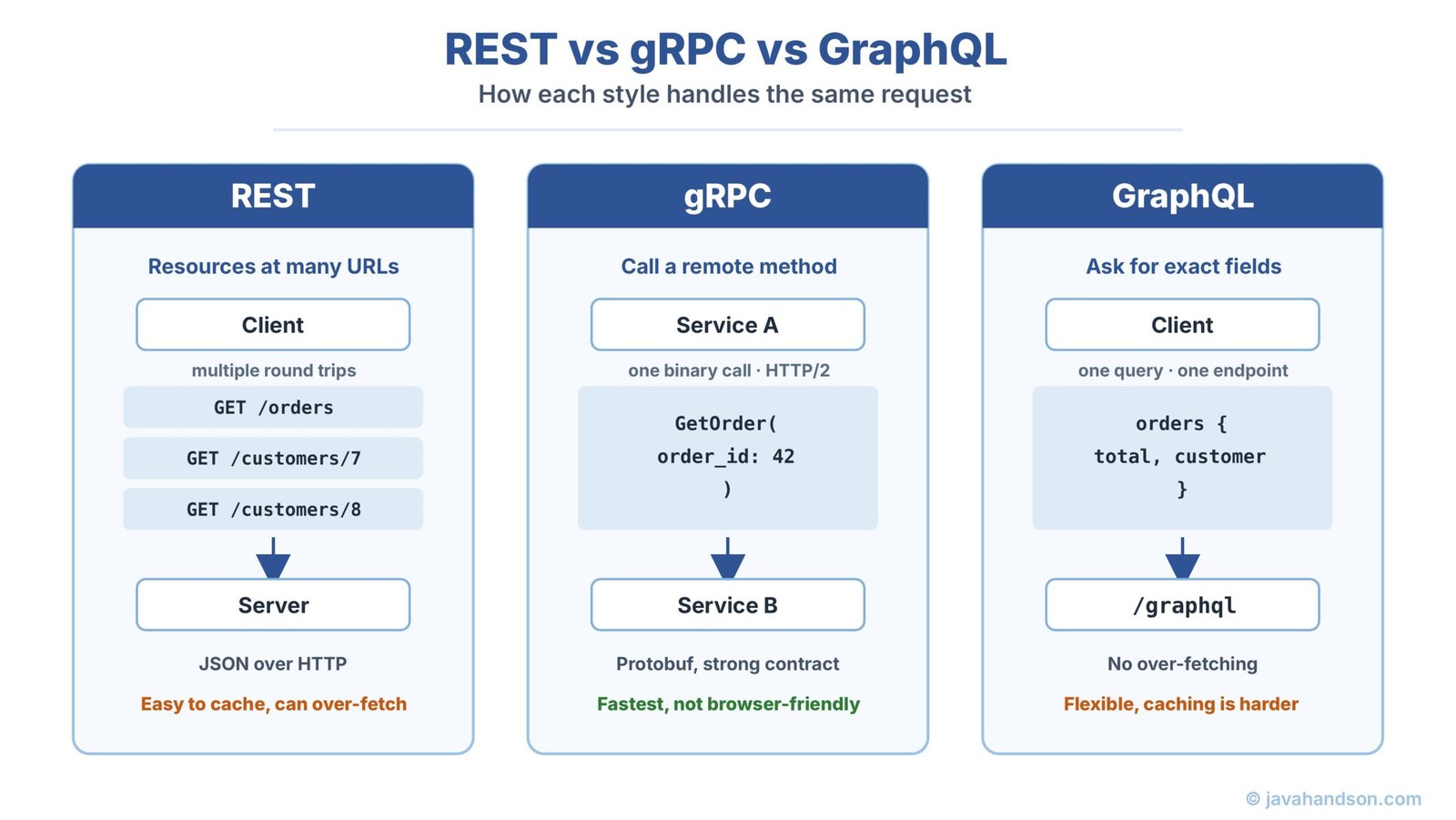
You do not need to memorise that whole table. Three short rules cover most real decisions, and they rarely steer you wrong.
One more thing worth saying. These are not rivals you must choose between once and forever. Plenty of mature systems use all three at the same time. GraphQL at the edge for the mobile app, gRPC between the internal services, and REST for a simple public webhook. Use each where it is strongest.
| Interview Insight When an interviewer asks you to compare REST vs gRPC vs GraphQL, do not just list features. Tie each choice to a concrete problem it solves. Say REST for public reach and caching, gRPC for fast internal service-to-service calls, and GraphQL for flexible client queries that dodge over-fetching. Then mention that a real system often mixes all three. That framing shows you think in trade-offs, not slogans, which is exactly what senior interviews reward. |
Comparisons usually stop at the happy path. Real systems live and die by what happens when things go wrong, so error handling deserves its own look. Here the three styles differ a lot, and the difference shapes how your clients write their code.
REST leans on the status codes HTTP already gives you. A 200 means success. Getting a 404 means the thing was not found. Meanwhile a 400 means the request was bad, and a 500 means the server broke. Clients and tools understand these out of the box, which is a real strength.
The weak spot is detail. A bare 400 does not say which field was wrong or why. So good REST APIs also return a small error body with a message and maybe an error code. The status code gives the broad category, and the body fills in the specifics.
gRPC does not use HTTP status codes directly. Instead it defines its own set, with names rather than numbers. You get values like OK, NOT_FOUND, INVALID_ARGUMENT, and UNAVAILABLE. These map cleanly onto common failure cases, and because they are part of the contract, every generated client handles them the same way.
This consistency is handy inside a microservices cluster. When one service calls another and sees UNAVAILABLE, it knows to retry or back off. The meaning is standard across every language in your stack, so error handling stays uniform.
GraphQL does something that surprises newcomers. Even when part of a query fails, it usually still returns HTTP 200. The failure shows up inside the response body, in a special errors array next to the data. One query can succeed on some fields and fail on others, and the response carries both at once.
This fits GraphQL’s model, where a single request can touch many resolvers. One resolver failing should not blow up the whole response. But it does mean clients cannot just check the HTTP status. They have to look inside the body for that errors array, which catches a lot of teams off guard at first.
| Interview Insight Error handling is a favourite follow-up question, because it quickly shows who has run these APIs in production. Say REST uses HTTP status codes plus an error body, gRPC uses its own named status codes that stay consistent across services, and GraphQL often returns a 200 with an errors array so partial failures travel alongside partial data. Mention that last one with confidence, since the fact that a failed GraphQL query can still be a 200 trips up many developers, and knowing it signals real experience. |
Theory is useful, but the clearest way to see these trade-offs is to walk through one system that uses all three. Imagine a mid-sized e-commerce platform. It has a mobile app, a public developer API, and a cluster of internal services. Watch how each style lands exactly where it fits.
The mobile app talks to the backend through GraphQL. This is a smart fit. A product screen needs the item, its price, a few reviews, and stock status, all at once. With GraphQL the app pulls all of that in one request, asking only for the fields that screen shows. On a patchy mobile network, cutting round trips and trimming payload size really matters.
Behind the scenes, the services chatter constantly. The order service calls the inventory service, which calls the pricing service, and so on. These calls happen millions of times a day inside the company’s own network. Speed is everything here, and nobody needs a browser to read the traffic. So the team uses gRPC. Its binary format and HTTP/2 streaming keep latency low and throughput high.
Finally, outside developers and partners need a public API to integrate with. For them the team exposes REST. It is the style every developer already knows, it works from any language and any tool, and its responses cache well on the open internet. A partner can test an endpoint in a browser in seconds, with no special tooling to install.
Notice the pattern. No single style won everything. Each one earned its place by matching the job in front of it. That is the real lesson of REST vs gRPC vs GraphQL. The mature answer is rarely one tool for all cases. It is the right tool in the right spot, working together as one system.
Now we switch gears. Choosing an API style is a day-one decision. Versioning is a problem that shows up on day two hundred, once your API has real users. Here is the trap. The moment other people depend on your API, you can no longer change it freely. Their code is built against the shape you gave them.
Say you rename a field from total to amount because it reads better. On your side it is a tiny change. For every client still expecting total, it is a broken app. This is called a breaking change, and versioning exists to handle exactly these moments. It lets you move your API forward while old clients keep working on the version they were built for.
Not every change needs a new version, so it helps to know the line. A non-breaking change is additive. You can safely add a new optional field or a whole new endpoint, because old clients simply ignore what they do not know about. These are free and need no version bump.
A breaking change is the dangerous kind. Renaming a field, removing one, or changing its type all qualify. So does changing the meaning of an existing value. Whenever a client that worked yesterday would break today, you are making a breaking change, and that is when a versioning strategy earns its keep.
There are a few well-known ways to version an API. They mostly differ in where you put the version information. Let us walk through the main ones, with the trade-offs that matter in practice.
This is the most popular approach, and probably the one you have seen most. You put the version right in the URL path. Everyone can see it, and it could not be more obvious.
Version lives in the URL path
GET /v1/orders/42
GET /v2/orders/42
The big strength is clarity. Anyone reading the URL knows which version they are hitting. It is trivial to test in a browser, easy to route at a gateway, and simple to document. The downside is more philosophical. Purists argue that /orders/42 should always point to the same order, and baking a version into the path breaks that idea. In day-to-day engineering, though, most teams happily accept that trade for the sheer convenience.
Here the version rides along as a query parameter instead of sitting in the path. The base URL stays clean, and the version is just another piece of the request.
Version passed as a query parameter
GET /orders/42?version=1
GET /orders/42?version=2
It is easy to add and keeps the resource path tidy. But it tends to get messy over time. Version parameters mix in with real filtering parameters, and caching can get awkward because the same path now serves different shapes. Most teams find URI path versioning cleaner for anything major.
With this strategy, the version moves out of the URL entirely and into a request header. The client sends a header such as X-API-Version, and the server reads it to decide which version to serve.
Version carried in a custom HTTP header
GET /orders/42 HTTP/1.1
Host: api.shop.com
X-API-Version: 2
Its appeal is clean URLs. The resource path stays pure, and versioning becomes part of the request metadata where some argue it belongs. Visibility is the cost here. You cannot tell the version just by looking at the URL, so it is harder to test casually and easier to forget. It also leans on clients setting headers correctly, which not everyone does well.
This is the most formal approach, and it uses a feature of HTTP called content negotiation. The client states the version it wants through the Accept header, using a custom media type that encodes the version inside it.
Version negotiated through the Accept header
GET /orders/42 HTTP/1.1
Host: api.shop.com
Accept: application/vnd.shop.v2+json
Purists love this one because it respects HTTP the way the standard intended. The URL names the resource, and the Accept header negotiates the representation, including its version. The catch is complexity. That media type string is fiddly, harder to document, and unfamiliar to many developers. It is powerful, but it asks more of everyone who uses your API.
The table below sums up the four approaches so you can pick with eyes open. For most teams, the honest answer is that URI path versioning wins on simplicity, and the others suit teams with stricter needs.
| Strategy | Where the version goes | Main strength | Main weakness |
|---|---|---|---|
| URI path | In the URL path (/v2/) | Clear and easy to use | Clutters the resource path |
| Query parameter | As ?version=2 | Simple to add | Gets messy, hurts caching |
| Custom header | In a request header | Clean URLs | Hard to see and test |
| Media type | In the Accept header | Respects HTTP standards | Complex and unfamiliar |
You may have seen version numbers like 2.4.1 and wondered how they relate to all this. That style is called semantic versioning, and it splits a version into three parts: major, minor, and patch. Each part sends a clear signal to the people using your API.
In practice, public APIs usually expose only the major number in the URL, as in /v2/. The minor and patch numbers live in docs and changelogs. That way the URL stays stable through small changes, and only a real breaking change forces clients to move.
Shipping a new version is only half the job. Retiring the old one well is what keeps your users happy. A rushed shutdown breaks apps and burns trust, so good teams follow a steady, telegraphed path instead. Here is a timeline that works.
This slow, visible process is the mark of a mature API. It respects the people who built on your work, and it lets your platform move forward without stranding anyone along the way.
| Interview Insight If an interviewer asks how you would version an API, start by separating breaking from non-breaking changes. Make it clear you only bump a version for breaking changes, since additive changes are safe. Then say you would default to URI path versioning for its clarity, but reach for header or media type versioning when the team needs cleaner URLs or strict HTTP correctness. Finish with deprecation. Explain that you would announce it early, send Deprecation and Sunset headers, keep the old version running through a real grace period, and only retire it once traffic drops off. That full arc, from change type to strategy to graceful retirement, signals real production experience. |
Those four strategies are really a REST story, because they lean on URLs and HTTP headers. gRPC and GraphQL handle change quite differently, and it is worth knowing how.
Protobuf was designed with evolution in mind, which is one of its nicest features. Every field in a message carries a number, and that number is what actually identifies the field on the wire. As long as you never reuse or change those numbers, you can add new fields freely. Old clients just skip the fields they do not recognise, and new clients read the new ones.
Because of this, gRPC often avoids the heavy versioning that REST needs. You evolve the same service by adding fields, and backward compatibility mostly takes care of itself. When a truly breaking change is unavoidable, teams usually create a new service, sometimes with a version in its package name, rather than versioning every endpoint.
GraphQL takes an even stronger stance. Its community generally avoids versioned endpoints altogether. There is no /v2/graphql in most setups. Instead, you evolve the single schema continuously. You add new fields whenever you like, since a client only receives the fields it explicitly asks for, so new fields never disturb old queries.
When you want to retire an old field, you do not delete it overnight. You mark it as deprecated right in the schema, with a note pointing to the replacement. Tools then show that warning to developers, who migrate at their own pace. Once the usage data shows nobody calls the old field, you finally remove it. It is versioning by gentle evolution rather than hard version numbers.
Whichever style and strategy you land on, a handful of habits will save you pain later. These hold true across REST, gRPC, and GraphQL alike.
None of this is glamorous. But good API hygiene is what separates a service people trust from one they dread upgrading against. The teams that get this right are the ones whose APIs quietly keep working year after year.
A: REST models data as resources at many URLs, gRPC calls remote functions over a fast binary protocol, and GraphQL lets the client ask for exactly the fields it needs from a single endpoint. REST is the easy public default, gRPC suits fast internal service-to-service calls, and GraphQL fits rich clients that need flexible, nested data.
A: gRPC is usually the fastest. It sends compact binary data using Protobuf and runs on HTTP/2, which supports multiplexing and streaming. That makes it ideal for high-volume communication between microservices, where its speed advantage matters most.
A: Yes, and many real systems do. A common setup uses GraphQL at the edge for mobile and web apps, gRPC between internal services, and REST for simple public endpoints or webhooks. You pick each style where it is strongest instead of forcing one choice everywhere.
A: URI path versioning, such as /v1/orders, is the most popular because it is clear and easy to use. Header and media type versioning keep URLs cleaner and suit teams that want stricter HTTP correctness. The best choice depends on your audience and how strictly you need to manage backward compatibility.
A: Only for breaking changes, like renaming or removing a field, or changing its type. Additive changes, such as adding a new optional field, are safe and need no version bump because old clients simply ignore what they do not recognise.
A: Not in the same way. gRPC relies on Protobuf field numbers, so you can add fields without breaking old clients. GraphQL avoids versioned endpoints and evolves one schema, marking old fields as deprecated before removing them. Both favour gentle evolution over hard version numbers.
So where does all of this leave you? The REST vs gRPC vs GraphQL question has no single winner, and that is the point. REST gives you reach, simplicity, and effortless caching. gRPC gives you raw speed and strong contracts for the services inside your own walls. GraphQL gives clients the power to ask for exactly what they need, no more and no less. Match the tool to the job, and feel free to mix them in one system.
Versioning then keeps whatever you build alive as it grows. Learn to spot breaking changes, default to URI path versioning when in doubt, and always retire old versions with care. Do that, and your API can evolve for years without ever leaving your users stranded. Master these two ideas, the styles and the strategies, and you will hold your own in any design review or interview that comes your way.