Java4Shell (CVE-2026-114938): How a Single Malformed Base64 Input Breaks the JVM
-
Last Updated: November 19, 2026
-
By: javahandson
-
Series

Java4Shell (CVE-2026-114938) is a critical OpenJDK Base64 decoder flaw. Learn how one malformed input triggers RCE, who is affected, and how to patch fast.
Every few years, one Java bug makes the whole industry stop and patch. Java4Shell is that bug for 2026. On 17 November 2026, a security firm named Calif disclosed Java4Shell, tracked as CVE-2026-114938. It is a memory-corruption flaw in the Base64 decoder of OpenJDK, the most widely used Java runtime. And the scary part is the trigger. One short, malformed Base64 string is enough to corrupt memory on a vulnerable server.
In this article, we will break down what actually happens, in plain language. You will learn where the bug lives, why it is not where most headlines point, and how a tiny input turns into a serious problem. We will also cover who is affected, how attackers could reach remote code execution, and exactly how to fix it. No hype, no made-up numbers. Just the verified facts and clear explanations for working developers.
Let us start with the basics.
Java4Shell is a flaw in how the Java Virtual Machine decodes Base64 data on certain CPUs. Base64 is everywhere in modern apps. It carries login headers, tokens, file uploads, and more. When a vulnerable Java server decodes attacker-controlled Base64, the decoder can write past the end of a memory buffer. That write corrupts nearby heap memory. From there, in the worst case, an attacker can run their own code.
The researchers at Calif found and reported the bug. They also gave it the catchy name “Java4Shell.” The name is a nod to Log4Shell, the famous 2021 Java logging flaw. But the two bugs work in very different ways, as we will see later.
The name signals two things at once. First, it is a Java flaw that can lead to a shell, meaning remote code execution. Second, it echoes Log4Shell to flag the severity. Marketing aside, the technical story is genuinely interesting. This is a low-level memory bug, not a configuration mistake.
Here is one more detail that caught everyone’s attention. Calif says an AI coding agent found the bug in about an hour, for under 200 dollars in tokens. So this is also a sign of how security research is changing.
Severity depends on who you ask, and both scores are public.
The gap is normal. Different CVSS versions weigh factors differently. Either way, the message is the same. You should treat this as a high-priority patch, especially for internet-facing Java servers.
Many posts say the bug is in “Java’s Base64 decoder.” That is only half right. The flaw is not in the normal Java code of java.util.Base64. It lives in a hardware-accelerated shortcut that the JVM uses on some CPUs. This distinction matters a lot, so let us slow down here.
An intrinsic is a special, hand-tuned piece of native code inside the JVM. When the Just-In-Time compiler sees certain hot methods, it does not use the plain Java version. Instead, it swaps in faster machine code built for your CPU. Base64 decoding is one such method. On supported chips, the JVM uses an AVX-512 vectorized routine to decode many bytes at once.
Normally, this is exactly what you want. Faster decoding means faster apps. The trade-off is trust. That trust lets the intrinsic skip the usual safety checks.
The pure-Java decoder checks bounds as it writes. It stops at the first character that is not valid, and it throws an IllegalArgumentException. The intrinsic behaves differently. According to Harness and Calif, the intrinsic does not receive the destination array’s length and does not re-check the array’s bounds. It trusts the length math done earlier.
That trust is the whole problem. If the length math is wrong, nothing stops the over-write in time. Therefore, the bug is really a JVM runtime flaw, not an application bug. Your own code can be perfectly clean and still be exposed.
| INTERVIEW INSIGHT What is a JVM intrinsic, and why does it matter for security? An intrinsic is native code that the JIT compiler substitutes for a hot Java method to gain speed. Because the JVM trusts it, bounds checks that exist in the Java version may be skipped. Java4Shell is a textbook example of how a performance optimization can become a security risk when the optimized path makes a wrong assumption. |
Now for the core mechanism. This is the part worth understanding well, because it is simpler than it sounds.
Base64 turns binary data into text using a 64-character alphabet. It packs 3 bytes into 4 characters. When the data does not divide evenly, the encoder adds padding with the = sign. One or two = signs at the end tell the decoder how many real bytes to produce.
So the decoder first predicts the output size. Then it allocates a byte array of exactly that size. Finally, it fills the array. The prediction uses a simple formula, and that formula is where things go wrong.
Here is the key idea to hold on to. The decoder trusts its own size prediction. If that prediction is wrong, the later write still goes ahead. Normally the math is fine, because padding is well-behaved. But a weird mix of characters and = signs can break the math. And once the predicted size is wrong, the safety net is gone.
The allocated output size follows this rule, per Calif’s write-up:
output_size = (ceil(input_len / 4) * 3) - padding
Inside the intrinsic, the output length is computed from the input, then reduced by one for each trailing =. For some odd tail shapes, that value is already zero before the padding is subtracted. Tail forms like =, ==, X=, X==, XY=, or === cause this. When padding is then subtracted, the number goes negative. It underflows to -1 or -2.
A negative length should never reach a memory write. But here it does, and it breaks the next step badly.
The intrinsic uses a masked vector move called evmovdqub to write the final bytes. Each bit of a 64-bit mask decides whether one byte gets written. The mask is built from the output length. When the length underflows, the mask becomes all ones. So all 64 bytes get written at once.
Let us put real numbers on it, straight from the disclosure:
A characters followed by one =. That is 65 bytes. On OpenJDK 17, the trigger is 128 A characters followed by =.ceil(65 / 4) * 3 = 51, minus 1 for padding, which gives a 50-byte buffer.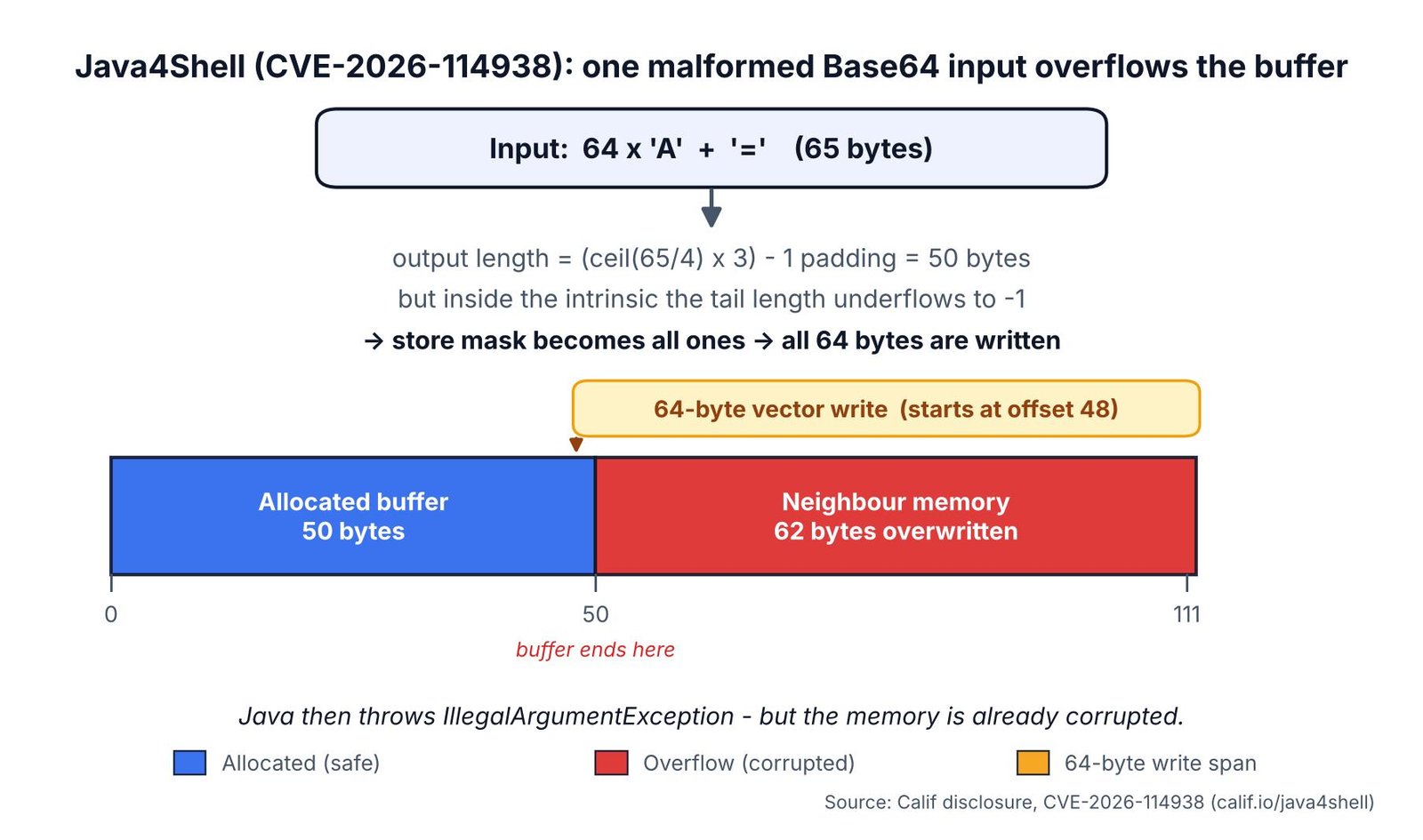
After the write, Java notices the input is invalid and throws IllegalArgumentException. But the damage is already done. The neighboring heap memory has been changed. Calif’s proof of concept confirms this. The decoder rejects the input, yet 62 bytes still change in a nearby 4096-byte array.
One more important nuance. The overwritten bytes are not freely chosen by the attacker. Per Calif, byte 0 is fully controlled, only 4 bits of byte 1 are controlled, and the rest follow a fixed pattern. Bytes 48 to 63 are always 0x9a. So the raw bug writes a mostly fixed pattern, not arbitrary attacker content. That detail becomes very relevant when we talk about turning this into code execution.
| INTERVIEW INSIGHT How can a decoder write out of bounds if Java has bounds checking? Plain Java array access is bounds-checked. But the JVM’s Base64 intrinsic is native code that is trusted and skips that check. It relies on an earlier length calculation. Java4Shell shows that when the length calculation underflows to a negative value, the trusted fast path writes far past the buffer before any exception is thrown. |
Reading about the bug is one thing. Seeing it in code makes it click. So here is a small, standalone Java program. It does not run the vulnerable intrinsic. Instead, it reproduces the exact length math from the disclosure. Then it writes the same 64 bytes next to a small object. That way you can watch the overflow corrupt memory safely.
import java.nio.charset.StandardCharsets;
import java.util.Arrays;
import java.util.HexFormat;

// Minimal model of CVE-2026-114938: decoding ONE malformed Base64 input
// silently corrupts a neighbouring object sitting next to the decode buffer.
public class Java4ShellDemo {

    static final int BUF = 50;     // the decode buffer lives at heap[0..49]
    static final int REC = 50;     // a live neighbour object sits right after it

    public static void main(String[] args) {
        byte[] heap = new byte[128];                 // a slice of memory
        Arrays.fill(heap, (byte) 0xAA);              // unrelated background data

        byte[] record = "role=user;balance=100".getBytes(StandardCharsets.US_ASCII);
        System.arraycopy(record, 0, heap, REC, record.length);   // the neighbour object
        byte[] before = heap.clone();                // snapshot to compare later

        System.out.println("Neighbour object BEFORE : "
            + new String(heap, REC, record.length, StandardCharsets.US_ASCII));

        // ---- the app decodes ONE malformed Base64 string: 64 'A' + '=' (65 bytes) ----
        int inLen = 65, pad = 1;
        int alloc = ((inLen + 3) / 4) * 3 - pad;     // decoder allocates 50 bytes
        int tail  = 0 - pad;                         // tail length underflows to -1
        long mask = (tail < 0 || tail >= 64) ? -1L : (1L << tail) - 1;
        int write = Long.bitCount(mask);             // all-ones mask -> writes 64 bytes

        byte[] decoded = new byte[write];
        decoded[0] = 'X';                            // attacker-controlled byte
        for (int i = 48; i < 64; i++) decoded[i] = (byte) 0x9A;  // documented fixed bytes
        System.arraycopy(decoded, 0, heap, 48, write);  // 64-byte store starting at offset 48

        System.out.println("Decoder wrote " + write + " bytes into a " + alloc
            + "-byte buffer (tail length = " + tail + ", underflow)\n");

        // ---- show the damage to the neighbour, which we never meant to touch ----
        System.out.println("Neighbour object AFTER  : " + printable(heap, REC, record.length)
            + "   (data destroyed)");
        System.out.println("  bytes now: "
            + HexFormat.ofDelimiter(" ").formatHex(heap, REC, REC + record.length));

        int corrupted = 0;
        for (int i = alloc; i < heap.length; i++) if (heap[i] != before[i]) corrupted++;
        System.out.println("\n" + corrupted + " bytes past the buffer were overwritten "
            + "by decoding a single string.");
    }

    // Render bytes as text, using '.' for anything not printable (classic hexdump view).
    static String printable(byte[] b, int off, int len) {
        StringBuilder sb = new StringBuilder();
        for (int i = off; i < off + len; i++) {
            int c = b[i] & 0xFF;
            sb.append(c >= 0x20 && c < 0x7F ? (char) c : '.');
        }
        return sb.toString();
    }
}Here is the real output from running that program:
Neighbour object BEFORE : role=user;balance=100
Decoder wrote 64 bytes into a 50-byte buffer (tail length = -1, underflow)

Neighbour object AFTER  : .....................   (data destroyed)
  bytes now: 00 00 00 00 00 00 00 00 00 00 00 00 00 00 00 00 00 00 00 00 00

62 bytes past the buffer were overwritten by decoding a single string.
Let us read the result together. One malformed string did real damage.
role=user;balance=100 was wiped in the process.Keep one caveat in mind. This program is a faithful model of the arithmetic and its effect on nearby memory. It is not a live exploit. In a real JVM these are live objects, which is why the overflow can crash the service. Turning it into full code execution needs heap grooming, and that part stays out of scope here.
| INTERVIEW INSIGHT Why does the decoder write 64 bytes into a 50-byte buffer? The intrinsic sizes its final masked store from a per-block length value. For a malformed padded tail, that value underflows below zero. The store mask is then built as all ones, so the vector instruction writes a full 64 bytes. Because the fast path never re-checks the array bounds, 62 of those bytes land outside the buffer. |
This bug is serious, but it is not universal. Several conditions must all be true. If even one is false, the fast, vulnerable path does not run.
The flaw is present in OpenJDK 17.0.6 and newer. That covers the current long-term and recent lines.
In lab tests reported by Harness, Java 17, 21, 25, and 27 builds wrote 160 bytes into a 98-byte array on the default fast path. Older lines behaved differently. OpenJDK 11.0.33 and 8u512 wrote 96 bytes into 98, so the overflow there was much smaller.
Here is the condition that saves many systems. The vulnerable intrinsic only runs on x86-64 CPUs that support the AVX-512 VBMI feature.
So a lot of laptops and ARM cloud instances dodge this bug entirely. Your big x86 production servers are the real concern.
On Linux, you can check the CPU flags quickly. Look for the AVX-512 and BMI2 features.
grep -o -E 'avx512f|avx512bw|avx512vbmi|bmi2' /proc/cpuinfo | sort -u
If avx512vbmi shows up, your CPU can run the vulnerable path. If it is missing, that host is not exposed through this intrinsic.
For a system to be truly exposed, all of these must hold at the same time:
avx512_vbmi.UseBASE64Intrinsics and UseAVX are left at defaults, so the fast path is on.| INTERVIEW INSIGHT Why does Java4Shell affect only some servers? The vulnerable code is a CPU-specific intrinsic that runs only on x86-64 chips with AVX-512 VBMI support, such as Intel Ice Lake or AMD Zen 4 and newer. ARM servers and older x86 chips never take that path. So hardware, not just the Java version, decides exposure. |
Finding every exposed runtime is harder than it looks. The JVM hides in many places. So a quick checklist helps you cover the gaps.
Start with a full inventory. Do not stop at the JDKs you installed by hand.
The fast decoder is a property of the runtime, not of your code. Therefore, two apps on the same host can differ only by their JDK build.
Next, confirm the three things that decide exposure. First, check the Java version on each host.
java -version
Then check whether the intrinsic and AVX settings are still at their defaults.
java -XX:+PrintFlagsFinal -version | grep -E 'UseBASE64Intrinsics|UseAVX'
Finally, confirm the CPU feature using the /proc/cpuinfo check shown earlier. If the version is 17.0.6 or newer, the flags are default, and the CPU has avx512vbmi, that host needs attention.
Many security vendors published guidance within a day of disclosure. So you do not have to build everything yourself. Teams at Tenable, Qualys, Wiz, Sophos, Censys, and others released detection and mitigation notes. Use your existing scanner to flag vulnerable JDK builds. Then cross-check the results against your own inventory.
| INTERVIEW INSIGHT How would you find every vulnerable JVM in a large estate? Treat it as a runtime inventory problem, not an application scan. List every JDK build, including ones inside container images and vendor appliances. For each host, check the Java version, the UseBASE64Intrinsics and UseAVX flags, and whether the CPU exposes avx512vbmi. Then confirm with a vulnerability scanner. |
A 62-byte write with a mostly fixed pattern does not sound like a full takeover. So how does it become remote code execution? The answer is careful exploitation, and Calif has described the shape of it without releasing full exploits.
Remember, the raw write is mostly fixed, not attacker-chosen. On default heap settings, Calif found the write was silent in their tests. It did not even crash. With small, fixed memory regions, the story changed. Using -XX:TLABSize=2048 -XX:-ResizeTLAB, the write corrupted live objects, and the JVM crashed with SIGSEGV in the G1 garbage collector. That proved denial of service, but not code execution on its own.
To reach code execution, Calif describes building stronger tools from the weak one. Here is the idea in plain terms:
Importantly, Calif did not publish ready-made, product-specific exploits. Each target needs its own tuning. Still, they demonstrated real impact against popular software.
Code execution is also not the only risk here. A successful chain can read heap memory before it runs any attacker code. That memory can hold private keys, session tokens, and other secrets. So even a partial attack can leak sensitive data, much like Heartbleed did years ago.
In their testing, Calif demonstrated pre-authentication remote code execution in default configurations of several widely used tools:
They also showed post-authentication execution against Elasticsearch. Because Base64 carries HTTP Basic credentials, SAML artifacts, CSRF tokens, and MIME encoded words, the decoder often runs before a user logs in. That is why pre-auth attacks are possible.
As of disclosure, there were no reports of exploitation in the wild, and the CVE was not in the CISA KEV catalog. CISA did publish an alert on 17 November 2026 urging fast patching.
The whole story moved fast. So a short timeline helps you see the sequence.
One more detail is worth noting. Calif published its detailed technical write-up after the patches shipped. So defenders got a head start before the full mechanics were public.
Good news first. Fixes shipped on the same day as disclosure. So you can act right now. Let us go from best option to backup options.
Patching is the real fix. Oracle and the OpenJDK project released updates on 17 November 2026. Oracle’s update is part of its November 2026 security cycle.
The replacement builds include:
Azul’s November update fixes the flaw in Zulu 17, 21, 25, and 27. Other distributions ship on their own schedules, so check your vendor. One tip from the field matters here. The JVM is often baked into container images and vendor appliances. So inventory every runtime you ship, not just the ones you install by hand.
A patch only helps once it actually runs. So verify each service after the upgrade. Restart the app, then print the version again.
java -version
Check that the build matches a fixed release, such as 17.0.21.1 or 21.0.13.1. Also remember containers. Rebuild the image on a patched base, then redeploy. A patched host does nothing for an old JVM still frozen inside an image.
If you cannot patch immediately, you can turn off the fast decoder. Start the JVM with this flag:
java -XX:-UseBASE64Intrinsics -jar your-app.jar
This forces the pure-Java decoder, which checks bounds correctly. In Calif’s control runs, it produced no overflow. The cost is some performance on Base64-heavy workloads. For most apps, that cost is acceptable for a short time.
You can also stop the CPU feature that enables the bug. Use this flag:
java -XX:UseAVX=2 -jar your-app.jar
Be careful with this one. It changes vectorization for the whole process, not just Base64. Also, use it only on x86-64 hosts. ARM OpenJDK does not recognize this flag and will fail to start. So never push this flag blindly to mixed fleets.
Strict input checks can act as a backstop. Before decoding credentials or tokens, confirm the input looks like valid Base64.
// Reject obviously malformed Base64 before decoding.
boolean looksValid =
    value.length() % 4 == 0
    && value.matches("[A-Za-z0-9+/]*={0,2}");

if (!looksValid) {
    throw new IllegalArgumentException("Bad input");
}
byte[] data = java.util.Base64.getDecoder().decode(value);
Keep expectations honest, though. Validation reduces exposure, but it does not fix the JVM. It also cannot undo a write that already happened. So treat it as a helper, not a cure. Patch the runtime as soon as you can.
| INTERVIEW INSIGHT How would you mitigate Java4Shell without downtime? Start affected services with -XX:-UseBASE64Intrinsics to force the safe pure-Java decoder. It needs only a restart, not a code change. Add strict Base64 validation at the edge as defense in depth. Then schedule the real fix, which is upgrading to a patched JDK build like 17.0.21.1 or 21.0.13.1. |
The name invites a direct comparison. But the two bugs work in very different ways. So let us line them up clearly.
Log4Shell, from 2021, abused a feature. It used a logging lookup and JNDI to load remote code. An attacker just sent a crafted string in a log message. The flaw lived in a popular library, not the runtime.
Java4Shell is a different animal. It is a memory-safety failure in a CPU-specific decoder inside the JVM. There is no clever feature to abuse here. Instead, a length value underflows and a trusted routine writes past a buffer.
Here are the key contrasts at a glance:
Still, the two share one big lesson. Untrusted input reaching powerful code is always risky. So input that flows straight into decoders, parsers, or lookups deserves extra care.
| INTERVIEW INSIGHT How is Java4Shell different from Log4Shell? Log4Shell was feature abuse in the Log4j library, where a crafted log string triggered a JNDI lookup and loaded remote code. Java4Shell is a memory-corruption bug in the JVM’s own Base64 intrinsic, which only runs on x86-64 CPUs with AVX-512 VBMI. Log4Shell was easy to exploit everywhere. Java4Shell needs heap grooming and the right hardware for full RCE. |
Beyond the patch, this bug carries a few lasting lessons. They are worth keeping in mind for any Java system.
The fast path was faster, but it trusted a length value it should have checked. Performance code is still security code. So reviews and fuzzing must cover intrinsics and native paths, not just application logic.
Two servers with the same Java version can have different risk. The CPU made the difference here. Therefore, your asset inventory should track CPU features and runtime flags, not just version numbers.
Finally, remember how this was found. Calif says an AI agent surfaced the bug in roughly an hour, cheaply. So both attackers and defenders now have faster tools. Defenders should assume more bugs like this will appear, and plan to patch quickly.
A: Java4Shell is a memory-corruption vulnerability in OpenJDK’s Base64 decoder, disclosed by the security firm Calif on 17 November 2026. On vulnerable servers, a single malformed Base64 input makes the JVM’s AVX-512 intrinsic write past the end of a buffer, which can lead to unauthenticated remote code execution. Calif rates it 9.2 (Critical) under CVSS 4.0; Oracle rates it 8.1 (High) under CVSS 3.1.
A: The flaw is present in OpenJDK 17.0.6 and newer, covering the 17, 21, 25, and 27 lines, plus downstream builds such as Corretto, Temurin, Azul Zulu, Liberica, Red Hat, Oracle, and GraalVM. It only runs on x86-64 CPUs with AVX-512 VBMI support, such as Intel Ice Lake and newer or AMD Zen 4 and newer.
A: The real fix is patching. Oracle and OpenJDK shipped updates on 17 November 2026, with replacement builds like 17.0.21.1, 21.0.13.1, 25.0.5.1, and 27.0.1.1. If you cannot patch at once, start the JVM with -XX:-UseBASE64Intrinsics to force the safe pure-Java decoder, or use -XX:UseAVX=2 on x86-64 hosts only. Remember to rebuild container images on a patched base.
A: No. Log4Shell (2021) abused a logging feature and JNDI lookups in the Log4j library, and it was easy to exploit everywhere. Java4Shell is a low-level memory bug in the JVM’s own Base64 intrinsic, it only affects x86-64 chips with AVX-512 VBMI, and full code execution needs careful heap grooming. The name is a nod to the severity, not the mechanism.
A: No. The vulnerable code path is an x86-64 intrinsic that needs the AVX-512 VBMI CPU feature. ARM64 servers are not affected, and most Apple Macs are not affected either. You can confirm on Linux by checking that /proc/cpuinfo lists the avx512vbmi flag.
A: As of disclosure, there were no reports of exploitation in the wild, and the CVE was not in the CISA KEV catalog. Calif demonstrated pre-authentication remote code execution against default configurations of tools like Jenkins, Jira, Confluence, Keycloak, Kafka, and more, but did not publish ready-made exploits. CISA still urged teams to patch immediately.
Java4Shell (CVE-2026-114938) shows how a small mistake in trusted, low-level code can put a whole platform at risk. The bug is not in your application, and it is not in the plain Java code of java.util.Base64. It lives in the JVM’s AVX-512 Base64 intrinsic, where a padding length underflows to a negative value and a masked vector store writes 62 bytes past a 50-byte buffer. Exposure needs three things at once: a JDK at 17.0.6 or newer, an x86-64 CPU with AVX-512 VBMI, and untrusted Base64 reaching the decoder.
The fix is simple, so do not wait. Patch to a fixed build such as 17.0.21.1, 21.0.13.1, 25.0.5.1, or 27.0.1.1, rebuild your container images on a patched base, and confirm the version after every restart. If you cannot patch right away, start the JVM with -XX:-UseBASE64Intrinsics as a stopgap and validate Base64 input at the edge. Then keep an inventory that tracks CPU features and runtime flags, not just Java versions, so the next bug like this is quicker to find.