Convert Date to LocalDate in Java: A Complete Guide
-
Last Updated: October 15, 2026
-
By: javahandson
-
Series

Learn how to convert Date to LocalDate in Java, both ways. Covers java.util.Date via Instant and a zone, the java.sql.Date shortcut, and the off-by-one-day bug.
Almost every Java project has some old date code. So sooner or later, you need to convert Date to LocalDate in Java. This is one of the most common tasks when you modernize code.
The old java.util.Date is a timestamp. Meanwhile, LocalDate is a clean, date-only class from Java 8. So you often bridge between the two worlds.
In this guide, we will keep things beginner friendly. First, we will see why the conversion needs a time zone. Then we will do it step by step. After that, both directions will feel easy.
I have migrated plenty of legacy date code myself. Honestly, this one trips up many developers. So let us clear it up once and for all. Let us begin.
The conversion itself is just a few lines. However, one hidden detail causes most of the trouble. That detail is the time zone, as we will soon see. So pay close attention to it.
By the end of this guide, you will know:
Let us start with why this conversion is not as simple as it looks.
Many beginners expect a one-line conversion. However, there is a hidden detail. A Date and a LocalDate are not the same kind of thing.
A java.util.Date is really a point in time. So it is a count of milliseconds from the epoch. In other words, it holds an exact moment, not a plain date.
A LocalDate is different. It holds only a year, month and day. So it has no time and no zone at all. That gap is the root of the whole issue.
Think of a Date as a dot on a worldwide clock. Everyone shares that same dot. Meanwhile, a LocalDate is just a page on a calendar. So turning the dot into a page needs a location.
Here is the tricky part. One exact moment can fall on different dates in different zones. So midnight in London might still be the previous day in New York.
Therefore you must pick a zone to get a date. The zone decides which calendar day the moment lands on. So the conversion always needs a ZoneId.
Before you convert, check which Date you hold. There are two very different classes. So the right method depends on which one it is.
So always check your imports first. A quick look tells you which class you have. In turn, that decides the cleanest conversion path.
A quick tip helps you spot the SQL one. It usually comes from a database result set. Meanwhile, a plain new Date() is the util class. So the source of the value is a strong hint.
| 💡 Interview Insight A common interview question is why converting a Date to a LocalDate needs a time zone. The reason is that a Date is an exact moment, while a LocalDate is a calendar day. The same moment can be two different days in two zones, so a ZoneId decides which day applies. |
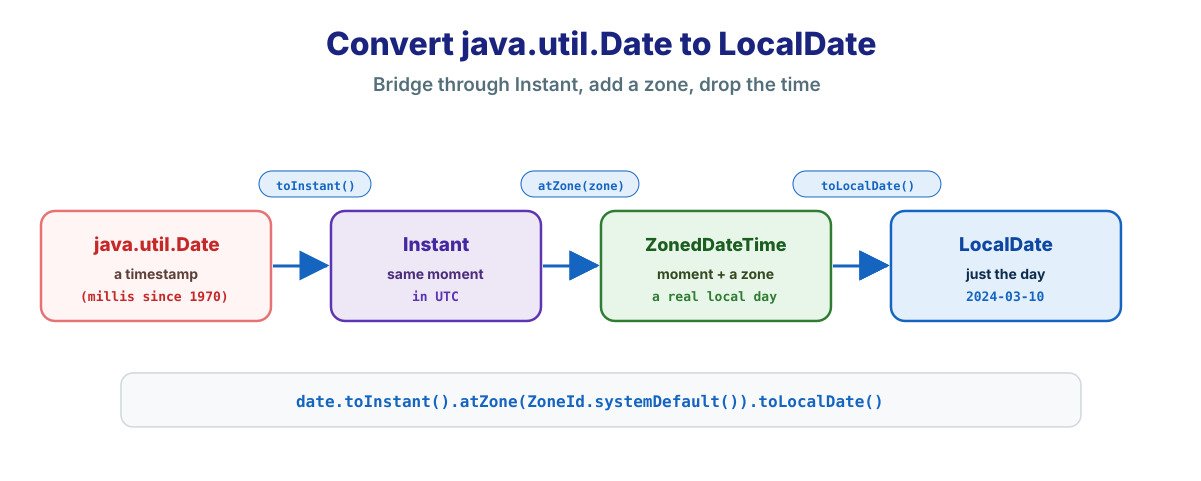
Now let us do the main conversion. The clean path goes through Instant. So you turn the Date into an Instant, then add a zone.
First, call toInstant() on the Date. Then attach a zone with atZone(). Finally, call toLocalDate() to drop the time.
Date date = new Date();   // old java.util.Date

LocalDate localDate = date.toInstant()
        .atZone(ZoneId.systemDefault())
        .toLocalDate();

System.out.println(localDate);   // e.g. 2024-03-10
So the three steps read like a sentence. You bridge to Instant, add a zone, then take the date. As a result, you get a clean LocalDate.
Let us unpack each step briefly. First, toInstant() turns the Date into a precise moment. Next, atZone() places that moment in a region. Finally, toLocalDate() keeps only the calendar day. So each step does one clear job.
Why go through Instant at all? Because a java.util.Date and an Instant are both timestamps. So the two map onto each other exactly. In short, Instant is the natural bridge into java.time.
The zone you pick really matters here. So think about which day you actually want. Here are the common choices.
So the default zone is fine for simple apps. However, a global app should be explicit. In that case, pick the zone on purpose, not by accident.
Here is a simple way to decide. Ask whose day you really care about. For a user-facing date, use the user’s zone. Meanwhile, for a system date, UTC is often the safest pick.
Sometimes you want the time too, not just the date. For that, use toLocalDateTime() instead. So you keep both the date and the time.
Date date = new Date();

LocalDateTime localDateTime = date.toInstant()
        .atZone(ZoneId.systemDefault())
        .toLocalDateTime();
So the only change is the last step. You call toLocalDateTime() instead of toLocalDate(). As a result, you keep the time of day as well. Everything else stays exactly the same.
Here is a happy surprise for database code. A java.sql.Date has a direct method. So the conversion is a single line.
The java.sql.Date class has a toLocalDate() method. So you call it, and you are done. There is no Instant or zone step needed.
java.sql.Date sqlDate = java.sql.Date.valueOf("2024-03-10");

LocalDate localDate = sqlDate.toLocalDate();
System.out.println(localDate);   // 2024-03-10
So why is this one so simple? Because a java.sql.Date has no real time part. It already represents just a calendar date. Therefore no zone math is needed.
Be careful about which Date you have. A java.util.Date and a java.sql.Date are different. So the shortcut only works for the SQL one.
In fact, calling toInstant() on a java.sql.Date throws an error. It is a date-only value, with no time to convert. So for that class, always use toLocalDate() instead.
This catches many developers off guard. The two classes share a name, so the mistake is easy. However, the method you need is different for each. So always confirm which Date you are holding first.
| 💡 Interview Insight An interviewer may ask how to convert a java.sql.Date to a LocalDate. The answer is simple: just call its toLocalDate() method. Unlike java.util.Date, the SQL Date has no time component, so it needs no Instant or time-zone step. |
You may also meet the old Calendar class. Luckily, the path is almost the same. So you still bridge through Instant.
Calendar calendar = Calendar.getInstance();

LocalDate localDate = calendar.toInstant()
        .atZone(calendar.getTimeZone().toZoneId())
        .toLocalDate();
Notice a nice touch here. A Calendar already knows its own zone. So you can read that zone and use it directly. As a result, the day stays correct.
This is a small but useful advantage. A Calendar carries its zone with it. So you avoid guessing which zone to use. In turn, the conversion is less likely to shift the day.
Often you must go the other way too. So you turn a LocalDate back into a Date. This happens when an old library needs a Date.
A LocalDate has no time, so you add one first. So atStartOfDay() sets the time to midnight. Then you add a zone and bridge back through Instant.
LocalDate localDate = LocalDate.of(2024, 3, 10);

Date date = Date.from(
        localDate.atStartOfDay(ZoneId.systemDefault())
                 .toInstant());
So the steps simply run in reverse. You add a start time, then a zone, then an instant. Finally, Date.from() gives you the old Date.
Why add a start time first? Because a Date needs a time inside it. A LocalDate has none, so you supply midnight. Therefore atStartOfDay() fills that gap before the bridge.
Keep the same zone in mind here too. The zone you pick sets the exact moment of midnight. So midnight in India differs from midnight in London. In short, stay consistent with your chosen zone.
For a java.sql.Date, there is again a shortcut. So valueOf() takes a LocalDate directly. This is the cleanest way for database code.
LocalDate localDate = LocalDate.of(2024, 3, 10);

java.sql.Date sqlDate = java.sql.Date.valueOf(localDate);
System.out.println(sqlDate);   // 2024-03-10
So valueOf() mirrors toLocalDate() nicely. One converts in, and the other converts out. In short, the SQL class keeps both directions easy.
This is why java.sql.Date is pleasant for JDBC code. You read a LocalDate from a result set with one call. Then you write one back with another. So your database layer stays clean and modern.
Let us gather all the conversions in one place. So you can find the right one fast. Keep this table handy during a migration.
| From | To | How |
|---|---|---|
| java.util.Date | LocalDate | date.toInstant().atZone(zone).toLocalDate() |
| java.sql.Date | LocalDate | sqlDate.toLocalDate() |
| Calendar | LocalDate | cal.toInstant().atZone(cal zone).toLocalDate() |
| LocalDate | java.util.Date | Date.from(ld.atStartOfDay(zone).toInstant()) |
| LocalDate | java.sql.Date | java.sql.Date.valueOf(ld) |
So the SQL rows are the short ones. Meanwhile, the util.Date rows need the Instant bridge. That split is the key thing to remember.
Notice a clear pattern across the table. Every util.Date path passes through Instant and a zone. Meanwhile, every sql.Date path is a single call. So once you know which class you have, the method is obvious.
Let us see this in a real setting now. Say an old method returns a java.util.Date. So you convert it, then work in modern code.
// legacy code gives us a java.util.Date
Date legacy = legacyService.getCreatedDate();

// move into java.time at the boundary
LocalDate created = legacy.toInstant()
        .atZone(ZoneId.systemDefault())
        .toLocalDate();

// now use clean, modern logic
boolean isOld = created.isBefore(LocalDate.now().minusYears(1));
So you convert right at the edge of the old code. Then the rest of your logic stays modern and clean. As a result, the legacy Date never spreads through your app.
Notice the last line uses isBefore(), which reads clearly. That is the real payoff of the switch. Once in LocalDate, your date logic becomes easy to read. Meanwhile, the same check on a raw Date would be clumsy.
This boundary idea is worth repeating. Convert as the data comes in from old code. Then work only with java.time inside your logic. So the messy legacy type stays in one small place.
The same holds on the way out. When an old library needs a Date, convert at that edge too. So your core logic never touches the legacy type. In short, keep the old world at the borders.
This is the single most common bug in date conversion. So it is worth a close look. Once you see it, you will always avoid it.
Imagine a moment near midnight in UTC. Now convert it using the wrong zone. So the calendar day can shift by one, backward or forward.
For example, 11:30 PM in New York is already the next day in UTC. So a UTC conversion would show tomorrow’s date. Meanwhile, a New York conversion would show today’s. In short, the zone changes the day.
The fix is simple but important. So always choose the zone that matches your intent. If the user cares about their local day, use their zone.
So one late-night test catches most of these bugs. A time like 23:30 is a great check. If the date stays correct there, your zone choice is right.
There is a deeper lesson in this bug. A date is never truly separate from a zone. So the moment you drop the zone, you make a choice. Being explicit about that choice is the safest habit.
Let me share a few habits from real migrations. They will save you from subtle date bugs. So keep them in mind as you convert.
These habits share one simple theme. Be explicit about the zone, and convert early. So the old Date type never causes a surprise later. In turn, your new code stays clean and predictable.
That first mistake causes the classic off-by-one-day bug. A missing zone defaults to something unexpected. So always set the zone yourself.
A: For a java.util.Date, call toInstant(), then atZone() with a ZoneId, then toLocalDate(). For example: date.toInstant().atZone(ZoneId.systemDefault()).toLocalDate(). The zone decides which calendar day you get.
A: A java.util.Date is an exact moment, while a LocalDate is a calendar day. The same moment can fall on two different days in two zones, so a ZoneId is needed to pick the right day.
A: Just call sqlDate.toLocalDate() directly. A java.sql.Date has no time component, so it needs no Instant or time-zone step. Note that calling toInstant() on it throws an exception.
A: For a java.util.Date, use Date.from(localDate.atStartOfDay(zone).toInstant()). For a java.sql.Date, just call java.sql.Date.valueOf(localDate).
To convert Date to LocalDate in Java, the key is a time zone. A Date is an exact moment, while a LocalDate is a calendar day. So a ZoneId decides which day you get.
Here is a quick recap of what we covered:
So convert your old Date values at the boundary. Then enjoy clean java.time code everywhere else. The pillar guide below ties the whole family together.
One last reminder before you go. The zone choice is the heart of this task. So pick it with care, and test near midnight. After that, your conversions will be solid.