Exception Handling Interview Questions in Java: 24 Q&A With Code
-
Last Updated: November 12, 2026
-
By: javahandson
-
Series

Exception handling interview questions in Java: checked vs unchecked, throw vs throws, try-with-resources. 24 Q&A from beginner to advanced.
Exception handling interview questions in Java show up in almost every backend interview round. They appear for freshers and for lead or architect panels alike. The topic looks simple on the surface. Yet interviewers love it, because your answers reveal how you think about failure, clean code, and production safety.
I have spent around ten years building banking and payment integrations. In that world, one swallowed exception can hide a failed transaction for hours. So I learned exception handling the hard way, in production. This guide shares that experience as 24 clear questions and answers, grouped from beginner to advanced.
Every answer is written the way I would actually say it to an interviewer. The language stays simple. Each tricky idea gets a short, runnable snippet so you can see the behaviour yourself. Many answers also add the follow-up question that interviewers ask next. By the end, you will handle this topic with real confidence, not just memorised lines. For the wider picture across every Core Java topic, see the Core Java interview questions for freshers guide.
Answer – An exception is an event that breaks the normal flow of a program. It usually means something went wrong at runtime. Maybe a file was missing, a number got divided by zero, or an object was null.
When this happens, the JVM creates an exception object. This object holds three useful things. It carries the exception type, a human message, and a full stack trace. The stack trace records which method called which, right up to the failure point.
After creating the object, the JVM stops the current flow. Then it starts searching for code that can handle the problem. This search is called stack unwinding. The JVM checks the current method for a matching catch block. If it finds none, it moves up to the caller, then to that method’s caller, and so on.
public class Account {
    public static void main(String[] args) {
        int balance = 1000;
        int people = 0;
        int share = balance / people; // throws ArithmeticException
        System.out.println(share);     // never runs
    }
}
// Exception in thread "main" java.lang.ArithmeticException: / by zero
//     at Account.main(Account.java:5)
Here the division by zero throws an ArithmeticException. The print line never runs. Because nobody caught it, the exception reached the top of the stack. At that point the default handler printed the trace and ended the thread.
We can also catch the problem and keep going. The example below recovers cleanly instead of crashing.
try {
    int share = balance / people;
} catch (ArithmeticException e) {
    System.out.println("Cannot divide by zero: " + e.getMessage());
    // program continues normally
}
Interview insight: A common follow-up: where does an uncaught exception finally go? It reaches the thread’s default uncaught-exception handler. You can even set your own handler with Thread.setDefaultUncaughtExceptionHandler to log it before the thread dies.
Answer – This is the most common opener, so I keep it crisp. Checked exceptions get checked by the compiler. You must either catch them or declare them with throws. Otherwise the code will not compile at all.
Unchecked exceptions skip that compile-time check. They extend RuntimeException. The compiler lets you ignore them completely. They usually point to bugs in your own logic, such as a null reference or a bad array index.
// Checked: compiler forces handling
void readFile() throws IOException {      // must declare or catch
    Files.readAllLines(Path.of("txns.csv"));
}

// Unchecked: compiler stays silent
void parse(String amount) {
    int value = Integer.parseInt(amount); // may throw NumberFormatException
}
People sometimes ask how to choose for their own code. My rule is simple. Use a checked exception when the caller can reasonably recover. Use an unchecked exception for a programming bug that the caller cannot fix at runtime.
Interview insight: A deeper follow-up: why is RuntimeException unchecked at all? My reason is practical. These errors can appear on almost any line. Forcing a throws clause everywhere would flood the code with noise and hide the real checked cases.
Answer – Everything you can throw or catch sits under one root class, Throwable. I like to draw it as a tree, because the shape explains the rules.
Throwable has two direct children. Error sits on one side, and Exception sits on the other. Error means a serious JVM-level failure, like running out of memory. Exception means an application-level problem you can often handle.
Under Exception sits a special branch called RuntimeException. That branch is unchecked. Everything else under Exception is checked. So the position in the tree decides whether the compiler polices it.
Throwable
 |- Error                 (unchecked, do not catch)
 |    |- OutOfMemoryError
 |    |- StackOverflowError
 |- Exception             (checked, mostly)
      |- IOException
      |- SQLException
      |- RuntimeException  (unchecked)
           |- NullPointerException
           |- IllegalArgumentException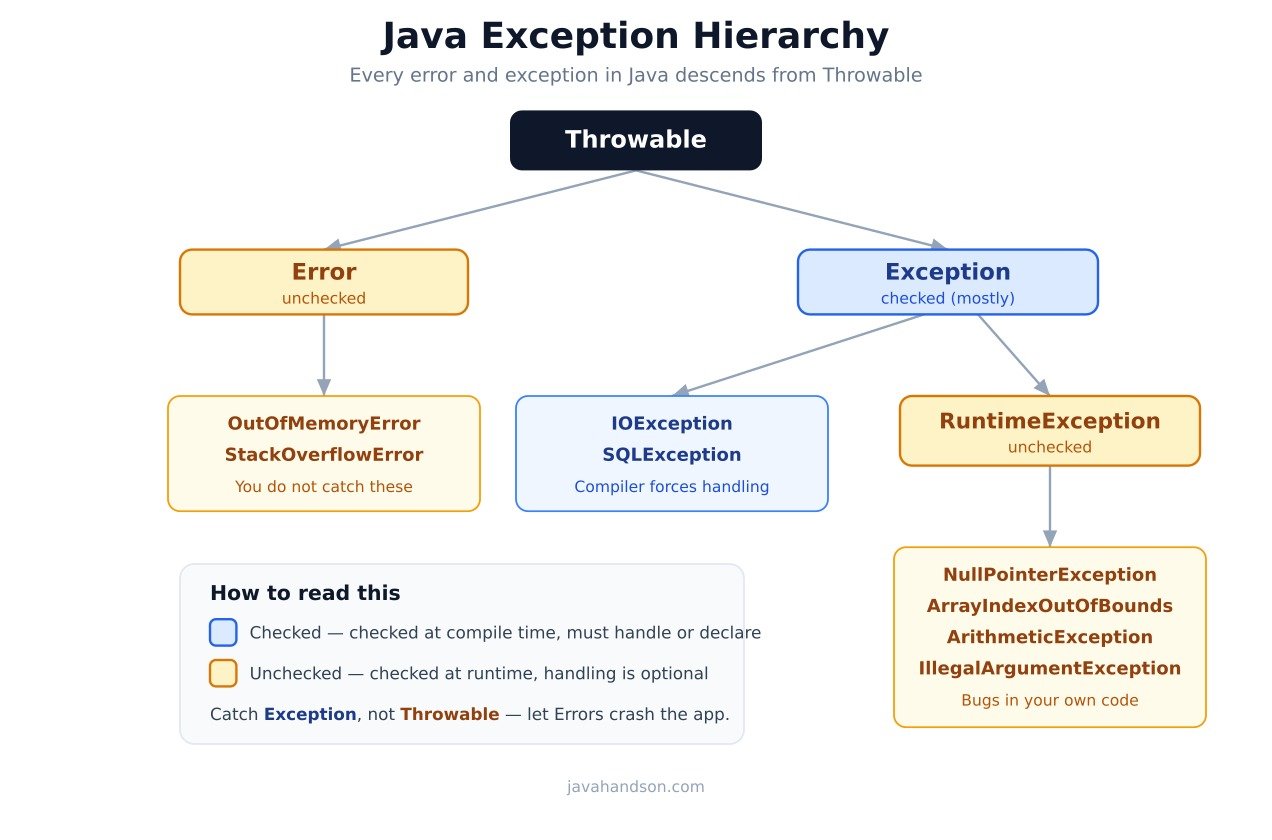
Because Throwable is the root, it also defines the methods you use every day. A few matter in interviews. getMessage returns the error text. getCause returns the wrapped reason. printStackTrace prints the full trace. getStackTrace returns it as an array you can inspect.
One practical rule follows from this tree. Always catch Exception or something more specific. Avoid catching Throwable, because that also traps serious Errors you cannot recover from.
Answer – Both are Throwable, so both can be thrown and caught. The real difference is about who caused the problem and whether recovery makes sense.
An exception usually comes from your application logic or its inputs. A missing file or a bad amount string are good examples. You can catch these, show a message, and keep the program running.
An error comes from the JVM or the environment itself. OutOfMemoryError and StackOverflowError fall here. You should not try to recover from them. Catching an error often hides a deeper problem and leaves the JVM in a broken state.
// A StackOverflowError from endless recursion
void loop() {
    loop();            // no base case
}
// Exception in thread "main" java.lang.StackOverflowError
// You fix the code; you do not 'handle' this at runtime.
Interview insight: A sharp follow-up I have faced: can you catch an Error? Technically yes, the syntax allows it. In practice I never do, except maybe to log the failure and then let the application shut down cleanly. Trying to continue after an OutOfMemoryError rarely ends well.
Answer – These three keywords form the core of handling. I think of them as risky work, rescue, and cleanup.
Connection conn = null;
try {
    conn = openConnection();   // risky
    conn.transfer(5000);
} catch (SQLException e) {      // rescue
    log.error("Transfer failed", e);
} finally {                     // cleanup
    if (conn != null) conn.close();
}
The finally block is perfect for releasing resources. Connections, files, and locks belong there. Because it runs on both the happy path and the failure path, your cleanup never gets skipped.
You can also stack several catch blocks on one try. Java tries each from top to bottom and uses the first type that matches. A try needs at least one catch or one finally to be valid.
One subtle case trips people. If the catch block itself throws, then finally still runs first. After that, the new exception from catch propagates outward. So cleanup is safe even when the rescue fails.
Answer – They look similar but do very different jobs. One letter changes everything, so interviewers test it often.
throw is a statement. It actually fires an exception object at runtime. You use it inside a method body when you detect a bad situation.
throws is a declaration. It sits in the method signature. This clause warns callers that the method might throw a checked exception. By itself, it throws nothing.
// throws: a promise in the signature
void withdraw(int amount) throws InsufficientFundsException {
    if (amount > balance) {
        // throw: the actual action
        throw new InsufficientFundsException("Not enough balance");
    }
    balance -= amount;
}
A few extra points round this out nicely. You may list many types after throws, separated by commas. An unchecked exception needs no declaration at all. You can also throw an exception and then rethrow it after logging, which passes it up to the caller.
Interview insight: A neat follow-up: can throw ever be used alone, with no new keyword? Yes. Inside a catch block you can write throw e to rethrow the same object. That keeps the original stack trace intact, which helps a lot during debugging.
Answer – These three sound alike but share nothing. This is a classic trick question, so I answer each one separately.
final int MAX_RETRIES = 3;        // final variable: a constant
final class Money { }             // final class: cannot be extended

try {
    process();
} finally {
    releaseLock();                // finally: cleanup
}

// finalize(): legacy cleanup hook, now deprecated
The history of finalize matters in senior interviews. Java 9 deprecated it. Java 18 then marked finalization for removal through JEP 421. The reason is that finalizers run at unpredictable times and can hurt performance.
Interview insight: If asked what replaced it, I answer clearly. Modern Java uses try-with-resources for deterministic cleanup. For native or off-heap resources, it uses the Cleaner API. Mentioning Cleaner shows you follow current Java, not just old textbooks.
Answer – printStackTrace prints the exception and its full call stack. By default it writes to System.err, the standard error stream. It is handy for a quick local test. In production, though, I avoid it.
The problem is that it bypasses your logging framework. It carries no log level, no timestamp, and no context like a transaction id. Your log aggregation tools may miss it entirely. So the failure can vanish from the dashboards your team actually watches.
// Weak: goes to System.err, outside the logging system
catch (PaymentException e) {
    e.printStackTrace();
}

// Better: structured, searchable, with context
catch (PaymentException e) {
    log.error("Payment failed for txn {}", txnId, e);
}
Notice the second form. It passes the exception as the last argument. A logger like SLF4J then prints the full trace under your chosen level. For production code, that structured log is far more useful during an incident.
Answer – Almost always, but not literally always. I say it runs whether the try succeeds, throws, or returns early. That covers normal programs completely.
A return inside try does not skip finally. The JVM prepares the return value first. Then it runs finally. Only after that does the method truly exit. So cleanup still happens.
However, a few extreme cases do skip it. I keep this short list ready, because interviewers push for it.
try {
    System.out.println("inside try");
    System.exit(0);              // JVM stops here
} finally {
    System.out.println("finally"); // this never prints
}
So the honest answer is nuanced, and that nuance earns marks. Under normal conditions finally always runs. Only a JVM shutdown or a never-ending try can stop it.
Answer – The finally block wins. Its return value overrides anything returned from try or catch. This surprises many people, so it makes a great interview trap.
int getValue() {
    try {
        return 1;        // scheduled to return 1
    } finally {
        return 2;        // overrides, actually returns 2
    }
}
// getValue() returns 2
The reason is timing. The try block prepares its return value first. Then finally runs before the method truly exits. A return inside finally replaces the earlier one.
A worse version hides a real exception. If try throws and finally returns a value, the exception simply disappears. The caller sees a normal return and never learns that something failed.
int risky() {
    try {
        throw new RuntimeException("boom");
    } finally {
        return -1;      // swallows the exception completely
    }
}
// caller gets -1, never sees the RuntimeException
Interview insight: My advice: never put a return inside finally. It hides exceptions and confuses readers. I treat this as a code smell in reviews, not a clever trick to use.
Answer – try-with-resources arrived in Java 7. It closes resources for you automatically. Any resource that implements AutoCloseable can go inside the small brackets after try.
With the old style, you closed resources yourself in finally. That code was long and easy to get wrong. People forgot null checks. Worse, the close call itself could throw and hide the real error.
// Old way: manual, noisy, error-prone
BufferedReader br = null;
try {
    br = new BufferedReader(new FileReader("txns.csv"));
    return br.readLine();
} finally {
    if (br != null) br.close();
}

// New way: clean and automatic
try (BufferedReader br = new BufferedReader(new FileReader("txns.csv"))) {
    return br.readLine();
}   // br.close() is called for you, even on exception
You can also declare several resources in one try. Java then closes them in reverse order of creation. That reverse order matters, because a later resource often depends on an earlier one.
try (Connection conn = openConnection();
     PreparedStatement ps = conn.prepareStatement(SQL)) {
    ps.executeUpdate();
}   // ps closes first, then conn

// Java 9+: an already-final resource can be used directly
final Scanner sc = new Scanner(System.in);
try (sc) {
    sc.nextLine();
}
Interview insight: A good follow-up: AutoCloseable or Closeable? Closeable came first, from java.io, and its close throws only IOException. AutoCloseable is broader and its close can throw any Exception. try-with-resources works with both, but AutoCloseable is the more general root.
Answer – A multi-catch block catches several exception types in one catch. Java 7 added it. You separate the types with a pipe symbol. It removes duplicate handling code.
try {
    processPayment(request);
} catch (IOException | SQLException e) {
    // one handler for both types
    log.error("Payment infra failed", e);
    throw new PaymentException("Infra error", e);
}
Two rules matter here. First, the types must not be parent and child of each other. Catching IOException and its subclass together is a compile error, because one already covers the other.
Second, the exception variable is effectively final. You cannot reassign it inside the block. The compiler also treats its type as the common parent of the listed types, so you only see shared methods.
Interview insight: A nice detail to drop in: multi-catch produces smaller bytecode than two separate catch blocks with the same body. So it is cleaner for readers and a touch leaner for the compiler too.
Answer – Exception chaining means wrapping a low-level exception inside a higher-level one while keeping the original. The original becomes the cause. You pass it into the new exception’s constructor.
This matters a lot in layered applications. The data layer may throw SQLException. The service layer should not leak that detail. So it wraps the error, yet it must not lose the root reason.
try {
    accountRepo.debit(accountId, amount);
} catch (SQLException e) {
    // wrap, but keep the cause
    throw new PaymentException("Debit failed for " + accountId, e);
}
The second argument is the cause. Later, the stack trace shows both layers. You see your business error, then a ‘Caused by’ line with the original SQL error. Without chaining, you would lose that reason and debug blind.
There is also a second way to set the cause. If a constructor has no cause parameter, you can call initCause once after creating the exception. Both approaches end up at the same place.
Interview insight: A common mistake is throw new PaymentException(e.getMessage()). That copies the text but drops the cause and its trace. Always pass the exception object itself, not just its message.
Answer – Both mean a class is missing, but at different moments. One is a checked exception, and the other is an error. The split confuses people, so I explain it by timing.
ClassNotFoundException happens during explicit loading. You call Class.forName or loadClass with a name, and the loader cannot find it. Since it is a checked exception, you handle it directly.
NoClassDefFoundError is different. The class was present at compile time. Then at runtime it went missing, maybe a jar dropped off the classpath. The JVM expected it and failed, so it throws an Error.
// ClassNotFoundException: dynamic lookup fails, you catch it
try {
    Class.forName("com.bank.OldDriver");
} catch (ClassNotFoundException e) {
    log.error("Driver not on classpath", e);
}

// NoClassDefFoundError: was there at compile, gone at runtime
// Usually a packaging or classpath problem, not your catch block
The fix differs too. For the exception, you check your loading code and the name string. For the error, you check your build and classpath. So spotting which one appeared tells you where to look.
Answer – When you have many catch blocks, order is not free. Java checks them top to bottom. So you must place the most specific exception first and the most general one last.
If you put a parent type before its child, the child becomes unreachable. The parent catch grabs everything first. The compiler spots this and refuses to build the code.
// WRONG: Exception catches everything first
try {
    risky();
} catch (Exception e) {          // too broad, too early
    ...
} catch (IOException e) {        // compile error: unreachable
    ...
}

// RIGHT: specific first, general last
try {
    risky();
} catch (IOException e) {
    ...
} catch (Exception e) {          // safety net at the bottom
    ...
}
So the rule stays simple. Specific exceptions go on top. Broad ones sit at the bottom as a safety net. This order lets each handler do its real job without stealing another’s work.
Answer – This is a dangerous pattern, and interviewers love it. If finally throws a new exception, that new one takes over. The original exception from try gets lost completely. Your real cause simply disappears.
try {
    throw new RuntimeException("the real problem");
} finally {
    throw new IllegalStateException("cleanup failed");
}
// Caller sees only IllegalStateException.
// The real RuntimeException is gone.
So I keep risky code out of finally. Cleanup should be safe and quiet. If a close call can fail, I either handle it there or let try-with-resources manage it. That construct suppresses the cleanup error instead of losing the main one.
Interview insight: A strong follow-up: how do you keep both errors? Use try-with-resources. It attaches the cleanup failure as a suppressed exception, which I cover in the suppressed-exceptions question below. That way, no failure is ever silently dropped.
Answer – A custom exception is just a class that extends an existing exception. You extend Exception for a checked type. You extend RuntimeException for an unchecked type. The choice depends on recovery.
I pick checked when the caller can reasonably recover and should be forced to think about it. I pick unchecked for programming errors or cases where recovery is unlikely. Most modern frameworks, including Spring, lean unchecked for business errors.
// Unchecked custom exception for a payment failure
public class PaymentException extends RuntimeException {
    private static final long serialVersionUID = 1L;
    private final String txnId;

    public PaymentException(String message, String txnId, Throwable cause) {
        super(message, cause);   // keep the cause
        this.txnId = txnId;
    }

    public String getTxnId() { return txnId; }
}
Notice a few good habits here. First, I pass the cause to super, so chaining works. Second, I add a txnId field, which carries business context into the logs. Third, I declare serialVersionUID, because every Throwable is serializable by design.
Interview insight: A frequent follow-up: checked or unchecked for business errors? My honest take is unchecked for most cases. Checked exceptions push throws clauses through every layer and clutter the code. I reserve checked for truly recoverable, expected situations.
Answer – A suppressed exception appears with try-with-resources. It happens when the try body throws one exception, and then close throws another during cleanup. Java cannot report both as the primary failure.
So it keeps the first one as the main exception. The second one from close gets attached as suppressed. You can read it later with getSuppressed. Nothing is silently lost, which is the whole point.
try (MyResource r = new MyResource()) {
    throw new RuntimeException("body failed");   // primary
}   // if close() also throws, that becomes suppressed

// Reading them later:
catch (Exception e) {
    System.out.println("Primary: " + e.getMessage());
    for (Throwable s : e.getSuppressed()) {
        System.out.println("Suppressed: " + s.getMessage());
    }
}
// Primary: body failed
// Suppressed: close failed
You can even add a suppressed exception by hand with addSuppressed. The old manual finally behaved far worse. There, a close error could replace the real error completely, and you lost the true cause. Suppressed exceptions fix exactly that loss.
Answer – Throwing an exception is not free. The expensive part is building the stack trace. The JVM walks the whole call stack and records each frame. That work costs real CPU time, especially on a deep stack.
So using exceptions for normal control flow is a bad idea. Imagine ending a loop by catching an exception every time. That design runs slowly and reads poorly. Plain conditionals stay faster and clearer.
// BAD: exception as control flow
try {
    int i = 0;
    while (true) {
        process(list.get(i)); // relies on IndexOutOfBounds to stop
        i++;
    }
} catch (IndexOutOfBoundsException e) {
    // used as a loop break -- avoid this
}

// GOOD: ordinary condition
for (int i = 0; i < list.size(); i++) {
    process(list.get(i));
}
Interview insight: An advanced follow-up: how do you make an exception cheap? You can override fillInStackTrace to skip trace capture. Some high-throughput libraries do this for expected control-signal exceptions. I mention it, but I stress it is a rare optimisation, not a default.
Answer – An overriding method cannot broaden the checked exceptions of the parent. It may throw the same checked exceptions, or narrower ones, or none at all. It must not add new or wider checked exceptions.
The reason comes from substitution. Calling code uses the parent type. It only prepares for the parent’s declared exceptions. A child that threw something new and checked would break that caller’s contract.
class Repository {
    void save() throws IOException { }
}

class SqlRepository extends Repository {
    // OK: same, narrower, or no checked exception
    @Override void save() throws FileNotFoundException { }
}

class BadRepository extends Repository {
    // COMPILE ERROR: SQLException is a broader / unrelated checked type
    @Override void save() throws SQLException { }
}
One more detail helps here. This rule covers checked exceptions only. An overriding method can freely throw any unchecked exception, because the compiler does not police those at all.
Answer – In a layered app, each layer should speak its own language. The data layer knows SQL. Your service layer knows business rules. The web layer knows HTTP. Exceptions should respect those boundaries.
So I catch low-level exceptions at the boundary and translate them. A raw SQLException should never reach the controller. Instead the service wraps it into a meaningful business exception, keeping the cause for the logs.
// Service layer: translate, do not leak
public void transfer(String from, String to, int amount) {
    try {
        accountRepo.debit(from, amount);
        accountRepo.credit(to, amount);
    } catch (SQLException e) {
        throw new TransferFailedException("Transfer failed", e);
    }
}

// Web layer (Spring): one place maps exceptions to HTTP
@RestControllerAdvice
public class ApiExceptionHandler {
    @ExceptionHandler(TransferFailedException.class)
    public ResponseEntity<ApiError> handle(TransferFailedException e) {
        return ResponseEntity.status(502).body(new ApiError(e.getMessage()));
    }
}
This approach gives clean separation. The client sees a tidy error message. The logs still hold the SQL cause. In Spring Boot, a central @RestControllerAdvice keeps all this mapping in one place.
Interview insight: A modern follow-up: how do you shape the error body? Spring 6 and Boot 3 support ProblemDetail, based on RFC 7807. It gives a standard JSON shape with type, title, status, and detail. Naming it signals that you know current Spring, not just older patterns.
Answer – Rethrowing means you catch an exception, do something, and then throw it again for a higher layer. Often you log it first, or add context, then let it bubble up.
Before Java 7, rethrowing was clumsy with broad catches. If you caught Exception and rethrew it, the method had to declare throws Exception. The compiler could not see the real, narrower types inside.
Java 7 added more precise rethrow. Now the compiler analyses what the try block can actually throw. So you can catch Exception, rethrow it, and still declare only the specific checked types in the signature.
// Java 7+: precise rethrow
void run() throws IOException, SQLException {   // specific, not Exception
    try {
        readFile();   // throws IOException
        query();      // throws SQLException
    } catch (Exception e) {
        log.error("run failed", e);
        throw e;      // compiler knows it is IOException or SQLException
    }
}
Sometimes you rethrow as a different type instead. In that case, pass the original as the cause. This keeps chaining intact and preserves the full trace for whoever debugs it later.
Answer – Yes, a constructor can throw an exception, both checked and unchecked. People often forget this. It is actually a clean way to reject invalid input and stop a bad object from ever existing.
When the constructor throws, the object is never fully created. The new expression does not return a reference. Your variable stays unassigned. The half-built instance becomes eligible for garbage collection.
public class Account {
    private final int balance;

    public Account(int balance) {
        if (balance < 0) {
            throw new IllegalArgumentException("Balance cannot be negative");
        }
        this.balance = balance;
    }
}

Account a = new Account(-500);  // throws; 'a' is never assigned
Interview insight: A careful follow-up: what about resources opened in a constructor? If the constructor opens a file and then throws, that file can leak, because close never runs. So I open such resources with care, or use a factory method that cleans up. I avoid risky work in the constructor itself.
Answer – This is where my production experience helps. I have seen the same mistakes cost real money in payment systems. Let me list the ones I flag the most.
// The worst one: a swallowed exception
try {
    settlement.run();
} catch (Exception e) {
    // nothing here -- the failure vanishes
}

// Better: log with context, then act on it
try {
    settlement.run();
} catch (SettlementException e) {
    log.error("Settlement failed for batch {}", batchId, e);
    alerting.notifyOps(batchId);
}
Interview insight: If I had to give one rule, it would be this. Never leave a catch block empty. Either handle the error, translate it, or log it with full context. A silent failure in production is the hardest bug to ever find.
Exception handling rewards clear thinking, not memorised lines. Start with the hierarchy, because it explains checked versus unchecked. Then master try, catch, finally, and especially try-with-resources. After that, the advanced questions become easy extensions of the same ideas.
In interviews, show judgment, not just rules. Explain why you wrap a SQLException, or why an empty catch is dangerous. That practical angle is what separates a strong candidate from a list-reader. Practice each snippet above by hand, and these answers will feel natural when it counts.