Java Collections Interview Questions: 24 In-Depth Q&A With Code
-
Last Updated: November 11, 2026
-
By: javahandson
-
Series

Java collections interview questions: 24 Q&A on List, Set, Map, ArrayList vs LinkedList, HashSet, fail-fast iterators and Big-O, with runnable code.
If you are preparing for a Java role, then java collections interview questions are something you simply cannot skip. Almost every interview, from fresher rounds to senior architect panels, digs into this topic. The reason is simple. Collections sit at the heart of nearly every Java program you will ever write.
I have spent close to ten years building banking and payment systems in Java. In that time, I have sat on both sides of the table, as a candidate and as an interviewer. So in this guide, I answer the way I would actually speak in a real interview. The language stays simple and beginner friendly. Still, I go deep into the internals, because that is where senior interviews are won or lost.
We move from easy warm-up questions to tricky internals. Each answer explains the what, the why, and the how. Every answer also ships with a complete, runnable snippet, and most show the exact output. On top of that, I add short interview insight notes. These point out the follow-up questions interviewers love to ask next. For the wider picture across every Core Java topic, see the Core Java interview questions for freshers guide.
Answer – The Java Collections Framework is a unified set of interfaces and classes for storing and processing groups of objects. It lives in the java.util package. Instead of hand-writing a list or a set every time, we reuse these well-tested building blocks. The framework also gives us common algorithms, like sorting and searching, that work across every implementation.
The design is layered, and that layering matters in interviews. At the very top sits Iterable, which just promises that we can loop over the elements. Below it comes Collection, the root for most structures. From Collection, three main interfaces branch out:
Map is also part of the framework. However, it does not extend Collection, because it stores key-value pairs instead of single elements. So it forms its own separate branch.
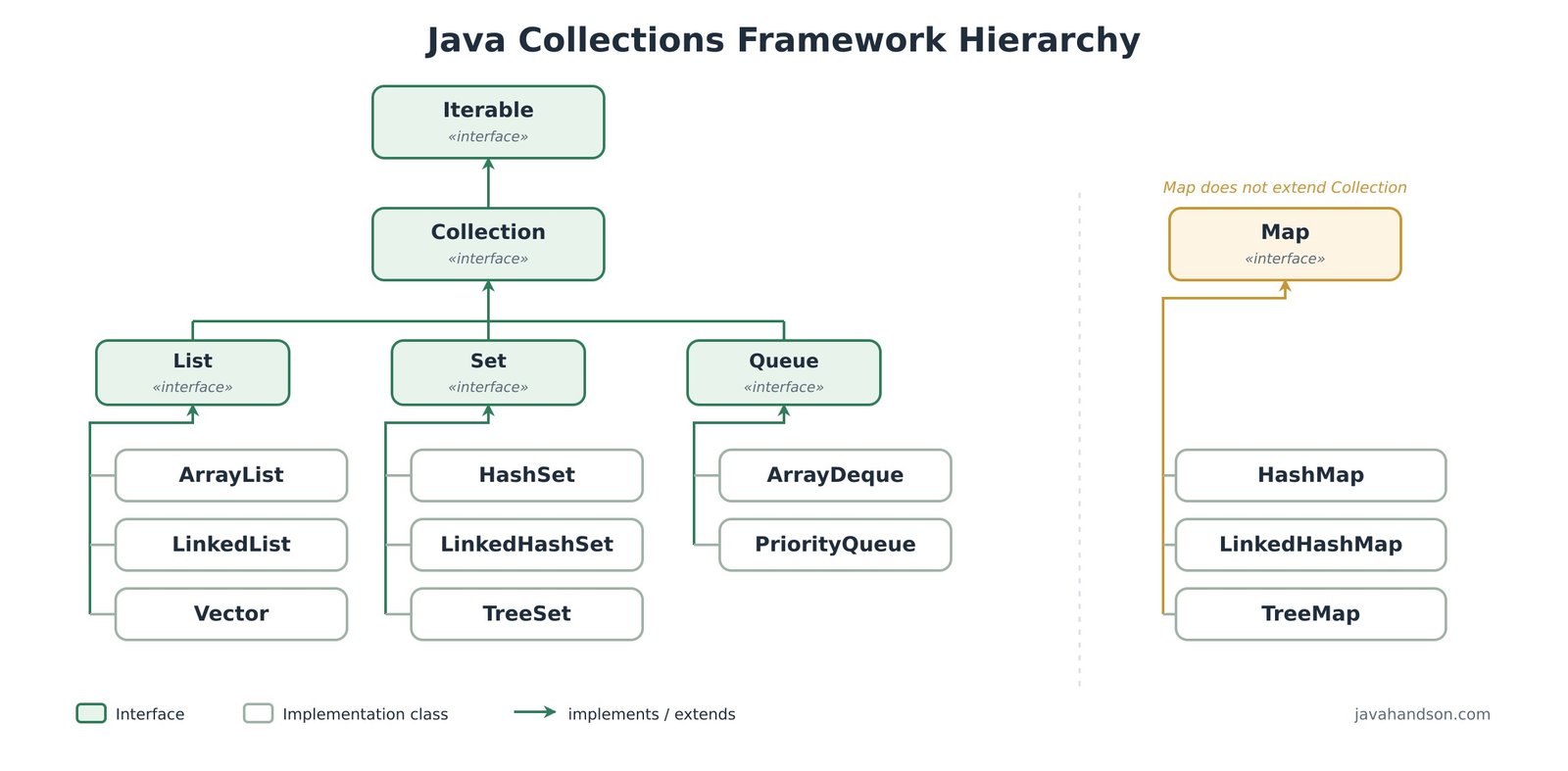
import java.util.*;

List<String> list = new ArrayList<>();   // ordered, duplicates allowed
Set<String>  set  = new HashSet<>();     // unique elements only
Queue<String> q   = new ArrayDeque<>();  // FIFO processing
Map<String,Integer> map = new HashMap<>(); // key -> value pairs

System.out.println(list instanceof Collection); // true
System.out.println(map  instanceof Collection); // false — Map is separate
Interview insight — Many candidates say Map extends Collection. It does not. Be ready to explain that Map models pairs, not single elements, which is why it needed its own hierarchy.
Answer – An array is a fixed-size structure built into the language itself. Once we set its length, we cannot change it. An ArrayList is a resizable list from the Collections Framework. It grows and shrinks automatically as elements come and go.
A few more differences are worth saying out loud. An array can hold primitives like int directly, which avoids boxing. An ArrayList holds only objects, so primitives get auto-boxed into wrapper types like Integer. Arrays expose a simple length field, while an ArrayList gives us rich methods such as add(), remove(), contains(), and size(). Arrays can also be multi-dimensional, whereas a list is single-dimensional, though we can nest lists.
int[] fixed = new int[2];       // size locked at 2
fixed[0] = 10;
// fixed[2] = 30;               // ArrayIndexOutOfBoundsException

List<Integer> dynamic = new ArrayList<>();
dynamic.add(10);                // grows on demand
dynamic.add(20);
dynamic.add(30);                // no size worry
System.out.println(fixed.length);     // 2   (field)
System.out.println(dynamic.size());   // 3   (method)
Interview insight — A common follow-up: when would you still prefer a plain array? For fixed-size data, for primitive-heavy number crunching where boxing hurts, or for low-level performance code.
Answer – Both implement the List interface, so they look similar from the outside. Inside, they are built very differently. An ArrayList is backed by a resizable array. So reading an element by its index is a direct memory jump, which is O(1). A LinkedList is backed by a doubly-linked list, where each node holds the data plus a pointer to the previous and next node.
This structural difference decides where each one wins:
In my experience, ArrayList wins most real cases. We read far more often than we insert in the middle. So its cache-friendly array usually beats LinkedList, even for many add and remove patterns.
List<String> arrayList  = new ArrayList<>(List.of("a", "b", "c"));
List<String> linkedList = new LinkedList<>(List.of("a", "b", "c"));

arrayList.get(2);               // O(1) — direct index
linkedList.get(2);              // O(n) — walks from the head

((LinkedList<String>) linkedList).addFirst("z"); // O(1) at the ends
arrayList.add(0, "z"); // O(n) — shifts every element rightAnswer – These three are the main child interfaces of Collection, and each enforces a different contract. A List keeps insertion order, allows duplicates, and gives index-based access. In contrast, a Set models a mathematical set, so it rejects duplicate elements. Finally, a Queue holds elements for later processing, and it usually follows first-in, first-out order.
Here is how I decide between them in practice. A List fits when order and duplicates matter, like a shopping cart. In contrast, a Set fits when every value must be unique, like a set of account numbers. Finally, a Queue fits when we process items in sequence, like transactions waiting to settle.
List<Integer>  ids    = new ArrayList<>(List.of(1, 2, 2, 3));
Set<Integer>   unique = new HashSet<>(List.of(1, 2, 2, 3));
Queue<String>  tasks  = new ArrayDeque<>();

tasks.offer("verify");
tasks.offer("settle");

System.out.println(ids);          // [1, 2, 2, 3] — duplicates kept
System.out.println(unique);       // [1, 2, 3]    — duplicate dropped
System.out.println(tasks.poll()); // verify — FIFO orderAnswer – A HashSet does not do the heavy lifting itself. Internally, it wraps a HashMap. When we add an element to the set, that element becomes a key in the hidden map, and the value is a fixed dummy object. Since a map cannot hold duplicate keys, the set stays unique for free.
To decide whether two elements are the same, the set uses two methods together. First, it calls hashCode() to find the correct bucket quickly. Then, inside that bucket, it calls equals() to confirm a true match. So the contract is strict. If you store custom objects, you must override both hashCode() and equals(), or duplicates will slip in.
class Customer {
    final String pan;                 // India tax id, unique per person
    Customer(String pan) { this.pan = pan; }

    @Override public boolean equals(Object o) {
        return o instanceof Customer c && c.pan.equals(pan);
    }
    @Override public int hashCode() { return pan.hashCode(); }
}

Set<Customer> set = new HashSet<>();
set.add(new Customer("ABCDE1234F"));
set.add(new Customer("ABCDE1234F")); // logically the same person
System.out.println(set.size());      // 1 — duplicate rejected
Interview insight — The classic trap: add two ‘equal’ objects but forget hashCode(). They land in different buckets, so the set keeps both. Interviewers expect you to name the equals–hashCode contract.
Answer – An Iterator is a simple one-way cursor. It moves forward only, and it works with every Collection type. It exposes three methods: hasNext(), next(), and remove(). A ListIterator is a more capable cursor, but it works only with lists.
The extra power of ListIterator shows up in several ways. It can move both forward and backward, using next() and previous(). It can also add or replace elements during iteration, using add() and set(). On top of that, it reports positions through nextIndex() and previousIndex(). So we reach for it whenever we must edit a list safely while looping.
List<String> list = new ArrayList<>(List.of("a", "b", "c"));
ListIterator<String> it = list.listIterator();

while (it.hasNext()) {
    String val = it.next();
    if (val.equals("b")) it.set("B");   // replace in place
}
// now walk backward
while (it.hasPrevious()) {
    System.out.print(it.previous() + " "); // c B a
}
System.out.println("\n" + list); // [a, B, c]Answer – This one looks like a trick, and honestly it is a favourite. Collection, without the ‘s’, is an interface. It is the root interface for List, Set, and Queue. Collections, with the ‘s’, is a final utility class full of static helper methods.
The Collections class bundles many handy tools. For example, we get sort() and reverse() to reorder a list. We get unmodifiableList() to wrap a read-only view. We also get synchronizedList() for a thread-safe wrapper, plus min(), max(), and frequency(). So think of one as a type and the other as a toolbox.
List<Integer> nums = new ArrayList<>(List.of(3, 1, 2, 1));

Collections.sort(nums);                         // [1, 1, 2, 3]
Collections.reverse(nums);                      // [3, 2, 1, 1]
int max  = Collections.max(nums);               // 3
int freq = Collections.frequency(nums, 1);      // 2

System.out.println(nums + " max=" + max + " freq=" + freq);
Answer – Both help us sort objects, but they live in different places and serve different goals. Comparable defines the natural, default order of a class. We implement it inside the class using compareTo(). Comparator defines an external, custom order. We write it outside the class using compare(), so one class can have many sort strategies.
A simple rule guides the choice. Use Comparable when there is one obvious ordering, like numbers by value. Use Comparator when you need several orderings, like employees by salary, then by name. The modern Comparator helpers make chained sorting very clean.
record Employee(String name, int salary) {}

List<Employee> staff = new ArrayList<>(List.of(
    new Employee("Asha",  50000),
    new Employee("Rohan", 50000),
    new Employee("Meera", 60000)));

// custom, chained order: salary ascending, then name A–Z
staff.sort(Comparator.comparingInt(Employee::salary)
                     .thenComparing(Employee::name));

staff.forEach(e -> System.out.println(e.name() + " " + e.salary()));
// Asha 50000
// Rohan 50000
// Meera 60000
Interview insight — A frequent follow-up: which package holds each one? Comparable is in java.lang, while Comparator is in java.util. Also know that compareTo returns negative, zero, or positive — not just -1, 0, 1.
Answer – An ArrayList is backed by an Object array called elementData. In modern Java, this array starts empty. It only gets a real capacity of 10 when we add the very first element. This lazy start saves memory for lists that stay empty.
When the backing array fills up, the list does not add a single slot. Instead, it allocates a larger array and copies every element across with Arrays.copyOf(). The new capacity is roughly 1.5 times the old one. The exact formula is oldCapacity plus oldCapacity shifted right by one.
A single resize is O(n), because of the copy. However, resizes happen rarely as the list grows. So the average cost of add() stays at O(1), which we call amortized O(1). We can observe the capacity jump using reflection.
import java.lang.reflect.Field;

List<Integer> list = new ArrayList<>();
Field f = ArrayList.class.getDeclaredField("elementData");
f.setAccessible(true);                       // needs --add-opens on JDK 17+

System.out.println(((Object[]) f.get(list)).length); // 0  (empty start)
list.add(1);
System.out.println(((Object[]) f.get(list)).length); // 10 (first add)
for (int i = 0; i < 10; i++) list.add(i);
System.out.println(((Object[]) f.get(list)).length); // 15 (10 -> 15)
Interview insight — If you know the final size up front, pass it to the constructor: new ArrayList<>(1000). This skips repeated resizing and copying, and it is a clean point to raise for large data loads.
Answer – This exception fires when we change a collection’s structure while iterating over it with a normal iterator. A typical mistake is calling list.remove() inside a for-each loop. The iterator detects the unexpected change and throws the exception right away, to stop silent corruption.
Under the hood, the collection keeps a counter named modCount. Each structural change bumps it. The iterator saves an expectedModCount when it starts. Before every next(), it compares the two. If they differ, it fails fast. There are a few clean ways to avoid the crash:
List<String> txns = new ArrayList<>(List.of("ok", "fail", "ok", "fail"));

// WRONG — throws ConcurrentModificationException
// for (String t : txns) if (t.equals("fail")) txns.remove(t);

// RIGHT — iterator.remove()
Iterator<String> it = txns.iterator();
while (it.hasNext()) {
    if (it.next().equals("fail")) it.remove();
}
// RIGHT — one-liner
txns.removeIf(t -> t.equals("fail"));
System.out.println(txns); // [ok, ok]Answer – A fail-fast iterator throws a ConcurrentModificationException the moment it spots a structural change during iteration. Most standard collections behave this way, like ArrayList, HashMap, and HashSet. The idea is to surface bugs early, not to hide them.
A fail-safe iterator never throws that exception. It iterates over a separate copy or snapshot, so changes to the original do not disturb the loop. CopyOnWriteArrayList is the clearest example, since its iterator reads a frozen array. ConcurrentHashMap is similar but subtler. Its iterator is weakly consistent, which means it may or may not reflect very recent updates, yet it still never throws.
// fail-fast: standard ArrayList
List<Integer> fast = new ArrayList<>(List.of(1, 2, 3));
try {
    for (int x : fast) fast.add(x);     // modifies during iteration
} catch (ConcurrentModificationException e) {
    System.out.println("fail-fast threw"); // this prints
}

// fail-safe: snapshot iterator, no exception
List<Integer> safe = new CopyOnWriteArrayList<>(List.of(1, 2, 3));
for (int x : safe) safe.add(99);        // allowed
System.out.println(safe.size());        // 6
Interview insight — Sharp follow-up: is fail-fast guaranteed? No. It is best-effort, so never build program logic around catching ConcurrentModificationException.
Answer – All three implement the Set interface, so none allows duplicates. The real difference lies in ordering and performance. A HashSet keeps no order at all, and it offers the fastest operations at roughly O(1). The LinkedHashSet variant preserves insertion order, and it costs only a little more, because it maintains a linked list across the entries. Meanwhile, a TreeSet keeps elements in sorted order, but its operations cost O(log n), since a red-black tree backs it.
So the choice follows the need. Pick HashSet for raw speed when order does not matter. Choose LinkedHashSet when you must replay items in the order they arrived. Go with TreeSet when the data should always stay sorted, or when you need range queries like headSet() and tailSet().
Set<Integer> hash   = new HashSet<>();
Set<Integer> linked = new LinkedHashSet<>();
Set<Integer> tree   = new TreeSet<>();

for (int v : new int[]{30, 10, 20, 10}) {
    hash.add(v); linked.add(v); tree.add(v);
}
System.out.println(hash);    // [20, 10, 30] — no guaranteed order
System.out.println(linked);  // [30, 10, 20] — insertion order
System.out.println(tree); // [10, 20, 30] — sorted orderAnswer – A HashSet can store exactly one null. The null key maps to a fixed bucket, so a second null is treated as a duplicate and ignored. A TreeSet usually cannot store null at all. The reason is simple. A TreeSet must compare elements to sort them, and comparing anything with null throws a NullPointerException.
This small detail trips up many candidates, so keep the rule sharp. A hash-based set tolerates a single null. In contrast, a sorted set rejects null, because sorting needs a valid comparison. The same logic applies to HashMap keys versus TreeMap keys.
Set<String> hs = new HashSet<>();
hs.add(null);
hs.add(null);                 // ignored as duplicate
System.out.println(hs.size()); // 1

Set<String> ts = new TreeSet<>();
try {
    ts.add(null);             // compares null -> boom
} catch (NullPointerException e) {
    System.out.println("TreeSet rejected null");
}Answer – The difference is subtle but important. An unmodifiable collection is only a read-only view over another collection. We cannot change it through the view. However, the original backing collection can still change, and the view reflects those changes live. So it is a protected window, not a frozen copy.
An immutable collection, like the one from List.of(), is truly fixed. Nothing can alter its contents, and there is no separate backing collection to update it either. As a bonus, List.of() and its siblings also reject null elements outright. Both approaches throw UnsupportedOperationException if we try to write to them.
List<String> base = new ArrayList<>(List.of("a", "b"));
List<String> view = Collections.unmodifiableList(base);

base.add("c");                 // backing list changes
System.out.println(view);      // [a, b, c] — view reflects it!

List<String> frozen = List.of("a", "b"); // truly immutable
try {
    frozen.add("c");
} catch (UnsupportedOperationException e) {
    System.out.println("cannot modify immutable list");
}Answer – All three deal with the head of a queue, but they differ on removal and on empty handling. peek() returns the head without removing it, and it returns null when the queue is empty. poll() returns and removes the head, and it also returns null when empty. remove() returns and removes the head too, yet it throws NoSuchElementException on an empty queue.
So the key distinction is the empty case. The peek and poll pair stays calm and hands back null. The remove and element pair is strict and throws. I prefer poll() and peek() in production, because a stray null is easier to handle than an exception in a hot path.
Queue<String> q = new ArrayDeque<>();
System.out.println(q.peek());   // null  — look, no removal, no error
System.out.println(q.poll());   // null  — remove, still no error

q.offer("settle");
System.out.println(q.peek());   // settle (still in queue)
System.out.println(q.poll());   // settle (now removed)
// System.out.println(q.remove()); // throws NoSuchElementExceptionAnswer – Enumeration is the older, legacy interface from Java 1.0. We mostly meet it with early classes like Vector, Stack, and Hashtable. It only reads elements, using hasMoreElements() and nextElement(). Iterator arrived with the Collections Framework and is the preferred choice today.
Iterator improves on Enumeration in two clear ways. First, it works across the whole framework, not just the legacy classes. Second, it can remove elements safely during a loop through its remove() method. Iterator is also fail-fast, so it catches accidental structural changes. Enumeration offers none of that safety. So in new code, we always reach for Iterator.
Vector<String> v = new Vector<>(List.of("a", "b", "c"));

Enumeration<String> en = v.elements();     // legacy, read-only
while (en.hasMoreElements()) System.out.print(en.nextElement() + " ");

Iterator<String> it = v.iterator();        // modern, can remove
while (it.hasNext()) {
    if (it.next().equals("b")) it.remove(); // safe removal
}
System.out.println("\n" + v); // [a, c]Answer – ArrayDeque is a double-ended queue backed by a resizable circular array. It keeps a head index and a tail index, and it wraps them around the array as elements move. So we can add and remove at both ends in amortized O(1). It serves as both a stack and a queue, which makes it very flexible.
It beats two older options for most stack and queue work. The legacy Stack class extends Vector, so all its methods are synchronized. That locking slows single-threaded code with no benefit. LinkedList can act as a deque too, but it allocates a separate node per element, which wastes memory and hurts cache performance. ArrayDeque avoids both problems, so the official docs recommend it.
Deque<Integer> stack = new ArrayDeque<>();
stack.push(10);                 // addFirst
stack.push(20);
System.out.println(stack.pop()); // 20 — LIFO, like a stack

Deque<Integer> queue = new ArrayDeque<>();
queue.offer(1);                 // addLast
queue.offer(2);
System.out.println(queue.poll()); // 1 — FIFO, like a queue
Interview insight — A gotcha interviewers love: ArrayDeque does not allow null elements. Adding null throws a NullPointerException, because null is reserved as the ’empty’ signal. LinkedList, by contrast, does allow null.
Answer – This question checks whether you truly understand the data structures, not just their names. Each collection pays a different cost for each operation. An ArrayList is great for index access but weak for middle inserts. A LinkedList is strong at the ends but poor at random access. An ArrayDeque is strong at both ends but offers no index access at all.
Here is the comparison I keep in my head for interviews:
So I always tie the Big-O value back to the design. For example, ArrayList is O(n) in the middle only because elements must shift. Explaining the cause, not just the number, is what senior interviewers reward.
// pick the structure from the access pattern
List<Integer>  readHeavy = new ArrayList<>();   // many get(i) calls
Deque<Integer> bothEnds  = new ArrayDeque<>();   // queue or stack
List<Integer>  endEdits  = new LinkedList<>();   // frequent head/tail edits

readHeavy.get(100);              // O(1)
bothEnds.offerFirst(1);          // O(1)
((LinkedList<Integer>) endEdits).addLast(9); // O(1)
Answer – A PriorityQueue does not follow plain first-in, first-out order. Instead, it serves elements by priority. By default, it works as a min-heap, so the smallest element always comes out first. We can flip this into a max-heap by passing a reversed Comparator.
Internally, a binary heap stored inside an array backs it. Because of the heap shape, offer() and poll() both cost O(log n), as the element bubbles up or sifts down. Peeking at the top is cheap at O(1). One subtle point catches people out. Iterating over a PriorityQueue does not visit elements in sorted order. Only repeated poll() gives you sorted output.
// min-heap (default): smallest first
PriorityQueue<Integer> minHeap = new PriorityQueue<>();
minHeap.offer(30); minHeap.offer(10); minHeap.offer(20);
System.out.println(minHeap.poll()); // 10
System.out.println(minHeap.poll()); // 20

// max-heap: largest first
PriorityQueue<Integer> maxHeap =
        new PriorityQueue<>(Comparator.reverseOrder());
maxHeap.offer(30); maxHeap.offer(10); maxHeap.offer(20);
System.out.println(maxHeap.poll()); // 30Answer – This separation follows a core design principle called programming to an interface. We declare variables and method parameters with the List type, not the ArrayList type. So if a different implementation suits us later, we change a single line. The rest of the code never notices.
This buys real flexibility in day-to-day work. For instance, a method that accepts List can take an ArrayList today and a LinkedList tomorrow. It also makes testing easier, because we can pass a simple stub that honours the same interface. On top of that, it enables polymorphism, where one method handles many concrete types.
// depend on the interface, not the concrete class
void process(List<String> items) {
    items.forEach(System.out::println);
}

process(new ArrayList<>(List.of("a", "b")));  // works
process(new LinkedList<>(List.of("c", "d"))); // works, zero code change

List<String> data = new ArrayList<>(); // swap to LinkedList later freelyAnswer – CopyOnWriteArrayList is a thread-safe variant of ArrayList from the java.util.concurrent package. It uses an unusual strategy. Every mutating operation, like add() or remove(), creates a brand-new copy of the internal array. Reads then run on the stable array with no locks at all, which makes them very fast.
Because copying on every write is expensive, this class fits one specific pattern. It shines when reads are very frequent and writes are rare. A classic example is a list of event listeners or cached configuration that we read constantly but update seldom. Its iterator is fail-safe too, since it snapshots the array, so it never throws ConcurrentModificationException.
List<String> listeners = new CopyOnWriteArrayList<>(List.of("log", "audit"));

// safe to modify while iterating — iterator sees a snapshot
for (String l : listeners) {
    if (l.equals("log")) listeners.add("metrics"); // no exception
}
System.out.println(listeners); // [log, audit, metrics]
Interview insight — Do not suggest CopyOnWriteArrayList for write-heavy work. Copying the whole array on every write will wreck performance, and interviewers test exactly this judgment.
Answer – This is a dangerous situation, and it gets asked a lot. A HashSet places an element in a bucket using its hashCode() at the moment of insertion. If we later mutate a field that feeds hashCode(), the object’s hash changes. But the object still sits in its old bucket, where it was first placed.
The result is a broken set. When we later call contains(), the set computes the new hash, looks in the new bucket, and finds nothing. So the object becomes effectively lost. We can no longer reliably find it or remove it. This is exactly why we should use immutable objects, or at least stable fields, as set elements and as map keys.
class Account {
    int id;
    Account(int id) { this.id = id; }
    @Override public boolean equals(Object o) {
        return o instanceof Account a && a.id == id;
    }
    @Override public int hashCode() { return Integer.hashCode(id); }
}

Set<Account> set = new HashSet<>();
Account a = new Account(101);
set.add(a);
System.out.println(set.contains(a)); // true

a.id = 999;                          // mutate the hashed field
System.out.println(set.contains(a)); // false — entry is now unreachableAnswer – The enhanced for-loop, also called the for-each loop, is pure syntactic sugar. For any Iterable, the compiler rewrites it into plain Iterator calls. It grabs an iterator, then loops with hasNext() and next() until the elements run out. So the loop reads cleanly for us, yet it still runs on the Iterator underneath.
This rewrite also explains an earlier gotcha. Since the for-each loop hides a normal Iterator, removing an element directly inside it triggers a ConcurrentModificationException. For arrays, the story differs. There the loop compiles to a simple index counter, because arrays are not Iterable objects.
List<String> list = List.of("a", "b", "c");

// what you write
for (String s : list) System.out.println(s);

// what the compiler roughly generates
Iterator<String> it = list.iterator();
while (it.hasNext()) {
    String s = it.next();
    System.out.println(s);
}
// arrays instead use an index: for (int i = 0; i < arr.length; i++)Answer – In real work, I pick the collection by asking a short chain of questions. First, do I need key-value pairs? If yes, a Map is the answer. If not, I move to the Collection side. Next, do duplicates matter? If duplicates are fine and order counts, a List fits. If every value must be unique, a Set fits. After that, I think about access speed, ordering, and thread safety.
These practical rules cover most of my decisions:
So the best answer here is never a single class name. Instead, I reason out loud and explain the trade-offs. Interviewers want to see how you think, not just what you memorised.