module-info.java Explained: requires, exports, opens, uses, provides
-
Last Updated: October 28, 2026
-
By: javahandson
-
Series

module-info.java explained with examples: learn requires, exports, opens, uses and provides directives, what each controls, and how to read any module file.
Every Java module has one special file at its root, and that file is module-info.java. It is a tiny file. Still, it decides almost everything about how your module behaves. The file says which other modules you depend on. It also lists which of your packages the outside world can see. On top of that, it wires up services between modules. In this guide, we will go directive by directive and understand each keyword with small, working examples.
If you have opened this file before and felt lost, do not worry. The syntax looks unusual at first. There are no classes inside, no methods, just a handful of keywords. But once you learn these five directives, the file becomes very easy to read. By the end, you will be able to write and understand any module declaration with confidence.
A quick word on why this file matters so much. Before Java 9, any public class was reachable from anywhere on the classpath. There was no way to hide a package while keeping its classes public. That led to messy, tangled projects. The module-info.java file fixes this by making you state your boundaries clearly. Nothing leaks out unless you say so. Nothing comes in unless you ask. This explicit style feels strict at first, yet it makes large codebases far easier to reason about.
| Note This article focuses only on the module-info.java file and its directives. The broader module system, migration errors, and tools like jdeps and jlink are covered in separate articles in this series. Links are at the end. |
A module is a named group of packages. To turn a plain set of packages into a module, you add a single file named module-info.java at the source root. The compiler treats this file specially. It is a module declaration, not a normal class.
Here is the smallest possible version:
module com.pay.api {
}
That is a valid module. It has a name, com.pay.api, and an empty body. By default, this module keeps all its packages hidden and depends on nothing except the base module. The directives go inside the curly braces. Each one is a short statement that ends with a semicolon.
The name sits right after the module keyword. By convention, it follows the reverse-domain style, just like package names. So a payments company might use com.pay.api or com.pay.upi. The name must be unique on the module path. Also, it does not have to match any single package name inside the module.
| 💡 Interview insight — Why no file extension in the name? The module name is a Java identifier chain, not a file path. A common mistake is writing the module name with slashes or a .java suffix. It is just dots and names, like a package. Interviewers love to check if you know the module name and the package names are independent things. |
The module-info.java file always sits at the root of the module’s source folder. It is never placed inside a package folder. So the layout looks like this:
com.pay.api/
├── module-info.java          <-- here, at the root
└── com/
    └── pay/
        └── api/
            └── PaymentProcessor.java
When you compile, the file becomes module-info.class in the compiled output. The JVM reads that compiled form at runtime to build the module graph. You write the .java version; the runtime uses the .class version.
The body holds directives, and only directives. You cannot declare fields here. You cannot write methods. The grammar allows just five directive types. Each one starts with a keyword and ends with a semicolon. The order of directives does not matter to the compiler. Still, grouping similar ones together keeps the file tidy and readable for humans.
Here are the five keywords you will meet:
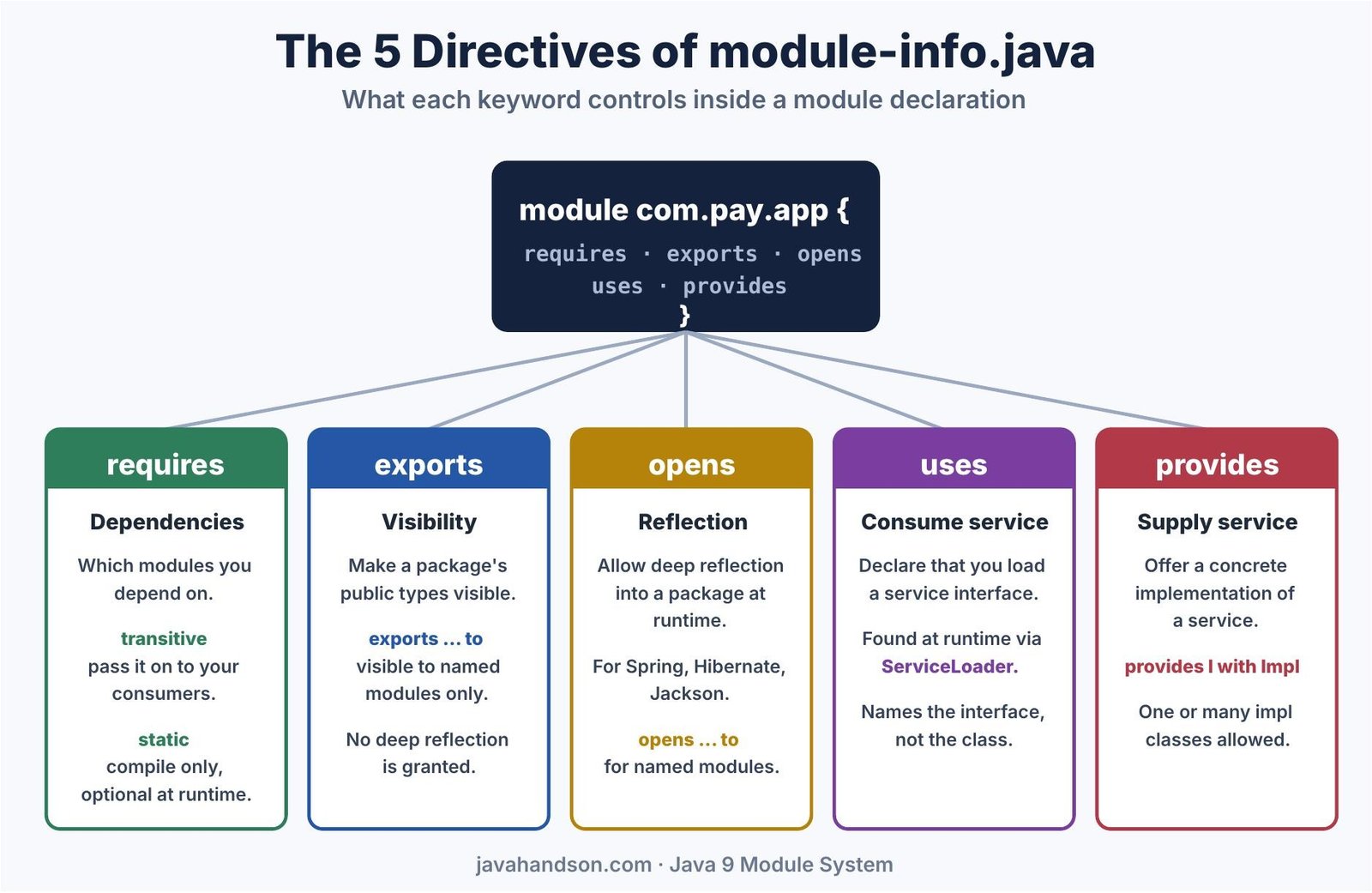
That is the full list. Everything else in this file is a variation on these five. Two of them, requires and exports, also take extra modifiers like transitive or a to clause. We will look at each one in turn, starting with dependencies.
The requires directive tells the module system which other modules you depend on. Think of it as the module-level version of an import, but stronger. An import only affects the compiler. A requires line affects both compile time and runtime. Without it, your module cannot even see the other module’s code.
Here is a module that depends on another:
module com.pay.upi {
    requires com.pay.api;
}
Now com.pay.upi can use the public types from com.pay.api. If you remove the requires line, the compiler fails immediately. The relationship created here is called readability. We say com.pay.upi reads com.pay.api.
Readability works in one direction. Because com.pay.upi requires com.pay.api, the upi module can see the api module. However, the api module cannot see the upi module in return. To get that reverse link, the api module would need its own requires line. So dependencies are never automatic both ways. You always declare them where you need them.
One more point worth stressing. A requires line does not make a package visible on its own. It only lets you read a module. The other module still has to export the package you want. So requires and exports work as a pair. One side asks; the other side grants. Keep that pairing in mind, and most access puzzles solve themselves.
Sometimes a module’s public API exposes types from another module. In that case, anyone who uses your module will also need that other module. Forcing every consumer to add its own requires line is painful. So Java gives us requires transitive.
Look at this API module:
module com.pay.api {
    requires transitive com.pay.model;
    exports com.pay.api;
}
The com.pay.api module exposes a Money type from com.pay.model in its public methods. Because of requires transitive, any module that requires com.pay.api can also use Money. It does not need its own requires com.pay.model line. The readability is passed along automatically. This feature is called implied readability.
The rule is simple to remember:
| 💡 Interview insight — requires transitive vs requires A classic interview question: module A has requires transitive B, and module C has requires A. Does C read B? Yes. That is exactly what transitive means. The readability of B flows from A to C. The old early-access name was requires public, so some old blog posts still use that word. The final keyword is transitive. |
The JDK itself uses this heavily. The java.sql module declares requires transitive java.logging. Why? Because some of its public methods return a Logger type from java.logging. So any module that requires java.sql also gets java.logging for free. Without transitive, every database app would need to add java.logging by hand. That would be noisy and easy to forget. The JDK designers chose the kinder path for us.
There are also aggregator modules. These hold no code of their own. Instead, they bundle other modules using requires transitive. A module can then depend on one aggregator and pull in a whole group at once. It is a neat way to offer a convenient umbrella dependency. The pattern shows how far a few directives can scale.
Some dependencies are needed only while compiling. A good example is an annotation library whose annotations are not kept at runtime. For these, we use requires static. The dependency must be present to compile. At runtime, it becomes optional.
module com.pay.app {
    requires com.pay.api;
    requires static com.pay.debug;
}
Here, com.pay.debug is a compile-time helper. If it is missing when the app runs, the module system does not complain. Your code must handle its absence, usually with careful checks. In contrast, com.pay.api is a hard requirement and must always be present.
| Note You can even combine the two modifiers as requires static transitive, though this combination is rare in everyday code. |
There is one dependency you never write. Every module automatically requires java.base. This base module holds core types like String, Object, and the collection classes. The compiler adds this line for you behind the scenes. So you do not need to declare it, and in fact you should not. Think of it as the one module that every other module can always read.
By default, every package in a module is hidden. Even public classes stay invisible to other modules. This is a big change from older Java, where public meant visible everywhere. To open a package to others, you use exports.
module com.pay.api {
    exports com.pay.api;
}
Now the public types inside the com.pay.api package can be used by any module that reads this one. Note one important detail. The exports directive names a package, not a module and not a class. Only public and protected members of that package become reachable. Private details stay private, as always.
Here is a subtle but important rule. Exporting a package exports only that one package. It does not export sub-packages. Suppose you export com.pay.api but keep classes in com.pay.api.internal. The internal sub-package stays hidden. Each package you want visible needs its own exports line. There is no wildcard that opens a whole tree at once.
Exporting a package allows normal compile-time and runtime access to its public types. However, it does not allow deep reflection into private members. So a framework cannot reach your private fields just because the package is exported. For that deeper access, you need opens, which we cover next.
Sometimes you want a package visible to only a few trusted modules, not the whole world. The qualified form handles this. You add a to clause with a list of module names.
module com.pay.lib {
    exports com.pay.lib.spi to com.pay.upi, com.pay.card;
}
Here, the com.pay.lib.spi package is visible only to com.pay.upi and com.pay.card. Every other module stays blocked. This is handy for internal APIs shared across a few modules in the same product. Outsiders cannot touch them.
| 💡 Interview insight — Qualified exports in real projects Teams use exports … to when they split one product into several modules but still want some internal glue shared between them, without leaking it publicly. If asked, mention that it keeps the public surface small while allowing tight collaboration between sibling modules. |
Many popular frameworks use reflection. Think of Spring, Hibernate, Jackson, and Gson. They peek into your classes, read private fields, and call non-public methods. The module system blocks this kind of deep reflection by default, even for exported packages. The opens directive brings it back for the packages that need it.
module com.pay.app {
    opens com.pay.app.config;
}
Now a framework can reflect freely into the com.pay.app.config package. It can read private fields and set them. This is exactly what a JSON library or a dependency-injection container needs. Meanwhile, compile-time access still follows the normal rules.
Why does Java block reflection by default? The goal is strong encapsulation. In older Java, any library could reach into your private fields through reflection. That made internal details hard to change safely. The module system stops this by default. If a framework truly needs that access, you grant it on purpose with opens. So the access becomes a clear, visible decision instead of a silent backdoor.
Beginners often mix these two up. The difference is simple once you see it clearly:
So a package used by a reflection framework usually needs opens, not exports. A package whose classes you call directly in code needs exports. Sometimes a package needs both, and then you write both directives for it.
Let us make this concrete with a small story. Say you have a User class with private fields. Your own code creates users through a public constructor. For that, the package needs exports. Now you also want Jackson to turn users into JSON. Jackson reads the private fields by reflection. For that, the same package needs opens. So the module file carries both lines for that one package. Each line solves a different half of the problem.
module com.pay.app {
    requires com.pay.api;

    // code calls these types directly
    exports com.pay.app.model;

    // Jackson reflects into the same package
    opens com.pay.app.model to com.fasterxml.jackson.databind;
}
Read it as two separate grants. The exports line handles normal usage. The opens line handles reflection, and only for Jackson. This split keeps your intent crystal clear. Anyone reading the file later knows exactly who touches what.
Just like exports, the opens directive has a qualified form. You can open a package to named modules only. This is the safer choice in practice.
module com.pay.app {
    opens com.pay.app.config to com.fasterxml.jackson.databind;
}
Now only Jackson can reflect into your config package. No other module gets that power. This limits the blast radius and keeps your internals protected from everything else.
What if nearly every package needs reflection? Writing opens for each one gets tedious. In that case, you can mark the whole module as open. You put the open keyword before module.
open module com.pay.legacy {
    requires com.pay.api;
}
An open module opens all its packages for reflection at once. You cannot add individual opens lines inside it, because they would be redundant. This is often used when migrating an old codebase that leans heavily on reflection.
| 💡 Interview insight — opens, exports, or open module? A frequent interview trap is asking what Jackson or Hibernate needs. The answer is opens (or an open module), not exports. Exported packages still block private-field reflection. Saying open module is fine for migration but mention it is a broad hammer, so a qualified opens … to is cleaner for new code. |
The last two directives work as a pair. They power the service mechanism built on java.util.ServiceLoader. The idea is loose coupling. One module declares a service interface. Other modules supply implementations. The consumer never names the implementation directly. It just asks for the interface and gets whatever is available.
First, we need an interface that both sides agree on. It lives in the API module and gets exported normally.
// in module com.pay.api
package com.pay.api;
import com.pay.model.Money;

public interface PaymentProcessor {
    String name();
    String pay(Money amount, String to);
}A provider module supplies a concrete class. It announces this with provides … with. The provides part names the service interface. The with part names the implementation class.
module com.pay.upi {
    requires com.pay.api;
    provides com.pay.api.PaymentProcessor
        with com.pay.upi.UpiProcessor;
}
The implementation itself is a normal class. It needs a public no-argument constructor so the loader can create it.
package com.pay.upi;
import com.pay.api.PaymentProcessor;
import com.pay.model.Money;

public class UpiProcessor implements PaymentProcessor {
    public UpiProcessor() { }
    public String name() { return "UPI"; }
    public String pay(Money amount, String to) {
        return "UPI sent " + amount + " to " + to;
    }
}The consumer module declares that it wants to load this service. It does so with the uses directive. This directive names the service interface, not any implementation.
module com.pay.app {
    requires com.pay.api;
    uses com.pay.api.PaymentProcessor;
}
Now the consumer can discover providers at runtime with ServiceLoader. Here is the lookup code:
ServiceLoader<PaymentProcessor> loader =
    ServiceLoader.load(PaymentProcessor.class);

for (PaymentProcessor p : loader) {
    System.out.println("Found: " + p.name());
    System.out.println(p.pay(new Money(25000), "merchant@upi"));
}
Run this with the provider module on the module path, and the output looks like this:
Found: UPI
UPI sent INR 250.0 to merchant@upi
Notice the power here. The app never mentions UpiProcessor by name. Add a card module later that also provides PaymentProcessor, and the loop finds it too. No change to the app code is needed. That is the whole point of services.
This pattern is common in plugin-style designs. Imagine a payments app that supports many methods. Each method lives in its own module. The core app declares uses PaymentProcessor once. Then each method module declares provides with its own class. Drop in a new module, and the new method appears automatically. Remove a module, and that method quietly disappears. The core never changes. For a payments team, this means new rails can ship as separate modules without touching the engine.
| 💡 Interview insight — How does the app find the provider? Service binding happens during module resolution. When a module declares uses for a service, the module system automatically pulls in any module that provides that service. So you do not always need to add the provider with –add-modules. Mentioning this binding step shows deep understanding beyond just the keywords. |
| Note Before Java 9, service providers were declared in a META-INF/services text file. The provides … with directive is the module-aware replacement. It is checked by the compiler, so typos fail early instead of silently at runtime. |
One module can even provide several implementations at once. You list them after with, separated by commas. The loader then offers all of them to any consumer. This is useful when a single module ships a few variants of the same service. Each one shows up in the consumer’s loop, ready to use.
module com.pay.bank {
    requires com.pay.api;
    provides com.pay.api.PaymentProcessor
        with com.pay.bank.NeftProcessor,
             com.pay.bank.RtgsProcessor;
}Let us see one module declaration that uses several directives at once. This ties the whole article together.
module com.pay.app {
    // hard dependency, always needed
    requires com.pay.api;

    // compile-time only, optional at runtime
    requires static com.pay.debug;

    // let a DI/JSON framework reflect into config
    opens com.pay.app.config;

    // discover payment providers at runtime
    uses com.pay.api.PaymentProcessor;
}
Read it top to bottom. First, it needs com.pay.api to work. Next, it uses com.pay.debug only during compilation. Then, it opens its config package for reflection. Finally, it consumes the PaymentProcessor service. Every line has a clear job, and the file stays readable.
Once the file is written, you compile the module like any other code. The javac command takes a module source path. The java command takes a module path and a main module. Here is the shape of both commands:
# compile all modules
javac -d out --module-source-path . $(find . -name "*.java")

# run the main class of the app module
java --module-path out --module com.pay.app/com.pay.app.Main
The –module-path flag replaces the old classpath for modules. The –module flag names the module and its main class, joined by a slash. Run it, and the module graph builds from your module-info.java files. If a required module is missing, the launch stops with a clear message. That early failure is a feature, not a bug.
Often you join a project and meet a module file someone else wrote. Reading it is a skill on its own. Here is a simple method that works every time. Go line by line and ask one question per line.
Work through the file this way, and its full intent becomes clear in a minute. You will know its dependencies, its public surface, its reflection needs, and its service wiring. That is the whole behavior of the module in one short file. No other place in the project tells you this much so quickly.
Here is a compact summary of all the directives in one place:
A few errors come up again and again when people first write this file. Watch out for these:
Keep these in mind, and most module-info.java problems disappear before they start. The compiler also gives clear messages for most of them, so read the errors carefully.
A: It is the module declaration placed at the root of a module. It states the module’s dependencies, which packages it exports, which packages allow reflection, and the services it uses or provides. The compiler turns it into module-info.class, which the runtime reads to build the module graph.
A: exports gives normal compile-time and runtime access to a package’s public types, but blocks deep reflection. opens allows runtime reflection into a package, including private members, which is what frameworks like Spring, Hibernate and Jackson need. A package can use both if it needs each kind of access.
A: It passes readability to your consumers. If module A declares requires transitive B, then any module that requires A can also read B without declaring its own dependency on B. Use it when a type from another module appears in your public API, such as a return type or parameter.
A: Use requires static for a dependency that must be present to compile but is optional at runtime. A common case is an annotation library whose annotations are not retained at runtime. Your code should handle the module’s absence gracefully when it runs.
A: A provider module declares provides Interface with Impl to supply an implementation. A consumer module declares uses Interface and loads implementations at runtime with ServiceLoader. The consumer never names the implementation directly, so you can add or remove providers without changing consumer code.
A: No. Every module automatically requires java.base, which holds core types like String, Object and the collections. The compiler adds it for you, so you should not write it yourself.
The module-info.java file is small, but it holds real power. We covered all five directive families. The requires family controls dependencies. Visibility of packages comes from exports. Reflection access comes from opens. Finally, the uses and provides pair wires up services. Learn these keywords once, and every module declaration becomes easy to read.
These concepts are not just a Java 9 curiosity. They carry straight into Java 17, 21, and 25. The JDK itself is built entirely from modules. So time spent here pays off across every modern Java version you will work with.