ZonedDateTime in Java: Time Zones Made Simple with Examples
-
Last Updated: October 14, 2026
-
By: javahandson
-
Series

ZonedDateTime in Java made simple. Learn to handle time zones, convert between zones with withZoneSameInstant, and let the class handle daylight saving.
Sooner or later, every Java developer meets time zones. That is where ZonedDateTime in Java comes in. It is the class that adds a time zone to a date and time.
In simple words, a plain LocalDateTime has no zone. However, a flight or a global meeting clearly needs one. So ZonedDateTime fills that exact gap.
In this guide, we will keep things beginner friendly. First, we will see what a ZonedDateTime holds. Then we will create one and change its zone. After that, time zones will feel much less scary.
I have shipped payment systems across many countries. So I have handled plenty of zone bugs over the years. Honestly, this class makes the job far easier. Let us see how.
Time zones feel hard for one simple reason. The rules change by region and by season. However, ZonedDateTime hides most of that pain. So you can focus on your own logic instead.
By the end of this guide, you will know:
Let us begin with the basics of the class.
ZonedDateTime represents a date and time with a time zone. So it marks a real point on the global timeline. For example, it can say 2:30 PM in Paris, not just 2:30 PM.
It lives in the java.time package and arrived with Java 8. Like its siblings, it is immutable and thread-safe. Therefore you can share it freely across threads.
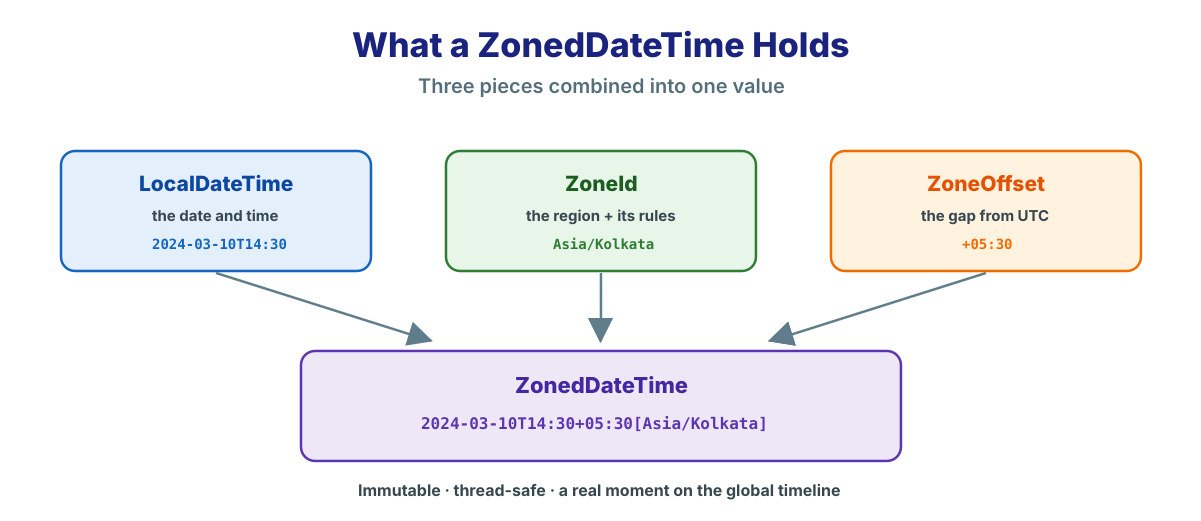
A ZonedDateTime is really three things in one. First, it has a LocalDateTime, which is the date and time. Second, it has a ZoneId, like Europe/Paris. Third, it has a resolved ZoneOffset, like +01:00.
So the ZoneId and the offset work together. The offset can change across the year, due to daylight saving. Meanwhile, the ZoneId knows the rules for when that happens.
Why store both the zone and the offset? Because each one answers a different question. The offset tells you the current gap from UTC. Meanwhile, the zone tells you how that gap will change later. Together, they keep the value correct all year.
A ZonedDateTime has a clear text form. It shows the date, the time, the offset and the zone. So you can read all the parts at a glance.
// example output
2007-12-03T10:15:30+01:00[Europe/Paris]
Notice the two zone pieces here. The +01:00 is the offset from UTC. Meanwhile, the [Europe/Paris] is the zone id. Together, they remove any confusion about the time.
Before we create a ZonedDateTime, let us meet ZoneId. It is the class that names a time zone. So it is the key building block here.
You create a ZoneId from a region name. So Asia/Kolkata and America/New_York both work. These names come from a standard zone database.
ZoneId india = ZoneId.of("Asia/Kolkata");
ZoneId newYork = ZoneId.of("America/New_York");
ZoneId systemDefault = ZoneId.systemDefault();   // your machine's zone
You can also list every available zone. For that, ZoneId has a handy method. However, the list is long, with hundreds of entries.
Set<String> allZones = ZoneId.getAvailableZoneIds();
System.out.println(allZones.size());   // hundreds of zones
Beginners often mix up offset and zone. An offset is just a fixed gap, like +05:30. However, a zone is a region with rules that change the offset.
So why does this matter? Because of daylight saving. A zone like America/New_York shifts its offset twice a year. Meanwhile, a plain offset never changes.
Here is a quick way to tell them apart. An offset looks like +05:30 or -08:00. However, a zone looks like a place, such as Asia/Kolkata. So one is a number, and the other is a region.
It helps to see the whole family at once. So the table below places ZonedDateTime next to its cousins. Each one carries a little more or less information.
| Class | Has date & time | Has offset | Has zone rules |
|---|---|---|---|
| LocalDateTime | Yes | No | No |
| OffsetDateTime | Yes | Yes | No |
| ZonedDateTime | Yes | Yes | Yes |
| Instant | a UTC moment | UTC (+00:00) | No |
So ZonedDateTime carries the most information. It knows the clock, the offset and the zone rules. As a result, it is the richest of the four.
Now we have the pieces, so let us build a ZonedDateTime. There are a few easy ways to do it. Each one fits a different situation.
The simplest way is now(). With no argument, it uses your system zone. However, you can also pass a specific ZoneId.
ZonedDateTime hereNow = ZonedDateTime.now();
ZonedDateTime parisNow =
ZonedDateTime.now(ZoneId.of("Europe/Paris"));You can also build one from exact date and time parts. So of() takes the year, month, day and time, plus a zone. This is great for a known event.
ZonedDateTime event = ZonedDateTime.of(
        2024, 3, 10, 14, 30, 0, 0,
        ZoneId.of("Europe/Paris"));
// 2024-03-10T14:30+01:00[Europe/Paris]Often you already have a LocalDateTime. So you can attach a zone to it with atZone(). As a result, the local value becomes a full zoned value.
LocalDateTime local = LocalDateTime.of(2024, 3, 10, 14, 30);
ZonedDateTime zoned = local.atZone(ZoneId.of("Asia/Kolkata"));
// now 14:30 is pinned to India time
So atZone() is a common bridge from local to zoned. You use it when a local value finally needs a zone. In practice, this happens near the display layer.
You will often start from a stored Instant. So ofInstant() turns that moment into a zoned value. This is the usual path when reading from a database.
Instant stored = Instant.now();   // a UTC moment from the DB
ZonedDateTime local = ZonedDateTime.ofInstant(
        stored, ZoneId.of("Asia/Kolkata"));
// the same moment, shown in India time
So you store the plain instant, then dress it with a zone. There is exactly one correct answer per instant. As a result, this conversion is always safe.
Once you have a ZonedDateTime, reading it is easy. So let us look at the common operations. Each one returns a clear value.
You can pull out any part you need. So getZone() returns the ZoneId, and getOffset() returns the offset. Moreover, the usual date and time getters all work.
ZonedDateTime zdt = ZonedDateTime.now(ZoneId.of("Asia/Kolkata"));
System.out.println(zdt.getZone());        // Asia/Kolkata
System.out.println(zdt.getOffset());      // +05:30
System.out.println(zdt.getHour()); // e.g. 14You can add or subtract time as usual. So plusHours() and plusDays() both work. Still, remember that the result is a new object.
ZonedDateTime zdt = ZonedDateTime.now(ZoneId.of("Asia/Kolkata"));
ZonedDateTime inTwoHours = zdt.plusHours(2);
ZonedDateTime nextWeek = zdt.plusDays(7);
One nice thing happens behind the scenes here. The class respects daylight saving during the math. So the results stay correct across a time change.
You will often show a zoned time to a user. For that, a DateTimeFormatter does the job. So you can include the zone or offset in the text.
DateTimeFormatter fmt =
        DateTimeFormatter.ofPattern("dd MMM yyyy, HH:mm z");

ZonedDateTime zdt = ZonedDateTime.now(ZoneId.of("Asia/Kolkata"));
System.out.println(zdt.format(fmt));   // 10 Mar 2024, 14:30 IST
Notice the z in the pattern, which prints the zone name. So the reader sees exactly which zone applies. We cover formatting fully in the DateTimeFormatter article.
Here is the most useful thing ZonedDateTime does. It converts a time from one zone to another. However, there are two ways to do it, and they differ.
Use withZoneSameInstant() to keep the same moment in time. So the instant stays fixed, and the wall-clock time changes. This is the one you want for real conversions.
ZonedDateTime paris =
        ZonedDateTime.of(2024, 3, 10, 10, 0, 0, 0,
                ZoneId.of("Europe/Paris"));

ZonedDateTime london =
        paris.withZoneSameInstant(ZoneId.of("Europe/London"));
// 10:00 in Paris becomes 09:00 in London — same instant
So this answers “what time is it there right now?” The moment never moves. Only the local reading changes to match the new zone.
Use withZoneSameLocal() to keep the same wall-clock reading. So the local time stays, but the instant changes. This is less common, yet still useful at times.
ZonedDateTime paris =
        ZonedDateTime.of(2024, 3, 10, 10, 0, 0, 0,
                ZoneId.of("Europe/Paris"));

ZonedDateTime tokyo =
        paris.withZoneSameLocal(ZoneId.of("Asia/Tokyo"));
// still shows 10:00, but now in Tokyo — a different instant
So this keeps the clock reading the same. The number on the clock does not move. However, the actual global moment is now different.
When would you want this behaviour? Imagine a chain of stores that all open at 09:00 local. You keep the same 09:00 clock value in each city. So same-local fits that kind of repeated schedule.
The choice comes down to one question. Do you want the same moment, or the same clock reading? For a real “convert this time” job, pick same-instant.
| Method | Keeps the same | Changes | Use for |
|---|---|---|---|
| withZoneSameInstant | Instant (moment) | Wall-clock time | Converting a time across zones |
| withZoneSameLocal | Wall-clock time | Instant (moment) | Reusing the same clock value elsewhere |
So in most apps, you want same-instant. It answers the real “what time is it there?” question. Meanwhile, same-local is a special tool for repeated schedules. If you are unsure, pick same-instant.
| 💡 Interview Insight A common interview question is the difference between withZoneSameInstant and withZoneSameLocal. Keep it sharp. withZoneSameInstant keeps the moment and changes the clock reading, while withZoneSameLocal keeps the clock reading and changes the moment. For a true time-zone conversion, use withZoneSameInstant. |
Let us put the pieces together now. Say a team sets a call for 3:00 PM in New York. Then two members in London and India want their local time.
ZonedDateTime newYork = ZonedDateTime.of(
        2024, 6, 10, 15, 0, 0, 0,
        ZoneId.of("America/New_York"));

ZonedDateTime london =
        newYork.withZoneSameInstant(ZoneId.of("Europe/London"));
ZonedDateTime india =
        newYork.withZoneSameInstant(ZoneId.of("Asia/Kolkata"));

System.out.println(newYork.toLocalTime());  // 15:00
System.out.println(london.toLocalTime());   // 20:00
System.out.println(india.toLocalTime());    // 00:30 (next day)
So everyone sees the same moment in their own clock. The call happens at one instant worldwide. Yet each person reads a different local time for it.
Notice the India result crosses midnight. So the date rolls to the next day there. This is exactly the kind of bug you avoid with same-instant conversion.
Daylight saving scares many developers. The good news is that ZonedDateTime handles it. So you rarely need to think about the rules yourself.
Twice a year, the clock jumps in many zones. In spring, it jumps forward and creates a gap. Meanwhile, in autumn, it falls back and creates an overlap.
So you do not write this logic yourself. The class reads the zone’s rules and adjusts. As a result, your date math stays correct across the change.
Imagine a reminder set for 2:30 AM on a spring night. In some zones, that exact time never happens. However, ZonedDateTime shifts it forward safely, so your app does not crash.
The old API made this painful. You often wrote manual offset math by hand. So mistakes crept in around the two change dates. Now the class carries that burden for you.
Still, one habit helps a lot here. For plain elapsed time, add a Duration, not a Period. So a strict “24 hours later” stays exact. Meanwhile, for “same time tomorrow”, a day-based add keeps the wall clock.
A ZonedDateTime connects well to the other classes. So you can move to and from it easily. Let us see the common conversions.
You can drop the zone to get a LocalDateTime. So toLocalDateTime() keeps the wall-clock value. Meanwhile, toInstant() gives the UTC moment for storage.
ZonedDateTime zdt = ZonedDateTime.now(ZoneId.of("Asia/Kolkata"));

LocalDateTime local = zdt.toLocalDateTime();  // drops the zone
Instant instant = zdt.toInstant();            // UTC moment
So toInstant() is great for a database. You store the UTC instant, with no zone confusion. Then you re-apply a zone only when you display it.
Sometimes you need an offset but not a full zone. For that, toOffsetDateTime() helps. So you keep the gap from UTC, but drop the region rules.
ZonedDateTime zdt = ZonedDateTime.now(ZoneId.of("Asia/Kolkata"));
OffsetDateTime odt = zdt.toOffsetDateTime();   // 2024-...+05:30
Why would you want this? Many databases store an offset, not a region. So OffsetDateTime maps cleanly to those columns. In short, it is a good fit for storage and network calls.
Here is a rule that saves many bugs. Store times as a UTC Instant in your database. Then convert to a ZonedDateTime only for display. So the user always sees their local time.
Why is UTC the safe choice for storage? Because UTC never shifts with daylight saving. So two servers in two zones always agree on it. Then each user interface adds the right local zone at the end.
Let me share a few habits from real projects. They will save you from painful zone bugs. So keep them in mind as you code.
Zone bugs are sneaky for one reason. They often pass every test on your machine. However, they break for a user in another zone. So these habits matter more than they first appear.
That first mistake is the most common one. People pick same-local by accident. So the moment shifts, and the converted time is simply wrong.
A: ZonedDateTime is a java.time class that holds a date, a time and a time zone. It combines a LocalDateTime, a ZoneId and a resolved ZoneOffset, so it marks a real point on the global timeline.
A: withZoneSameInstant keeps the same moment and changes the clock reading, so 10:00 in Paris becomes 09:00 in London. withZoneSameLocal keeps the clock reading and changes the moment. For a real time-zone conversion, use withZoneSameInstant.
A: Yes. It reads the zone’s rules and resolves gaps (spring forward) and overlaps (fall back) for you. So your date math stays correct across a daylight saving change.
A: Usually not directly. Store a UTC Instant instead, which is clean and unambiguous. Then rebuild a ZonedDateTime for display using the user’s zone.
Using ZonedDateTime in Java is easier than it first looks. It joins a LocalDateTime, a ZoneId and an offset into one value. So it finally makes time zones clear and safe.
Here is a quick recap of what we covered:
So reach for this class whenever zones matter. For everything else, a plain local type is simpler. The pillar guide below ties the whole family together.
One last word before you go. Do not add a zone just because you can. Instead, use the simplest type that fits the job. Then add a zone only when the real world demands it.