Literals in Java: Types, Rules, and the Traps Nobody Warns You About
-
Last Updated: July 19, 2026
-
By: javahandson
-
Series

Learn Java in a easy way

Literals in Java made simple — integer, float, char, boolean, and String literals, plus the octal, overflow, and String-pool traps that catch beginners.
You write numbers and text in code every single day. The value 10, the word “hello”, the flag true. Those are all literals in Java, and you have been using them since your very first program.
A literal is just a fixed value you type straight into your code. It is not stored in a variable first. It sits right there in the source, ready to use.
Most of the time literals feel too simple to think about. But Java has quiet rules around them. Some rules save you from bugs. Others surprise you when you least expect it.
For example, a number that starts with zero can mean something you did not intend. A big number without the right marker can break your build. These small details matter more than they look.
In this article we break down every kind of literal in Java. We start with the basics and then move to the sharp edges. Here is what we will cover:
No deep background needed. If you can declare an int, you are ready to go. By the end, you will read literals with a sharper eye and dodge the bugs that trip up most beginners.
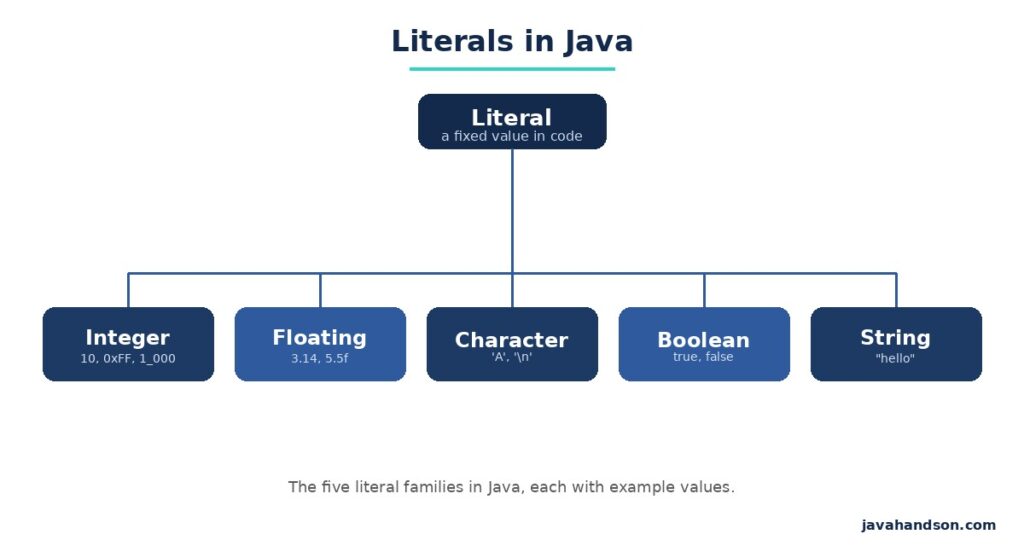
A literal is a value written directly in your code. When you type the following line, both 5 and 3 are literals.
int total = 5 + 3;
System.out.println(total); // 8
The variable total is not a literal. It holds a value. But the raw 5 and 3 are literals because you spelled them out by hand.
The compiler reads these values right where they sit. It does not look them up anywhere else. What you type is exactly what the program uses.
Think of it like a price tag on a shelf. The number printed on the tag is fixed. That printed number is your literal. The register that adds prices up is your variable.
A variable is a named box. Its value can change while the program runs. A literal never changes, because it is the value itself.
This difference matters in practice. You can reassign a variable ten times, but the literals you feed it stay constant. Each literal is a snapshot of one exact value.
So a literal is raw data in your source. A variable is a handle you use to reach that data later. Once you see them as two separate things, the rest of Java gets clearer.
Java groups literals by the kind of value they hold. There are five families you will meet again and again. Each one has its own way of being written.
The null literal also exists. It stands for “no object” and can go into any reference type. We will touch on it later.
We will walk through each family one by one. For every type, you will see the syntax and the traps that come with it.
Integer literals are whole numbers. They cover int and long values, and they show up more than any other kind. By default an integer literal is an int.
You use them for counts, sizes, ages, and loop indexes. Almost every program leans on them. So it pays to know their rules well.
Write a plain whole number, and Java treats it as an int. That works fine until the value grows past the int limit.
An int can hold values up to about 2.1 billion. Go beyond that, and the literal no longer fits. Java stops you right at compile time.
int small = 100;        // fine, well inside int range
long big = 10000000000; // compile error, too big for int
The second line fails even though the target is a long. The literal itself is read as an int first, and 10 billion does not fit. Java flags it before it ever reaches the long variable.
This catches a lot of people off guard. The type on the left does not rescue a literal that is already too big. The fix is to mark the literal as a long from the start.
To make a literal a long, add an L at the end. This tells Java to treat the value as a long from the start.
With the L in place, the value never gets read as an int. It skips the int limit entirely. That single letter solves the overflow problem.
long big = 10000000000L; // works, the L makes it a long
long ok = 500L;          // also fine for small values
Use a capital L, not a lowercase l. A lowercase l looks almost exactly like the digit 1. That tiny slip causes real confusion during code reviews. A value like 100l can read as one hundred and one at a glance.
| INTERVIEW INSIGHT Q: Why does long x = 3000000000; fail to compile? A: The literal 3 billion is read as an int before assignment. It overflows the int range of about 2.1 billion, so the compiler rejects it. Add an L suffix to make the literal a long. |
You can write integers in bases other than ten. Java supports four number systems for integer literals. Each uses a small prefix to show its base.
| Form | Prefix | Example | Decimal value |
|---|---|---|---|
| Decimal | none | 42 | 42 |
| Binary | 0b or 0B | 0b101010 | 42 |
| Octal | 0 | 052 | 42 |
| Hexadecimal | 0x or 0X | 0x2A | 42 |
All four rows above hold the same value, just written in different bases. Binary is handy for bit flags and masks. Hex shows up a lot in colors and memory addresses. Octal is rare today, so watch out for it.
That leading zero for octal trips people up. A value like 013 is not thirteen. It is octal for eleven. A stray zero at the front changes the number without any warning. So never pad a number with a zero unless you truly want octal.
| INTERVIEW INSIGHT Q: What does int x = 010; print, and why? A: It prints 8, not 10. A leading zero marks the literal as octal, so 010 means “1 zero in base eight,” which equals 8 in decimal. Avoid leading zeros unless you mean octal on purpose. |
Long numbers are hard to read. Since Java 7 you can drop underscores between digits to group them. The compiler ignores the underscores completely.
The value stays the same with or without them. They exist only to help human eyes. A grouped number is much easier to scan for errors.
int million = 1_000_000;      // reads much easier
long card = 1234_5678_9012L;  // grouped like a card number
int bits = 0b1010_0101;       // group binary in nibbles
There are a few placement rules, though. You cannot put an underscore at the start or end of a number. You also cannot place one right next to the decimal point or a suffix. Break any of these, and the code will not compile.
Floating-point literals hold decimal numbers. They map to the double and float types. By default a decimal literal is a double.
You reach for them when whole numbers are not enough. Prices, averages, and measurements all need decimals. So this family shows up often in real code.
Type a number with a decimal point, and Java reads it as a double. A double has more precision than a float, so it is the safe default.
Precision means how many digits the type can track. A double keeps more of them. That extra room helps avoid rounding surprises in your math.
double price = 19.99;   // this is a double
double pi = 3.14159;    // also a double
For a float, add an f or F to the end. Without it, the literal stays a double, and you get a compile error on assignment.
float rate = 5.5f;   // the f makes it a float
float bad = 5.5;     // error, a double will not fit a float
The second line fails because a double is wider than a float. Java will not quietly shrink it for you. The f suffix fixes it in one keystroke.
This mirrors the long rule from earlier. The target type does not change how the literal is read. You have to mark the literal itself.
You can also add a d or D for a double, but it is optional. Most people skip it since double is already the default.
Very large or very small numbers can use the e notation. The letter e means “times ten to the power of.”
double large = 1.5e3;   // 1.5 x 10^3 = 1500.0
double tiny = 2.0e-4;   // 2.0 x 10^-4 = 0.0002
A positive exponent shifts the point to the right. A negative one shifts it left. This form keeps huge values short and readable. It is common in science and math-heavy code.
A character literal is a single character wrapped in single quotes. It maps to the char type. Only one character fits inside the quotes.
You use chars for letters, digits, and symbols one at a time. They power text parsing and simple checks. Behind them sits a neat trick we will explore soon.
You write a char with single quotes, never double quotes. Double quotes make a String, which is a different thing entirely.
char grade = 'A';    // a single character
char digit = '7';    // the character 7, not the number
char bad = 'AB';     // error, too many characters
The last line breaks because a char holds exactly one character. Two characters need a String instead. Also note that ‘7’ is the symbol seven, not the number seven you would do math with.
Some characters cannot be typed directly. A newline or a tab needs a special code called an escape sequence. Each one starts with a backslash.
| Escape | Meaning |
|---|---|
\n | New line |
\t | Tab |
\' | Single quote |
\" | Double quote |
\\ | Backslash |
\r | Carriage return |
\u0041 | Unicode character (A here) |
The backslash tells Java that the next character is special. Without it, a quote or newline would confuse the compiler. You will reach for \n and \t most often. The Unicode form is useful when you need a character your keyboard cannot type.
Under the hood, a char stores a number. That number is its Unicode code point. So a char can join in arithmetic like an integer.
char letter = 'A';
int code = letter;        // 65, the code for A
char next = (char)(letter + 1); // B
This surprises beginners. The letter A is really the number 65 in disguise. Add one, and you land on B. The same idea lets you loop from A to Z with simple math.
| INTERVIEW INSIGHT Q: What is the result of System.out.println(‘A’ + 1)? A: It prints 66, not “A1” or “B”. The char ‘A’ is promoted to its int code 65, then 1 is added. To get the character B, cast the result back with (char). |
These two are the simplest literals in Java. There is nothing to memorize beyond a couple of words. Still, both come with one rule worth knowing.
A boolean literal is either true or false. That is the whole list. There are no other values.
boolean isReady = true;
boolean isDone = false;
Note that these are keywords, not strings. Do not write “true” in quotes when you mean the boolean. Quotes turn it into a String, which will not fit a boolean variable.
Also, Java does not treat 1 as true or 0 as false. That trick works in some languages, but not here. Only the words true and false count.
The null literal means “no object.” You can assign it to any reference variable, such as a String or a custom class. It marks a spot that points to nothing yet.
String name = null;   // points to nothing yet
Integer count = null; // valid for wrapper types too
One thing to remember. You cannot assign null to a primitive like int or boolean. Primitives always hold a real value, so null has no place there. Try it, and the compiler stops you.
A String literal is text inside double quotes. It is the literal you will type the most after numbers. Strings power messages, labels, and almost every bit of output.
They look simple, but Strings hide some clever behavior. Java stores them in a special way to save memory. That storage trick leads to a famous bug we will cover.
You wrap text in double quotes to make a String. Single quotes are for a single char, so keep the two apart.
String greeting = "Hello, world";
String empty = "";       // an empty string is fine
String one = "A";        // a single-char string, still a String
Notice that “A” and ‘A’ are not the same. One is a String of length one. The other is a char. They behave differently in code, and mixing them causes type errors.
Java stores String literals in a special area called the String pool. When you write the same literal twice, Java reuses the one copy instead of making two.
This saves memory when a value repeats across your code. Both names simply point to the same shared object. The pool is why some String comparisons behave in surprising ways.
String a = "cat";
String b = "cat";
System.out.println(a == b); // true, same pooled object
Here a and b point to the exact same object in the pool. That is why == returns true. The pool saves memory by avoiding duplicate strings.
Using new String(“cat”) skips the pool. It forces a brand-new object on the heap, even if the same text already sits in the pool.
String a = "cat";
String c = new String("cat");
System.out.println(a == c);      // false, different objects
System.out.println(a.equals(c)); // true, same text
So == compares object identity, while equals() compares the actual text. The == operator asks if two names point to the same object. The equals() method asks if the characters match. For Strings, reach for equals() almost every time. This one catch trips up a huge number of new developers.
| INTERVIEW INSIGHT Q: Why does “cat” == new String(“cat”) return false? A: The literal “cat” lives in the String pool. new String(“cat”) builds a separate object on the heap. Since == checks reference identity, the two differ. Use equals() to compare String content. |
Since Java 15, you can write multi-line text with three double quotes. This is called a text block. It keeps long text readable without messy escapes.
String json = """
    {
        "name": "Suraj"
    }
    """;
A text block is still a String literal underneath. It just makes multi-line content far easier to write and read. This helps a lot with JSON, HTML, and SQL blocks.
Literals look simple, yet they cause a fair share of bugs. Here are the traps that catch people most often. Learn these once, and you will spot them fast.
A large whole number without an L suffix stays an int. If it exceeds the int limit, the code will not compile. Add the L, and it becomes a valid long. This is the most common numeric slip for beginners.
A number that starts with zero becomes octal. So 011 is nine, not eleven. Never pad numbers with a leading zero unless you truly want octal. This bug hides well, since the code still compiles.
Single quotes make a char. Double quotes make a String. Swapping them leads to type errors or subtle bugs in your logic. Keep this pair straight, and you avoid a whole class of mistakes.
The == operator checks if two references point to the same object. It does not compare the text. Rely on equals() when you want to know if two strings hold the same characters. This one bug shows up in interviews and real code alike.
When you multiply large int literals, the math happens in int space. The result can overflow before it reaches a long variable. Mark one value with L to push the whole calculation into long.
long wrong = 1000000 * 1000000;  // overflows, gives a small wrong value
long right = 1000000L * 1000000; // correct, computed as long
The first line looks fine but returns a broken value. Both numbers are ints, so Java multiplies them as ints. One L on either side fixes the whole thing.
These questions come up often for beginner and mid-level Java roles. They test whether you know the quiet rules, not just the syntax. The full question-and-answer set is provided below.
A: A literal is a fixed value written directly in your source code, like 10, ‘A’, or “hello”. It is the raw value itself, not a variable that holds a value.
A: A plain whole number is an int by default. If the value is too large for int, add an L suffix to make it a long.
A: A leading zero marks the literal as octal. So 010 equals 8 in decimal, not 10. Avoid leading zeros unless you mean octal on purpose.
A: A double holds more precision, so Java uses it as the safe default. To make a float, add an f suffix, as in 5.5f.
A: It prints 66. The char ‘A’ is promoted to its int code 65, then 1 is added. Cast the result with (char) to get the character B.
A: The literal “cat” lives in the String pool, while new String(“cat”) builds a separate object on the heap. Since == checks reference identity, they differ. Use equals() to compare text.
A: Yes, since Java 7. You can place underscores between digits, like 1_000_000, and the compiler ignores them. They cannot sit at the start, at the end, or next to a decimal point or suffix.
A: No. The null literal only fits reference types like String or wrapper classes. Primitives such as int and boolean always hold a real value.
A: The literal is read as an int before assignment, and 3 billion overflows the int range of about 2.1 billion. Add an L suffix so the literal is treated as a long.
A: A text block is a multi-line String literal written with three double quotes, added in Java 15. It makes multi-line content readable without messy escape characters.
Let us pull the threads together. A literal is a fixed value you write straight into your code, and Java sorts them into a handful of families.
Integer literals default to int, and you add an L for long. Decimal literals default to double, and you add an f for float. Characters use single quotes, strings use double quotes, and both come with quiet rules.
The traps are worth remembering. Leading zeros mean octal. Big numbers need the L. And == on strings checks identity, not text. Keep those in mind, and literals will serve you well.
None of this is hard once you have seen it. The tricky parts are just small rules, not deep theory. Read a few more code samples, and these will feel natural.