Type Conversion and Casting in Java (Primitives): A Beginner’s Guide
-
Last Updated: July 19, 2026
-
By: javahandson
-
Series

Learn Java in a easy way

Learn type conversion and casting in Java for primitives. See widening vs narrowing, when Java auto-converts, when you need a cast, and the data traps to avoid.
You wrote your first bit of Java. You made an int, and it held a whole number just fine. Then you tried to save it into a double, or squeeze a double back into an int, and something felt off.
That moment is where type conversion and casting in Java starts to matter. Java is strict about types. Each variable has a fixed type, and Java checks that type at every step.
So when you move a value from one primitive type to another, Java has to make a decision. Sometimes it handles the move for you. Other times it stops and asks you to be clear about what you want.
In this guide, we’ll stick to primitives only. No objects, no wrapper classes, no generics. Just the eight basic types and how values flow between them.
Here’s what we’ll go through:
You don’t need much to follow along. If you know what an int and a double are, you’re ready to go.
Before we convert anything, let’s line up the players. Java has eight primitive types. Each one holds a single value and takes a fixed amount of memory.
Here they are, grouped by what they store:
byte, short, int, longfloat, doublecharbooleanThe size of a type tells you how much it can hold. A bigger type has more room for larger values. This size is the whole reason conversion gets interesting.
Take a look at the ranges:
| Type | Size | Rough Range |
|---|---|---|
| byte | 8 bits | -128 to 127 |
| short | 16 bits | -32,768 to 32,767 |
| int | 32 bits | about -2.1 billion to 2.1 billion |
| long | 64 bits | very large whole numbers |
| float | 32 bits | decimals, lower precision |
| double | 64 bits | decimals, higher precision |
| char | 16 bits | 0 to 65,535 (as a number) |
So an int can hold far more than a byte. That gap is exactly what drives the two kinds of conversion we’re about to meet.
One quick note before we move on. The boolean type does not join in. You cannot convert a boolean to a number, and you cannot turn a number into a boolean.
In Java, true is not 1 and false is not 0. They are their own thing. So for the rest of this article, we’re talking about the other seven types.
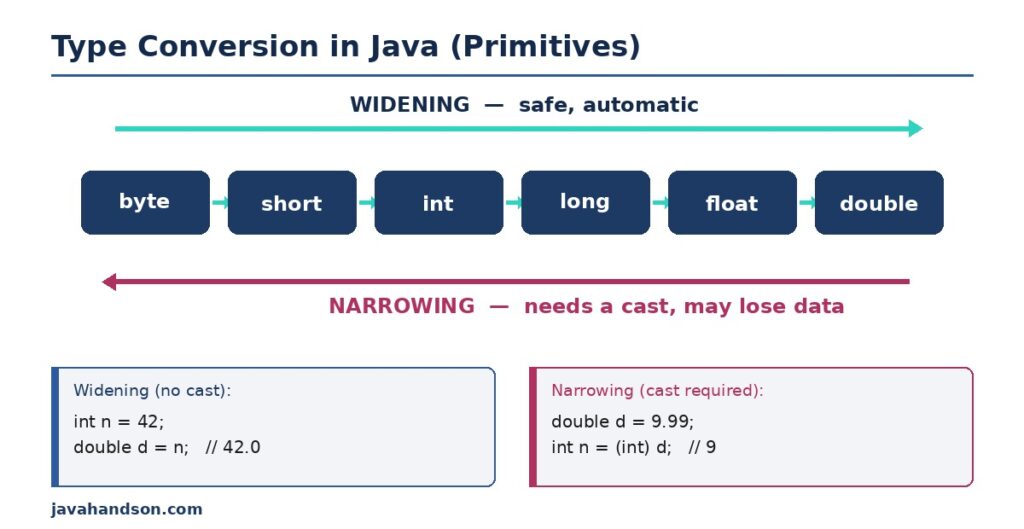
Every primitive conversion falls into one of two buckets. Once you can spot which bucket you’re in, the rules almost explain themselves.
Widening means moving a value into a bigger type. You go from something small, like a byte, into something roomy, like an int or a double.
This move is safe. The bigger type has plenty of space, so the value fits with room to spare. Nothing gets lost along the way.
Because it’s safe, Java does this one for you. You don’t write anything special. You just assign the small value to the big variable, and Java handles the rest.
Here’s the widening order, from smallest to largest:
byte → short → int → long → float → double
A char also widens into int and beyond, since a char is really a number underneath.
byte small = 42;
int bigger = small;      // widening, automatic
double evenBigger = bigger;  // widening again

System.out.println(bigger);      // 42
System.out.println(evenBigger);  // 42.0
Notice you didn’t do anything extra. The int value slid into the double on its own. It even picked up a .0 to show it’s a decimal type now.
Why is Java so relaxed here? Because the move can’t fail. A double holds every whole number an int can, plus a lot more. So there’s no way to lose the value, and Java sees no reason to bother you.
This is the pattern to remember. Widening is a promotion. The value climbs into a type with more room, and Java signs off on it without a word.
Narrowing is the opposite. You push a value from a big type into a smaller one. Think double down to int, or int down to byte.
Now there’s a problem. The small type might not have room. A big number could get chopped, and a decimal loses its fractional part. Data can go missing.
Because of that risk, Java will not do this quietly. It stops and forces you to say, in code, “yes, I know, do it anyway.” That’s where casting comes in.
Think of it like moving into a smaller apartment. Some of your stuff won’t fit. Java refuses to just throw things out behind your back. Instead, it hands you the keys and lets you decide what stays.
A cast is you taking charge. You put the target type in parentheses right before the value. It’s a short note to Java that says you accept the outcome.
The shape of a cast is simple. You write the type you want inside round brackets, then the value.
double price = 9.99;
int rounded = (int) price;   // cast, on purpose

System.out.println(rounded); // 9
See the (int) in front of price? That’s the cast. Without it, this line would not even compile. Java would refuse to guess what you meant.
Also notice the result is 9, not 10. A cast to int does not round. It simply drops everything after the decimal point.
You might wonder why Java is so fussy. Why not just convert and move on?
The answer is safety. A silent narrowing could quietly ruin your data, and you’d never notice. By forcing the cast, Java makes you pause and take responsibility.
So the cast is really a signal. It tells anyone reading the code that the loss of data was a choice, not an accident.
Casting sounds tidy on paper. In practice, a narrowing cast can surprise you. Let’s look at the ways a value can change or break.
When you cast a double or float to a whole-number type, the decimal part just falls off. Java throws it away.
double a = 7.99;
int b = (int) a;   // b is 7, not 8

double c = -3.75;
int d = (int) c;   // d is -3, not -4
This trips up a lot of beginners. They expect 7.99 to round up to 8. Java doesn’t round. It truncates, meaning it cuts straight at the decimal point.
If you actually want rounding, use Math.round() instead of a plain cast. That’s a different tool for a different job.
Here’s a stranger one. When a value is too big for the target type, the extra bits get dropped. The number that’s left can look random.
int big = 300;
byte small = (byte) big;

System.out.println(small); // -44, not 300
A byte only holds up to 127. When you force 300 into it, the value overflows and wraps around into the negative range. The result, -44, looks nothing like 300.
So narrowing isn’t only about losing decimals. Push a whole number past a type’s limit, and the value itself changes into something unexpected.
Why does it wrap instead of just capping at 127? Java keeps only the lowest 8 bits of the original number and throws the rest away. Those leftover bits happen to spell out -44 in a byte. The math is exact, but the result rarely looks like what you started with.
The lesson is simple. Before you narrow a whole number, make sure it fits the target range. If it doesn’t, the value you get back is basically garbage.
A char is a number in disguise. Each character maps to a code point, so you can move between char and int freely.
char letter = 'A';
int code = letter;       // widening, gives 65

int num = 66;
char next = (char) num;  // narrowing, gives 'B'
Going from char to int is widening, so it’s automatic. Going from int to char is narrowing, so it needs a cast. The letter A sits at code 65, and 66 lands on B.
Not every conversion is something you request. Java quietly converts values in a few everyday spots. It helps to know where.
When you do math with two different types, Java lines them up first. It promotes the smaller type to match the larger one, then does the calculation.
int count = 5;
double rate = 2.5;
double total = count * rate;  // int becomes double first

System.out.println(total); // 12.5
Here count is promoted to a double before the multiply. That’s why the result is 12.5 and not something chopped. The whole expression works in double.
This one bites almost everyone once. When both values are whole numbers, Java does whole-number division. The decimal part never even appears.
int a = 7;
int b = 2;
double result = a / b;  // still 3.0, not 3.5
You’d think result holds 3.5. It holds 3.0 instead. The division 7 / 2 runs as int math first and gives 3, and only then does that 3 widen to 3.0.
To fix it, make one side a double before dividing. For example, (double) a / b gives you the 3.5 you expected. Once one operand is a double, Java promotes the other one too, and the whole division runs in decimal math.
This bug is sneaky because the code looks right. There’s no error and no warning. The number is just quietly wrong, which is the worst kind of bug to chase down later.
Here’s a subtle rule. When you do math on byte or short values, Java promotes them to int first. The result is an int, even if both inputs were small.
byte x = 10;
byte y = 20;
// byte z = x + y;   // this won't compile
int z = x + y;       // works, result is int
The commented line fails because x + y produces an int, and an int won’t drop into a byte without a cast. This surprises people who assume small plus small stays small.
Let’s boil this down into something you can carry in your head. Two questions cover almost every case.
First, figure out the direction of your move. Are you going into a bigger type or a smaller one?
That single question sorts out most of the confusion. Direction tells you whether a cast is even needed.
Second, think about the cost. When you narrow, ask what might go missing.
If you’re fine with that, cast away. If not, rethink your types before you write the line.
Here’s the whole idea in one small table. Keep it handy while you’re learning.
| Situation | Type of Move | Cast Needed? |
|---|---|---|
| int to double | widening | no |
| double to int | narrowing | yes |
| byte to int | widening | no |
| int to byte | narrowing | yes |
| char to int | widening | no |
| int to char | narrowing | yes |
This isn’t just textbook stuff. Type conversion shows up in ordinary code all the time. Here are a few spots.
Say you’re finding an average. You divide a total by a count, and both are int values. Without a cast, your average comes out wrong.
int total = 250;
int count = 4;
double average = (double) total / count;

System.out.println(average); // 62.5
The cast on total forces the division into double math. Drop the cast, and you’d get 62.0, silently losing the fraction. This tiny detail matters in real reports.
Text processing leans on char and int conversions. Shifting letters, building simple ciphers, or checking ranges all use this trick.
char c = 'a';
int shifted = c + 1;        // 98
char nextChar = (char) shifted; // 'b'
Adding 1 to 'a' promotes it to an int, so you get 98. Casting back to char lands you on 'b'. That’s the base of many small text tasks.
Sometimes you store values in a small type to save space. Sensor readings or byte streams often use byte. You cast on the way in, and you must know the limits.
Do this carefully. If a reading can exceed the range of a byte, the overflow will corrupt it. Pick a type that fits your real data.
A few slips come up again and again. Spotting them early saves you a lot of head-scratching.
The classic mistake. People cast a double to an int and expect rounding. Java truncates instead, so 9.99 becomes 9. Use Math.round() when you want real rounding.
Dividing two int values gives an int, even when you store the result in a double. The fraction is gone before the widening happens. Cast one operand to double first.
A cast to a smaller type never warns you about overflow. Force 300 into a byte, and you get a strange negative number. Always check that your value fits the target range.
Math on byte or short promotes to int. So byteA + byteB is an int, and it won’t fit back into a byte without a cast. Plan for that promotion.
Some folks try to turn a boolean into a number. It doesn’t work. Java keeps boolean completely separate from the numeric types, and the compiler blocks any such cast.
A: Widening moves a value into a bigger type, like int to double. It is safe and automatic. Narrowing moves a value into a smaller type, like double to int. It is risky, can lose data, and needs an explicit cast.
A: No. A cast truncates. It drops everything after the decimal point, so 9.99 becomes 9, not 10. Use Math.round() when you actually want rounding.
A: Both operands are int, so Java runs integer division and drops the fraction, giving 3. Cast one side to double first, like (double) a / b, to get 3.5.
A: A byte holds only -128 to 127, so the value overflows. Java keeps the lowest 8 bits and discards the rest, which turns 300 into -44. Always check the value fits the target range before narrowing.
A: Java promotes byte and short to int before arithmetic. So byteA + byteB produces an int, which will not fit back into a byte without an explicit cast.
A: No. Java keeps boolean fully separate from numeric types. true is not 1 and false is not 0, and the compiler blocks any cast between them.
A: A char is a number underneath. char to int is widening and automatic, giving the code point (for example ‘A’ is 65). int to char is narrowing and needs a cast, like (char) 66 giving ‘B’.
Let’s pull the threads together. Type conversion and casting in Java comes down to direction and cost.
Going into a bigger type is widening. It’s safe, and Java does it for you with no extra code. Going into a smaller type is narrowing. It’s risky, so you write a cast to take responsibility.
A cast doesn’t round. It truncates decimals and can overflow big numbers into odd values. Watch for integer division and the automatic promotion of byte and short in math.
Keep those rules in mind, and primitive conversion stops being scary. It becomes a small, predictable part of everyday Java.