Period vs Duration in Java: The Difference, With Examples
-
Last Updated: October 13, 2026
-
By: javahandson
-
Series

Period vs Duration in Java explained simply. Learn why Period is date-based and Duration is time-based, with examples and the daylight-saving trap.
The topic of Period vs Duration in Java confuses many beginners. Both classes measure an amount of time. However, they measure it in very different ways.
In simple words, Period counts calendar units like days and months. Meanwhile, Duration counts exact time units like seconds. So picking the wrong one can give you a surprising result.
In this guide, we will clear up the confusion for good. First, we will look at each class on its own. Then we will compare them side by side. After that, you will always pick the right one.
I have hit this exact trap in real code. Honestly, the fix is easy once you see the idea. So let us build that understanding step by step.
This pair also shows up in interviews a lot. So knowing the difference well pays off twice. It helps your daily code, and it helps your next interview. By the end here, you will handle both with ease.
By the end of this guide, you will know:
Let us start with the date-based class, Period.
Period measures an amount of time in years, months and days. So it is date-based and human-friendly. Think of phrases like “2 years and 3 months” or “10 days”.
It lives in the java.time package and arrived with Java 8. Like its siblings, it is immutable and thread-safe. Therefore you can pass it around without any worry.
A Period holds three fields: years, months and days. So it maps neatly to how people talk about time. For instance, a notice period or a loan tenure fits well. In fact, any calendar-style amount belongs here.
There are a few simple ways to make a Period. For a mix of units, you use of(). For a single unit, you use a named helper.
Period p1 = Period.of(1, 2, 10);      // 1 year, 2 months, 10 days
Period p2 = Period.ofDays(30);        // 30 days
Period p3 = Period.ofWeeks(2);        // 14 days
Period p4 = Period.ofMonths(6);       // 6 months
Notice that ofWeeks(2) becomes 14 days. So weeks are stored as days inside a Period. As a result, the class keeps only three fields: years, months and days.
There is a small catch to remember here. Each field is stored on its own. So Period.of(0, 13, 0) keeps 13 months, not 1 year and 1 month. However, you can call normalized() to tidy it up when needed.
A common need is the gap between two dates. For that, Period.between() does the job. It takes two LocalDate values and returns a Period.
Period gap = Period.between(
        LocalDate.of(2024, 1, 15),
        LocalDate.of(2024, 3, 20));

System.out.println(gap.getMonths());  // 2
System.out.println(gap.getDays());    // 5
One detail is worth knowing here. The start date counts, but the end date does not. So the range is start-inclusive and end-exclusive.
One more point surprises people. A Period does not give a single total day count directly. The reason is that months vary in length. So for an exact day gap, use ChronoUnit.DAYS.between() on two dates instead.
import java.time.temporal.ChronoUnit;

long days = ChronoUnit.DAYS.between(
        LocalDate.of(2024, 1, 1),
LocalDate.of(2024, 3, 10)); // 69You can read each unit with a simple getter. So getYears(), getMonths() and getDays() each return one field. However, they are not combined for you.
Period p = Period.of(1, 15, 0);        // 1 year and 15 months
System.out.println(p.getYears());         // 1
System.out.println(p.getMonths());        // 15, not 3
System.out.println(p.toTotalMonths());    // 27  (1*12 + 15)
System.out.println(p.normalized());       // P2Y3M  (15 months tidied)
So getMonths() returns the raw months field, even if it is 15. To merge years and months, you call toTotalMonths(). Moreover, normalized() tidies 15 months into extra years, giving 2 years and 3 months.
Duration measures an amount of time in seconds and nanoseconds. So it is time-based, not date-based. Think of phrases like “30 seconds” or “2 hours”.
Like Period, it is immutable and thread-safe. However, it thinks in clock units, not calendar units. Therefore it is perfect for machine-level timing.
Inside, a Duration stores just seconds and nanoseconds. So it is a pure measure of elapsed time. Yet you can read it in hours or minutes too. In short, it bends to whatever unit you need.
You build a Duration with clear factory methods. So ofSeconds(), ofMinutes() and ofHours() all work. Each one reads just as you would say it.
Duration d1 = Duration.ofSeconds(90);   // 90 seconds
Duration d2 = Duration.ofMinutes(5);    // 5 minutes
Duration d3 = Duration.ofHours(2);      // 2 hours
Duration d4 = Duration.ofDays(1);       // 1 day = exactly 24 hours
Notice the last line carefully. A Duration day is exactly 24 hours, or 86400 seconds. So it ignores any daylight saving changes, as we will see soon.
Duration.between() measures a gap in time. It works on values that carry a time, like Instant. However, it does not work on a plain LocalDate.
Instant start = Instant.now();
// ... some work ...
Instant end = Instant.now();

Duration took = Duration.between(start, end);
System.out.println(took.toMillis() + " ms");
This is why Duration suits timing so well. You wrap a task and measure how long it ran. As a result, you get an exact number down to nanoseconds.
You can read a Duration in several units. So toHours(), toMinutes() and toMillis() each convert the total. Each one divides the whole duration into that unit.
Duration d = Duration.ofMinutes(150);
System.out.println(d.toHours());      // 2  (150 minutes = 2.5 hours)
System.out.println(d.toMinutes());    // 150
System.out.println(d.getSeconds());   // 9000
Notice that toHours() rounds down to 2. So it drops the extra 30 minutes. In short, each getter gives the whole number of that unit.
Both classes have a neat text form based on ISO-8601. So a Period prints with a P prefix, like P1Y2M10D. Meanwhile, a Duration prints with a T for time, like PT15M.
System.out.println(Period.of(1, 2, 10));   // P1Y2M10D
System.out.println(Duration.ofMinutes(15)); // PT15M
System.out.println(Duration.ofDays(2));     // PT48H

// you can parse them back too
Period p = Period.parse("P6M");             // 6 months
Duration d = Duration.parse("PT2H30M");     // 2 hours 30 minutes
Notice that a two-day Duration prints as PT48H. So it shows hours, not days. This is one more hint that Duration always thinks in exact time.
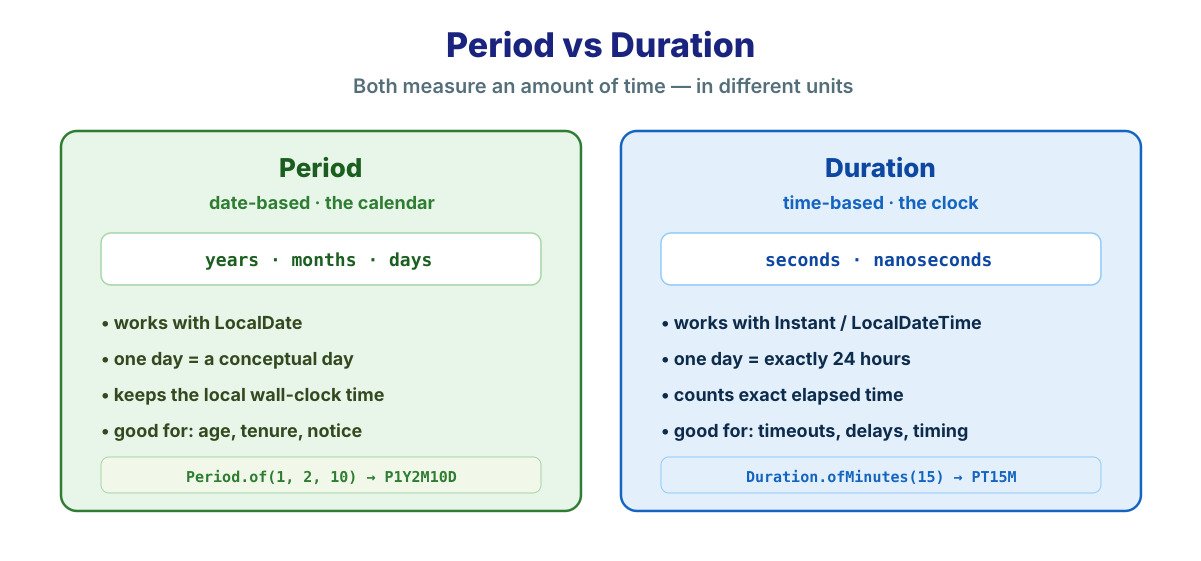
Now we reach the heart of the topic. The core idea is simple. Period is date-based, while Duration is time-based.
So they answer different questions. Period answers “how many days or months?” Duration answers “how many seconds or hours?”
The table below lays out the differences clearly. Keep it handy while you decide. It covers the points that matter in daily work.
| Feature | Period | Duration |
|---|---|---|
| Based on | Dates (calendar) | Time (clock) |
| Units | Years, months, days | Seconds, nanoseconds |
| Works with | LocalDate | Instant, LocalDateTime, LocalTime |
| One day means | a conceptual day | exactly 24 hours |
| Good for | Age, notice period, tenure | Timeouts, delays, timing |
So the split is really about units. One thinks in the calendar, the other in the clock. That single idea drives every other difference.
Why does Java even split them? The reason is that calendars are messy. Months have different lengths, and some days are not 24 hours. So one clean class could not model both ideas well.
Here is a simple memory trick. Use Period when a human would say the amount. Use Duration when a stopwatch would measure it.
So once you ask that question, the choice is obvious. A calendar phrase points to Period. A stopwatch phrase points to Duration.
| 💡 Interview Insight A common interview question is the difference between Period and Duration. Keep it crisp. Period is date-based and uses years, months and days, while Duration is time-based and uses seconds and nanoseconds. Also, a Period day is a conceptual day, but a Duration day is exactly 24 hours. |
Both classes can add to or subtract from a value. However, each one fits a different target type. So let us see them in action.
You add a Period to a LocalDate with plus(). So the calendar units apply cleanly. For instance, adding one month lands on the same day next month.
LocalDate date = LocalDate.of(2024, 1, 31);
Period oneMonth = Period.ofMonths(1);

LocalDate result = date.plus(oneMonth);  // 2024-02-29 (leap year)
// Java adjusts for the shorter month automatically
Notice the smart adjustment here. January 31 plus one month is not March. Instead, Java lands on the last valid day of February. So month lengths are handled for you.
You add a Duration to a time-bearing value. So an Instant or a LocalDateTime works well. Here the exact seconds apply, with no calendar logic.
LocalDateTime dt = LocalDateTime.of(2024, 3, 10, 23, 0);
Duration twoHours = Duration.ofHours(2);

LocalDateTime result = dt.plus(twoHours);  // 2024-03-11T01:00
So the two hours simply roll past midnight. The date moves forward by the clock. In short, Duration always counts exact time.
Here is the most important difference in practice. It only shows up around a daylight saving change. Still, it causes real bugs when missed.
A Period adds a conceptual day and keeps the local time. Meanwhile, a Duration adds exactly 24 hours. So on a daylight saving day, they give different results.
Imagine a clock that springs forward by one hour overnight. Now add “one day” to 18:00 the evening before. A Period keeps the local time, so you get 18:00 the next day. However, a Duration adds exact hours, so you get 19:00.
// near a daylight-saving gap
ZonedDateTime evening = /* 18:00 the night before the shift */;

ZonedDateTime byPeriod = evening.plus(Period.ofDays(1));
// 18:00 next day — same wall-clock time

ZonedDateTime byDuration = evening.plus(Duration.ofDays(1));
// 19:00 next day — exactly 24 hours later
So the two disagree by one hour here. This is not a bug in Java. Instead, it is the whole point of having two classes. Each one models a different real-world idea.
Think about why this makes sense. A Period works on the calendar, so it keeps the wall-clock time. Meanwhile, a Duration works on the clock, so it counts exact hours. Therefore, on a normal day, they agree perfectly. Only the special daylight saving day pulls them apart.
This trap is easy to miss in testing. Most days have no time change at all. So the bug hides until the clocks shift. Then a reminder fires one hour early or late, and users notice.
Both are correct, but for different needs. For a “same time tomorrow” reminder, use a Period. For a “24 hours from now” deadline, use a Duration.
So always ask what the user really means. Do they mean the same wall-clock time? Or do they mean an exact elapsed time? That answer picks your class.
In most calendar tasks, Period is the safer pick. It behaves the way people expect across time changes. So “same time next week” just works. However, for a strict timeout, Duration is the honest choice.
| 💡 Interview Insight An interviewer may ask why adding one day can give different results. Explain the daylight saving case. A Period adds a calendar day and keeps the local time, while a Duration adds exactly 24 hours. So across a daylight saving change, the two land one hour apart. |
Let us ground the idea in real tasks. These are jobs you will meet in actual projects. So each one shows the natural class to reach for.
Age is a classic Period job. It is measured in years, so it is calendar-based. So Period.between() gives a clean answer.
LocalDate birthday = LocalDate.of(1995, 8, 15);
LocalDate today = LocalDate.now();

Period age = Period.between(birthday, today);
System.out.println(age.getYears() + " years old");
So you get the exact years, months and days. The leap years are handled for you. As a result, the age is always correct.
Timing a task is a classic Duration job. It is measured in milliseconds, so it is clock-based. So Duration.between() fits perfectly.
Instant start = Instant.now();
doSomeWork();
Instant end = Instant.now();

Duration elapsed = Duration.between(start, end);
System.out.println("Took " + elapsed.toMillis() + " ms");
So you measure the exact time spent. There is no calendar logic here at all. In short, a stopwatch idea maps to a Duration.
A subscription often runs for a number of months. That is calendar-based, so it is a Period job. So you add the Period to the start date.
LocalDate start = LocalDate.of(2024, 1, 15);
Period oneYear = Period.ofYears(1);

LocalDate endDate = start.plus(oneYear);  // 2025-01-15
So the end date lands one year later, on the same day. The class handles the calendar for you. Therefore your billing logic stays simple and correct.
A login session often expires after some minutes. That is clock-based, so it is a Duration job. So you compare the elapsed time against a limit.
Instant lastActive = session.getLastActive();
Duration idle = Duration.between(lastActive, Instant.now());

if (idle.compareTo(Duration.ofMinutes(30)) > 0) {
    logout();   // idle for more than 30 minutes
}
So the check reads clearly and stays exact. There is no calendar math to worry about. In short, a timeout is always a Duration.
Let us turn all of this into a simple rule. First, decide if your amount is calendar-based or clock-based. Then pick the matching class.
So the rule comes down to units. Calendar units mean Period. Clock units mean Duration. Keep that split in mind and you will rarely go wrong.
Let me share a few habits from real projects. They will save you from subtle date bugs. So keep them in mind as you code.
That second mistake trips up many beginners. A LocalDate has no time of day. So Duration.between() cannot measure it, and you should use Period instead.
A: Period is date-based and measures years, months and days. Duration is time-based and measures seconds and nanoseconds. Period works with LocalDate, while Duration works with time-bearing values like Instant.
A: Across a daylight saving change, a Period adds a calendar day and keeps the local time, while a Duration adds exactly 24 hours. So the two can land one hour apart on that day.
A: A Duration day is always exactly 24 hours, so it is fine for plain elapsed time. However, for calendar days that must survive a daylight saving change, use a Period instead.
A: A Period does not give a single total day count, because months vary in length. For an exact day gap, use ChronoUnit.DAYS.between() on two LocalDate values.
The whole topic of Period vs Duration in Java comes down to one idea. Period is date-based, while Duration is time-based. Once you see that, the rest follows naturally.
Here is a quick recap of what we covered:
So pick the right class in your own code from now on. Ask whether the amount is calendar-based or clock-based. Over time, that question becomes automatic.
If you want the full picture, read the pillar guide next. It maps the whole java.time package in one place. From there, each class links to its own deep dive. So you can learn the family step by step.