Private Method in Interface Java 9: A Simple Guide with Examples
-
Last Updated: November 3, 2026
-
By: javahandson
-
Series

A private method in interface java explained simply: learn private and private static methods in Java 9, the rules, and when to use them, with clear examples.
Since Java 9, you can write a private method in interface java code, and this small change solves a real problem. Before Java 9, an interface could hold default and static methods. But if two of those methods needed the same helper logic, you had to copy that logic into both. There was no way to hide a shared helper inside the interface. Java 9 fixes this. Now an interface can have private methods and private static methods, just like a class.
This guide keeps things very simple. We will start with why this feature exists. Then we will write private and private static methods step by step. Along the way, you will see short, working examples you can try yourself. By the end, you will know exactly when and how to use them.
Before we dive in, one thing is worth saying up front. This is not a huge, complex feature. It is a small, focused addition. But small features often matter the most in daily work. You will reach for this one every time two interface methods start sharing logic. So it pays to understand it well. The payoff is cleaner interfaces that are easier to read and change later.
| Note This article covers only private methods inside interfaces. Other Java 9 topics like the module system, JShell, and collection factory methods have their own guides, linked at the end. |
To understand this feature, it helps to see how interfaces changed over time. The interface started simple and gained more power with each version. Each step added one new kind of member.
In Java 7 and earlier, an interface was very plain. It could hold only two things. First, it could hold constant variables. Second, it could hold public abstract methods. These abstract methods had no body. Every class that implemented the interface had to write the body itself.
public interface Greeting {
    String LANGUAGE = "English";   // constant
    void sayHello();               // abstract method, no body
}
That was the whole story for years. An interface was a pure contract. It listed what a class must do, but never how to do it. The word public was optional on these methods, because every interface method was public by default. Many developers still wrote it anyway, just for clarity.
This design was clean, but also limited. An interface could not hold any real behavior. If you wanted shared code, you had to put it in an abstract class instead. And a class can extend only one abstract class. So interfaces and abstract classes each solved half the problem. That tension is what pushed the language forward in Java 8.
Java 8 was a big release for interfaces. It allowed method bodies inside an interface for the first time. Two new member types arrived. One was the default method. The other was the static method.
public interface Greeting {
    void sayHello();                       // abstract

    default void sayHelloTwice() {         // default
        sayHello();
        sayHello();
    }

    static String language() {             // static
        return "English";
    }
}
This was useful. However, it created a new gap. Default and static methods often shared small pieces of logic. And there was still no way to tuck that shared logic away privately. So people repeated code. That gap is exactly what Java 9 closed.
There was a clumsy workaround before Java 9. Some developers added a public default method just to hold shared code. But that leaked an internal helper into the public API. Every implementing class could now see and call it. Worse, a class could override it by accident and break the interface’s own methods. Clearly, the language needed a proper private option. That is why this feature arrived.
Java 9 added two more member types to interfaces. The first is the private method. The second is the private static method. With these, an interface can now hold six kinds of members in total:
| 💡 Interview insight — Know the timeline cold Interviewers often ask which version added what. A clean answer wins points: abstract methods and constants from the start, default and static methods in Java 8, and private plus private static methods in Java 9. If you can name the exact version for each, you show you understand how interfaces evolved, not just that the feature exists. |
The main reason is code reuse. A private method lets you share common code between the non-abstract methods of an interface. That means your default and static methods can call one shared helper. You write the helper once. You hide it from the outside world. This keeps your interface clean and avoids copy-paste.
There is a second reason too, and it matters just as much. It is about encapsulation. Good design hides the details that nobody else needs to see. A private method lets the interface keep its internal steps to itself. The classes that use the interface see only the methods meant for them. The messy middle stays private. This is the same principle you already follow inside your classes.
Let us see the pain first. Imagine a simple logger interface. It has two default methods. One logs an info message. The other logs a warning. Both need the same timestamp and format logic.
import java.time.LocalTime;

public interface CustomLogger {

    default void logInfo(String msg) {
        System.out.println("[" + LocalTime.now() + "] [INFO] " + msg);
    }

    default void logWarn(String msg) {
        System.out.println("[" + LocalTime.now() + "] [WARN] " + msg);
    }
}
Look closely at those two methods. The timestamp part and the bracket format repeat in both. Right now there are only two methods. But picture five or six log levels. The same formatting code would appear again and again. Any change to the format means editing every method. That is fragile and annoying.
Now we pull the shared logic into one private method. Both default methods call it. The duplication disappears.
import java.time.LocalTime;

public interface CleanLogger {

    default void logInfo(String msg) {
        log("INFO", msg);
    }

    default void logWarn(String msg) {
        log("WARN", msg);
    }

    // private method: shared, and hidden from implementing classes
    private void log(String level, String msg) {
        System.out.println("[" + LocalTime.now() + "] [" + level + "] " + msg);
    }
}
Much better. The format lives in one place now. Change it once, and every log level follows. Best of all, the log helper stays private. A class that implements CleanLogger cannot see it or call it. The helper is an internal detail, exactly as it should be.
| Note A private method must have a body. It can never be abstract. This makes sense: a private method is hidden, so no class could ever provide its body. The compiler enforces this rule for you. |
The syntax is easy. You write the method just like a private method in a class. The private keyword goes first. Then you add a body. That is all there is to it.
private returnType methodName(parameters) {
    // method body
}
There is one firm rule about who can call it. A private method can be called only from inside the same interface. More precisely, it can be called from the default methods and other private methods of that interface. Nothing outside the interface can reach it.
Let us tie it together with a class that actually runs. The class implements CleanLogger. It calls the two public default methods. It cannot call the private log method at all.
public class Demo implements CleanLogger {
    public static void main(String[] args) {
        Demo d = new Demo();
        d.logInfo("Service started");
        d.logWarn("Low disk space");

        // d.log("INFO", "test");  // will NOT compile: log is private
    }
}
Run this program, and you get clean, formatted output:
[10:19:51.355] [INFO] Service started
[10:19:51.378] [WARN] Low disk space
Notice the commented line. If you remove the comment, the code will not compile. The compiler says the log method is not visible. That is the whole point. The private method serves the interface, not the classes that implement it.
Let us be precise about the reach of a private instance method. It can be called from the default methods of the same interface. It can also be called from other private methods of the same interface. That is the full list. No class, no sub-interface, and no static method can reach it directly.
Why default methods and not static ones? A private instance method needs an object to run on. Default methods always run on an object, so they qualify. But a static method has no object, so it cannot call an instance helper. We will look at that static rule more closely in a moment, because it is a favourite interview point.
| 💡 Interview insight — Private methods are not inherited A common interview question: can an implementing class override or call a private interface method? The answer is no. Private methods are never inherited by sub-interfaces or implementing classes. They exist only to help the interface’s own methods. Saying this clearly shows you understand encapsulation, not just syntax. |
Java 9 also allows private static methods in interfaces. The idea is the same, but the target is different. A private static method shares common code between the static methods of an interface. You use it when your helper does not need any instance context.
Think about an interface with several static methods. They often share a small check or calculation. A private static method is the perfect home for that shared piece. Here is a small math helper interface.
public interface MathOps {

    static int doubleIt(int n) {
        return base(n) * 2;
    }

    static int tripleIt(int n) {
        return base(n) * 3;
    }

    // private static method: shared by the static methods above
    private static int base(int n) {
        if (n < 0) {
            throw new IllegalArgumentException("n must be >= 0");
        }
        return n;
    }
}
Both doubleIt and tripleIt validate their input the same way. Instead of repeating the check, they call base. The base method does the guard once and returns the value. You call the public static methods on the interface name directly:
int a = MathOps.doubleIt(5);   // 10
int b = MathOps.tripleIt(5);   // 15
The private static base method never shows up outside the interface. It is a quiet helper. It keeps the static methods short and consistent, and it lives in exactly one place.
How do you choose between the two kinds? The rule is about what the helper needs. Ask one simple question. Does the helper use any instance method of the interface? If yes, make it a private instance method. If the helper is pure and needs nothing from an object, make it a private static method.
A private static helper has one more advantage. It can serve both static methods and default methods. So it is the more flexible choice when the logic is self-contained. In short, lean toward a private static helper for pure utility code. Reach for a private instance helper only when the shared logic calls other instance methods of the interface.
Private interface methods follow a few clear rules. Keep these in mind, and you will never misuse the feature. Here they are in plain words.
The last rule trips people up, so let us make it simple. A static method has no object to work with. A non-static private method needs an object. So a static context cannot reach a non-static method. This is the same rule you already know from normal classes.
public interface Drinkable {

    static void breakTime() {
        coffee();   // ERROR: cannot call a non-static method from static
    }

    private void coffee() {
        System.out.println("Have a coffee");
    }
}
The call above fails to compile. The breakTime method is static, but coffee is not. To fix it, you would make coffee a private static method instead. Then the static breakTime method can call it freely.
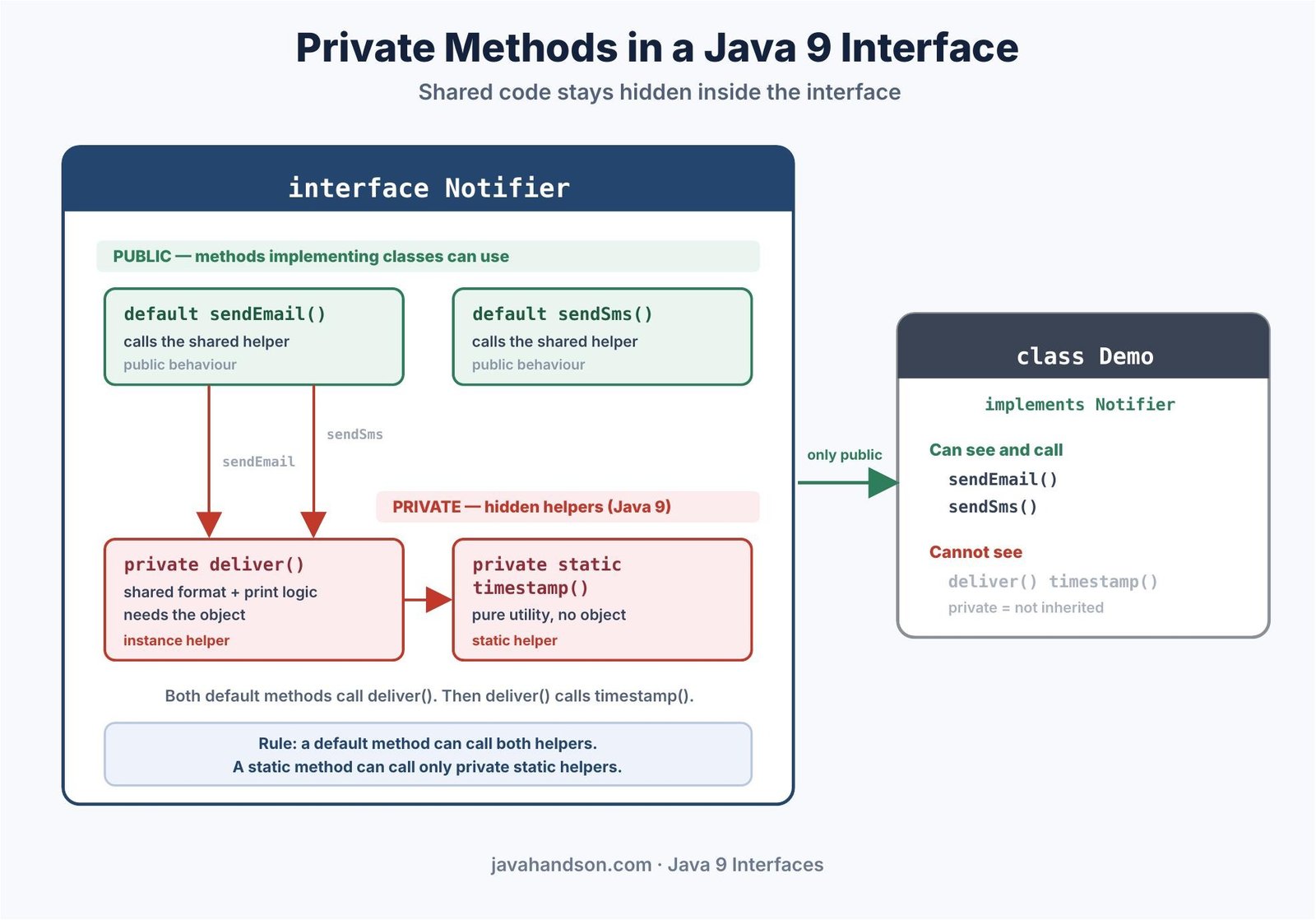
| 💡 Interview insight — Which method can call which? A neat way to remember it for interviews: a default (instance) method can call everything, both static and non-static private methods. A static method can call only private static methods. Picture it as a one-way street: instance code sees static helpers, but static code cannot see instance helpers. |
Here is a question that comes up a lot. Suppose one interface extends another. Can the child interface use the parent’s private methods? The answer is no. Private methods are not inherited, not even by a sub-interface. They belong only to the interface that declares them.
This keeps things predictable. A private method is a local helper, nothing more. It never becomes part of any other type’s behavior. If a child interface needs similar logic, it must write its own private helper. That may feel strict, but it protects each interface from surprises. Private truly means private here.
Beginners sometimes mix these two up. The difference is really about visibility and purpose. One is public and meant for the outside. The other is private and meant only for the inside.
So the choice is simple. If you want a method that classes can use or replace, make it a default method. If you only want a helper to avoid duplication inside the interface, make it a private method. Each one has a clear job.
Here is a side-by-side view of the two, so the difference stays clear:
Read down the list once, and the roles click into place. The two features look similar on the surface. Under the hood, they serve opposite goals. One opens behaviour up. The other locks a helper away.
Before Java 8 and 9, the usual home for shared helper code was an abstract class. You would put a protected or private helper there, and your subclasses inherited the shared behaviour. So how does the new interface feature compare? The two are close, but not the same.
An abstract class can hold state, like fields that change over time. An interface still cannot hold mutable state. Its only variables are constants. So if your shared helper needs instance fields, an abstract class is still the right tool. For pure, stateless helper logic, a private interface method now does the job cleanly.
There is one more big difference. A class can implement many interfaces, but it can extend only one class. So pushing shared code into an interface helper keeps your options open. The implementing class is free to extend something else. In modern Java, many small, focused interfaces with private helpers often beat one large abstract base class.
| 💡 Interview insight — Interface helper or abstract class? A strong design answer in interviews: use a private interface method for stateless shared logic, since it avoids forcing a single inheritance line. Fall back to an abstract class only when the shared code needs mutable instance state, which interfaces still cannot hold. Framing it around state and single inheritance shows real design judgement. |
Let us end with a slightly richer example. It combines everything we covered. The interface has default methods, a private helper, and a private static helper. This is close to how you would use the feature in real code.
import java.time.LocalDateTime;

public interface Notifier {

    default void sendEmail(String to, String body) {
        deliver("EMAIL", to, body);
    }

    default void sendSms(String to, String body) {
        deliver("SMS", to, body);
    }

    // private instance helper: shared by the default methods
    private void deliver(String channel, String to, String body) {
        String stamp = timestamp();
        System.out.println(stamp + " " + channel + " -> " + to + ": " + body);
    }

    // private static helper: pure utility, no instance needed
    private static String timestamp() {
        return "[" + LocalDateTime.now() + "]";
    }
}
See how the pieces fit. The two default methods stay tiny. Each one just calls deliver with its channel name. The deliver helper formats and prints the message. It also calls timestamp, a private static helper, to get the time. The instance method can call the static helper with no trouble.
A class that implements Notifier sees only sendEmail and sendSms. The two helpers stay out of sight. This is clean design. The public surface is small, and the shared logic sits safely inside.
Think about how this scales. Add a third channel later, say a push notification. You write one more default method. It calls deliver with the channel name push. No formatting code gets copied. No timestamp logic gets repeated. The two private helpers do the heavy lifting for every channel. That is the real value of this feature in a growing codebase.
| Note You can verify every example here on Java 9 or any later version. Compile with javac and run with java. The private methods will refuse to be called from outside, which proves the encapsulation works. |
You do not always need a full project to test an interface. A quick scratch file works fine. Save the interface and a small class in one folder. Then compile and run from the command line. Here are the two commands you need:
javac CleanLogger.java Demo.java
java Demo
The first command compiles both files. The second runs the Demo class. If you try to call a private method from Demo, the first command fails right away. That fast feedback makes it easy to learn the rules by hand. Change one line, recompile, and see what the compiler says.
A few errors come up often when people first use this feature. Watch out for these, and you will save yourself some confusion.
Most of these mistakes trigger a clear compiler error. So read the error message. It usually tells you exactly which rule you crossed. Fix the modifier or the call site, and the code compiles.
A feature is only useful when you know its right moment. Private interface methods shine in a few clear cases. They are not something to add everywhere. Use them with a light touch, and your interfaces stay tidy.
Here are the signals that tell you it is time to add a private helper:
And here is when to skip it. If only one method uses the logic, you do not need a separate helper yet. Inline code is fine for a single use. Also, if the shared behaviour should be visible to classes, use a default method instead. A private helper is for internal reuse only, so save it for that case.
In practice, you often start without a private method. Then a second method needs the same logic. That is the moment to extract a private helper. This keeps you from over-designing too early. Let the duplication appear first, then remove it cleanly. That simple habit leads to interfaces that are easy to grow and maintain over time.
A: Yes. Since Java 9, an interface can have private methods and private static methods. They let you share common code between the default and static methods of the interface, without exposing that code to the classes that implement it.
A: Java 8 allowed default and static methods in interfaces, but those methods often repeated the same logic. There was no way to hide a shared helper. Java 9 added private methods so you can write that shared logic once and keep it hidden, which improves code reuse and encapsulation.
A: No. A private interface method is not inherited by implementing classes or sub-interfaces. It cannot be overridden or even called from outside the interface. It exists only to help the interface’s own default and static methods.
A: A default method is public, inherited by classes, and can be overridden. A private method is hidden, not inherited, and cannot be overridden. Use a default method for shared public behaviour, and a private method for an internal helper that avoids duplication inside the interface.
A: No. A static method has no object to work with, so it cannot call a private instance method. A static method can call only private static methods. A default method, however, can call both private static and private non-static methods.
A: Yes. A private method in an interface must always have an implementation body. It can never be abstract, because a hidden method could never have its body provided by an implementing class.
Private methods in interfaces are a small but handy Java 9 feature. They let you share code between the default and static methods of an interface without exposing that code. A private method helps instance methods. A private static method helps static methods. Both stay hidden from the classes that implement the interface.
The feature rounds out the interface nicely. Since Java 8 gave interfaces real method bodies, it made sense to also give them a way to reuse code privately. Now interfaces feel complete. Use default methods for shared public behavior. Reach for private methods when you just need a tidy internal helper. With these tools, your interfaces stay clean and easy to maintain.
One last thought to carry with you. This feature has not changed since Java 9. It works the same way in Java 11, 17, 21, and every version after. So what you learned here is not a one-version trick. It is a stable part of the language you will use for years. Keep the rules in mind, write a quick example when in doubt, and you will use private interface methods with full confidence.